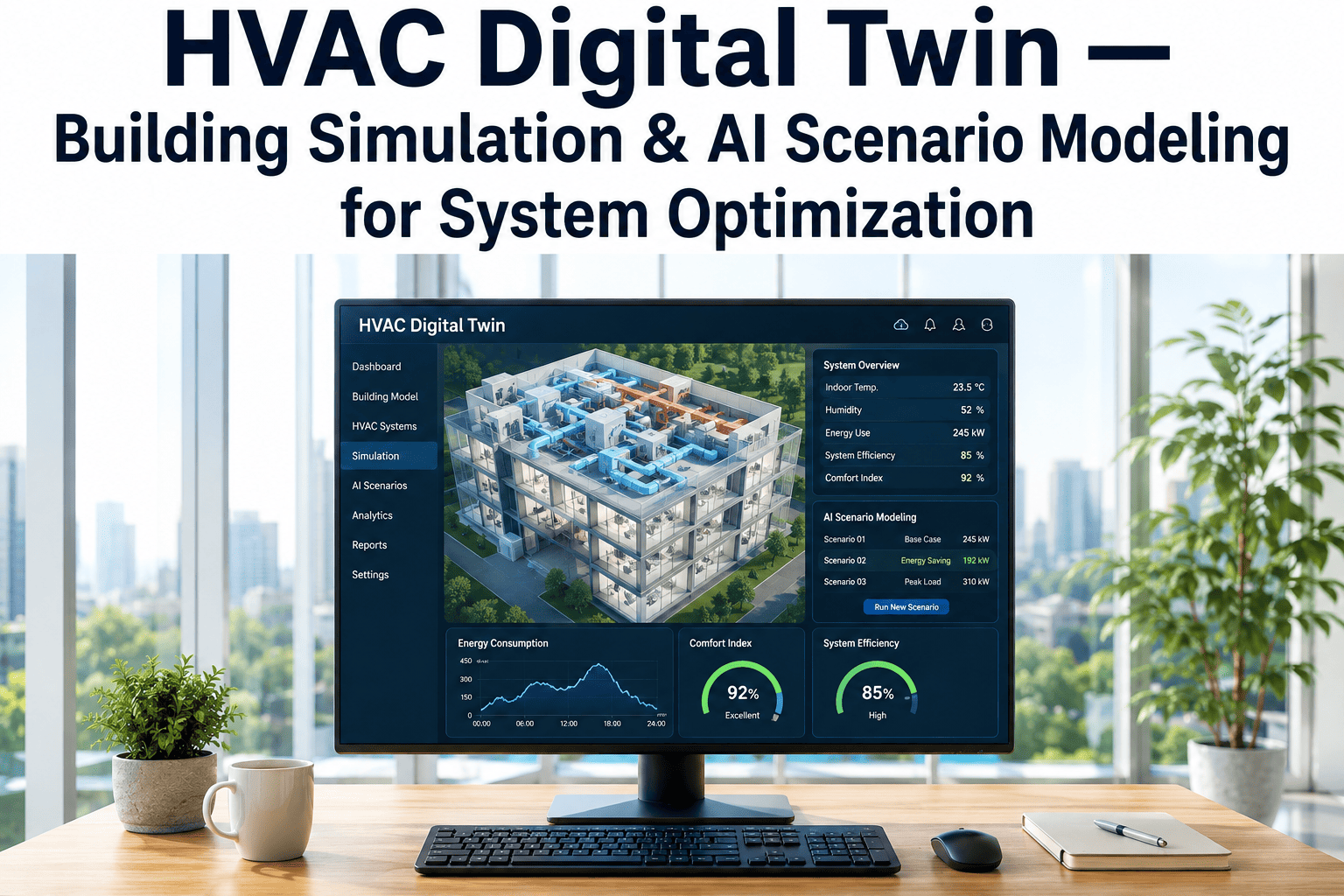
A digital twin turns a building from a physical asset you maintain reactively into a virtual model you can simulate, predict, and optimize before touching anything physical. iFactory Building Digital Twin connects your asset data, sensor feeds, and maintenance workflows into a live virtual replica that powers predictive maintenance, scenario planning, and capital decisions. Book a demo to see it live.
Run Simulations Before You Run Capital
A practical guide to deploying building digital twins in commercial properties — covering virtual building models, asset visualization, simulation scenarios, lifecycle planning, and the integration patterns that turn twin insights into scheduled maintenance work.
What a Digital Twin Actually Is — And What It Isn't
The terminology is often used loosely, but the distinction matters. A BIM model is a static snapshot of what the building is. A digital twin is a continuously updated virtual replica that reflects how the building is performing right now — and uses that intelligence to predict what's likely to happen next. The shift is from documentation to live operational intelligence.
Most Buildings Are at Stage 1 — Stage 3 Is Where Value Concentrates
Building digital twins evolve through three maturity stages. Each builds on the previous and unlocks different capabilities. Most commercial portfolios sit somewhere between Stage 1 and Stage 2 today; the operators capturing the biggest returns are deliberately moving toward Stage 3 with the IoT and CMMS integrations to support it.
As-Built Twin
A 3D model of the building reflecting actual constructed conditions, with asset records linked to their locations. Static today — but ready to receive live data.
Performance Twin
Live IoT sensor data flowing into the model. HVAC performance, energy consumption, occupancy, equipment vibration all visible in real time across the virtual building.
Predictive Twin
AI models running on the connected data — predicting failures, simulating retrofit scenarios, optimizing energy strategies, generating recommended work orders automatically.
Six Use Cases That Drive Twin ROI
Digital twin investments don't pay back on the sophistication of the virtual model — they pay back on specific operational use cases. The six below are where commercial property operators consistently see measurable returns, ranked roughly by how quickly they generate financial outcomes.
Predictive Maintenance
Sensors feed vibration, temperature, and runtime data into the twin. AI flags equipment heading toward failure days or weeks before it happens — converting alerts into scheduled work orders.
Highest ROIEnergy Optimization
HVAC strategies tested in the virtual model before deployment. Setpoint schedules, ventilation profiles, and equipment sequencing optimized with simulation rather than trial and error.
High ROICapital Planning Simulation
Model the impact of a roof replacement, HVAC retrofit, or façade upgrade in the twin before committing capital. See projected energy savings, lifecycle costs, and operational impact.
High ROISpace & Occupancy Analytics
Live occupancy data flows into the twin's floor plates. Underused space identified, over-crowded floors flagged, lease decisions informed by actual utilization data instead of assumptions.
Medium ROICompliance & Inspection Records
Every asset in the twin carries its inspection history, certifications, and compliance status. Auditors get visual evidence linked to documentation — surveys close faster with fewer findings.
Medium ROIVirtual Commissioning
New equipment installations validated in the twin before physical commissioning. Reduces commissioning time, surfaces integration issues, and accelerates project closeout.
Targeted ROIConnect Your Twin to Maintenance Execution, Not Just Visualization
Our team maps your building's BIM model, sensor infrastructure, and CMMS records — then configures iFactory so every twin insight becomes an actionable work order, every simulation generates a capital recommendation, and every prediction triggers a measurable maintenance outcome.
The Four-Phase Twin Deployment Path
Most digital twin pilots stall because they jump straight to advanced features without the foundation. The phased deployment below builds capability progressively — each phase delivers standalone value and creates the data foundation for the next stage.
Foundation: Build the As-Built Twin
Import BIM model or scan the building. Verify against actual conditions. Link asset records from the CMMS to their physical locations. The virtual building becomes searchable and navigable.
Connect: Integrate Live Data
Building Management System (BMS) feeds connected. IoT sensors on critical equipment. Energy meters streaming consumption data. The twin starts reflecting real-time performance.
Analyze: Activate Predictive Models
AI models trained on the historical and live data. Anomaly detection enabled for critical assets. Energy optimization recommendations begin generating. Twin starts predicting rather than just reflecting.
Operationalize: Close the Loop
Twin insights auto-generate CMMS work orders. Capital planning scenarios run quarterly. Operations team uses the twin as the primary visualization layer. ROI measurement begins.
From the Technology Integration Side
Digital Operations Director
The biggest reason most digital twin projects fail is the temptation to skip foundation work and rush to the simulation features. A twin with no maintenance execution layer behind it is a visualization tool, not an operations platform. The buildings that get genuine ROI integrate the twin with their CMMS from day one — every insight the twin produces lands in someone's work queue with the right priority, the right parts list, and the right deadline.
Conclusion: The Twin Is the Operating Layer, Not the End Goal
Digital twins have moved from experimental technology to operational infrastructure in commercial real estate. The pattern across the market is becoming clear: portfolios that integrate twins with their maintenance execution layer are unlocking measurable gains in energy efficiency, predictive maintenance, and capital planning accuracy. Those treating the twin as a visualization-only project often watch their early investment stall before reaching production. The decision now isn't whether to deploy a digital twin — it's how quickly to connect it to the operational systems that turn simulation into scheduled work.
Frequently Asked Questions
What's the difference between BIM and a digital twin?
BIM is a static 3D model describing what a building is — its geometry, asset positions, and design specifications. A digital twin uses BIM as its foundation but adds live sensor data, operational history, and AI analytics to reflect how the building is performing right now and predict what's likely to happen next. BIM tells you what's there; the twin tells you how it's behaving.
Do I need a BIM model to start with a digital twin?
A BIM model accelerates deployment significantly, but it's not strictly required. Older buildings without BIM can be scanned using LiDAR or photogrammetry to create an as-built model. Some operators also start with simplified floor plates and asset position data, then expand the model fidelity over time as use cases justify the investment.
Why do so many digital twin pilots stall?
Because they're built as visualization projects rather than operational ones. A twin that shows beautiful dashboards but doesn't connect to the maintenance execution layer can't produce financial outcomes. Many organizations remain stuck in the pilot demo phase — building impressive virtual models that never integrate with the work order systems, asset management platforms, or capital planning workflows where actual operational decisions get made.
What's the realistic ROI from a building digital twin?
ROI depends entirely on which use cases get prioritized. The strongest returns typically come from predictive maintenance and energy optimization — both of which require the twin to be connected to live sensor data and operational systems. Returns from visualization-only deployments are much harder to measure, which is why so many pilot projects stall after the initial demonstration phase.
How does iFactory support building digital twin operations?
iFactory connects BIM models, IoT sensor feeds, and operational data into a unified twin platform. Every asset in the virtual model is linked to its CMMS record. Predictive insights auto-generate work orders. Capital planning scenarios use live operational data. The twin becomes the visual layer for maintenance decisions, energy strategies, and capital recommendations — not a separate visualization silo.
Make the Twin the Operational Layer Your Buildings Run On
Stop running digital twin pilots that stall after the demo. Bring BIM models, sensor data, predictive analytics, and maintenance execution into one platform built for commercial portfolios that want twin investments to produce measurable financial outcomes.