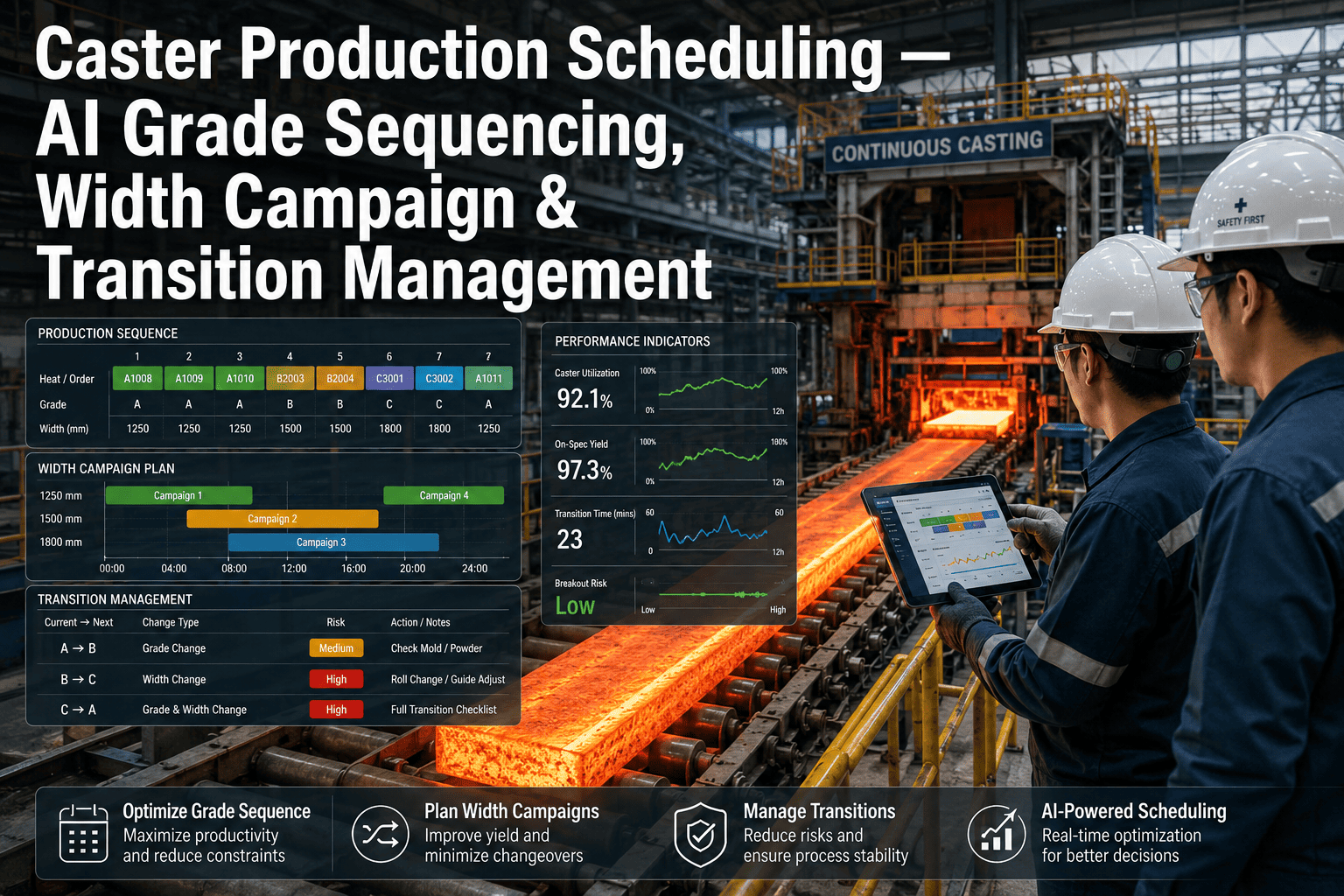
Every hot strip mill scheduler carries the same three constraints in their head at once — which grades can safely follow each other without a transition downgrade, how far a width campaign can run before edge quality drifts, and how many more coils a roll can take before wear risk turns into a cobble. Getting any one of those wrong costs money; getting the combination wrong on a Friday night shift with a lean crew can cost a full roll change plus the width and grade transitions that follow it. Operations directors have historically managed this with scheduler experience and a spreadsheet of roll campaign limits that everyone quietly knows are approximate. AI-based scheduling optimization replaces the approximation with a model trained on your actual mill's transition history, roll wear curves, and cobble incidents, and it is worth a direct conversation about what that could mean for your next quarter's throughput — start with a scheduling diagnostic call before your next campaign planning cycle.
Four Places Throughput Leaks Out of the Schedule
Most mills measure schedule adherence. Few measure how much throughput a conservative, experience-based schedule leaves on the table every week, because the counterfactual — what the mill could have produced with a tighter, data-backed sequence — is never tracked.
Throughput Left Behind by Overly Conservative Campaigns
Schedulers often cut a width or roll campaign short out of caution, ending a run days before the actual wear or quality risk would require it, because the true limit is not precisely known.
Coils Lost to Avoidable Grade Transition Downgrades
A grade sequence that looks fine on paper can still produce transition coils that fall out of spec, especially when back-to-back orders push a sequence the scheduler has not run before.
Cost per Cobble Event
Between lost production time, roll damage, and cleanup labor, a single cobble tied to roll wear or an aggressive width campaign can run into six figures on a large hot strip mill.
Scheduler Time Spent Re-Sequencing per Week
When an order changes or a roll needs an early change, schedulers manually rework the sequence by hand, re-checking transition rules and campaign limits against experience rather than data.
Want to know where your schedule is leaving throughput on the table? Talk to an iFactory scheduling specialist about a diagnostic review of your last quarter's campaign and transition data.
What AI Optimizes Across the Production Schedule
Hot mill scheduling optimization is not a black-box replacement for your scheduler's judgment — it is a model that learns the real limits your mill operates under from years of actual transition, campaign, and cobble data, then surfaces sequencing options a human would not have time to fully evaluate under shift pressure, especially when a schedule change has to be made in the middle of a shift with limited time to double-check every constraint. The scheduler still makes the call, but with the real constraint boundaries in front of them instead of a rule of thumb.
Curious what your actual roll wear and transition data would show? Book a scheduling data review and iFactory will benchmark your current campaign lengths against the model.
Three Scheduling Decisions the Model Changes
The real value of scheduling optimization shows up in the specific calls a scheduler makes under time pressure — the moments where experience says "probably fine" but the data says something more precise. These three scenarios reflect common patterns across deployed hot strip mills.
Extending a Width Campaign Two More Turns
A scheduler unsure whether the current width campaign can safely run two more turns before edge quality drifts gets a data-backed answer based on this specific roll's actual wear trend, rather than defaulting to the conservative campaign limit that leaves tonnage on the table.
Inserting a Rush Order Without a Grade Clash
When a rush order needs to be slotted into an already-built sequence, the model checks the grade transition against your mill's actual historical outcomes for that pairing, flagging a clash before it becomes a transition-coil downgrade instead of after.
Deciding Whether a Roll Change Can Wait Until Shift End
A roll approaching its typical change interval, but not yet showing hard limit signals, gets evaluated against its specific wear curve and the grades still queued, so the scheduler knows whether waiting three more hours is safe or is inviting a cobble.
Give Your Schedulers the Real Constraint Boundaries
iFactory's scheduling model learns your mill's actual grade transition outcomes, roll wear curves, and cobble history, then surfaces sequencing options your team can act on immediately — without replacing the scheduler's final call.
Before and After: One Quarter of AI-Assisted Scheduling
The comparison below reflects typical outcomes from hot strip mills after one full quarter of AI-assisted scheduling running alongside the existing scheduling team, measured against the prior quarter's baseline on the same mill, with no change to crew size, order mix, or equipment during the comparison window.
Conservative Limits, Manual Re-Sequencing
- 86% first-time-through rate on transition coils
- 4-5 cobble events per quarter tied to roll wear or campaign length
- 18 turns average width campaign length
- 3 hrs/wk scheduler time spent manually re-sequencing
Data-Backed Limits, Faster Re-Sequencing
- 93% first-time-through rate on transition coils
- 1-2 cobble events per quarter tied to roll wear or campaign length
- 20 turns average width campaign length
- 45 min/wk scheduler time spent manually re-sequencing
Want an estimate built from your own campaign lengths and cobble history? Book a 30-minute scoping call for a fixed-price proposal.
How This Fits Into Your Existing Scheduling Workflow
Scheduling optimization only works if it fits inside the tools your team already uses to build and adjust the sequence every shift. iFactory is designed to sit alongside your production scheduling system, not replace it, and every recommendation is traceable back to the specific historical data point that produced it, so the scheduling team can audit the reasoning rather than treating it as a black box.
Order Management & ERP
Order due dates, gauge, width, and grade requirements are pulled directly from your ERP or order management system, so the model works from the same order book your schedulers already reference.
Level 2 Process Data
Roll force, temperature, and campaign history are read from your existing Level 2 system, giving the model a live view of roll wear and edge quality trends as the current campaign progresses.
Scheduler Interface
Recommendations surface directly inside the scheduling tool your team already uses, flagged with the specific constraint and confidence level behind each suggestion, so the scheduler retains full control over the final sequence.
Running a custom or legacy scheduling system? Talk to a specialist about the integration path for your environment.
Getting the Model Live: What the First Quarter Looks Like
Rolling out scheduling optimization does not mean handing sequencing decisions to software on day one. The model earns trust the same way a new scheduler would — by showing its reasoning against real decisions before anyone relies on it for the ones that matter.
Historical Data Ingestion
Twelve to eighteen months of grade transitions, campaign lengths, roll change history, and cobble incidents are pulled from your ERP and Level 2 systems to train the baseline model.
Shadow Mode Recommendations
The model generates sequencing recommendations alongside the live schedule without influencing it, and the scheduling team compares its suggestions against their own decisions daily.
Advisory Integration
Recommendations begin appearing inside the scheduling tool itself, with confidence scores attached, and schedulers start acting on the ones they trust most while flagging edge cases back to iFactory.
Full Quarter Review
A full quarter of comparative results — first-time-through rate, campaign length, cobble events, and re-sequencing time — is delivered alongside a plan to extend the model to additional mill stands.
Expert Perspective
Our schedulers were good — really good — but they were making judgment calls on roll campaigns and grade transitions with incomplete information, every single shift. Once the model started showing them the actual wear curve for the roll currently in the stand instead of a generic campaign limit, we picked up almost two extra turns per campaign on average without a single additional cobble. That is real tonnage we were leaving on the table for years.
— Operations Director, integrated hot strip mill (Texas, 2.6M tons/year)
first-time-through improvement on transition coils within one quarter of go-live
reduction in cobble events tied to roll wear or aggressive campaign length
Stop Scheduling Against Approximate Limits
Your mill's true grade transition, campaign length, and roll wear limits already exist in your production data — they are just not visible to the person making the call under shift pressure. iFactory makes those limits visible, in real time, inside the scheduling workflow your team already trusts.
Frequently Asked Questions
Does this replace our schedulers or the scheduling system we already use?
No. The model is built to surface data-backed recommendations inside your existing scheduling workflow, not to automate the final sequencing decision. Schedulers keep full authority over the sequence and can override any recommendation, but they do so with the actual constraint data in front of them instead of relying purely on memory and rules of thumb built up over years.
How does the model know our specific grade transition limits?
The model is trained on your mill's own historical transition outcomes — which grade pairs produced downgrades, at what temperature deltas, and under what conditions — rather than a generic industry rule set. This means the recommendations reflect your specific furnace, mill stand, and cooling bed characteristics, which can vary meaningfully even between mills of similar design.
Can this help extend roll campaigns without increasing cobble risk?
Yes, and this is typically where mills see the fastest payback. The model tracks each roll's actual wear progression against the grades and tonnage it has run, rather than using a fixed campaign limit for all conditions, which allows campaigns to safely extend when wear is trending better than average and flags an earlier change when it is trending worse.
How does the system handle rush orders that need to be inserted mid-sequence?
When a rush order is added, the model checks the proposed insertion point against grade transition compatibility, width campaign status, and current roll wear before the change is committed, flagging any point where the insertion would create elevated downgrade or cobble risk. This turns a rush-order insertion from a manual re-check into a quick data-backed confirmation.
What does a pilot look like and how long until we see results?
A typical pilot trains the model on twelve to eighteen months of your historical scheduling, transition, and cobble data, then runs in an advisory mode alongside your current scheduling process for a full quarter before any changes to workflow are made. Book a scoping call to get a fixed-price proposal and timeline specific to your mill.