Industry surveys consistently report that 70 percent of textile ERP implementations miss their original budget, timeline, or scope — and a significant fraction are abandoned entirely after millions spent and years of effort. The failure rate is not due to poor software; it is driven by a recurring set of preventable pitfalls that plague textile ERP projects regardless of which vendor platform is chosen. Textile manufacturing has unique complexities that generic ERP implementations routinely underestimate: multi-step process routing with divergent yields (spinning, weaving, dyeing, finishing each have fundamentally different production models), variable raw material properties that affect finished output (cotton staple length, yarn count variation, fabric shrinkage), co-product and by-product tracking in dyeing and finishing, lot traceability requirements that span 8–14 process steps, and seasonal demand patterns that interact with long raw material procurement lead times. These textile-specific factors require an implementation approach that is fundamentally different from a discrete manufacturing or general process manufacturing ERP rollout. iFactory's textile ERP implementation methodology is built on lessons learned from 40+ textile ERP projects across spinning, weaving, dyeing, finishing, and garment manufacturing — a structured playbook that addresses the nine most common failure modes before they derail the project.
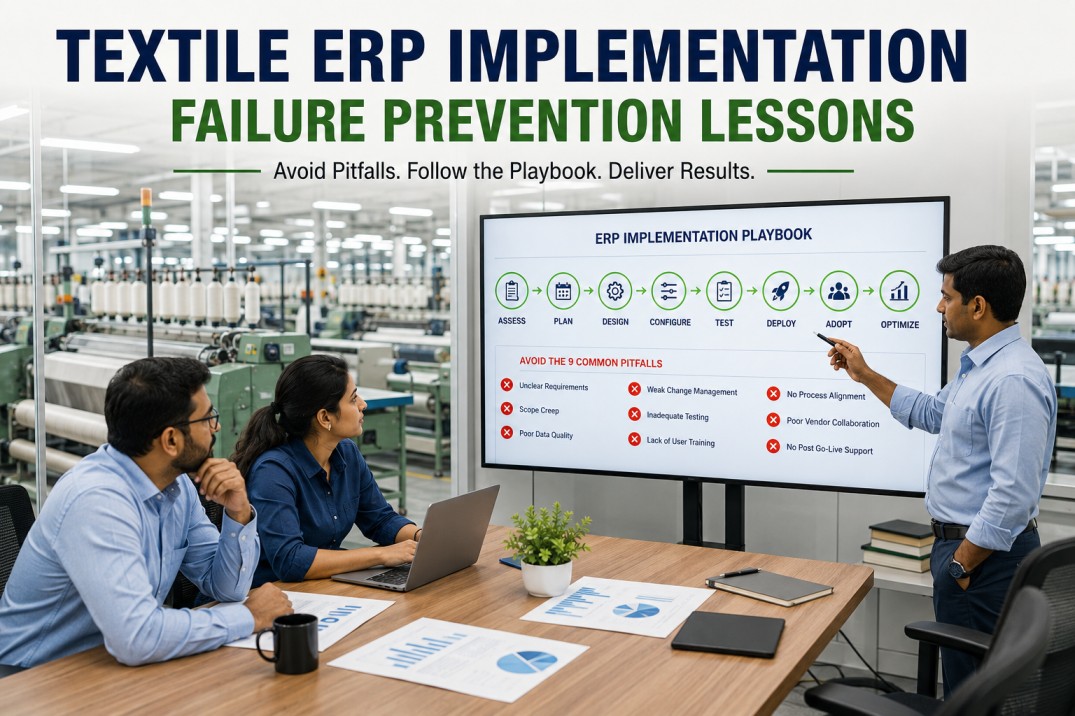
Avoid the 9 ERP Implementation Pitfalls That Derail Textile Projects
iFactory's textile ERP implementation methodology has delivered on-time, on-budget deployments for 40+ textile mills worldwide. Learn from their lessons before you start.
Nine Implementation Pitfalls That Cause Textile ERP Projects to Fail
These nine failure modes are the most common root causes of textile ERP budget overruns, timeline delays, scope creep, and outright abandonment. Each pitfall is preventable with the right methodology — but only if it is identified and addressed before it takes root.
Phased Rollout Timeline — The Proven Path to a Successful Go-Live
iFactory's implementation methodology follows a phased rollout approach that delivers production value at each stage while managing risk through controlled scope expansion. Each phase has defined deliverables, acceptance criteria, and a go/no-go decision gate before the next phase begins.
Success Prevention Playbook — Six Rules That Keep Textile ERP Projects on Track
The difference between a textile ERP project that succeeds and one that fails is not the software — it is the implementation discipline. These six rules form the foundation of iFactory's implementation methodology and have been validated across 40+ textile ERP deployments.
Don't Let Your ERP Project Become a Statistic — Use a Proven Methodology
iFactory's textile ERP implementation methodology has delivered on-time, on-budget, high-adoption deployments for 40+ mills. Schedule a methodology review to see how it applies to your project.
What Success Looks Like — Measurable Outcomes from a Well-Executed Textile ERP Implementation
Textile mills that follow a structured implementation methodology with phased rollout, process-first configuration, and dedicated change management consistently achieve these outcomes within 12 months of go-live.
Frequently Asked Questions
How long does a typical textile ERP implementation take with iFactory?
A full textile ERP implementation covering production, quality, inventory, maintenance, costing, and financials typically takes 16–24 weeks from kickoff to full go-live across all departments, assuming a single-plant deployment with a defined scope. The timeline varies based on plant complexity, data quality, organizational readiness, and the number of integration points with existing systems. iFactory's phased methodology delivers production value early: the first department typically goes live within 10–14 weeks while subsequent departments follow at 3–4 week intervals. This phased approach means the mill starts seeing ROI from the first departmental go-live rather than waiting for a monolithic cutover. The full 16–24 week timeline assumes the mill assigns a dedicated project manager and department super users who can participate in process workshops, user acceptance testing, and training without competing with their full-time operational responsibilities. Mills that staff the project with part-time resources or that have significant process harmonization requirements may need 28–36 weeks. iFactory provides a detailed project plan during the discovery phase that forecasts the timeline based on the mill's specific scope, staffing, and readiness factors.
What makes textile ERP implementation different from other manufacturing ERP projects?
Textile manufacturing has several structural characteristics that make ERP implementation fundamentally different from discrete manufacturing (assembly, automotive, electronics) and other process manufacturing (chemicals, pharmaceuticals, food and beverage). First, textile routing is multi-step and divergent — a single batch of cotton entering the spinning process can produce multiple yarn counts that are further split across weaving, knitting, dyeing, and finishing into dozens of finished SKUs, requiring a bill-of-material structure that can handle co-products, by-products, and variable yields at each process step. Second, raw material properties are not fixed — cotton staple length, strength, micronaire, and color grade vary by bale and season, directly affecting yarn quality and fabric appearance, so the ERP must track material properties alongside quantity. Third, textile traceability is multi-dimensional — a finished fabric lot may contain cotton from 40 different bales that were blended at the blow room, spun into multiple yarn lots, and woven together with different warp and weft yarns, requiring a lot genealogy system that can trace forward (fiber to fabric) and backward (fabric to specific bales) across 8–14 process steps. Fourth, textile costing is complex — conversion costs vary significantly by process stage, yield loss at each stage affects standard cost, and the interaction between raw material quality and process efficiency creates cost variances that generic costing models cannot capture. Generic ERP platforms designed for discrete or simple process manufacturing require extensive customization to handle these textile-specific requirements, which is why textile-specific ERP platforms like iFactory significantly reduce implementation risk.
How does iFactory handle data migration from legacy systems?
Data migration for textile ERP implementations follows a five-step process that iFactory has refined across 40+ projects. Step one is data audit: iFactory's migration team analyzes the legacy system's data structures, identifies data quality issues (missing values, inconsistent coding, duplicate records, orphaned transactions), and produces a data quality report that quantifies the effort required for each data domain. Step two is data mapping: each field in the legacy system is mapped to its counterpart in iFactory's data model, with transformation rules defined for units of measure, material codes, customer and supplier IDs, and accounting dimensions. Step three is data cleansing: the mill's data team (supported by iFactory) cleans the legacy data based on the audit findings — standardizing material codes, filling missing lot traceability links, correcting inventory balances, and reconciling open transactions. Step four is migration script development and testing: iFactory builds migration scripts that extract, transform, and load data from legacy systems into iFactory, and runs multiple test migrations in a sandbox environment until data accuracy reaches 99.9% across all domains. Step five is production migration: the final migration is executed during the go-live weekend with validation checks and rollback capability. The most time-consuming data domain is typically lot traceability history (12–18 months of historical lot data) and open transactions (open orders, WIP balances, open purchase orders). Financial master data and current inventory balances can typically be migrated in 2–3 days of effort.
What kind of ongoing support does iFactory provide after go-live?
iFactory provides a structured post-go-live support program with three tiers. Tier one is hypercare, which runs for the first four weeks after each departmental go-live. During hypercare, iFactory's implementation team is available on-site or remotely during all production shifts, providing real-time issue resolution, user coaching, and process adjustment support. Hypercare response time targets are under 30 minutes for critical issues that block production. Tier two is stabilized support, which runs from week 5 through month 6. During this phase, iFactory provides a dedicated support engineer for the mill with a 4-hour response time for critical issues, weekly performance review calls with the project steering committee, and monthly user adoption reviews. Tier three is ongoing support, which begins after month 6 and continues for the duration of the subscription. Ongoing support includes a 24/7 help desk with 8-hour critical issue response, quarterly system health checks, semi-annual user training refreshers, and access to iFactory's continuous improvement program that delivers new features and optimization recommendations based on the mill's usage patterns. All support tiers include access to iFactory's online knowledge base, community forum, and release notes. On-premise customers also receive remote support for server health monitoring, backup verification, and patch management.
Can iFactory ERP be implemented in phases across multiple plants?
Yes — multi-plant textile ERP implementations are iFactory's most common deployment pattern, and the phased rollout methodology is specifically designed to handle them. The recommended approach is to implement the first plant end-to-end (all departments) as a reference deployment, which takes 16–24 weeks and establishes the process blueprint, configuration template, data migration patterns, and user training materials that can be reused for subsequent plants. Each additional plant typically takes 6–10 weeks to deploy because the process blueprint and configuration are already validated, and the implementation team can focus on plant-specific data migration, integration with local systems, and user training rather than redefining processes from scratch. Plants can be deployed sequentially or in parallel depending on the mill group's available implementation resources. iFactory's multi-tenant architecture supports centralized or decentralized deployment models: each plant can have its own iFactory instance with local configuration and data (recommended for plants with different processes or regulatory requirements), or multiple plants can share a single instance with plant-level data isolation (recommended for plants with standardized processes and centralized management). The multi-plant rollout plan is defined during the discovery phase and includes a plant sequencing recommendation based on process complexity, data quality, organizational readiness, and business priority.
A Proven Textile ERP Implementation Methodology That Delivers Results
iFactory's implementation methodology has delivered on-time, on-budget, high-adoption ERP deployments for 40+ textile mills. Book a methodology review to learn how it can work for your mill.