8D Problem Solving Template with AI-Assisted Investigation

By David Cook on October 31, 2026

8d-problem-solving-template-ai-assisted-investigation

An 8D report is often judged on its first page. If the problem statement is vague or the containment count does not add up, the customer sends it back before anyone reads the root cause. A good 8D problem solving template forces the facts in early: a sharp is/is-not, a counted suspect quantity, two proven causes and a prevention step that reaches past one part. Watch AI draft the first disciplines from real complaint data in a short 8D workflow demo.

8D WORKFLOW · AI-ASSISTED INVESTIGATION

Run Every 8D From Complaint to Closure With the Evidence Already Drafted

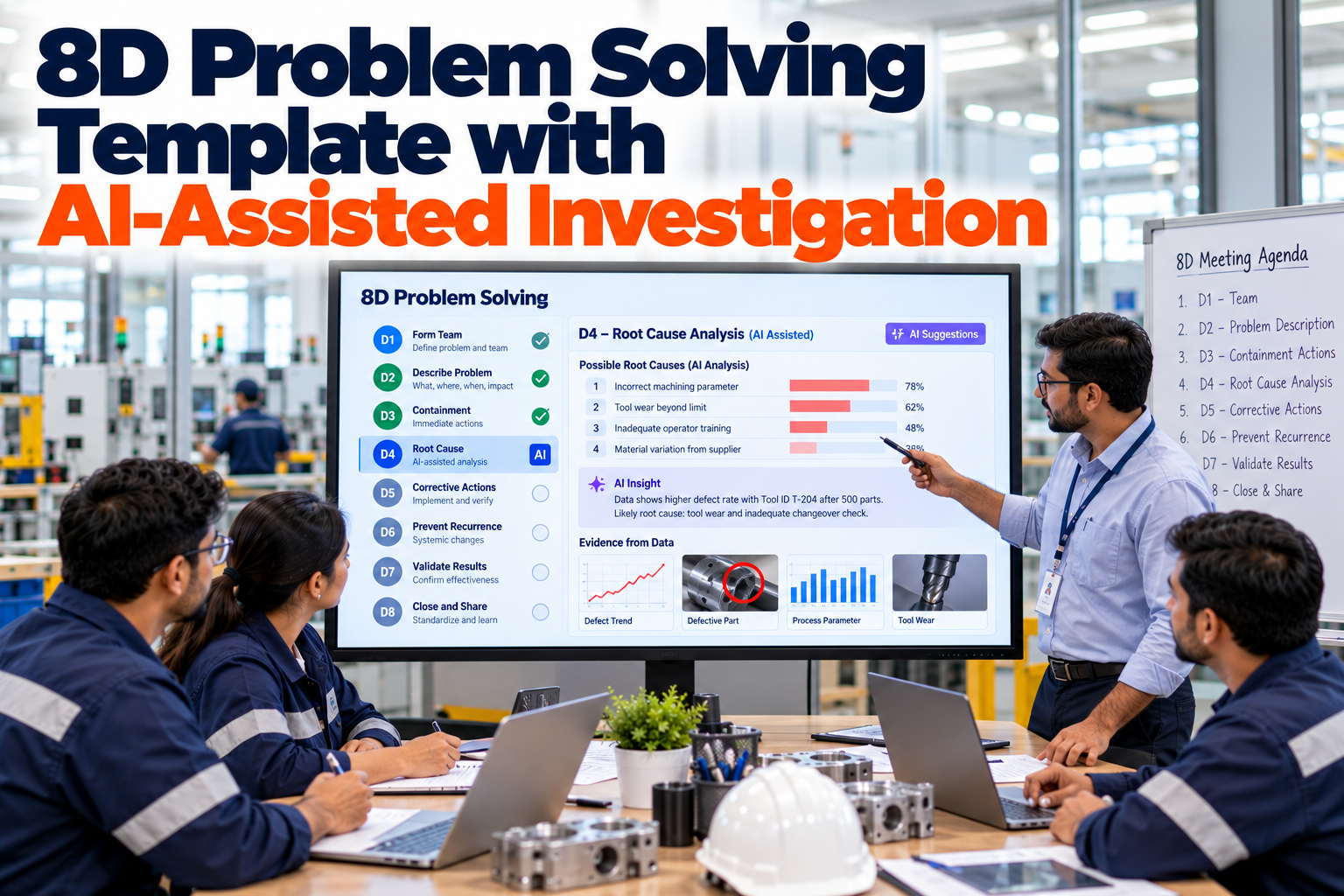
iFactory 8D Workflow guides the team through D1 to D8 in order. AI drafts the problem description and the is/is-not from complaint, traceability and process data, and the customer-ready 8D exports in one click.

D1✓
D2✓
D3✓
D4now
D5
D6
D7
D8
Complaint C-2291Day 6Root cause in review
D1–D3 doneD4 currentD5–D8 open
EIGHT DISCIPLINES

D0 to D8: The Question Each Discipline Must Answer

The 8D method came out of Ford, where the Team Oriented Problem Solving manual was first published in 1987. Ford's Global 8D revision in the late 1990s added D0 for preparation and emergency response. The format now reaches well beyond Ford: VDA published its own 8D volume in November 2018, and aero-engine suppliers work to SAE AS13000, which uses the same eight disciplines. The matrix shows where AI can help and where the team still decides. Ask our CAPA support team how your customers' forms map to it.

Discipline
Question it answers
Evidence a customer expects
AI can draft
Team decides
D0 · Prepare
Does this need an 8D, and what must happen today?
Emergency response, customer told
Similar past complaints, open lots
Whether a full 8D is needed
D1 · Team
Who has the knowledge and the authority?
Named leader, members, sponsor
Members suggested from the routing
Final team and leader
D2 · Describe
What is wrong, and where is it not?
Is/is-not, counts, photos
Is/is-not from trace data
Which distinctions matter
D3 · Contain
How is the customer protected now?
Suspect count by location, clean point
Suspect lots and where they sit
Scope and sort method
D4 · Root cause
Why was it made, why was it missed?
Both causes proven
Process changes in the window
Which cause is proven
D5 · Choose
Which permanent action works?
Verification trial results
Past actions on similar causes
The chosen action
D6 · Implement
Is it working in normal production?
Validation data, containment ended
Before and after charts
When containment ends
D7 · Prevent
What in the system let it happen?
PFMEA, control plan, similar parts
Similar parts and lines to review
System changes and owners
D8 · Close
Is the customer satisfied?
Customer sign-off
The export-ready report
Closure and recognition
D2 PROBLEM DESCRIPTION

Is/Is-Not Draws the Line Before Anyone Guesses a Cause

A problem statement such as "latch broken" sends a team in every direction. The is/is-not method compares where the defect appears with where it could appear but does not, and the difference points to what changed. Take complaint C-2291, an illustration: a harness maker found 37 connector housings with an incomplete locking latch in a shipment of 9,600 from an eight-cavity mould. Let AI fill the first draft from your own traceability in a guided D2 session.

What
IsShort shot at the latch tip
Is notFlash, cracks or size faults
Clue: a filling problem, not handling damage
Where
IsCavity 6, from the moulded cavity ID
Is notCavities 1–5, 7 and 8
Clue: something specific to one cavity
When
IsDate codes 13 to 20 Oct
Is notParts made before 13 Oct
Clue: the tool came back from maintenance on 13 Oct
How many
Is37 of 1,200 cavity-6 parts, 3.1%
Is not0 of 8,400 from other cavities
Clue: a steady rate, not one bad shot
The distinction to test in D4

Only cavity 6 changed during the tool maintenance on 13 Oct. Whatever changed there is the first candidate, and it must be proven, not assumed.

CONTAINMENT ACTIONS

Count the Suspect Parts in Every Location Before You Sort

Containment protects the customer while the cause is still unknown, so the scope has to be counted, not estimated. For C-2291, every cavity-6 part moulded from 13 Oct until the tool was pulled on 20 Oct is suspect: 2,400 parts across four locations. Some customers ask for every cavity to be held until D4 is proven, so check their rules before you narrow the scope. Set up containment records with our support team.

1,200
At the customerSorted on site with a go/no-go latch gauge
400
In transitSecond shipment stopped and returned for sorting
600
Finished goodsOn hold in the warehouse, sorted 100%
200
At the pressQuarantined beside the tool
Suspect total1,200 + 400 + 600 + 200 = 2,400 cavity-6 parts
Clean pointFirst shipment after the tool repair, every carton marked

Ask for the Is/Is-Not and Get a Draft With Its Sources

iFactory reads the complaint, the cavity and date codes, the lot history and the tool records, then drafts D2 and the D3 suspect list for the team to check. Every line points back to the record it came from.

Complaint C-2291 · Quality engineer and iFactory
Quality engineerDraft the is/is-not for C-2291.
iFactoryAll 37 rejects carry cavity ID 6 and date codes from 13 Oct. The other seven cavities show none in 8,400 parts. The tool came back from maintenance on 13 Oct.
Quality engineerHow many parts are suspect?
iFactory2,400 cavity-6 parts: 1,200 at the customer, 400 in transit, 600 in finished goods and 200 at the press.
D4 ROOT CAUSE

Two Causes, Each Proven by Switching It On and Off

Global 8D asks for the root cause and the escape point at D4: why the defect was made, and why the process did not catch it. A cause counts as proven only when you can make the problem come and go with it. Escape-point analysis deserves its own method, so the 8D record keeps it to a clear, tested line. Test a cause against your own data in a root cause walkthrough.

OCCURRENCE · WHY IT WAS MADE
  • Vent at the cavity-6 latch tip partly blocked after tool maintenance
  • Trapped air stops the melt filling the thin latch section
  • Proven: blocking the vent on a trial gave short shots, cleaning it stopped them
ESCAPE · WHY IT WAS MISSED
  • Latch fill was not on the press audit checklist
  • The press camera looked only at the mating face for flash
  • Proven: seeded short-shot parts passed both checks
CORRECTIVE ACTION AND VALIDATION

Verify the Fix on a Trial, Validate It in Production

D5 proves the chosen action removes the cause, usually on a controlled trial. D6 puts it into normal production and shows it keeps working, and only then does containment end. Running the two as one step is a common reason a customer asks for more evidence. Agree exit criteria for each customer with our support team.

1ChooseClean and deepen the cavity-6 vent, add latch fill to the camera program
2Verify · D5500-shot trial, all 4,000 parts gauged, zero short shots required
3Implement · D6Tool card, camera program and work instruction released
4ValidateThree production runs with cavity ID logged on every reject
5End containmentCustomer agrees, clean-point marking stops
D7 SYSTEMIC PREVENTION

D7 Reaches Past the Part to Similar Tools, Then the System

The prevention discipline asks what in the management system allowed the failure, and where else the same weakness sits. A fix limited to cavity 6 leaves every other multi-cavity tool exposed to the same missed vent. The four layers below are a practical way to scope D7. Review read-across candidates in a prevention planning session.

Tool
This mouldVent depth restored and a vent check added to its tool card
Peers
Similar toolsEleven other multi-cavity tools with thin latch features get the same check at their next service
Docs
PFMEA and control planBlocked vent added as a cause of incomplete fill, latch fill added to the camera check
System
Tool return-to-serviceQuality signs off every tool after maintenance, and new part features start a checklist review
8D PROBLEM SOLVING TEMPLATE

A Customer-Ready 8D Report You Can Copy

Customers rarely read an 8D from top to bottom. They check the header, the problem statement, the counts and the dates, then the proof. This layout puts those first and keeps each discipline to the evidence that answers it, shown here mid-investigation. Ask our support team for the same format with your customers' header fields.

8D numberC-2291
PartConnector housing, 8-cavity
Opened20 Oct
StatusDay 6 · D4 in review
D1
Quality lead as owner, moulding engineer, toolmaker, camera technician, customer contact
Done
D2
Short shot at latch tip, cavity 6 only, date codes 13 to 20 Oct, 37 of 1,200 parts
Done
D3
2,400 suspect in four locations, sorted by latch gauge, clean point marked
Done
D4
Occurrence: blocked vent, proven on and off. Escape: latch fill on neither check
Review
D5
Vent restored, 500-shot trial planned with every part gauged
Planned
D6
Tool card, camera program and work instruction, then three logged runs
Planned
D7
Eleven similar tools, PFMEA and control plan, return-to-service sign-off
Planned
D8
Customer sign-off, team thanked, record filed by defect type
Planned
8D PROBLEM SOLVING TEMPLATE BEST PRACTICES

Six Reasons an 8D Comes Back From the Customer

Supplier quality engineers see the same weak spots again and again. None of them needs a new tool, only discipline in the record. Check your last few reports against this list in a 30-minute review call.

1
D2 with no is-not sideOnly where the defect is, so nothing narrows the search
2
Counts that do not add upSuspect, sorted and rejected totals that disagree
3
D5 and D6 mergedAn action put in place with no trial to show it works
4
Cause never switchedA likely story that was never turned on and off
5
Containment ended earlySorting stopped with no data showing the fix holds
6
D7 stops at one partNo look at similar tools, lines or documents
8D PROBLEM SOLVING TEMPLATE EXAMPLES

Three Short 8Ds From Other Industries

The disciplines stay the same while the evidence changes by sector. These are illustrations, not customer case studies. Bring one of your open complaints to our quality support team.

Aerospace · machined bracket
Burr in one cross-drilled holeD2: one 5-axis machine, only after a program revision. D4: deburr step missing from the new program. D7: program release checklist on every 5-axis cell.
Medical device · catheter hub
Cracked hubs from one resin lotD2: one lot, one dryer. D4: resin moisture high after a muted dryer alarm. D7: dryer alarms tied to batch release, run inside CAPA under ISO 13485 clause 8.5.2.
Electronics · power board
Voiding under one BGAD2: line 2 only, after a reflow profile edit. D4: profile changed with no validation run. D7: profile edits go through change control on every line.
8D PROBLEM SOLVING TEMPLATE COST AND ROI

Price the Hours Spent Gathering Evidence

Much of the effort in an 8D goes into finding data: lot histories, process changes, audit records and photos. That time can be measured. Every input below is assumed, so swap in your own figures. Run the numbers with us in a cost review call.

8Ds opened per year40, assumed
Hours per 8D gathering and formatting data today12, assumed
Hours per 8D with drafts pre-filled5, assumed
Hours saved per year40 × (12 − 5) = 280 h
Loaded labour rate$70 per hour, assumed
Yearly value of hours saved280 × $70 = $19,600

Faster containment and fewer returned reports may be worth more, but price them only from your own records.

TURNKEY AI DEPLOYMENT

8D Workflow and an AI Server That Arrive Ready

iFactory delivers 8D Workflow as a turnkey package. A pre-configured NVIDIA AI server ships racked and ready, with connectors to your complaint, traceability and MES data set up before it arrives, so investigation data stays on site. You rack it, plug in power and Ethernet, and the AI is live. Plan the connections with our deployment team.

What's Included
  • Pre-configured NVIDIA AI server, racked and ready
  • Guided D0 to D8 workflow with due dates by customer
  • AI drafts of D2 problem statements and is/is-not
  • Suspect lot finder across plant, transit and customer stock
  • Links to PFMEA, control plan and work instructions for D7
  • One-click customer-ready 8D export
  • 24×7 remote monitoring of models and hardware
Live in 6–12 weeks
Wk 1–4
Connect and Load

Server installed, complaint, trace and MES data linked, open 8Ds loaded.

Wk 5–8
Pilot One Customer

One customer's complaints run in the new workflow while engineers review every AI draft.

Wk 9–12
Go-Live and Training

All customers switched on, export formats agreed, quality team trained.

HOW iFACTORY FITS

An 8D That Starts From the Data, Not a Blank Form

iFactory sits on top of the records you already keep and turns them into a guided investigation. See a complaint run end to end in a 30-minute session.

1
Guided disciplines. D1 to D8 steps with owners, due dates and the evidence each one needs.
2
Drafts from data. AI writes the problem description and is/is-not from complaint and trace records.
3
Counted containment. Suspect parts are listed by location, so the D3 total adds up.
4
One-click export. The customer-ready 8D leaves with every attachment in place.
1000+
Industrial clients running iFactory
99.9%
Platform uptime for quality teams
6-12 wks
From racked server to drafted 8Ds
FREQUENTLY ASKED QUESTIONS

What Quality Leaders Ask About 8D Templates and AI

What is the difference between an 8D and a CAPA?
An 8D is a team method for solving one problem, often a customer complaint. CAPA is the wider quality system process for corrective and preventive action. Many plants run the 8D inside their CAPA system, so the 8D supplies the investigation and CAPA tracks it to closure.
Does the AI decide the root cause?
No. It drafts the problem description, the is/is-not and the list of process changes in the time window, each linked to its source record. The team proves the cause and signs each discipline. You can see how drafts are reviewed on a sample complaint.
How fast should containment start?
Each customer sets its own response times, and many expect containment within about a day of the complaint. Load each customer's dates into the workflow so due dates are set the moment a complaint is logged.
Is there an implementation guide for moving 8Ds into software?
Start with one customer and the complaints still open. Connect complaint and traceability data, agree the export format, then add customers one at a time. Our support team can share a step-by-step plan.
Can we export in our customer's own 8D format?
Yes. Export layouts are set per customer, including portals that need set fields, so the same investigation can leave in each format without retyping. Walk through your customer forms with our team.
How do we start?
Pick one recent complaint that took too long to answer. We load its data and show which parts of D2 and D3 could have been drafted on day one. To try it on your own case, book a 30-minute demo.

Close Every 8D With Proof, Not Just Paperwork

Guided disciplines, drafts built from your data, counted containment and a customer-ready export. The full package arrives turnkey and goes live within 6 to 12 weeks.
Example 8D board · Complaint C-2291
D1 to D3Done · 2,400 parts contained
D4Both causes in review
D5 and D6500-shot trial planned
D7Eleven similar tools listed
Customer-ready 8D exports in one click

Share This Story, Choose Your Platform!