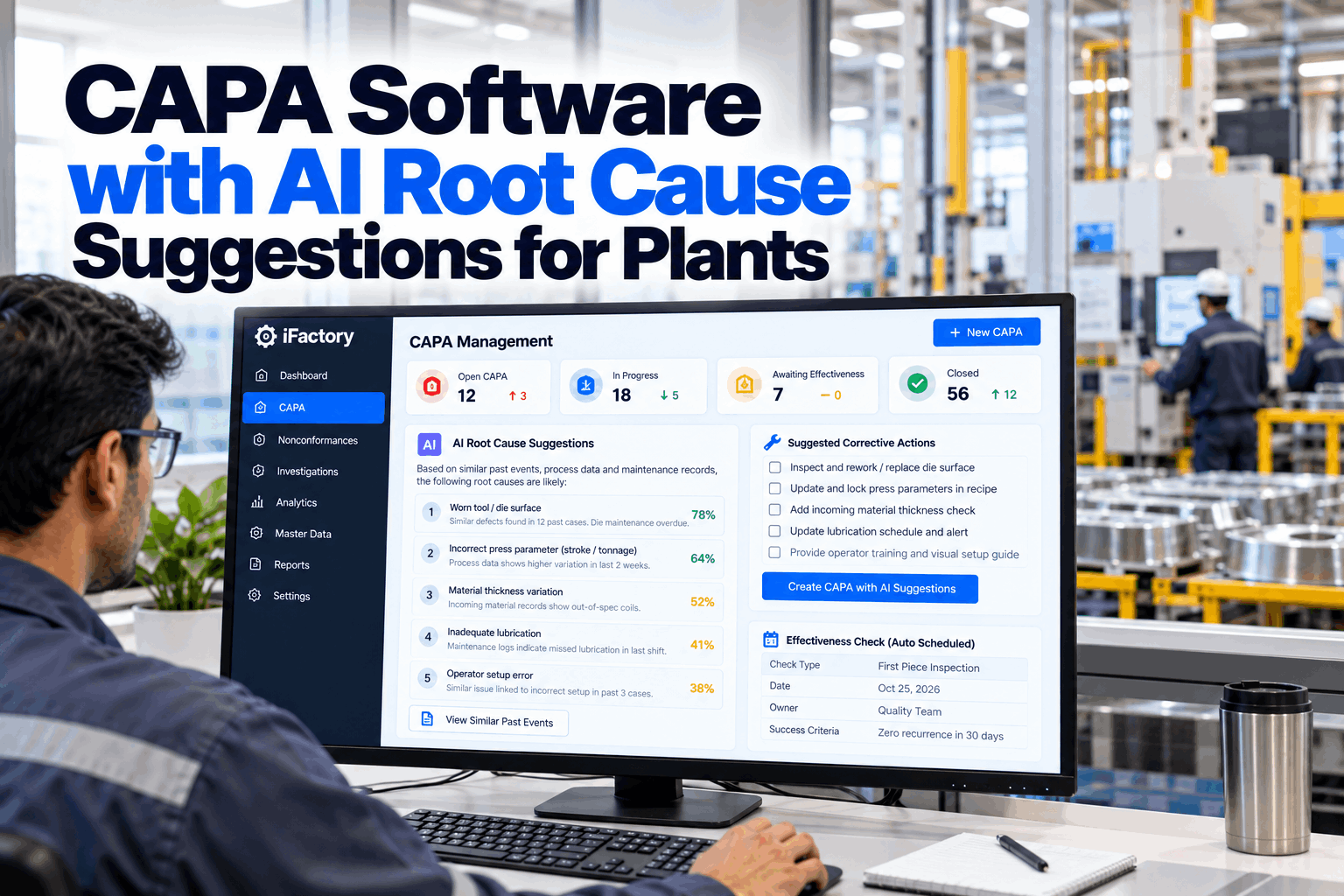
Most plants have a CAPA process on paper. In practice, the same defect comes back every few months, each time with a new CAPA number, a root cause of "operator error" and a corrective action that says "retrain". Nobody has time to search years of records to see what happened before and what fixed it. CAPA software with AI root cause suggestions does that search for the team. It finds similar past events, pulls the process data around them and proposes likely causes and proven actions for people to test. Start with a CAPA review.
CAPA Software with AI Root Cause Suggestions for Plants
A CAPA agent drafts the problem statement, finds similar past events, brings in process data, suggests 5-Why paths and schedules effectiveness checks. Your team decides the cause and the action.
- Why CAPAs close but problems come back
- How AI finds similar events and likely causes
- Effectiveness checks that prove the fix worked
Why CAPAs Close but Problems Come Back
The paperwork finishes. The problem does not.
ISO 9001:2015 clause 10.2 asks organisations to react to nonconformities, evaluate the need to remove their causes so they do not recur, implement action and review its effectiveness. Many CAPA systems record those steps without making them easier. Investigators start from a blank page, past events sit in separate systems, and effectiveness checks are skipped when the next urgent issue arrives. Our quality specialists can review your current CAPA process.
Blank page start
Every investigation starts from scratch.
Shallow causes
"Operator error" and "retrain" close the case.
History hidden
Past NCRs and fixes are hard to find.
No proof of fix
Effectiveness checks skipped or rushed.
The CAPA Workflow, Step by Step
A clear path from first report to verified fix.
Whether your plant uses 8D, A3 or its own format, a good CAPA follows the same core steps. The software guides the team through each one and keeps the record together, with owners, due dates and reminders, so investigations do not stall between meetings. Map your workflow with our implementation team.
Describe
Clear problem statement with facts.
Contain
Protect the customer now.
Analyse
Find the root cause with evidence.
Correct
Fix the cause, not the symptom.
Verify
Prove the problem has not returned.
A good problem statement says what was found, where, when, how many and against which requirement, without guessing why. "Leak at valve body seal on 37 parts from Line 2, 3 to 5 October, against 2 bar test" is a problem statement. "Bad O-rings" is a guess that closes the investigation too early.
Containment Comes First
Protect the customer before chasing the cause.
While the investigation starts, suspect product has to be found and controlled. The agent lists every lot, shipment and work in progress that could be affected, based on the time, line and material involved, and tracks containment actions until each one is closed. Plan containment steps with our quality team.
Finished goods
Suspect lots placed on hold in the warehouse.
Work in progress
Parts on the line checked or quarantined.
Customer stock
Shipments identified for customer notice.
Temporary checks
Extra inspection until the fix is proven.
How AI Finds Similar Past Events
The answer to today's problem is often already in your records.
The CAPA agent searches past nonconformances, customer complaints, CAPAs, deviations and maintenance repairs for events that look like the new one. It matches on the part, the defect description, the line, the supplier and the time, even when the wording is different. Each match comes with what was found and what was done, and a short note on why the agent thinks it is similar, so investigators can quickly judge whether the link is real or just a coincidence of wording. Connect your records with our integration team.
Process Data Around the Event
Facts from the line, not just from memory.
When a problem has a time and place, the agent pulls the process data around it: machine settings, sensor readings, test results and lot information for good and bad parts. Comparing the two often points straight at what changed. Where data is missing, the agent says so, so the team knows which facts still need to be gathered by hand before drawing conclusions. Ask our data team which process data can be linked.
Settings and states
Parameters, alarms and changes at the time.
Test results
In-process and end-of-line results for affected parts.
Lots and suppliers
Which material lots went into which parts.
Shifts and changes
Shift, setup and procedure changes nearby in time.
Start Every Investigation With What You Already Know
Similar past events, process data and proven actions brought to the team on day one, with effectiveness checks scheduled automatically.
Suggested 5-Why Paths
A starting point for the team, built from evidence.
Using past events and process data, the agent suggests one or more 5-Why paths, each step backed by the evidence that supports it. The team tests each step, rejects what does not hold and adds what the data cannot show. The final root cause is always the team's decision. Paths that were tested and rejected stay in the record too, which shows auditors that other explanations were considered and ruled out with evidence. Practise with our problem-solving coaches.
Stop the 5-Why chain only when the answer points to something the organisation can change, such as a missing check, a weak procedure or a design gap. If the last answer is about a person, keep going.
Proven Corrective Actions
Learn from what worked, and from what did not.
Every closed CAPA becomes part of a library of causes and actions, marked by whether the effectiveness check passed. When a similar cause appears, the agent suggests actions that worked before, and warns about actions that were tried and failed. Good fixes found on one line or site can then be spread to others with the same risk, turning a single CAPA into a preventive action. Build your action library with our quality team.
Stronger actions
- Design or process changes that remove the cause
- Error-proofing that prevents the mistake
- New checks at the right point in the process
- Supplier changes with verification
Weaker actions on their own
- Retraining the operator
- Reminder memos
- Extra inspection with no end date
- Warning signs
Effectiveness Checks That Prove the Fix
A CAPA is not done until the data says it worked.
When an action is agreed, the agent schedules the effectiveness check, defines what will be measured and pulls the data when the check is due. If the problem has returned, the CAPA reopens, and the original root cause is questioned rather than a second action simply being added on top of the first. Plan effectiveness criteria with our quality team.
What success looks like
A measurable result, such as no repeat in the next set number of lots.
When to check
Dates set automatically from the action and production plan.
Data, not opinion
Results pulled from inspection and complaint records.
One CAPA for a Repeat Problem, Not Five
Repeat problems deserve a deeper look, not a new number.
When a new event matches an open or recently closed CAPA, the agent says so before a new one is opened. The team can then reopen the original CAPA, question why the earlier fix did not hold and escalate if needed. Over time, this cuts the pile of duplicate CAPAs and makes recurring problems visible to management. Discuss escalation rules with our quality team.
CAPA Metrics That Matter
Measure whether problems stay fixed, not just how fast forms close.
Closure speed alone rewards shallow investigations. A balanced set of measures shows both speed and quality. Review your metrics with our analytics team.
Cycle time
Days from opening to verified closure.
Recurrence rate
Share of CAPAs whose problem came back.
Cause type
Share of causes in systems rather than people.
Overdue checks
Effectiveness checks past their due date.
CAPA Mistakes to Avoid
A faster CAPA is only better if it finds the real cause.
These are common problems in CAPA programs. A short CAPA review can find them.
What works
- Factual problem statements
- Past events checked every time
- Root causes tested with data
- Effectiveness checks with clear criteria
What fails
- Jumping to a cause in the first meeting
- Accepting AI suggestions without testing
- Closing when actions are done, not proven
- Opening a new CAPA for a repeat problem
How iFactory Runs CAPA With AI Suggestions
CAPA Agent, on your own network.
iFactory's CAPA Agent drafts problem statements, pulls similar past events and process data, suggests 5-Why paths and proven actions, and schedules effectiveness checks automatically. It runs on an on-prem AI server inside your plant. Fit questions go to our solutions team.
Problem statements
Drafted from the event facts.
Similar events
NCRs, complaints, CAPAs and repairs.
Process data
Good and bad parts compared.
5-Why suggestions
Evidence for each step.
Action library
What worked and what did not.
Effectiveness checks
Scheduled and verified with data.
AI suggestions support your problem-solving team. Root causes, actions and closure remain decisions for your people.
Turnkey AI: Delivered, Connected and Live in 6–12 Weeks
You do not build this. It arrives ready.
iFactory ships as a pre-configured NVIDIA AI server with the software pre-loaded, racked and ready. Rack it, plug in power and Ethernet, and the AI is live on your network. Our team handles cabling, network setup, PLC, SCADA, DCS and CMMS integration, QMS and process data links, operator training and 24×7 remote monitoring. Data stays on your network. For a scope matched to your plant, request a turnkey quote.
Ship, network and data
Server installed. NCRs, complaints, CAPAs, maintenance and process data connected.
Model training and pilot
Similarity search and suggestions tuned on past CAPAs with your quality team.
Go-live and training
CAPA agent live. Investigators trained. 24×7 monitoring begins.
Frequently Asked Questions
What is CAPA software with AI root cause suggestions?
CAPA software that searches past events and process data to propose likely causes and proven actions, while guiding the team through the CAPA workflow.
Does the AI decide the root cause?
No. It suggests possible causes with evidence. The team tests them and decides, and the decision is recorded with its reasons.
Which records does it search?
Nonconformances, customer complaints, past CAPAs, deviations, maintenance repairs and supplier and lot data, as far as they are available.
What happens with repeat problems?
The agent flags matches with open or recently closed CAPAs before a new one is opened, so the team can reopen the original and ask why the fix did not hold.
Does it work with 8D or A3?
Yes. The workflow can follow 8D, A3 or your own format, with the same suggestions and records.
How are effectiveness checks handled?
The agent schedules each check, defines what will be measured and pulls the data when it is due. If the problem returns, the CAPA reopens.
How does it support ISO 9001?
It keeps records of nonconformity, cause analysis, action and effectiveness review, which supports the requirements of clause 10.2. Certification remains with your registrar.
Where is data stored?
On the on-prem server inside your plant, with access control and audit trails.
How do we start?
Start with one product family and a few years of records. A 6-week pilot connects your data and tests suggestions on past CAPAs. To plan it, contact our team.
Stop Solving the Same Problem Twice
In thirty minutes we review a recent CAPA with your team and show which past events and data the agent would have found. You keep the notes either way.
- 1Your CAPA procedure
- 2A recent CAPA report
- 3An export of past NCRs
- 4Systems holding complaints and repairs
- 5One problem that keeps coming back