Receiving is the last cheap place to stop a bad part. Once material reaches the line, the same defect costs a stopped station, a sort and sometimes a customer complaint. Yet many docks still sample every lot the same way, whatever the supplier's record, and file certificates nobody has read. An incoming inspection process that sets sampling by supplier history and holds failures automatically fixes both problems, as a short receiving demo shows.
RECEIVING AGENT · INCOMING QUALITY
Sample by Supplier History, Skip What Has Earned It, Hold What Fails
iFactory's Receiving Inspection Agent chooses each sampling plan from the supplier's track record and the Z1.4 switching rules. Inspectors record results by voice or handheld, failed lots go straight to quarantine and a SCAR is drafted automatically.
LOTA-4417
Supplier A · EPDM gaskets10 lots accepted in a row · this lot not drawn
SKIP LOT
LOTB-0912
Supplier B · Machined bracketsLot of 80 · level II · code E · AQL 1.0
INSPECT n=13
LOTC-2208
Supplier C · Bored housingsLot of 2,000 · n=125 · 4 found, reject at 4
HOLD · QUARANTINED
INCOMING INSPECTION PROCESS
Six Stations Between the Truck and the Line
A receiving inspection process works when every lot passes the same stations in the same order, and the only thing that changes is how hard each station looks. Strong suppliers move through quickly. New or struggling ones get a closer check. Nothing reaches stock without a recorded decision. Our support team can map your dock against these stations.
1Dock checkPackaging damage, labels and quantity against the packing list
Receiving clerk
2Paperwork and CoCPO, part revision, lot number and certificate matched
Inspector
3Sampling planChosen from supplier history and the current switching state
Agent
4Inspect and recordMeasurements and defects entered by voice or handheld
Inspector
5DispositionAccept to stock, or hold in quarantine with a tag
Quality
6Put-awayReleased material booked into the ERP, the dock-to-stock clock stops
Stores
WORKED SAMPLING EXAMPLE
From Lot Size to Accept or Reject in Five Steps
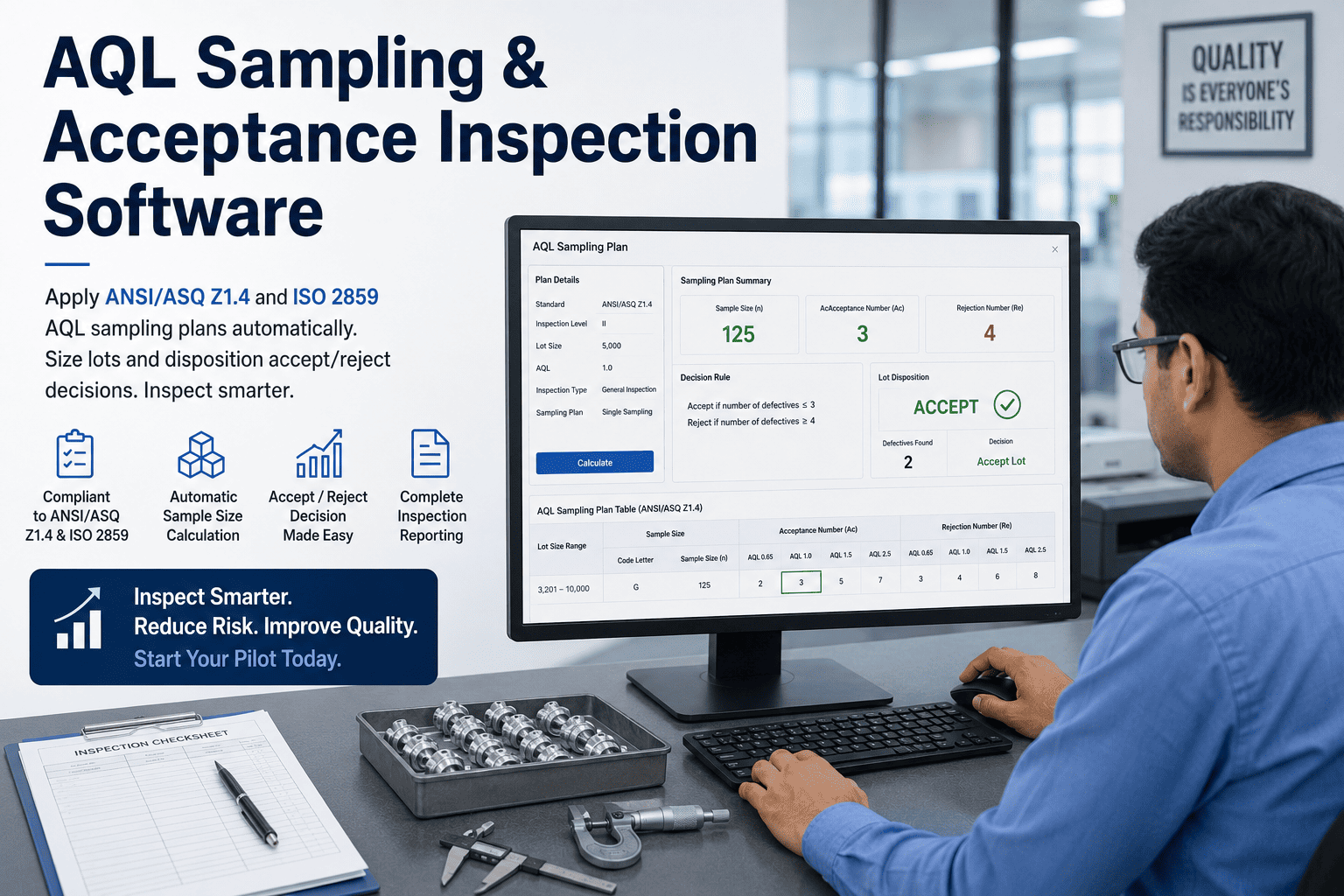
ANSI/ASQ Z1.4 turns a lot size into a sample size through a code letter. At general inspection level II, the usual default, lots of 1,201 to 3,200 pieces take code letter K, and code K means a sample of 125. Take a lot of 2,000 bored housings checked at an AQL of 1.0 on normal inspection. Lot boundaries matter: a lot of 1,200 falls under code J and a sample of 80. Check your own plans with our quality engineers.
Lot size2,000
Level II range1,201–3,200
Code letterK
Sample sizen = 125
AQL 1.0 normalAc 3 · Re 4
2 nonconforming found2 is at or below the acceptance number of 3. The lot is accepted and released to stock.
4 nonconforming found4 reaches the rejection number. The lot is rejected, quarantined and a SCAR is drafted.
SUPPLIER HISTORY SAMPLING
Switching Rules Let the Supplier's Record Set the Effort
Z1.4 is meant to run on a continuing stream of lots, with switching rules that tighten inspection when a supplier slips and reduce it when the record is steady. Applied by hand, the rules are often forgotten. Applied per supplier and part by software, they become the supplier history sampling plan. Our support team can load your current states.
SKIP LOT SAMPLING
Skip-Lot Status Is Earned, and Lost on One Failure
ASQ/ANSI S1 describes an attribute skip-lot program for suppliers that have shown consistent control. It is built to sit on top of Z1.4 lot-by-lot plans, so only a share of lots is inspected. One published version is the DLA Troop Support skip-lot procedure, adapted from S1: the product qualifies after 10 consecutive accepted lots on normal inspection and at least six months of steady production, then one lot in four is drawn at random. See the states running on sample suppliers in a live demo.
State 1 · Lot by lot
Every lot sampledThe starting point. Qualification counts accepted lots on normal inspection.State 2 · Skip lot
1 lot in 4 drawnIn the DLA procedure, a year at 1 in 4 with no change of status allows 1 in 6.State 3 · Interrupted
Back to every lotOne failed lot interrupts skipping. Requalify with 5 consecutive accepted lots within the next 10.
Set your own rules in writing
Frequencies and qualification counts should be agreed with your quality authority and, where it applies, your customer. Keep critical characteristics and safety items out of skip-lot entirely.
Say the Result, Let the Agent Do the Rest
Inspectors speak or tap results at the bench. The agent checks them against the plan, reads back what it heard, and quarantines and drafts the SCAR the moment a lot fails.
Receiving bench 2 · Inspector and iFactory
Inspector, by voice"Lot C-2208, sample one-two-five done, four bores oversize."
iFactoryConfirmed: lot C-2208, n=125, 4 nonconforming, rejection number 4. Lot rejected and moved to quarantine Q-3. SCAR draft ready for Supplier C.
Inspector, by voice"Send it with the photos."
iFactorySent with 4 photos. One more rejected lot in Supplier C's next four moves this part to tightened inspection.
COC VERIFICATION BEST PRACTICES
Read the Certificate Against the PO, Not Just for a Signature
A certificate of conformance is the supplier's statement that the lot meets requirements. AS9100D lists it as one form of objective evidence for accepting purchased product, and asks organizations to evaluate the data in test reports and, for critical raw materials, to validate their accuracy. In practice that means comparing each field with your own records, not filing the paper. Our quality team can set up the checks.
Part number and revisionMatch the PO line. Common miss: an older drawing revision.
Lot or heat numberMatches the label on the material. Common miss: a certificate from a previous lot.
QuantityMatches the packing list and the count at the dock.
Specification citedYour spec and its current revision, not a generic standard.
Results inside your limitsWhere data is given, check every value against your tolerance, not the supplier's.
Signature and dateAn authorised person, a date that fits the shipment.
QUARANTINE AND DISPOSITION
A Failed Lot Needs a Location, a Tag and an Owner
Incoming material defects only stay contained if the rejected lot is blocked in the ERP as well as on the floor. A red tag in a cage that the system still shows as available stock will be picked sooner or later. Hold the lot in both places, name an owner and set a date for the disposition decision. Walk through the hold flow in a short session.
Return
Back to the supplierDebit note raised, replacement lot requested and the return logged against the SCAR.Sort or rework
Recover good parts100% sort or rework, usually at the supplier's cost, with results recorded.Use as is
Accepted by reviewOnly through your material review process and, where contracts require it, customer approval.Scrap
Removed for goodQuantities and cost recorded so the supplier's score and chargeback reflect them.
RECEIVING QUALITY FOR PLANT MANAGERS
Dock-to-Stock Time Shows Where Material Waits
Dock to stock has two meanings. It is the time from arrival at the dock until material is available in stock, and it is also the name some plants give a program where certified suppliers' material goes straight to stock without inspection. Both depend on knowing which path each lot took. The bars below are illustrative, not plant data. Our support team can help you measure your own.
Hours from dock to stock, by pathIllustrative
Skip lot, CoC check only2
Sampled, n=135
Sampled, n=125 plus lab test26
Held for disposition72
INCOMING INSPECTION PROCESS IMPLEMENTATION GUIDE
Write One Receiving Plan per Part and Supplier
Before any software goes live, each purchased part needs a short receiving plan that an inspector can follow and an agent can apply. Start with parts that carry critical characteristics or come from new suppliers. Get a blank version from our implementation team.
Part and supplierHousing 7714-B · Supplier C
Characteristics checkedBore Ø, thread, surface finish
Level and AQLGeneral level II · AQL 1.0
Current stateNormal, 4 accepted in a row
Certificate neededCoC with bore results per lot
GaugesBore gauge, thread plug gauge
Hold locationQuarantine cage Q-3
SCAR triggerAny rejected lot, auto-drafted
INCOMING INSPECTION PROCESS COST AND ROI
Count the Inspection Hours Skip-Lot Gives Back
The clearest early return from supplier history sampling is inspection time moved from proven suppliers to risky ones. Inputs marked assumed are placeholders, and only the arithmetic is fixed. Put your own receiving counts in before you quote a result. Our team can fill it in with you.
Lots received per month400, assumed
Lots from skip-lot qualified suppliers120, assumed
Skip frequency1 in 4, so 30 of 120 still inspected
Lots no longer sampled120 − 30 = 90
Inspection hours per sampled lot1.5, assumed
Hours freed per month90 × 1.5 = 135 hours
Those hours are best spent on tightened suppliers, new parts and CoC checks rather than counted as savings. Add avoided line stoppages only where your own records show them.
TURNKEY AI DEPLOYMENT
Receiving Agent, Handhelds and AI Server, Shipped Ready
iFactory delivers the Receiving Inspection Agent as a turnkey bundle. A pre-configured NVIDIA AI server ships racked and ready with the sampling engine, voice models and SCAR drafting pre-loaded, so receiving data stays inside the plant. You rack it, plug in power and Ethernet, and the AI is live. Get a turnkey quote for your docks.
What's Included
- Pre-configured NVIDIA AI server, racked and ready
- Sampling engine with Z1.4 switching and skip-lot states
- Voice and handheld entry for receiving benches
- Quarantine holds linked to ERP stock status
- Automatic SCAR drafts from rejected lots
- Connectors for ERP receipts and supplier records
- 24×7 remote monitoring
Live in 6–12 weeks
Wk 1–4
Plans and Connections
Server installed, ERP receipts linked, receiving plans loaded for pilot parts.
Wk 5–8
Bench Pilot
Inspectors use voice entry on one dock, switching states checked against past lot history.
Wk 9–12
All Docks Live
Every receiving bench live, quarantine holds and SCAR drafts switched on.
HOW iFACTORY FITS
Incoming Inspection Process Software That Remembers Every Supplier
iFactory carries each supplier's lot history from the dock to the scorecard, so the next sampling decision is based on evidence. Our support team can review your receiving procedure before a pilot.
1
Plans set by performance. The agent picks normal, tightened, reduced or skip-lot for each supplier and part.
2
Voice or handheld entry. Inspectors speak or tap results, and each entry is repeated back for confirmation.
3
Failed lots quarantined. Holds apply on the floor and in ERP stock at the same moment.
4
SCAR drafted automatically. Lot, defects, photos and quantities go to the supplier without retyping.
1000+
Industrial clients running iFactory
99.9%
Platform uptime for receiving benches
6-12 wks
From racked server to live receiving plans
FREQUENTLY ASKED QUESTIONS
What Receiving and Quality Teams Ask About Incoming Inspection
What is an incoming inspection process?
It is the set of checks purchased material passes before it can be used: a dock check, paperwork and certificate review, sampling and inspection against the drawing or spec, and a recorded decision to accept, hold or reject. A good process varies the depth of inspection by supplier history and part risk.
How do I find the sample size for a lot?
Use the lot size and inspection level to find the code letter in Z1.4, then read the sample size and acceptance numbers for your AQL. At general level II, a lot of 2,000 takes code K and a sample of 125, and at AQL 1.0 on normal inspection the lot is accepted with up to 3 nonconforming.
See the agent work it out on your own parts.
When does a supplier switch to tightened inspection?
Under Z1.4, when 2 lots are not accepted within 5 or fewer consecutive lots on original inspection. The supplier returns to normal after 5 consecutive accepted lots. If 5 lots fail while on tightened, acceptance under the standard stops until the supplier corrects the process.
Is a certificate of conformance enough to accept material?
Rarely on its own. It is the supplier's claim, so check that the part, revision, lot and quantity match, and that any results fall inside your limits. Your own sampling then confirms the claim at a frequency set by the supplier's record. Our
support team can share a CoC check list.
Which parts should never go on skip-lot?
Parts with critical or safety characteristics, new parts, parts after a design or process change, and anything from a supplier with an open SCAR on that part. Many customer contracts also restrict skip-lot, so check flowdowns first.
Review your part list with our team before switching anything.
How long does it take to go live?
The full system is delivered turnkey and goes live in 6 to 12 weeks, starting with one receiving dock and the parts that matter most. Past lot history is loaded so suppliers start in the right switching state.
Book a 30-minute demo to scope your dock.
Stop Bad Material at the Dock, Not on the Line
Let supplier history set the sampling plan, record results by voice or handheld, quarantine failed lots automatically and send SCARs without retyping. Delivered turnkey and live in 6 to 12 weeks.
Example receiving shift · Dock 2
Lots received18
Skip lot, CoC checked6
Sampled and accepted11
Quarantined1, SCAR drafted
Every lot decision on record