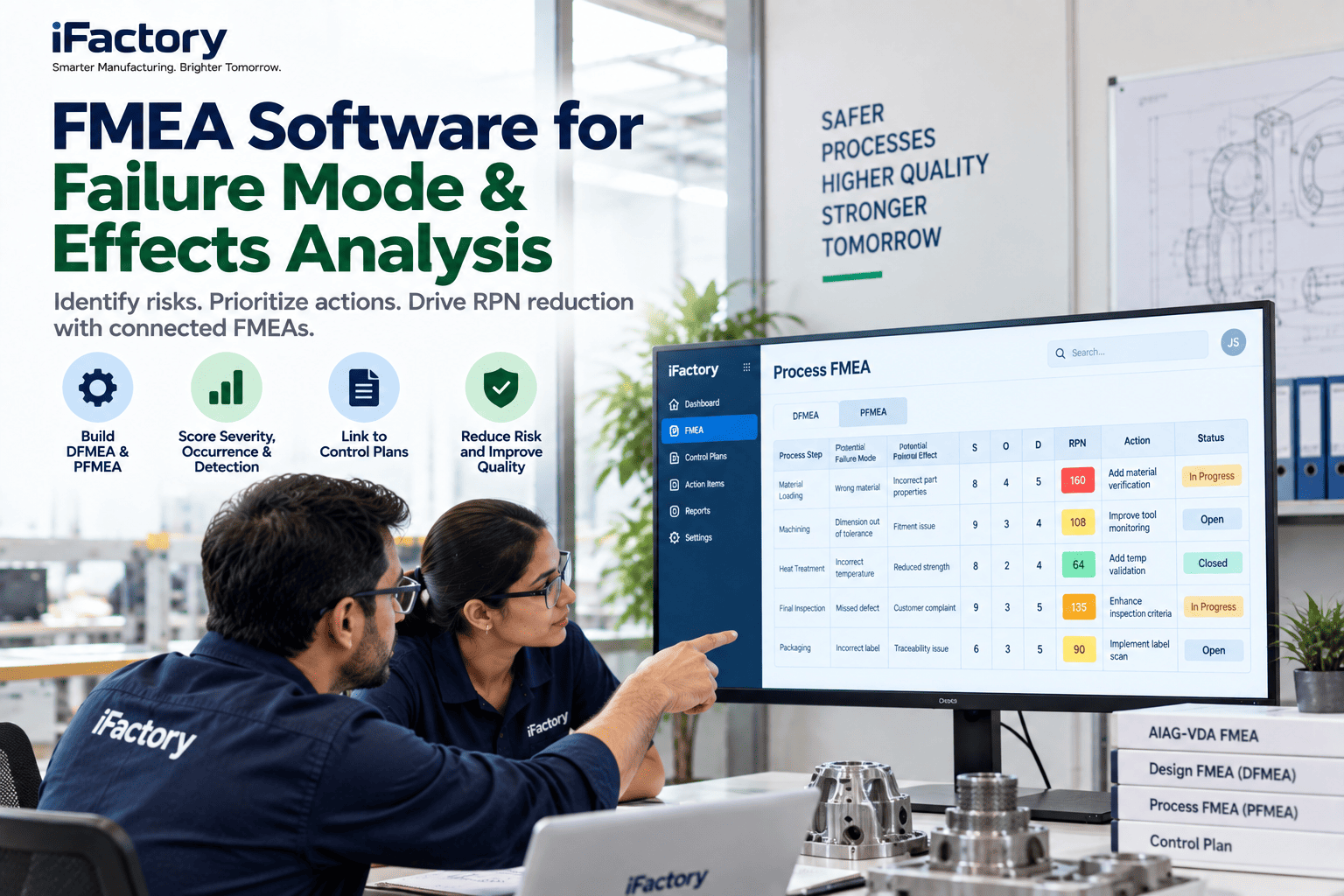
PFMEA Software: Build, Link and Update Process FMEAs with AI
By James C on October 30, 2026
A process FMEA usually gets its best attention twice: when the PPAP is due and when an auditor asks for it. In between, scrap codes change, a warranty return arrives, a new rework loop appears, and the file on the shared drive still shows the ratings from launch day. PFMEA software is worth having only if it closes that gap, keeping each failure mode tied to the defects, control plan lines and work instructions it is supposed to govern. To see a PFMEA kept live from your own defect history, book a demo.
LIVING FMEA · PROCESS RISK
A PFMEA That Reopens Itself When the Field Talks Back
iFactory Living FMEA suggests failure modes from your defect history, keeps the PFMEA, control plan and work instructions linked, and flags the exact row when a new field failure points back to it.
Aluminium gearbox housing · PFMEA line 40.2Linked: control plan line 14 · WI-40 rev F
PROCESS FMEA · AIAG-VDA
Seven Steps, Applied to One Machined Housing
The AIAG and VDA FMEA Handbook, first published in June 2019, replaced the old "fill in the columns" habit with seven steps in three groups. The first three steps build an understanding of the process before anyone rates a risk. The next three find and reduce the risks. The last one tells people what was decided. Here is what each step produced for a die-cast aluminium gearbox housing on a five-axis machining line. Our support team can map your current format onto these steps.
System analysis
1Planning and preparationScope: Op 10 to Op 70 on line M3, team of process, quality and maintenance engineers
2Structure analysisEach operation broken into its machine, people, material and environment elements
3Function analysisWhat each element must do, such as "hold bore size within H7"
Failure analysis and risk mitigation
4Failure analysisEffect, mode and cause linked into one failure chain per function
5Risk analysisPrevention and detection controls rated, Action Priority assigned
6OptimizationActions with owners and dates, then the row re-rated on evidence
Risk communication
7Results documentationWhat changed, why, and which control plan lines now carry it
STRUCTURE AND FAILURE CHAIN
Break Op 40 Down Before You Rate Anything
Most weak PFMEAs skip straight to a failure mode list. The structure step forces a different question: which element of this operation could cause the problem? For the finish-bore operation, the causes sit in four places, and each one needs its own prevention control. Once the elements are clear, the failure chain writes itself, from the effect the customer feels back to the cause on the machine. Try it on one of your operations in a working session.
Process itemGearbox housing machining, line M3
Process stepOp 40 · Finish bore bearing seat Ø52 H7 (0 to +0.030 mm)
MachineBoring spindle and toolCut the bore to size every cycle
ManSetterEnter tool offsets correctly after a tool change
MaterialCoolantKeep the part and tool at a stable temperature
EnvironmentShop climateAvoid large swings between morning and afternoon
Failure effectBearing moves in its seat, gear whine reported by the driver
←
Failure modeBore diameter above 52.030 mm
←
Failure causeBoring tool wear not compensated before the size drifts out
ACTION PRIORITY
How the Bore Row Moves From High to Low
Action Priority replaced the RPN number in the AIAG-VDA method. Instead of multiplying three ratings, the team reads one lookup that weighs severity first, then occurrence, then detection. High means the team must act or write down why current controls are enough. For severity 9 or 10 with an H or M result, the handbook recommends management review. The ladder below shows how two actions moved the Op 40 row. The ratings are illustrative team ratings, not values for your process. Check your own ratings with our quality team.
HMust act on prevention or detection, or record why the controls are enough
MShould act, or record why the controls are enough
LCould act to improve prevention or detection
StartS 8 · O 5 · D 7
Final check with a hand bore gauge, 1 part per 50Detection relies on a sample long after the cut
H
Action 1S 8 · O 5 · D 3
In-process air gauge on every part at Op 40Oversize bores are caught at the machine
M
Action 2S 8 · O 3 · D 3
Tool-life counter with automatic wear offsetThe cause itself is prevented before size drifts
L
Severity does not move
Neither action changes what a loose bearing does to the driver, so severity stays at 8. Only a design change can lower it. That is why the ladder works on occurrence and detection.
CONTROL PLAN LINKAGE
One Thread From PFMEA Row to Control Plan Line
IATF 16949 expects the control plan to follow the PFMEA, and the AIAG Control Plan manual published in 2024 stresses traceability in both directions. In practice, each field in the PFMEA row has a home in the control plan. When one side changes and the other doesn't, an auditor finds the gap, or a customer does. Map your own links with our quality engineers.
PFMEA field
Control plan column
Op 40 example
What breaks if they drift apart
Process step
Part or process number, operation description
Op 40 finish bore
Controls listed against the wrong operation
Failure cause and prevention control
Process characteristic and control method
Tool life count, auto wear offset
Operators never told the counter is a control
Detection control
Measurement technique, sample size, frequency
Air gauge, every part
Plan still says 1 in 50 with a hand gauge
Severity and special characteristic
Special characteristic class
Bore size marked SC
Symbol missing, so the line gets routine checks
Error-proofing as a control
Verification frequency of the device
Air gauge master check each shift
A failed gauge passes bad parts unnoticed
Let Your Scrap History Draft the Next Rows
iFactory reads scrap codes, rework records and complaints, compares them with the PFMEA, and drafts failure modes that are missing. Your team reviews, rates and signs off every row. Nothing is added without an engineer.
Quality engineerWhich scrap codes from last quarter have no matching row in the housing PFMEA?
iFactoryThree: porosity opened at Op 30, short thread depth at Op 20 and a burr left in the cross-drilled oil hole. Draft rows are ready with the scrap records attached.
Quality engineerPut the porosity row on Thursday's review.
iFactoryDone. It is on the agenda as a draft, unrated, waiting for the team.
LIVING FMEA
Six Events That Should Reopen a Row
A living FMEA is one that changes when the process or the evidence changes, not on a calendar. IATF 16949 names several of these moments. Clause 8.5.6.1 asks for FMEA review before a product or process change goes in, 8.7.1.4 asks for rework risks to be assessed, and 8.5.1.4 points to the PFMEA for checks after a planned or unplanned shutdown. iFactory watches for each event and flags the rows it touches. See how flags reach the right engineer in a support call.
FieldWarranty return or field failureTraced to an operation and a failure mode
CustomerComplaint or 8D requestOccurrence and detection ratings questioned
PlantScrap code trending upOccurrence rating no longer matches reality
IATF 8.5.6.1Process or product changeReview before the change reaches the line
IATF 8.7.1.4New rework pathRework risks need their own rows
IATF 8.5.1.4Restart after shutdownChecks after the stop come from the PFMEA
FAILURE MODE LIBRARY
Reuse What the Last Housing Already Taught You
Every boring operation in the plant shares failure modes: oversize, undersize, taper, poor finish, chatter. Writing them from scratch for each part wastes time and loses lessons. A library holds those modes with their causes and controls at three levels. The ratings are always re-checked for the new part, because the same cause can be far more likely on a thin-walled casting than on a solid one. Build your first library with a guided session.
1
Foundation entryGeneric "finish boring" failure modes, causes and proven controls, owned by process engineering
2
Family PFMEAAll three housing variants on line M3 share one analysis, with variant-only rows marked
3
Part PFMEAThe housing for one program, ratings checked against its own scrap and capability data
PFMEA SOFTWARE TEMPLATE
Every Field the Op 40 Row Carries
Use this layout as a template for one PFMEA row. It follows the AIAG-VDA order and adds the two links most spreadsheets lack: the control plan line and the defect records that justify the occurrence rating. Ask our support team for a blank copy.
Process stepOp 40 finish bore Ø52 H7
Work elementMachine: boring spindle and tool
FunctionHold bore within 52.000 to 52.030 mm
Failure effect · SGear whine in vehicle · 8
Failure modeBore oversize
Failure cause · OTool wear not compensated · 5
Prevention controlTool change at fixed count
Detection control · DHand bore gauge 1 in 50 · 7
Action PriorityH, actions opened
Action, owner, dueAir gauge at Op 40 · process engineer · wk 46
Linked control plan lineLine 14, revision follows the PFMEA
EvidenceScrap records, field return, gauge study
PFMEA SOFTWARE FOR PLANT MANAGERS
Four Counts That Show Whether the PFMEA Is Alive
A plant manager does not need to read every row. Four counts show whether the analysis is being used or just stored. Track them monthly by product line and ask about any that grow. Set them up on your own lines with our team.
Open H rows past dueActions lateHigh-priority rows with actions past their due date
Rows with no control plan lineBroken linksDetection controls that never reached the floor
Defects with no matching modeBlind spotsScrap or complaints the analysis did not foresee
Days since last reviewStalenessFor the highest-volume part on each line
PFMEA SOFTWARE COST AND ROI
Price the Cross-Checking Time First
The largest PFMEA value is the defect it prevents, and that is hard to size honestly. The easier part to measure is the engineering time spent keeping three documents in step after each revision. The inputs below are assumed. Replace them with your own figures, or let our support team help you gather them.
Part numbers with an active PFMEA40, assumed
Revisions per part per year6, assumed
Hours to cross-check PFMEA, control plan and work instructions per revision3 h, assumed
Share of that cross-check handled by linked records50%, assumed
Engineering cost per hour$70, assumed
Hours and cost freed per year40 × 6 × 3 h × 50% = 360 h · 360 × $70 = $25,200
TURNKEY AI DEPLOYMENT
Defect History In, Linked Risk Records Out
iFactory delivers Living FMEA as a hardware and software bundle. A pre-configured NVIDIA AI server ships racked and ready, with the failure-mode models and connectors for your MES, scrap, complaint and document systems loaded before it arrives. You rack it, plug in power and Ethernet, and the AI is live. Get a priced scope in a turnkey quote.
What's Included
Pre-configured NVIDIA AI server, racked and ready
Import of your current PFMEAs, control plans and work instructions
Failure-mode suggestions from scrap, rework and complaint data
AIAG-VDA structure, function and Action Priority logic
Linked revisions across PFMEA, control plan and instructions
Row flags when new field failures or changes arrive
24×7 remote monitoring and model support
Live in 6–12 weeks
Wk 1–4
Connect and Import
Server installed, existing FMEAs imported, scrap and complaint feeds connected.
Wk 5–8
Link and Pilot
One product line linked end to end, suggested rows reviewed by your team.
Wk 9–12
Go-Live and Training
Flags switched on for all lines, engineers trained on review and sign-off.
HOW iFACTORY FITS
Risk Analysis That Stays Tied to the Line
iFactory keeps the team method intact and removes the clerical work around it. Your support contact can sketch a first pilot around one product line.
1
Suggests failure modes. Scrap, rework and complaint records are matched against existing rows, and gaps become drafts.
2
Keeps documents linked. A change to a PFMEA control shows up on the control plan line and work instruction it affects.
3
Flags rows from the field. A new warranty return or complaint reopens the row it traces to.
4
Leaves ratings to people. Severity, occurrence and detection are rated and signed by your team.
1000+
Industrial clients running iFactory
99.9%
Platform uptime across shifts
6-12 wks
From racked server to linked PFMEAs
FREQUENTLY ASKED QUESTIONS
What Quality Leaders Ask About PFMEA Software
What is PFMEA software?
It is a tool for building and maintaining process FMEAs as linked records rather than spreadsheets. Good PFMEA software follows the AIAG-VDA structure, applies Action Priority, and connects each row to the control plan, work instructions and the defect data behind its ratings.
Does Action Priority mean we stop using RPN?
In the AIAG-VDA method, yes. AP replaced RPN because multiplying ratings could treat very different risks as equal. Programs launched before the switch may still carry RPN, so check what each customer expects. You can see AP assigned on a sample row in a short demo.
Can AI write our PFMEA?
It can draft rows from your defect history and library, which saves the blank-page hours. The FMEA is still a team method. Engineers confirm each failure chain, assign ratings and sign off, and the drafts stay marked until they do.
Is there a new edition of the FMEA handbook?
The current handbook is the AIAG and VDA first edition from 2019, with errata issued since. Watch AIAG for any later edition and check what your customers require. To talk through how a future edition would affect your files, book a short call.
How does a field failure reach the PFMEA?
The return is traced to a part number, an operation and a failure mode. iFactory then flags the matching row, or drafts a new one if no row exists, and shows the evidence next to the current ratings. If your returns sit in another system, our support team can explain the connector options.
Where should we start?
Start with one high-volume part whose PFMEA is older than its last process change. Import it, link it to the control plan, and let the system compare it with a year of scrap data. The gaps it finds make the case for the rest. Plan that pilot with our team.
Keep Every Row as Current as the Line
Build PFMEAs on the AIAG-VDA method, link them to control plans and work instructions, and let field failures reopen the rows they trace to. The full bundle ships turnkey, with most plants live inside 6 to 12 weeks.