PPAP Checklist: 18 Elements and How to Manage Submissions

By David Cook on October 30, 2026

ppap-checklist-18-elements-manage-submissions

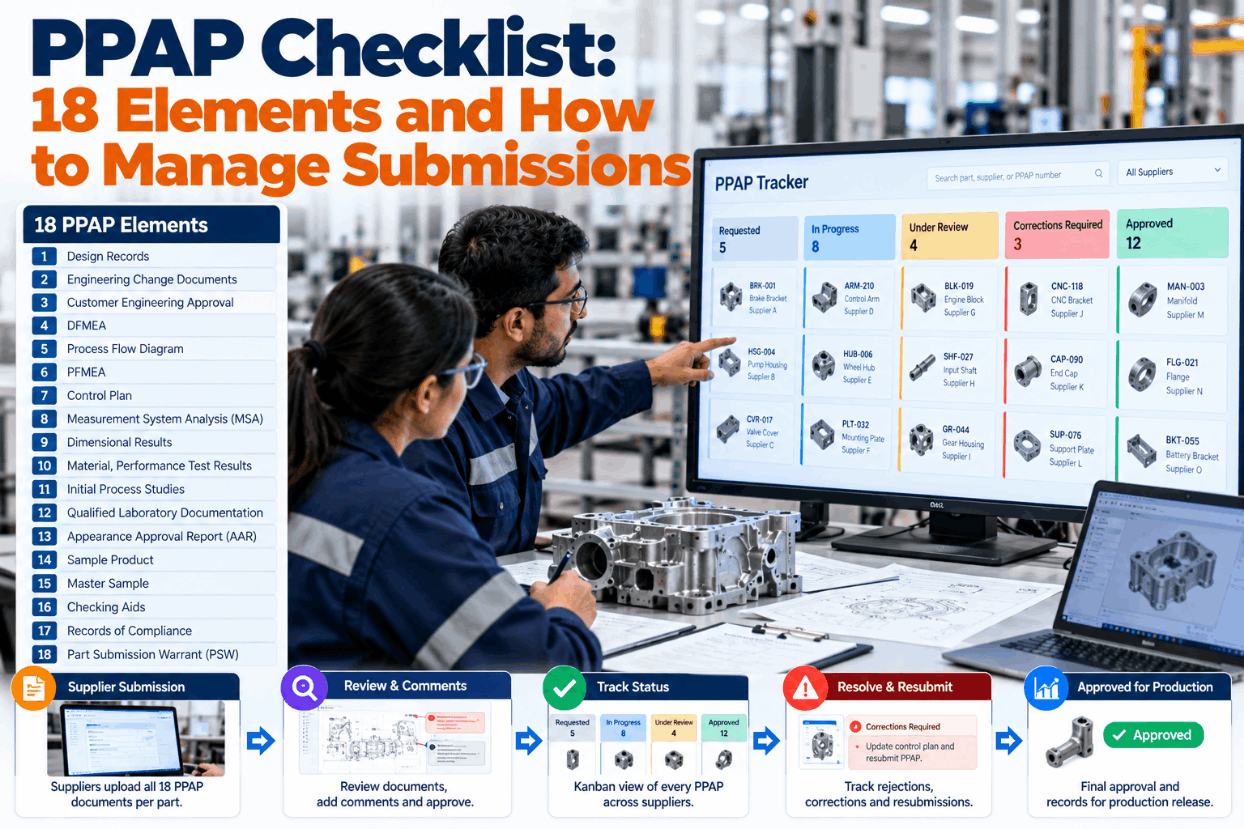
A PPAP package is only as strong as its weakest element. One study run on the wrong gauge, one drawing at an old revision or one unsigned warrant can turn weeks of supplier work into a rejection notice just before start of production. For a buyer managing dozens of parts, the harder job is knowing which packages are close and which are quietly stuck. This checklist lists the evidence reviewers accept for each element and shows how to track every submission in one place. Watch the board run with sample suppliers in a short PPAP tracker demo.

PPAP CHECKLIST · SUPPLIER SUBMISSIONS

See Which PPAP Elements Are Done, Pending or Sent Back

iFactory PPAP Tracker gives every part its own element checklist, lets suppliers upload evidence and keeps reviewer comments on each element. A kanban shows every PPAP from requested to approved, so nothing waits unnoticed.

CH-4C connector housingSupplier S-14
123456 789101112 131415161718
Done 14Pending 3Rejected 1
Level 3 · 14 of 18 · PSW pending
PPAP CHECKLIST TEMPLATE

18 Elements, Each With the Evidence Reviewers Accept

The AIAG PPAP manual, 4th edition, defines 18 elements. The customer decides which ones are submitted and which are kept on file, but a complete file is expected either way. Each line below pairs an element with the kind of evidence that usually passes review. It reflects common reviewer practice, so check every line against your customer's own requirements. Tick items as you go. For a copy loaded with your part numbers, contact our support team.

ADesign inputs4 items
BProcess and risk4 items
CMeasurement and results5 items
DParts and sign-off5 items
PPAP REJECTION REASONS

Why Packages Come Back, and What to Check First

Rejections rarely come from a part that can't be made. They come from evidence that doesn't line up. The reasons below appear again and again in supplier manuals and in reviewer comments. One supplier manual, for example, treats a submission at the wrong revision or part number as an automatic rejection, and many customers want one part measured from each cavity of a multi-cavity tool. Review a returned package with us in a rejection review session.

Rejection reason
Why it happens
Check before sending
Wrong revision or part number
The package was built from an older drawing than the PO
Match PSW, drawing and PO revisions
Dimensional gaps
Balloons without results, or one cavity not measured
Count balloons against result lines
Short or weak capability study
Too few readings, or an index under the customer's limit
Confirm readings and index per characteristic
MSA on the wrong gauge
The study used a lab gauge, the line uses another
Match gauge IDs to the control plan
Documents that disagree
Flow, PFMEA and control plan use different steps
Trace one step through all three
Warrant on the wrong form
Some customers refuse the generic AIAG warrant
Use the customer's own PSW format
Initial process study · AIAG bands
Index above 1.67Meets the acceptance criteria
1.33 to 1.67May be acceptable, review with the customer
Below 1.33Does not meet the criteria yet
Bands assume a stable process and normal data. Many customers set their own limits.
Gauge R&R · common guidance
Under 10%Generally acceptable
10% to 30%May be acceptable, depending on the use
Over 30%Not acceptable, improve the gauge
The study must use the gauge the control plan names for the line.
PSW PART SUBMISSION WARRANT

What You Declare When You Sign the Warrant

The PSW is the one element required at every level. It names the part, the change level, the reason for submission and the level the customer asked for, from Level 1, the warrant alone, up to Level 5, with everything reviewed at your plant. Level 3 is the usual default. The signature says the results meet every customer requirement and the records are ready. Ask our PPAP specialists about customer-specific warrant forms.

Part name and numberCH-4C housing, as released
Drawing change level and dateSame as the PO
Additional engineering changesListed with approval dates
Part weightMeasured, in kilograms
Organization name and codePlant code from the PO
Reason for submissionInitial submission
Requested levelLevel 3, set by customer
DeclarationSigned, with name, title and contact
Reasons for submission on the AIAG warrant

Initial submission, engineering change, tooling transfer, replacement, refurbishment or addition, correction of a discrepancy, tooling inactive for more than a year, optional construction or material, sub-supplier or material source change, change in part processing, parts made at an additional location, and other.

Ask Which Launches Are at Risk and Get a Straight Answer

iFactory reads every element, upload and reviewer comment across your suppliers. Ask in plain language which PPAPs threaten a start-of-production date and why.

Program X12 · Supplier quality engineer and iFactory
Supplier quality engineerWhich open PPAPs could miss the build date?
iFactoryThree of the 20 still open. Two wait on capability studies. The CH-4C housing had its MSA sent back because the study used a lab gauge, not the line gauge.
Supplier quality engineerWhen can S-14 resubmit?
iFactoryThey uploaded a new study plan this morning on the line gauge. If it passes, the warrant can be signed on Friday.
PPAP KANBAN

Every Supplier PPAP on One Board

Spreadsheets show what was planned. A board shows where each package is right now. Each card is one part from one supplier, and it moves only when its evidence moves. Cards that sit too long in one column are flagged before they threaten a build date. The board below is illustrative, with 22 cards in all. See it with your own suppliers in a board walkthrough.

Requested6
S-31 · seal kitLevel 2 · due wk 44
S-07 · cable clipLevel 3 · due wk 46
In preparation7
S-14 · CH-4C housingElement 8 returned
S-22 · end capRun at rate wk 43
Submitted4
S-09 · bracketLevel 3 · 2 days
S-18 · gasketLevel 1 · 1 day
Under review3
S-05 · busbar11 days in review
S-12 · harness2 comments open
Approved2
S-03 · fastener setPSW signed
S-26 · spacerPSW signed
Rules that keep the board honest

A card moves to Submitted only when every element required at its level has an upload. A returned element sends the card back to In preparation with the reviewer's comment attached. Each column has an age limit, and cards past it show on the weekly launch review.

PPAP STATUS

Approved, Interim or Rejected: What Each One Allows

The customer's decision sets what you may ship. Supplier manuals define the three outcomes in similar terms. Interim approval is a bridge, not an approval, and it needs a dated plan to reach full approval. Track every expiry date on the board, because an interim that lapses quietly can stop shipments overnight. Agree status rules with suppliers up front using help from our supplier quality team.

Approved
Ship production quantitiesThe part meets every requirement and the supplier may ship to schedule
Interim approval
Ship for a limited time or quantityAllowed while open items are closed, with an action plan and an expiry date
Rejected
No production shipmentsThe package or its parts fall short and must be corrected and sent again
PPAP CHECKLIST BEST PRACTICES

Five Habits of Suppliers Whose PPAPs Pass First Time

Teams that pass first time treat PPAP as a planned launch task, not an end-of-project document hunt. These habits cost little and save whole resubmission cycles. See them built into a workflow in a PPAP workflow demo.

1
Agree the level and CSRs at kickoffWrite down the level, the warrant format and any customer forms before tooling starts.
2
Book the significant production run earlyThe AIAG default is 1 to 8 hours of production and at least 300 consecutive parts, unless the customer says otherwise.
3
Review internally against the customer's listA second engineer checks revisions, gauge IDs and step numbers before anything leaves.
4
Send one complete packageA trickle of partial uploads makes reviewers chase pieces and slows the decision.
5
Keep the file current after approvalAny change on the warrant's list of reasons means telling the customer and submitting again.
PPAP CHECKLIST EXAMPLES

Three Submissions, Three Different Reasons

The cards below are made-up illustrations rather than customer stories. Each one starts from a different reason on the warrant, and each changes what the package must contain. Your customer's requirements decide the real scope. Talk through one of your own parts with our support team.

Electronics · initial submission
4-cavity PA66-GF30 connector housingDimensional results come from one part per cavity, so four parts are measured against every balloon.
Automotive · tooling refurbishment
Stamped seat-belt anchor bracketThe progressive die is refurbished. The supplier tells the customer and resubmits at the level requested.
Industrial · additional location
Die-cast e-motor end capA second plant starts casting. Its parts need their own approval before they ship.
TURNKEY AI DEPLOYMENT

PPAP Tracker, Supplier Portal and NVIDIA Server in One Package

iFactory delivers the PPAP Tracker as a turnkey bundle. A pre-configured NVIDIA AI server ships racked and ready with the element checklists, supplier portal and review workflows pre-loaded, so drawings and supplier data stay on your site. You rack it, plug in power and Ethernet, and the AI is live. To size it for your supplier network, ask for a turnkey quote.

What's Included
  • Pre-configured NVIDIA AI edge server, racked and ready
  • 18-element checklist per part, by submission level
  • Supplier portal for evidence uploads
  • Reviewer comments kept on each element
  • Kanban from requested to approved, with age flags
  • Revision and gauge ID checks before review
  • 24×7 remote monitoring of models and hardware
Live in 6–12 weeks
Wk 1–4
Set Up and Connect

Server installed, part and supplier lists loaded from ERP, customer levels and forms configured.

Wk 5–8
Pilot One Program

Open PPAPs for one program moved onto the board, first suppliers invited to the portal.

Wk 9–12
Roll Out and Train

All active programs on the board, buyers and reviewers trained, weekly risk review started.

HOW iFACTORY FITS

PPAP Management Built for Buyers and Reviewers

iFactory gives suppliers, buyers and quality reviewers the same view of every package, so status meetings turn into decisions. Our support team can outline a pilot plan.

1
Checklist per part. All 18 elements, set to the level each customer asks for.
2
Supplier uploads. Evidence arrives against the right element, not in an email thread.
3
Reviewer comments. Each finding stays on its element until the supplier closes it.
4
One kanban. Every PPAP from requested to approved, with stuck cards flagged.
1000+
Industrial clients running iFactory
99.9%
Uptime for supplier uploads and reviews
6-12 wks
From racked server to a live PPAP board
FREQUENTLY ASKED QUESTIONS

What Buyers and Quality Engineers Ask About PPAP

What goes on a PPAP checklist?
The 18 elements from the AIAG PPAP manual, from design records to the part submission warrant, plus the evidence each one needs. A good checklist also notes which elements the customer wants submitted at the requested level and which stay on file.
What is a part submission warrant?
It is the summary form signed by the supplier. It names the part, change level, weight, reason for submission and level, and declares that the results meet all customer requirements. It is required at every submission level.
Which PPAP level should we plan for?
Level 3, with the warrant, samples and full supporting data, is the usual default. The customer can ask for any level, so confirm it at kickoff. You can see levels set per customer in a demo.
Is interim approval the same as approval?
No. It allows shipments for a limited time or quantity while open items are closed, and it carries an action plan and an expiry date. Our support team can share a template for interim action plans.
How do we track PPAPs across many suppliers?
Give every part its own checklist and put all of them on one board with a column for each stage. Flag cards that stay too long in a column. Book a 30-minute walkthrough to see a board with live supplier uploads.
What are the most common PPAP rejection reasons?
Wrong revision or part number, missing dimensional results, short capability studies, MSA on the wrong gauge, documents that disagree and an unsigned or wrong-format warrant. Walk through the checks with our team before your next submission.

Get Every PPAP to Approved Without the Chase

Element checklists, supplier uploads, reviewer comments and one kanban for every package. Delivered turnkey and live in 6 to 12 weeks.


Example program view · X12
Open PPAPs20 across 14 suppliers
Elements returnedTracked to closure
Interim approvalsExpiry dates watched
WarrantsSigned against matching revisions
Every package visible from request to approval

Share This Story, Choose Your Platform!