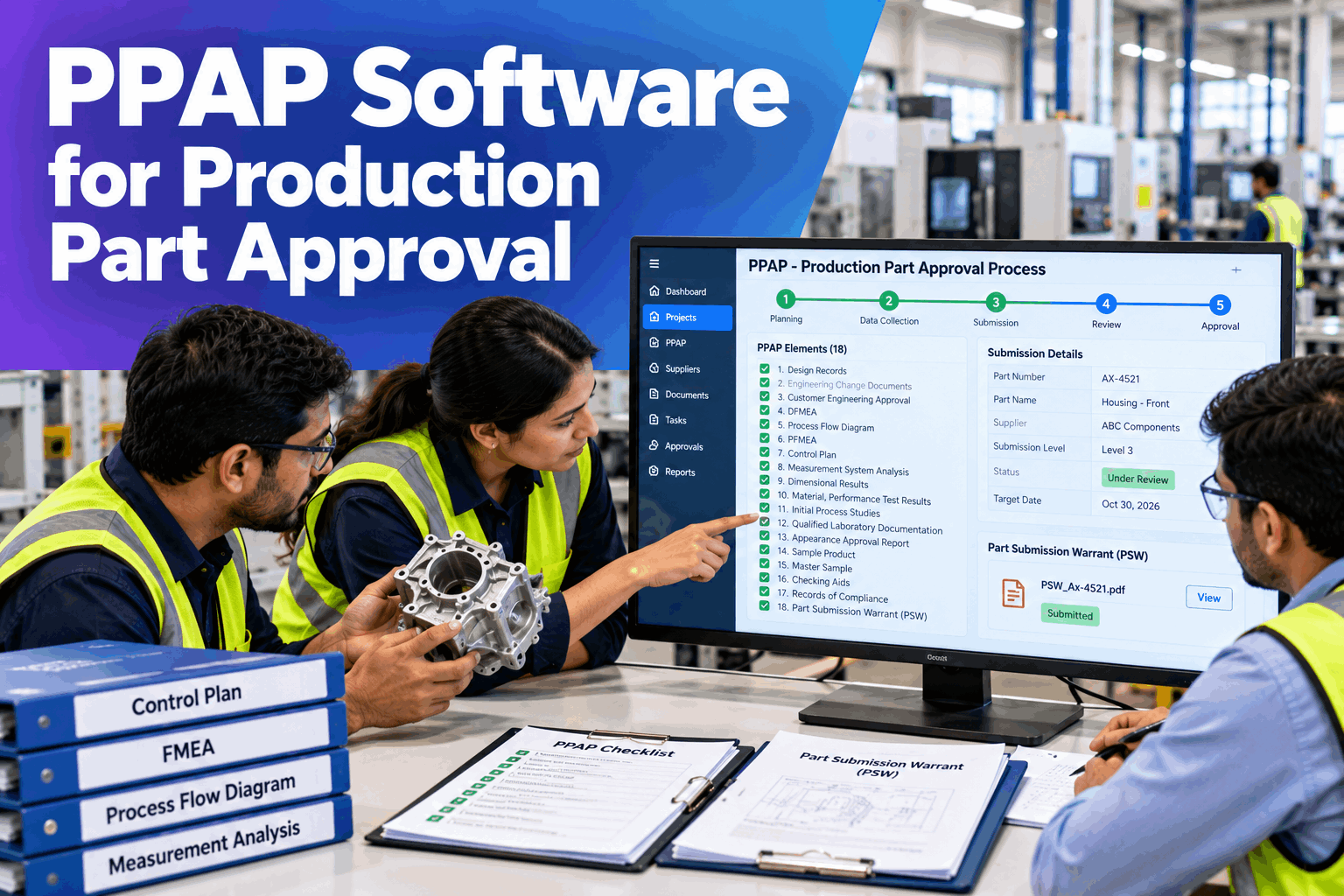
A PPAP package is rarely late because the work was not done. It is late because the work is scattered: the design record sits with engineering, the control plan in a spreadsheet, the dimensional results on a gauge PC and the process flow in a drawing, and someone has to gather and check all eighteen elements before the Part Submission Warrant can be signed. PPAP software compiles the production part approval process into one controlled package, keeps the elements linked, manages the submission level your customer asks for and records every approval. This page explains how it works, with a worked example and what to bring to a pilot. Quality teams can see it on their own parts in a PPAP demo.
PPAP Software for Production Part Approval
APQP and PPAP in one place: compile all 18 PPAP elements and the PSW, manage submission levels and approve parts digitally with full traceability. It runs on a turnkey on-prem AI server, next to your quality and production systems.
- All 18 elements and the PSW in one package
- Submission level set to your customer's requirement
- Every approval recorded with its owner and date
Why PPAP Packages Take Too Long
The elements exist, but they are not connected.
A PPAP submission pulls together documents from design, process engineering, quality and the shop floor. When each lives in a different file or system, the package is assembled by email, and an inconsistency between two documents is found only at review, or by the customer. A rejected submission costs weeks. A digital PPAP removes the chasing and the mismatches. Our PPAP specialists can map where your packages slow down today.
Scattered files
Elements held by different people and tools.
Broken links
Flow, FMEA and control plan drift apart.
Last-minute chasing
Owners found only when the deadline is close.
Rejected submissions
Missing or inconsistent data sent back.
The 18 PPAP Elements, Grouped
Five groups cover the whole package.
The table below groups the 18 PPAP elements the way the software manages them. The structure follows the AIAG PPAP manual, and your customer's own requirements decide which elements apply and in what form. Each group has an owner, a status and a link to the data it comes from. Review the groups for your parts in a working session.
Elements 1–4
Elements 5–7
Elements 8–12
Elements 13–16
Elements 17–18
Levels, formats and which elements apply come from your customer and its manual. The software holds those rules per customer and part, so the package matches what the customer expects to see, and the approval decision stays with them.
A Worked Example: One Level 3 Submission
From open elements to a signed PSW.
Take a part with a Level 3 submission. Of the 18 elements, the customer marks 1 as not applicable, leaving 17 required. 12 are compiled from linked records, such as the control plan, the dimensional results and the inspection data, and 5 are uploaded or entered by hand. Every required element has an owner and a status, the PSW is built from the package data and 3 internal sign-offs are recorded before submission. All figures are illustrative.
See Your Own PPAP Package Assembled
Bring a recent PPAP and your customer's requirements, and watch the elements link, the status roll up and the PSW build from the data.
PPAP Submission Levels
Five levels, and the customer chooses.
The submission level tells you what to send and what to keep ready. Level 3 is the common default when the customer does not say otherwise, but the level is always set by the customer. The software applies the level to each part and customer, so the right items are collected from the start. Discuss your customers' requirements with our part approval team.
Level 1
PSW only, plus an appearance report where it applies.
Level 2
PSW with samples and limited supporting data.
Level 3
PSW with samples and complete supporting data.
Level 4
PSW and other items the customer defines.
Level 5
Complete data reviewed at the supplier's site.
PPAP Is the Output of APQP
The package is built during the project, not at the end.
The strongest PPAPs are not assembled in a rush. They are the by-product of good APQP work, where each phase produces the elements the submission needs. Keeping APQP and PPAP in one system means the design FMEA, the flow, the control plan and the validation data are already linked when the submission date arrives. See how it fits your launch process in a live walk-through.
Plan and define
Requirements, timing and customer rules set.
Product design
Design records and design FMEA created.
Process design
Flow, process FMEA and control plan built.
Validation
Studies and samples feed the PPAP submission.
Ask the Package What Is Missing
Ask in plain words and get an answer from the live package.
Quality engineers and plant managers can question a PPAP at any point, instead of opening each file to check. The answers come from the element records, the links between them and the approval log.
Both Sides of PPAP
Submit to your customer, and approve your suppliers.
Most plants sit in the middle of the chain. They submit PPAP to their own customers and receive it from their own suppliers. The same package structure serves both, so your team works in one system whichever way the submission flows.
When you submit to a customer
- Customer requirements and level held per part
- Elements compiled from linked records
- PSW built from the package and signed off
- Approval, interim approval or rejection recorded
When a supplier submits to you
- Requested level and elements sent to the supplier
- Submitted elements checked against requirements
- Review comments and decisions recorded
- Supplier PPAP status visible across the plant
PPAP Mistakes to Avoid
Most rejections come from the gaps between documents.
These are common best practice gaps in PPAP management. A short readiness review can find them before a submission goes out.
What works
- Customer requirements and level confirmed up front
- Flow, FMEA and control plan kept linked
- An owner and a due date for every element
- An internal review before each submission
What fails
- Assembling the package in the last week
- Updating one document and not the others
- Assuming the level without checking
- Losing the approval trail in email
How iFactory Runs APQP and PPAP
The package and the server, delivered together.
iFactory loads your parts, customer requirements and quality records, links the elements and runs APQP and PPAP on one on-prem server. After the pilot, results are reviewed against your baseline. Fit questions go to our solutions team.
18-element package
Every element tracked by owner and status.
PSW generator
Warrant built from the package data.
Submission levels
Level 1 to 5 set per customer and part.
Linked documents
FMEA, flow and control plan kept aligned.
APQP timeline
Phases and dates that feed the PPAP.
On-prem
Part data stays in the plant.
The figures and exchanges on this page are illustrative. Your own results depend on your parts, customers, records and systems, and we measure them on your data during the pilot. PPAP requirements are set by your customer, and the customer decides approval.
Turnkey AI: Delivered, Connected and Live in 6–12 Weeks
You do not build this. It arrives ready.
iFactory ships as a pre-configured NVIDIA AI server with the software pre-loaded, racked and ready. Rack it, plug in power and Ethernet, and the AI is live on your network. Our team handles cabling, network setup, PLC, SCADA, DCS and CMMS integration, gauge and MES links, record migration, user training and 24×7 remote monitoring. Data stays on your network. For an implementation guide and a quote matched to your plant, request a turnkey quote.
Ship, network and baseline
Server installed. Parts, customer rules and records connected and the baseline captured.
Setup and pilot
Package templates and links configured. Live pilot runs on a few parts.
Go-live and measured result
Roll-out across programs. Teams trained. Results compared with the baseline.
Frequently Asked Questions
What is PPAP software?
It is software that manages the production part approval process: collecting the PPAP elements, keeping them linked, applying the customer's submission level, building the PSW and recording the approval.
What are the 18 PPAP elements?
They cover design records, engineering changes, customer approval, design FMEA, process flow, process FMEA, control plan, MSA, dimensional results, test results, initial process studies, laboratory documents, appearance approval, sample parts, a master sample, checking aids, customer-specific requirements and the PSW.
What are the PPAP submission levels?
There are five levels, from the PSW alone at Level 1 to complete data reviewed at the supplier's site at Level 5. Level 3 is the common default, and the customer decides which level applies.
What is the PSW?
The Part Submission Warrant is the document in which the supplier declares that the part meets the customer's requirements. It is signed after the supporting elements are complete, and the software builds it from the package data.
How does the software keep the package consistent?
The process flow, process FMEA and control plan are linked, so a change in one flags the others for review. Measurement results come from linked gauge and inspection records, which reduces retyping and mismatches.
Is PPAP only for automotive?
PPAP is best known in automotive, but many other industries and customers ask for it or for similar part approval packages. The software holds each customer's own rules, so one system can serve different requirements.
What does it cost and when is the return?
Cost depends on the number of parts, customers, suppliers and integrations, so we issue a turnkey quote after a short scoping call. Return shows up as faster package assembly, fewer rejected submissions and less chasing, and the pilot measures it against your baseline.
What do quality and plant managers need to prepare?
Your customer's PPAP requirements and levels, a recent package, your control plans, FMEAs and flow diagrams, capability and dimensional data and a list of supplier PPAPs in progress. A short working session turns these into a pilot scope.
How do we start?
Start with a short session to review your customer requirements and one recent package. A 6-week pilot then connects your records, captures the baseline and runs live packages on a few parts. To plan it, contact our team.
Get Parts Approved Faster, With the Full Trail
In thirty minutes we take a recent PPAP through the software and show how the elements would have linked, tracked and signed off. You keep the findings either way.
- 1Your customer's PPAP requirements and level
- 2A recent PPAP package or checklist
- 3Control plan, PFMEA and flow diagram
- 4Dimensional and capability study data
- 5Supplier PPAPs in progress