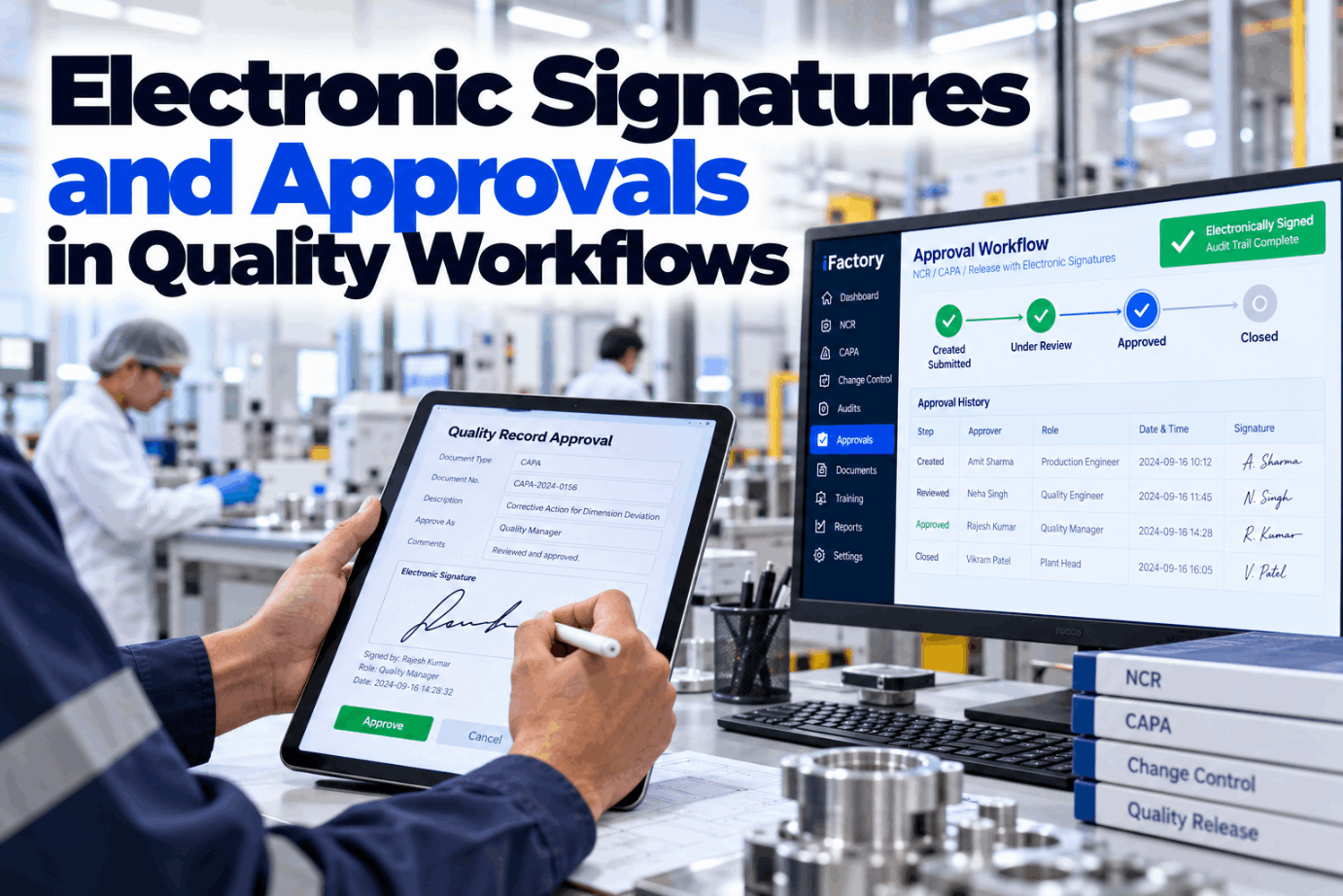
A wet-ink signature on a paper NCR is easy to trust because everyone can see it. An electronic approval has to earn that trust: the system must prove who signed, when, in what role and what the signature meant, and that nobody moved it to another record afterwards. Done well, electronic signatures make quality approvals faster and stronger in an audit. See how signature controls work in a short approvals demo.
Approvals That Prove Who Signed, When and Why
iFactory Signature Controls route NCRs, CAPAs and releases to the right roles by risk level. Each signature records its meaning, and every step lands in a full audit trail your customers and regulators can follow.
What Every Approval Has to Prove Later
An approval is only as good as the evidence behind it. Months later, an auditor or a customer will pick one NCR or CAPA and ask four questions. If the record answers all four on its own, the approval stands. If someone has to explain it from memory, it does not. Review your current sign-off records with our compliance team.
Six Clauses Behind Every Electronic Signature
For FDA-regulated records, 21 CFR Part 11 sets the rules. FDA's August 2003 Scope and Application guidance narrowed how Part 11 is applied and eased enforcement in areas such as validation and audit trails, but it stated that the signature sections, 11.50, 11.70, 11.100, 11.200 and 11.300, would still be enforced. Walk through each clause on a live record in a Part 11 walkthrough.
Author, Reviewer, Approver: Say What Each Signature Means
Part 11 lists review, approval, responsibility and authorship as examples of signature meaning. A signature without a stated meaning leaves an auditor guessing whether the person checked the work or simply saw it. Fix the meanings in your procedures and make the system show them every time. Ask our support team for a sample signature manifest.
Segregation of Duties Built Into the Route
Part 11 requires authority checks so only authorised people can sign or change a record, and written policies that hold people accountable for actions under their signatures. Segregation of duties takes this one step further: the person who raises a nonconformance should not be the one who approves its disposition. Map your roles in a role design session.
- Anyone with a login can approve any record
- The author can approve their own NCR or CAPA
- Shared accounts for a line or a shift
- Delegation agreed by email and never recorded
- Signer leaves the company, account stays active
- Each step can be signed only by the roles it names
- Author and approver must be different people
- One person, one signature, never reassigned
- Delegation is dated, limited and on the audit trail
- Leavers lose signing rights the day they go
Route Each Approval by Its Risk Level
Not every record needs three signatures. ICH Q9(R1) sets the principle that effort, formality and documentation should match the level of risk, and the same logic works for approval workflows. These routes are illustrations, not a standard. Your own procedures and customer requirements set the final rules. Plan your risk tiers with our quality specialists.
The Right Signers, Every Time
iFactory reads the risk level on each NCR, CAPA or release, routes it to the right roles, captures the meaning of each signature and keeps the full trail. Nothing waits in a tray or an inbox.
One Session, Many Signatures: When to Ask Again
Section 11.200 handles a common situation: a QA manager signing several records in one sitting. The first signing in a continuous session uses all signature components. Later signings in the same session need at least one component that only that person can use. A new session starts the full check again. See the signing steps on screen in a sign-off demo.
Part 11 also asks that signatures be administered so an attempt to use someone else's would need two or more people to collude. That is why passwords are never reset and handed over by the same person who could then sign.
What the Audit Trail Shows Around One Approval
The signature tells you the decision. The audit trail tells you how the record got there: who changed what, when, and the reason they gave. Earlier values stay visible, and the trail is kept as long as the record itself. The example is illustrative. Ask our support team for a sample audit export.
EU GMP, IATF 16949, ISO 9001 and AS9100
Traceable approvals are not only a pharma concern. EU GMP has its own rule, and in automotive, aerospace and general manufacturing it is usually the customer's auditor who asks to see who approved a release or a concession. One set of signature controls can serve all of them. Compare your audit requirements in a compliance review call.
An Approval Route Template for Each Record Type
Write one route per record type before go-live. It turns your procedures into rules the system can enforce and gives auditors one place to see who may sign what. Ask our compliance team for a blank version.
Size the Time Spent Chasing Signatures
The main value of signature controls is an approval that holds up in an audit, which is hard to price and should not be inflated. The part you can size is the time spent carrying paper between desks and chasing signers. The figures below are assumed inputs that show the arithmetic only. Build your own case in a sizing session.
Add faster audit preparation and fewer findings on missing signatures only where your own records support a figure.
Implementation Guide: Signature Controls on Your Own Server
iFactory delivers Signature Controls as a turnkey package. A pre-configured NVIDIA AI server ships racked and ready, so records, signatures and audit trails stay on your site, and the AI can flag stalled approvals and route records locally. You rack it, plug in power and Ethernet, and the AI is live. Scope the rollout with our implementation team.
- Pre-configured NVIDIA AI server, racked and ready
- Role and signing-rights setup from your org chart
- Risk-based routes for NCRs, CAPAs and releases
- Signature meanings shown on screen and in print
- Full audit trail with reason-for-change prompts
- Validation package for regulated sites
- 24×7 remote monitoring of platform and hardware
Roles, signing rights and risk routes agreed, server installed.
Routes tested and validated, one record type piloted on one site.
All record types live, signers trained, paper routes retired.
Approvals Your Auditors Can Follow
iFactory builds signature controls into the quality workflow itself, so the right approval is also the easiest one. See it on your own records in a signature controls demo.
Electronic Signatures Quality for Plant Managers
Sign Faster, Defend Every Approval
Role-based approvals, signature meaning captured, full audit trails and routing by risk level, delivered turnkey and live in 6 to 12 weeks.