Line OEE works without a camera. The Add counts button sits in the header of every page of the tool and opens a form to record good and rejected units for a line over a period, such as the last hour. Manual counts are stored with their source and feed the same OEE, Hour by hour, Analysis and shift report as camera counts. You can sign up to access Line OEE and record your first hour by hand, with 14 days of Pro features and no card.
iFactory Tools · Production · Counting sources
No camera yet? Count by hand and still get OEE
Good and rejected units per line and period, plus stops with their times and reasons.
Two things to record by hand
Counts
Press Add counts, pick the line and the period, and enter good and rejected units.
Stops
On the Stops page, press Add a stop and give its start, end and reason. An hour's total cannot show when a stop happened.

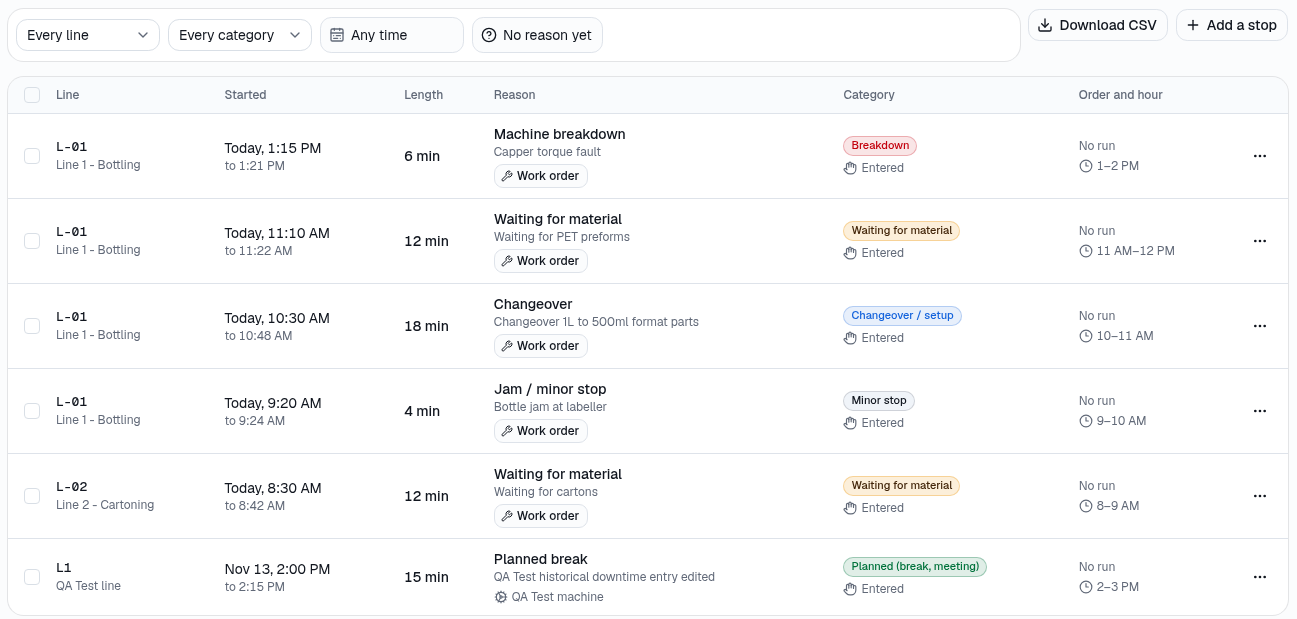
Entered stops in the list
Each stop added by hand is marked Entered, with its line, times, length, reason and category, so it counts in the right OEE factor.
Start measuring OEE before the cameras arrive
Manual counts feed the same views as camera counts. Pro features are free for 14 days, no card required.
What a manual line gets
| View | Camera line | Manual line |
|---|---|---|
| Overview line card | Yes | Yes |
| Hour by hour | Counted each minute | From the periods you enter |
| Analysis and daily table | Yes | Yes |
| Shift report (PDF) | Yes | Yes |
| Stops | Found from gaps or entered | Entered by hand |
| Runs page made count | From counts during the run | May show 0 |
A limit seen in testing
Counts entered this way are attached to the line and period, not to a run, so the Runs page may show 0 made for a run whose units were entered by hand. Pack-out still records cartons against the run.

A simple manual routine
Expert review
A close review of the counts dialog and the data model shows manual entry treated as a first-class source: stored with its own label, fed into the same calculation as camera counts, and visible in every report.
Manual counts are only as fresh as the last entry, and hourly totals hide when a stop happened, so pair them with stops added by hand. Plants often mix cameras on some lines with manual entry on others. Screenshots are from a test account.
Manual entry questions
Can I use Line OEE without any camera?
Yes. Add counts records good and rejected units for a line over a period, and stops can be added by hand on the Stops page. OEE, Hour by hour, Analysis and the shift report work from those records. You can sign up to access Line OEE and try it without a camera.
Are manual counts kept apart from camera counts?
Yes. Each count is stored with its source, so manual entries are told apart from camera, phone, video and fixed-camera counts.
Why should I add stops as well as counts?
An hour's total cannot show when a stop happened. Adding the stop with its start, end and reason puts the lost time in the right place and in the right OEE factor.
Why does my run show 0 made?
Counts entered with Add counts are attached to the line and the period, not to a run, so the Runs page may show 0 made for a run whose units were entered by hand.
Can some lines use cameras and others manual entry?
Yes. Many plants mix the two, and every line still appears in the same Overview, Analysis and shift report. You can get started with Line OEE with one manual line.
Count your first line by hand today
Record an hour of good and rejected units, add the stops, and read the OEE.
- Add counts on every page
- Manual source kept apart
- Same OEE, Analysis and reports
Free for 14 days · no card needed