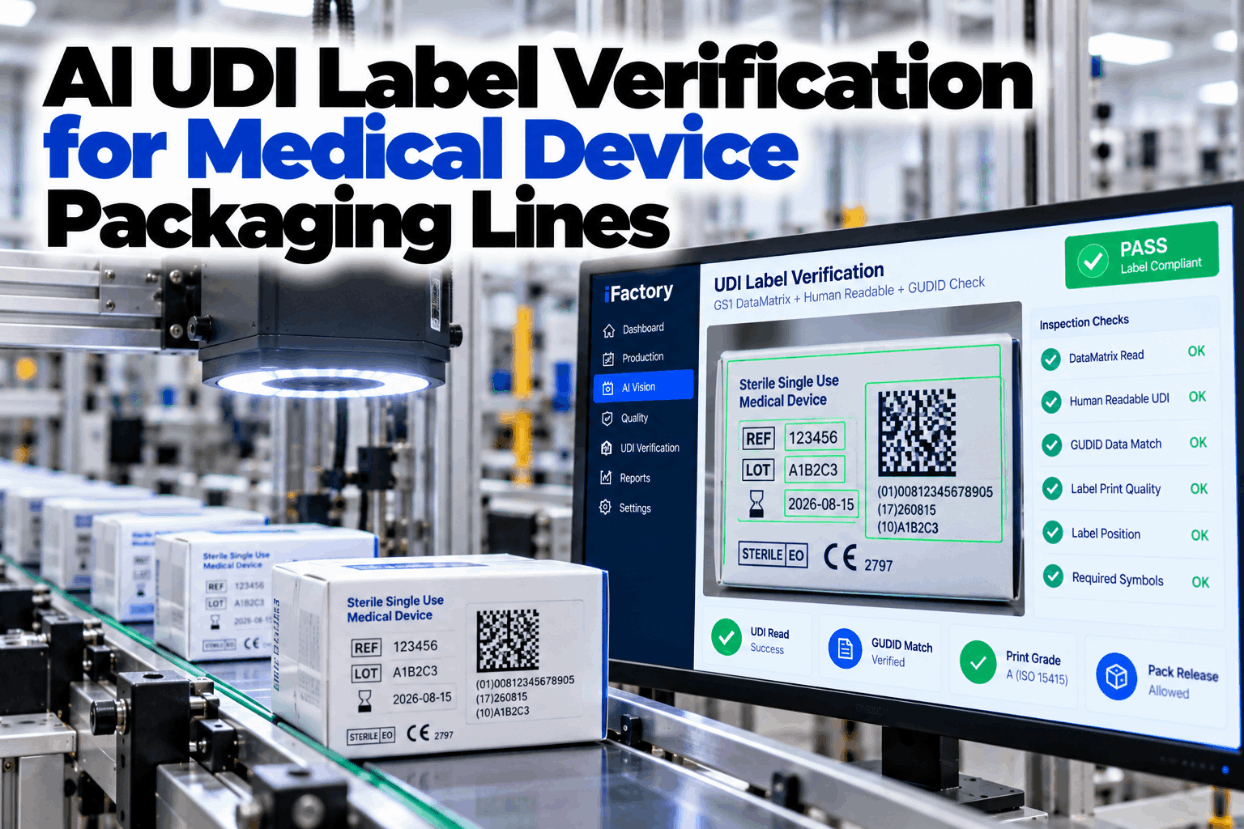
AI UDI Label Verification for Medical Device Packaging Lines

By Josh Brook on October 23, 2026

ai-udi-label-verification-medical-device-packaging-lines

Every medical device pack has to carry the right UDI twice, once as a GS1 DataMatrix and once as plain text, and both have to agree with each other, with the work order and with the device record in GUDID. A carton from the last job, an expiry keyed by hand or a code that has faded to a poor grade can turn into a mislabeled lot and a recall. AI vision reads, checks and grades every pack at line speed. See it on real device labels in a short UDI vision demo.

AI VISION · MEDICAL DEVICE UDI LABELS

Read, Check and Grade Every UDI Before the Pack Ships

iFactory Vision OCR Inspection reads the GS1 DataMatrix and the human-readable UDI on every pack, compares the DI and PI against GUDID or your master data, and grades print quality. Mislabeled packs are blocked before they reach the case.

Line 3 · Carton pack-outPack blocked
Work order 41187 · Sterile catheter kit · Carton 2,316
(01) DI00812345000177GUDID match
(10) LotA2604Matches order
(17) ExpiryCode 280331 · text 2028-03-30Mismatch
Print grade3.0/08/660 (B)Above spec
Plain-text expiry disagrees with the code · carton sent to reject
21 CFR 801 UDI

What the FDA Rules Ask of Every Device Label

FDA's UDI rule sits mainly in 21 CFR Part 801 Subpart B and Part 830. The UDI must be issued under a system run by an FDA-accredited issuing agency, which today means GS1, HIBCC or ICCBBA. This page uses GS1 examples throughout. Check how these rules apply to your device range in a UDI labeling review.

801.20
Label to bear a UDIThe device label and every device package must carry a UDI, unless an exception applies
801.40
Two forms, one UDIPlain text and AIDC, such as a DataMatrix. If the AIDC isn't visible, the label must say it is there
801.45
Direct markingDevices used more than once and reprocessed between uses must carry a permanent UDI on the device itself
801.18
Date formatDates on the label are written year-month-day, such as 2028-03-31, with some exceptions
GS1 DATAMATRIX ON A DEVICE LABEL

One Device Identifier, Several Production Identifiers

A UDI has two parts. The device identifier (DI) names the model and package level and never changes for that version. The production identifier (PI) carries what changes from lot to lot or unit to unit. In GS1 terms, each part is marked with an Application Identifier, the number in brackets that also appears in the human-readable text. Map your own label fields with our support team.

(01)
GTINThe DI. Fixed for the model and package level, and the key to the GUDID record
(17)
Expiry datePI. Encoded as YYMMDD in the code, printed as YYYY-MM-DD in the text
(10)
Lot or batchPI. Must match the batch record for the run
(21)
Serial numberPI. Used where the device is serialized, unique per unit
(11)
Production datePI. Used where the label shows a date of manufacture
UDI LABEL VERIFICATION

Reading the Code Is Not the Same as Grading It

Two different checks often get the same name. Reading, sometimes called validation, decodes the symbol and checks that the data is right. Verification grades how well the symbol is printed against ISO/IEC 15415. The GS1 DataMatrix Guideline warns not to confuse the two, and notes that some symbols that fail verification can still be read by some scanners. A code that reads today on your line may not read at a hospital. Compare both checks on your packs in a sample pack test.

READING AND DATA CHECK
  • Does the symbol decode at all?
  • Is the GS1 syntax and check digit valid?
  • Do DI and PI match the work order?
  • Does the plain text say the same thing?
PRINT QUALITY GRADING
  • Symbol contrast and modulation
  • Fixed pattern damage
  • Axial and grid nonuniformity
  • Unused error correction
LABEL PRINT QUALITY ISO 15415

What a 1.5/08/660 Grade Actually Means

ISO/IEC 15415 grades a 2D symbol from 4 (best) to 0, or A to F. Each image gets a scan grade equal to its lowest parameter, and the overall grade is the average across the images tested. GS1 writes the requirement as grade, aperture and light: for regulated healthcare items not scanned at retail, its minimum is 1.5/08/660, meaning grade 1.5 or better, an 8 mil aperture and 660 nm red light. Set the right grade limits for your printers with our print quality team.

A · 4
3.5 to 4.0. Strong margin for any scanner
B · 3
2.5 to under 3.5. Healthy print with room to drift
C · 2
1.5 to under 2.5. GS1 healthcare minimum sits at 1.5
D · 1
0.5 to under 1.5. Below the healthcare minimum
F · 0
Under 0.5, or fails to decode
In-line grading and the official grade

A camera on the line can grade every code and show the trend as a printhead wears. A formal ISO grade comes from a verifier built and calibrated to ISO/IEC 15426-2. Most plants use both: in-line grading to catch drift on every pack, and a calibrated verifier to confirm the grade on samples.

Find Out Why a Pack Was Blocked in Seconds

Every block comes with the image, the decoded data, the text read and the grade. QA can ask iFactory what happened in plain language and get a clear answer, instead of pulling cartons apart at the end of the shift.

Line 3 · QA lead and iFactory
QA leadWhy were 14 cartons blocked after the 10:00 changeover?
iFactoryThe code says expiry 280331, but the printed text reads 2028-03-30. Every other field matches the work order.
QA leadSo the text field was keyed by hand?
iFactoryThat fits. The text field changed at 10:02 while the code field kept the order value. Both fields now match from carton 2,331 on.
GUDID DATA CHECK

Six Checks Behind Every Pass

GUDID holds the device identifier and its attributes, not lot or serial values. It also holds flags for which production identifiers your UDI carries. That makes it a good reference: the DI on the pack must belong to the product being run, and the PI fields printed must be the ones the record says to expect. iFactory works from a master data copy you approve, so the line never depends on a live connection. See the full check sequence in a line walkthrough.

1DecodeRead the DataMatrix and confirm GS1 syntax
2Match DIDI belongs to this product and package level
3Check PI setLot, expiry, serial present as the record expects
4Read textOCR the plain-text UDI and dates
5CompareCode, text and work order agree field by field
6Pass or blockGrade checked, pack released or rejected
EU MDR UDI LABELS

Running One Line for Both the US and the EU

Under the EU MDR, Article 27 and Annex VI set out the UDI system, and EUDAMED holds the device data. The label carries the UDI carrier, in AIDC and human-readable form, built from the UDI-DI and UDI-PI. The Basic UDI-DI groups models for EUDAMED, certificates and the declaration of conformity, and does not appear on the label. A pack built for both markets has to satisfy both sets of rules. Compare your label set against both in a call with our regulatory support team.

Topic
US (FDA)
EU (MDR)
What the camera checks
Main rules
21 CFR 801 Subpart B and Part 830
MDR Article 27 and Annex VI
Both on one label where needed
Device database
GUDID, keyed by the DI
EUDAMED, keyed by the Basic UDI-DI
DI against master data
On the label
UDI in plain text and AIDC
UDI carrier in AIDC and HRI
Both forms read and compared
Model grouping code
No equivalent
Basic UDI-DI, never on the label
Flags it if printed
Packaging levels
Label and every device package
Label or device, and higher packaging levels
DI matched to the package level
Reusable devices
Direct marking under 801.45
Direct marking under Annex VI Part C
Separate direct-mark station
MEDICAL DEVICE LABELING COMPLIANCE

What 820.45 Expects Under the QMSR

The QMSR took effect on 2 February 2026 and amended Part 820 to incorporate ISO 13485:2016. Labeling control stayed in the rule: section 820.45 adds to ISO 13485 clause 7.5.1 and asks for labeling and packaging to be examined for accuracy before release or storage, for operations that prevent mixups, and for results documented under clause 4.2.5. Walk through your labeling procedure in a QMSR labeling session.

Correct UDI or UPCExamined for accuracy before release. Vision reads and matches it on every pack
Expiration dateChecked in both the code and the plain text, against the work order
Storage and handlingInstruction text and symbols compared with the approved artwork
Processing instructionsAny added processing text checked for presence and content
Mixup preventionWrong-product packs blocked, with each block recorded
Documented resultsInspection results kept with the lot for the device history
HOW TO VERIFY UDI LABELS

A Run Checklist for UDI Labeling Lines

Vision does the per-pack work, but the run still starts and ends with people. Use this checklist at each changeover and through the run. Tick items as you go, and adapt it to your own procedure. Ask our support team for an editable copy.

01Before the runChangeover
02During and after the runEvery shift
MISLABEL PREVENTION DEVICES EXAMPLES

Three Typical Catches on a Device Packaging Line

These illustrations show how the checks usually respond. They are not case studies, and the right response always follows your own procedures. Walk through your own label set in a scenario review.

Carton from the last job
DI doesn't match the work orderA carton left in the magazine after changeover carries the previous DI. The pack is blocked and the magazine is checked.
Sterile barrier label check
Pouch and carton disagreeThe pouch label shows a different lot from the carton it goes into. Both stations are compared and the kit is held.
Grade sliding on night shift
Drift caught before it failsGrades fall from B toward C as a printhead wears. Maintenance cleans it before any code falls below the limit.
TURNKEY AI DEPLOYMENT

Cameras, OCR Models and Edge Server in One Package

iFactory delivers UDI label inspection as a turnkey bundle. Cameras and lighting are fitted at pouch, carton and case stations, and a pre-configured NVIDIA AI server ships racked and ready with the reading, OCR and grading models loaded, so every pack is checked beside the line. You rack it, plug in power and Ethernet, and the AI is live. To scope it for your packaging lines, ask our support team for a turnkey quote.

What's Included
  • Pre-configured NVIDIA AI edge server, racked and ready
  • Cameras and lighting for pouch, carton and case labels
  • DataMatrix reading, OCR and print grading models
  • Master data link to your GUDID records and ERP
  • PLC link for reject gates and line stops
  • Per-pack results attached to the lot record
  • 24×7 remote monitoring of models and hardware
Live in 6–12 weeks
Wk 1–4
Map and Install

Label sets, fields and grade limits agreed, cameras and server installed, master data linked.

Wk 5–8
Train and Shadow

OCR trained on your fonts and substrates, then run silently beside current checks.

Wk 9–12
Validate and Go Live

Challenge packs run for qualification, reject gates switched on, operators trained.

HOW iFACTORY FITS

Vision OCR Built for Device Pack-Out Inspection

iFactory is designed for regulated packaging lines, where every block must be explained and every pack traced to its lot. We can plan a pilot on one line in a short scoping call.

1
Reads both forms. The GS1 DataMatrix and the human-readable UDI are read and compared on every pack.
2
Checks the data. DI and PI are matched to GUDID-based master data and the work order.
3
Grades the print. Every code gets an ISO/IEC 15415-style grade, with drift shown as a trend.
4
Blocks mislabeled packs. Failed packs go to the reject gate, with image and reason kept.
1000+
Industrial clients running iFactory
99.9%
Platform uptime for continuous packaging lines
6-12 wks
From racked server to live UDI checks
FREQUENTLY ASKED QUESTIONS

What Device Quality and Packaging Teams Ask About UDI Checks

Does the UDI have to appear in both plain text and a barcode?
Yes. Under 21 CFR 801.40, the UDI is presented in easily readable plain text and in AIDC form, such as a GS1 DataMatrix. If the AIDC isn't visible on inspection, as with RFID, the label must disclose that it is there. The EU MDR likewise asks for the UDI carrier in both AIDC and human-readable form.
Is a code that scans the same as a code that passes?
No. A scan only shows that one reader could decode it. Verification grades print quality under ISO/IEC 15415, and GS1 sets a minimum of 1.5/08/660 for regulated healthcare items not scanned at retail. A code can scan on your line and still fall below that grade.
Does the system connect to GUDID directly?
GUDID holds DI records and PI flags, not lot or serial values. iFactory checks against a master data copy you approve, built from your GUDID records and ERP, so the line runs even without a live connection and any change to the reference goes through your own controls.
Why do the dates look different in the code and the text?
GS1 encodes expiry as YYMMDD under AI (17), while 21 CFR 801.18 asks for label dates as year-month-day, such as 2028-03-31. The system converts one to the other before comparing, so a real mismatch is caught and a format difference is not.
Should the Basic UDI-DI be printed on EU labels?
No. The Basic UDI-DI is the key for EUDAMED and appears in certificates, the declaration of conformity and technical documentation, but not on the label. The label carries the UDI-DI and UDI-PI. The system can flag a Basic UDI-DI that appears on a label by mistake.
How do we start?
Start with one packaging line and its highest-volume label set. Agree the fields, grade limits and package levels, run the cameras silently while QA reviews the results, then switch on the reject gate. Our support team can plan that pilot with you.

Stop Mislabeled Device Packs at the Line

Read both forms of the UDI, check them against your device records, grade every code and block what doesn't match. Delivered turnkey and live in 6 to 12 weeks.


Example lot summary · Line 3
Packs readEvery pouch and carton
Data checkDI and PI against master data
Print gradeTrend held above 1.5
Blocked packsImage and reason for each
Results attached to the lot record

Share This Story, Choose Your Platform!