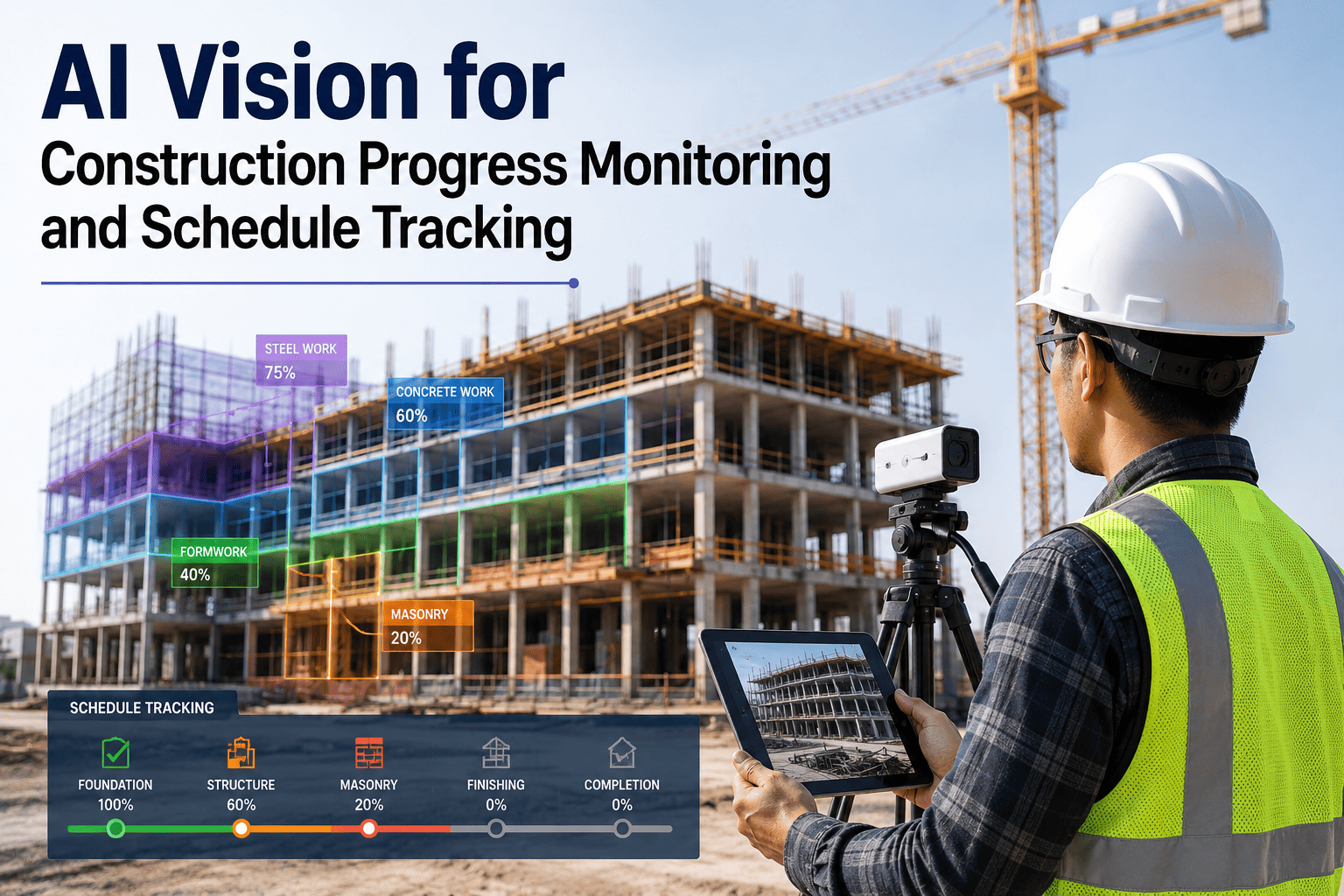
Every payment application depends on proving what got built, and most contractors are still proving it with a phone camera roll and a superintendent's memory of last Tuesday. When an owner disputes a billing line or a delay claim goes to arbitration, "the work was done" isn't evidence, a timestamped photo tied to a schedule milestone is. AI vision cameras compare what's actually on site against the BIM model and schedule automatically, generating that evidence for every work activity without anyone walking the site with a clipboard. Book a demo to see your own schedule compared against real site imagery.
CONSTRUCTION VISION · PROGRESS & SCHEDULE TRACKING
Disputes Are Won With Records, Not Recollection.
A contractor arguing from memory and a handwritten invoice loses to one who can produce timestamped photographic evidence tied directly to every schedule milestone. AI vision builds that record automatically, every day.
20%
Average project value lost to delays industry-wide
2-4 wks
Lead time on delay flags achievable at task-level detection
Task
Level of detail vs. a single overall percent-complete number
WHERE THE PAPER TRAIL BREAKS DOWN
The Photo That Doesn't Exist Is the Claim That Doesn't Win
Construction claims boards have denied otherwise valid claims for exactly one reason: no contemporaneous documentation. A differing site condition with no photo, a weather delay with no daily report anchoring it, a completed scope item with no timestamped evidence tying it to a specific date. The work may have genuinely happened. Missing documentation loses the argument anyway. Weekly site walks and phone photos are the default across the industry, and that's a weak position the moment an owner decides to test a billing line or a delay claim moves toward arbitration.
Weekly Site Walks
A snapshot once a week means anything that happened and changed again between walks has no record at all.
Subjective Percent-Complete
"About 80% done" from a superintendent's estimate carries far less weight than a task-level count tied to the schedule.
Disconnected Phone Photos
A photo roll with no schedule link or GPS tie-in is evidence of something happening, not evidence of what the contract required.
WHAT THE CAMERA ACTUALLY COMPARES
As-Built Against As-Planned, Automatically
The core function is simple to describe and hard to do manually at any real frequency: capture what's physically on site, then compare it against what the BIM model and master schedule say should be there at that exact point in time. This is what makes the comparison possible.
01
Continuous Visual Capture
Fixed cameras, or imagery from regular walkthroughs, document site conditions far more frequently than a weekly superintendent walk ever could, without adding a dedicated task to anyone's day.
02
Element Recognition
Computer vision identifies specific construction elements in the imagery, poured concrete, erected steel, ductwork, framing, drywall, rather than requiring someone to manually log what they see.
03
BIM and Schedule Comparison
Recognized elements are checked against the BIM model and the master schedule's milestone dates, flagging each task as ahead, on track, or behind at the individual activity level.
04
Timestamped, Located Evidence
Every comparison produces a dated, geotagged image tied to a specific schedule line item, the exact form of evidence that holds up in a payment review or a delay claim.
See Your Schedule Matched Against Real Site Imagery
Send us your BIM model and current master schedule. We'll show you what task-level progress tracking looks like on your own project.
SITE WALKS VS CONTINUOUS AI TRACKING
What Changes When Every Activity Has a Record
The comparison isn't about whether a good superintendent can accurately estimate progress, experienced supers often can. It's about whether that estimate can survive being challenged, and whether the record exists at the frequency a real dispute or billing review actually needs.
| Documentation Point | Manual Site Walk | AI Vision Tracking |
| Capture frequency |
Weekly, if schedule allows |
Continuous or daily |
| Progress granularity |
Overall percent-complete estimate |
Task-level, per trade and zone |
| Evidence for each task |
Disconnected phone photo, if any |
Timestamped image tied to schedule line |
| Delay detection lead time |
Discovered at next walk or milestone review |
2-4 weeks ahead of critical-path impact |
| Payment application backup |
Assembled manually before each billing cycle |
Generated automatically from ongoing capture |
| Dispute defensibility |
Contractor's word against owner's challenge |
Contemporaneous, dated, located record |
FROM CAPTURE TO EVIDENCE
How Site Imagery Becomes a Defensible Record
This is the path from a camera capturing site conditions to a piece of evidence that actually holds up when a payment line or a delay claim is challenged.
1
Site imagery captured continuously. Fixed cameras or regular walkthroughs document conditions across the site without requiring a dedicated documentation task.
2
Elements identified automatically. Computer vision recognizes what's actually been built in each captured frame, no manual tagging required.
3
Compared against BIM and schedule. Recognized progress is checked against the model and master schedule at the exact point in time the image was captured.
4
Deviations flagged early. A task running behind schedule is flagged well before it becomes a critical-path problem, giving the team time to intervene.
5
Evidence attached to every activity. Timestamped, geotagged imagery tied to specific schedule line items becomes the backup for payment applications and the record for any future dispute.
WHERE THIS SHOWS UP ON A REAL PROJECT
Four Moments This Record Actually Gets Used
The value of continuous progress evidence isn't abstract, it shows up at specific, recurring moments where the difference between a documented record and a verbal assertion determines the outcome.
Payment Application Review
A billing line backed by timestamped, schedule-linked evidence faces a documented record instead of a contractor's assertion, and most legitimate disputes resolve right at this stage.
Delay Claim Documentation
Delay-related claims are the most document-hungry disputes in construction, and a liquidated damages clause turns undocumented lost days into hard dollars against the contractor.
Change Order Substantiation
A change order tied to a dated image showing the actual condition that triggered it makes the scope change nearly impossible to dispute later.
Owner and Stakeholder Reporting
Quantified, task-level progress data replaces the subjective reporting that leaves owners reacting to problems they could have seen coming weeks earlier.
Stop Assembling Payment Backup the Night Before It's Due
We'll show you how continuous vision capture turns into ready-made payment application evidence for your next billing cycle.
MISTAKES THAT UNDERMINE THE RECORD
Six Ways Progress Documentation Falls Short
None of these are exotic failures. They're the routine ways a documentation effort that looks reasonable day to day turns out to be indefensible the moment it's actually tested.
Photos with no schedule link
An image proving something was built means little if it can't be tied to the specific schedule milestone or contract line it satisfies.
Gaps between capture dates
Whatever happened and changed again between two weekly walks has no contemporaneous record at all, which is exactly the gap a dispute exploits.
Overall percent-complete only
A single number for the whole project can't tell an owner which specific trade or zone is actually behind, or defend a specific billing line.
BIM model not kept current
A comparison against a stale model produces false deviations, since the detection is only as accurate as what it's being compared against.
Evidence assembled reactively
Scrambling to find supporting photos after a dispute starts is far weaker than a record that existed before anyone thought to challenge it.
Delay flags that don't reach the PM tool
A deviation report that doesn't create a task or RFI in the project management platform is a report, not an intervention.
BEFORE YOU START
Readiness Checklist for AI Progress Tracking
A deployment produces genuinely defensible progress evidence when these basics are in place before capture begins.
Current BIM model available and kept synchronized as design changes are approved through the project
Master schedule structured at a task level detailed enough to match against individual captured elements
Camera coverage or capture cadence planned to eliminate the gaps a weekly walk would otherwise leave
Deviation-flag routing confirmed into the project management platform so a flag becomes an actionable task, not just a report
TURNKEY AI DEPLOYMENT
iFactory Ships Vision Hardware Built for Active Job Sites
iFactory's turnkey deployment handles the comparison pipeline end to end, from capture through BIM matching to the evidence record itself. A pre-configured NVIDIA AI server ships racked and ready, with vision software pre-loaded and mapped against your specific schedule structure. Rack it, plug power and Ethernet, and the AI is live, building a defensible progress record from the very next capture cycle.
Pre-configured NVIDIA edge AI hardware, racked and shipped ready to install on site
Camera or capture-device integration mapped to your site layout and schedule structure
BIM and master schedule integration configured to your specific project data
Deviation-flag routing into your existing project management platform
Operator and project-team training on pulling evidence for payment applications
Twenty-four seven remote monitoring from day one of production
DEPLOYMENT TIMELINE
Live in 6 to 12 Weeks From Contract to First Comparison
Deployment is structured so the system is generating usable evidence well before your next payment application cycle, not months down the line.
Weeks 1-4
Ship, Integrate, and Baseline
Hardware ships pre-racked. BIM model and schedule integration completed, baseline capture established across the site.
Weeks 5-8
Model Training and Shadow Comparison
Model trained on your specific project elements. Runs in shadow mode, comparing against manual site-walk reports before go-live.
Weeks 9-12
Go-Live and Evidence Handoff
System takes over full comparison and evidence generation, feeding directly into payment application workflows, plus twenty-four seven remote monitoring active.
FREQUENTLY ASKED QUESTIONS
Questions Project Teams Ask Before Deploying
Does this replace our superintendent's site walks entirely?
No, it gives the superintendent a continuous, quantified baseline to work from rather than replacing their judgment about what's actually happening on site. The value is in coverage and consistency, catching a deviation two to four weeks before it reaches critical-path impact, rather than discovering it at the next scheduled walk, and giving every progress claim documented backup rather than relying entirely on someone's recollection weeks later.
Book a demo to see how the comparison fits alongside your existing site-walk process.
How accurate is the comparison against our BIM model?
Detection accuracy depends directly on how current and detailed the BIM model and schedule are, since the comparison is only as good as what it's measured against, which is why keeping the model synchronized as design changes are approved matters as much as the vision technology itself. A well-maintained model paired with continuous capture produces task-level accuracy that a weekly subjective walk simply can't match, but a stale model will generate false deviations regardless of how good the underlying detection is.
Can this evidence actually hold up in a payment dispute or delay claim?
Timestamped, geotagged imagery tied to a specific schedule line item is exactly the kind of contemporaneous record that claims boards look for, and the difference between having that record and not having it is frequently the difference between a valid claim being upheld and being denied for lack of documentation. Most legitimate payment disputes resolve at the application review stage when the backup documentation is complete, before the dispute ever escalates toward mediation or arbitration.
Contact our support team to see how the evidence record integrates with your existing payment application process.
What happens when a deviation gets flagged?
A flagged deviation routes directly into your project management platform as a task or an RFI rather than sitting in a report nobody acts on, since a delay flag that doesn't generate an actionable next step is documentation, not intervention. The goal is catching a task running behind before it compounds into a critical-path problem, which requires the flag to actually reach the person who can do something about it, not just appear on a dashboard.
Does this work across multiple trades and zones on a large site?
Yes, the comparison operates at the individual task level across every trade and zone the schedule tracks, not as a single overall percent-complete figure, which is what lets a project manager see exactly which trade in which zone is running behind rather than only knowing the project as a whole is off pace.
Book a demo to see multi-trade, multi-zone tracking against your actual project structure.
Build a Progress Record That Holds Up When It's Challenged
iFactory compares as-built site imagery against your BIM model and schedule automatically, generating defensible evidence for every work activity. Book a demo and see it running against your own project data.