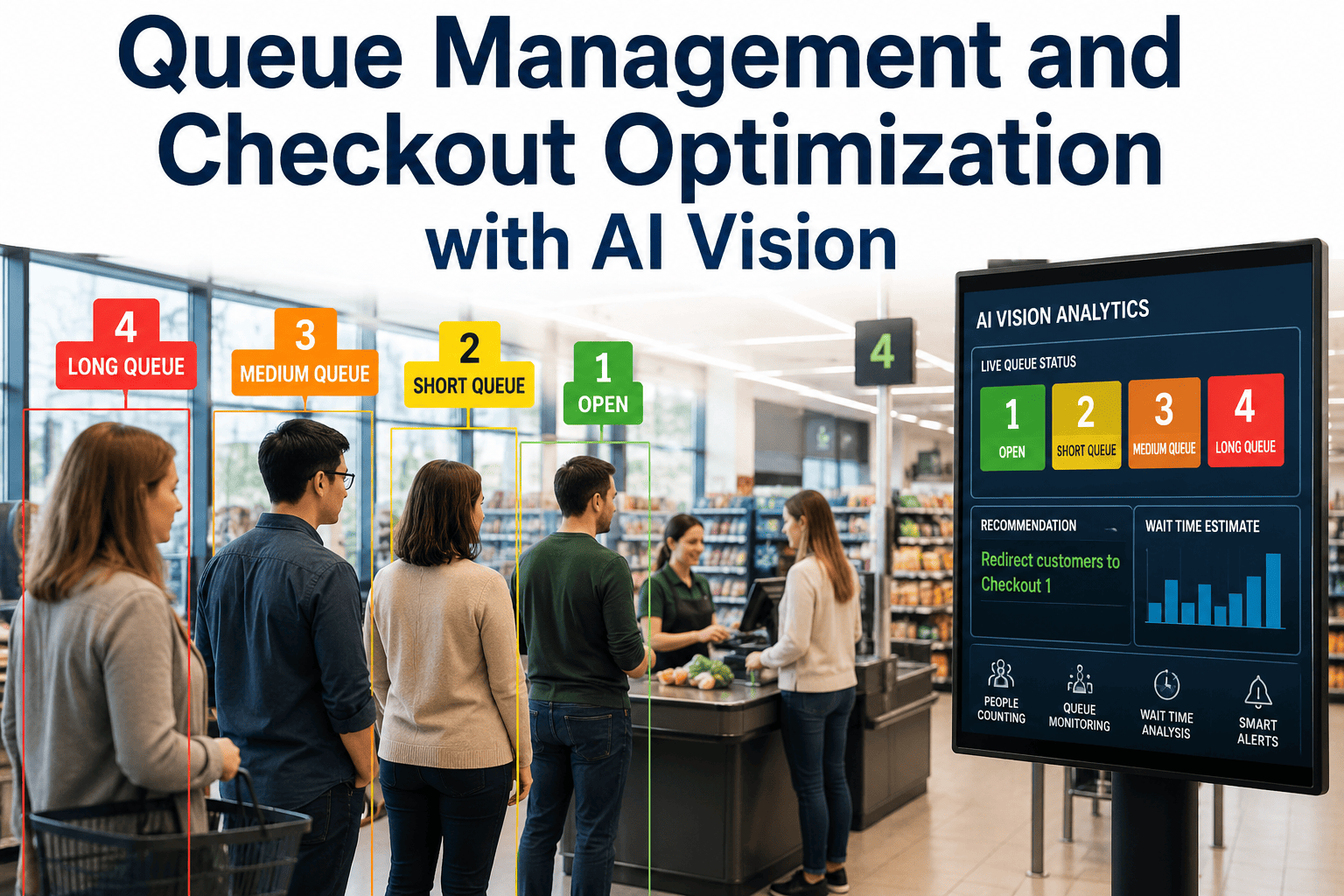
The average shopper abandons a checkout line at around 8 to 10 minutes, and 32% of customers admit to walking away from a purchase entirely because the line was too long. For a store serving 500 shoppers a day, even a modest abandonment rate can mean well over 100 lost transactions before the register ever rings them up. Most of these losses are preventable — not because staff aren't trying, but because nobody is watching every lane in real time to know a line is forming until it's already ten people deep. AI vision changes that by reading queue length and wait time continuously from your existing cameras, triggering an alert or opening a lane before frustration peaks instead of after a shopper has already left the basket behind. Book a demo to see live queue detection running on your own checkout layout.
Stop Losing Customers to Lines You Never Saw Forming
iFactory reads queue length and wait time from your existing cameras in real time, alerting managers and triggering extra lanes before customers give up and walk out.
Why Lines Build Before Anyone Notices
Checkout congestion rarely appears out of nowhere — it builds gradually as a rush of shoppers finish browsing at roughly the same time, or as one register runs into a slow transaction while others sit idle. A manager doing a normal floor walk might pass the front end once every fifteen or twenty minutes, which is more than enough time for a two-person line to become a ten-person line. By the time the congestion is visually obvious to staff, several shoppers have already made the decision to set down their basket and leave. Checkout queue length is consistently one of the most cited sources of shopper dissatisfaction, yet it remains one of the least actively monitored parts of the store, simply because watching every lane continuously has never been a realistic task for a floor team already juggling restocking, customer questions, and their own register duties.
What the System Tracks at Every Lane
Live Queue Length
Counts the number of shoppers waiting at each open lane continuously, rather than relying on a manager's periodic glance at the front end.
Estimated Wait Time
Combines queue depth with average transaction speed at that register to estimate how long the person at the back will actually wait.
Abandoned Cart Detection
Flags carts or baskets left behind near checkout, a strong signal that a shopper reached their patience limit and walked away.
Self-Checkout Congestion
Monitors self-checkout clusters separately, since bottlenecks there often build differently than at staffed lanes.
See Your Checkout Congestion in Real Time
A short walkthrough shows exactly how queue detection would run across your current lane layout.
From Camera Feed to Opened Lane
Continuous Lane Monitoring
Cameras already covering the front end track queue depth at every open register and self-checkout cluster without any change to store layout.
Threshold Detection
When queue length or estimated wait crosses a threshold your store defines, the system flags that specific lane as approaching a frustration point.
Manager Alert or Auto-Trigger
A notification goes to the floor manager's device, or, where integrated with staffing systems, a call to open an additional lane is triggered automatically.
Resolution Tracking
The system logs how quickly congestion cleared once a lane opened, building a record of what response times actually work for your store.
Manual Floor Checks vs. Continuous Queue Detection
| Factor | Manual Floor Walk | iFactory AI Vision |
|---|---|---|
| Monitoring frequency | Every 15 to 20 minutes, if consistent | Continuous, every lane, every moment |
| Detection timing | After the line is already visibly long | As soon as a defined threshold is crossed |
| Response trigger | Manager judgment call, when noticed | Automatic alert or lane-open trigger |
| Abandoned cart visibility | Found later during cleanup | Flagged near real time |
| Historical pattern data | Rarely tracked systematically | Logged by hour, day, and lane |
| Staffing decisions | Based on fixed shift schedules | Informed by actual peak-time data |
What This Looks Like on a Saturday Rush
Picture a mid-size grocery store on a Saturday afternoon, historically its busiest window between 11am and 3pm. Three registers are staffed, and self-checkout is running at full capacity when a wave of shoppers finishes browsing within the same ten-minute stretch. Under normal conditions, the front-end supervisor is pulled toward a customer question in another aisle and does not see the queue building until it stretches past the candy rack. With continuous queue detection running, the system flags register two crossing an eight-person threshold within ninety seconds of the buildup starting, sending an alert to the supervisor's handheld device along with a same-second count at every other lane. A fourth register opens within two minutes instead of the ten or more it might have taken under a standard floor walk, and the queue clears before any cart gets abandoned at the belt.
What Comes With iFactory's Queue Analytics Layer
Real-Time Lane Dashboard
A live view of queue length and estimated wait across every open lane, visible to managers from the floor or a back office screen.
Configurable Alert Thresholds
Set the queue length or wait time that triggers a notification, tuned separately for staffed lanes and self-checkout clusters.
Peak-Hour Pattern Reports
Historical congestion data broken down by hour, day, and season, so staffing schedules can be built around real demand instead of guesswork.
Cross-Store Benchmarking
Compares queue performance across locations to identify which stores handle peak volume well and which need staffing or layout changes.
What a Pilot Needs to Get Started
Front-End Camera Coverage
Existing cameras angled toward checkout lanes and self-checkout clusters are generally sufficient to begin tracking queue depth.
Defined Alert Thresholds
A starting point for what counts as an unacceptable wait at your store, which the system refines as real data comes in.
A Response Owner
One person or system responsible for acting on alerts during the pilot, so flagged congestion actually gets addressed in the moment.
Frequently Asked Questions
Do we need new cameras specifically for queue monitoring?
In most stores, the cameras already installed for general security coverage at the front end are sufficient to begin tracking queue length and wait times, so a dedicated analytics camera network usually is not required. The platform analyzes the existing video feed rather than needing purpose-built hardware for this specific use case. Where checkout camera angles do not fully capture lane depth, our team identifies those gaps during a site walkthrough and recommends the minimum adjustment needed. To check what your current setup can support, contact our support team.
Can this automatically open a new checkout lane without a manager involved?
Where your staffing or store operations system supports it, alerts can be configured to trigger an automated call for a lane to open, such as a page or a signal to a nearby employee station. In stores without that level of system integration, the alert goes directly to a manager's device so a human makes the final call on when and where to open additional coverage. Either approach is designed to shrink the time between congestion starting and a response happening. A walkthrough of both configurations is available during a scheduled consultation.
How does the system estimate wait time rather than just counting people in line?
Queue length alone does not tell the whole story, since a line of five people at a fast register can clear faster than a line of three at a register stuck on a complicated return. The system factors in the average transaction speed being observed at that specific lane in real time, combining it with current queue depth to produce a more accurate wait estimate than a simple headcount. This is part of why alerts can be tuned separately for staffed lanes versus self-checkout, where transaction patterns differ significantly. To see this calculation in action, book a demo with our team.
How quickly does the system detect a line starting to build?
Detection runs continuously against the live camera feed, so a queue crossing a defined threshold is typically flagged within seconds rather than the minutes it can take for a manager doing a normal floor walk to notice the same buildup. This speed is the core value of the system, since the gap between a line forming and a response happening is exactly what determines whether a shopper abandons their cart or gets checked out in time. Response speed depends on how alerts are routed at your store, which can be discussed in detail by booking a demo.
Is this useful for smaller stores with only a few registers, or mainly large chains?
Queue detection scales down as well as up, and smaller stores with only two or three registers often benefit just as much, since even a single register going down or running slow can create a disproportionate wait relative to total checkout capacity. A single-location store can use it to catch exactly those moments, while a multi-location chain can layer in cross-store benchmarking to see which locations consistently handle peak volume better than others. The underlying detection approach is the same regardless of store size. To scope a deployment for your store count, reach out to our team.
Turn Every Line Into a Problem You Solve Before It Costs You a Sale
See queue congestion the moment it starts, not after the customer has already walked away.