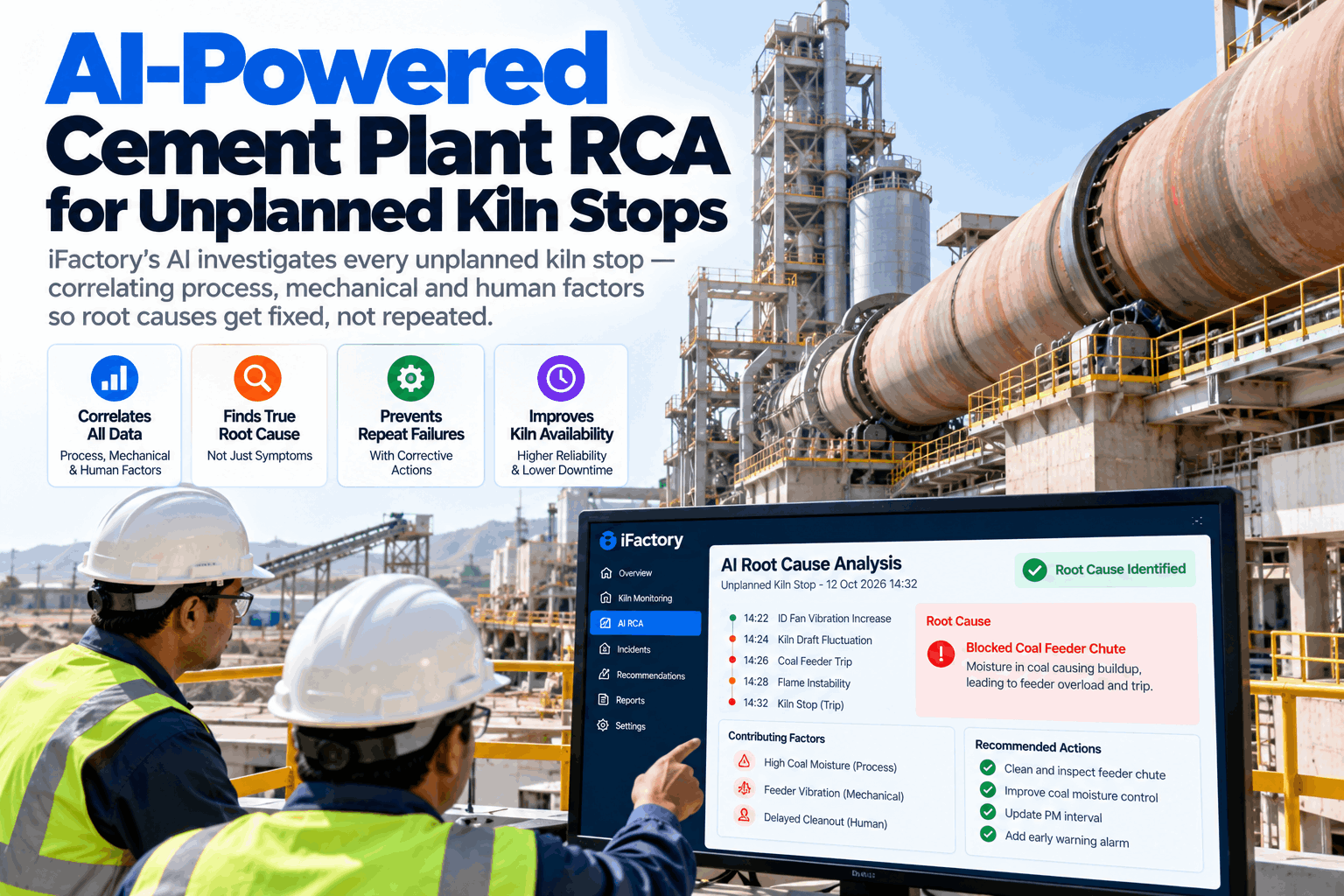
A kiln stop is rarely a surprise to the plant, and rarely a surprise to the data either. The stop report says "ID fan trip" or "ring collapse", the kiln is restarted, and three months later the same stop returns under a new name. The cause sits across process trends, mechanical history, shift logs and material changes that nobody has time to line up. AI root cause analysis does that work for every stop. To see it on your own kiln history, book an RCA walkthrough.
AI-Powered Root Cause Analysis for Unplanned Kiln Stops
After every unplanned stop, the AI pulls process data, mechanical history, shift records and material changes into one timeline. It proposes causes with the evidence behind each one, so engineers verify and fix instead of searching and guessing.
- How process, mechanical and human factors are lined up on one timeline
- How repeat stops are found and ranked by lost hours and cost
- How verified causes become fixes that are tracked to closure
Four cause groups account for four fifths of the lost hours. The dashed line marks where the cumulative share passes 80%. This is the list of bad actors that deserve a full investigation.
Why Kiln Stops Repeat
Repeat stops are not a lack of effort. They are a lack of joined-up evidence.
A kiln is a long chain of linked systems: raw mill, preheater, kiln, cooler and fans. A stop in one place often starts in another, hours earlier. Teams are busy restarting, so the review is short, the cause is a best guess and the data is spread across the DCS historian, the maintenance system, shift logs and the lab. The AI joins those sources while the evidence is still fresh. Our reliability team can show how it works on your own stop reports.
What changed in the process
Temperatures, pressures, feed and fuel before the stop.
What the equipment history says
Past failures, repairs and condition trends on the asset.
What was done and when
Set-point changes, shift notes and procedure steps.
What went into the kiln
Raw mix, fuel and alternative fuel quality over time.
Process data is kept at full resolution for a short time in many historians. Capture the window around each stop automatically, so the evidence is still there when the review happens a week later.
The Evidence the AI Lines Up
Each source answers a different question about the stop.
No single dataset explains a kiln stop. The AI reads them together on one timeline, then looks for patterns that match earlier stops. To see which of your data sources are ready, book a data readiness call.
The goal is to find the gap in procedure, training or design, not to blame a person. The AI shows what was done and what conditions were present, and your team decides what it means.
What One Kiln Stop Really Costs
The repair is often the smaller bill. The lost clinker, the heat-up and the knock-on effects on the rest of the plant add up faster.
From Stop Report to Verified Root Cause
A method that runs the same way after every stop.
The engine follows the steps a good reliability engineer would, but runs them on every stop and keeps the record. The engineer stays in charge of the conclusion. The AI saves the hours spent collecting and comparing data.
Capture
Stop time, area and first alarm recorded.
Collect
Data from all sources pulled for the window.
Correlate
Events lined up and compared with past stops.
Propose
Ranked causes shown with evidence.
Verify
Engineer confirms on site and in the data.
Fix and track
Actions assigned and checked after the restart.
Ending the Repeat Failures
The value of an RCA is measured by what does not happen again.
Finding the cause is half the job. The other half is making sure the fix is done, the result is checked and the lesson reaches the next shift and the next plant. The engine tracks every action to closure and watches for the same pattern returning.
Closing the action loop
- Actions with owner, date and evidence
- Work orders raised in the maintenance system
- Checks after restart that the fix worked
Spotting the repeat
- Early warning when an old pattern returns
- Bad actor list ranked by hours and cost
- Lessons shared across kilns and plants
Each investigation should end as confirmed, ruled out or still open. That record shows which patterns really lead to which causes on your kiln, and makes each later investigation faster.
How iFactory AI Root Cause Analysis Engine Works
Stop data in, verified causes and tracked fixes out.
iFactory's AI Root Cause Analysis Engine collects data from your historian, maintenance system, shift logs and lab. It builds the stop timeline, compares it with earlier stops, proposes causes with evidence, and tracks every action to closure. It runs on an on-prem server inside your plant network. Questions on fit go to our support desk.
Every source
Historian, CMMS, shift logs and lab data.
One timeline
Events lined up and matched to past stops.
Ranked causes
Each shown with the evidence behind it.
Tracked actions
Owners, dates and checks until closed.
Results depend on data quality, the stop history available and how fast actions are closed. We measure repeat stops, investigation time and availability on your own kiln during the pilot, rather than promising a general figure.
Turnkey AI: Delivered, Connected and Live in 6–12 Weeks
You do not build this. It arrives ready.
iFactory ships as a pre-configured NVIDIA AI server with the software pre-loaded. Rack it, plug in power and Ethernet, and the AI is live on your network. Our team handles cabling, network setup, DCS, historian and maintenance system integration, team training and 24×7 remote monitoring. Data stays on your own network. For a scope matched to your plant, request a turnkey quote.
Ship, network and data
Server installed. Historian, maintenance records and shift logs connected for the pilot kiln.
Back-test on past stops
Engine run on past stops. Findings checked with your reliability and process teams.
Go-live and training
Live RCA after every stop. Teams trained. 24×7 remote monitoring begins.
Frequently Asked Questions
What is AI root cause analysis for kiln stops?
It is the use of AI to collect and line up process, mechanical, human and material data around every unplanned stop, and to propose causes with evidence for an engineer to verify.
Does it replace the reliability engineer?
No. It does the data collection and comparison. The engineer verifies the cause on site, decides the fix and owns the conclusion.
Which data does it need?
A process historian is the main need. Maintenance records, shift logs and lab data make the findings much stronger, and gaps can be filled in over time.
Can it test its findings on past stops?
Yes. During the pilot the engine is run on your earlier stops, so your team can compare its findings with what you already know about each event.
How does it find repeat failures?
It compares each stop with earlier ones by area, signals and conditions, then ranks the repeat patterns by lost hours and cost.
How do we start?
With one kiln and a few recent stops that your team never fully explained. A 6-week pilot connects the data, back-tests the engine and checks its findings with your team. To plan it, contact our team.
Fix the Cause, Not the Symptom
In thirty minutes we look at your recent kiln stops, the data you already hold and how findings could reach your reliability team. You keep the notes whether or not you go further with iFactory.
- 1Reports from the last few unplanned stops
- 2An export of historian trends around those stops
- 3Maintenance history for the main kiln assets
- 4A rough cost per hour of kiln downtime
- 5The stops your team still cannot explain