A QA technician’s phone rings at 7:00 AM — a potential allergen cross-contact recall is unfolding. The plant’s ERP shows shipment numbers, but tracing back which input lots ran on which lines, through which tanks, to which customers cannot wait for tomorrow’s spreadsheet reconciliation meeting. Regulators and customers expect trace-backs and trace-forwards that identify affected product quickly and narrowly — in hours, not days. Yet the data sits in MES, QMS, historians, spreadsheets, and paper logbooks, each holding a piece of the truth. Batch genealogy is the digital thread that ties those pieces together into one queryable record.
iFactory / Batch genealogy & lot traceability
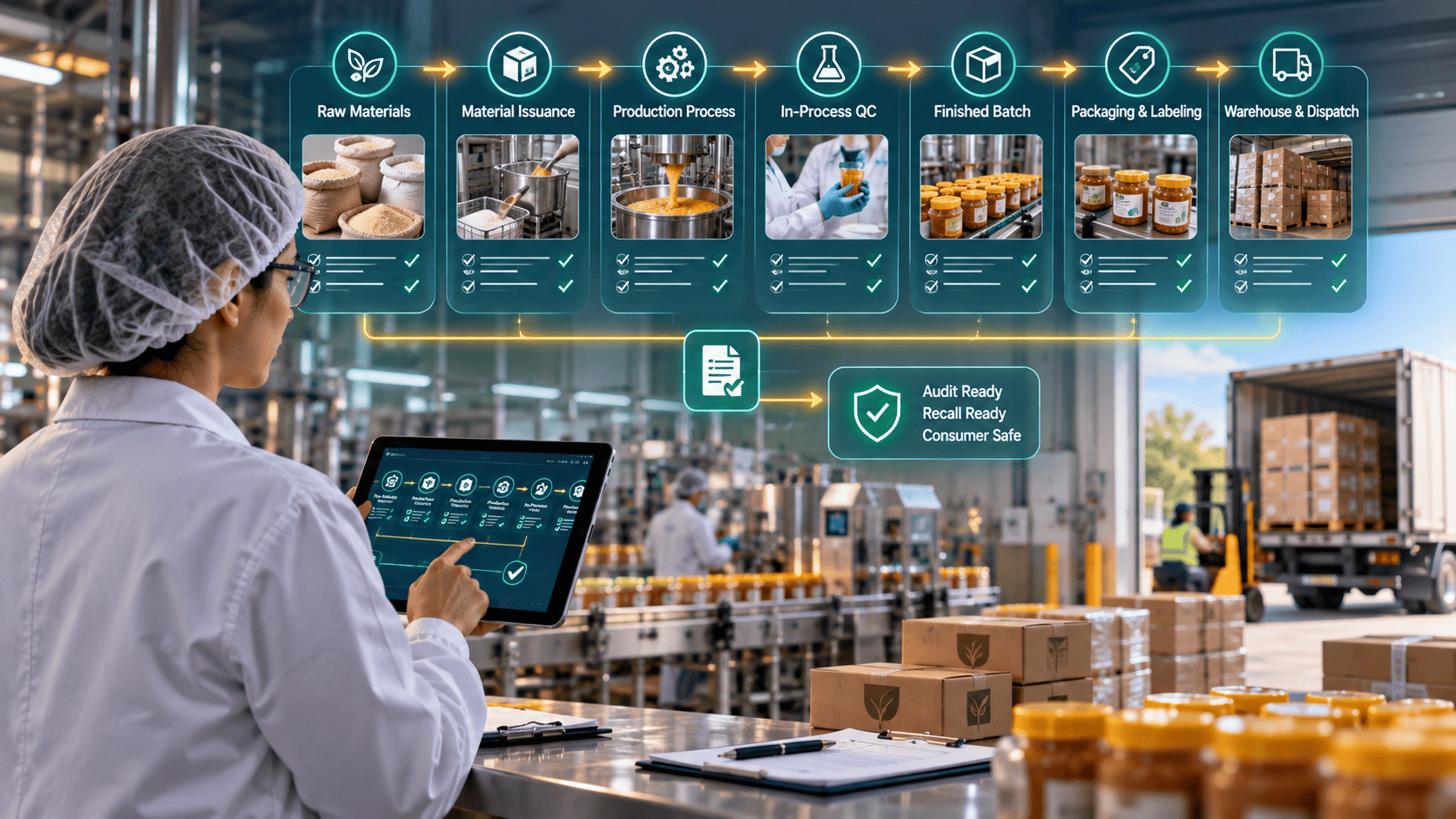
Lot to Material to Process to Shipment — One Digital Thread
An overlay intelligence layer that connects MES, QMS, historians, spreadsheets, and digitized paper logs into a single genealogy chain — with rapid trace-back, trace-forward, and audit-grade attribution built in.
Raw material lot
RM-4471-A
↓
Process step / tank
MIX-03 · 14:22
↓
↓
Shipment
S-1234 → 3 customers
Hours
not days for a full trace
Overlay
no rip-and-replace
FDA / BRC / ISO 22000
audit-ready trail
The Problem on the Floor
When a recall alert or a customer complaint arrives, the question is always the same: which lots are affected, and where did they go? In most food and batch plants the answer requires reconstructing the chain across four or five systems that were never designed to talk to each other. The MES knows what ran on which line. The QMS holds the quality events. The PLC historian carries the tank and time data. Paper logbooks record the manual splits, blends, and reworks. And an Excel spreadsheet somewhere holds the workaround data no other system has. Reconciling all of it manually takes days — while regulators, customers, and legal teams are already asking for the trace-back.
Where the Digital Thread Actually Breaks
Batch genealogy fails in predictable places. Every one of them is fixable, but only if you can see the gap before the recall arrives.
Fragmented systems
MES, QMS, PLC historians, and spreadsheets each hold a piece of the truth. Nothing joins them into one queryable chain.
Manual records
Paper logbooks and ad hoc Excel entries create gaps that require reconciliation the day the recall lands — not before.
Complex material flows
Lot splits, blends, rework, and co-manufacturing introduce combinatorial complexity that spreadsheets cannot model reliably.
Weak audit trails
Missing user IDs, absent source attributions, and vague timestamps make auditor answers tenuous even when the underlying data exists.
What Good Genealogy Actually Looks Like
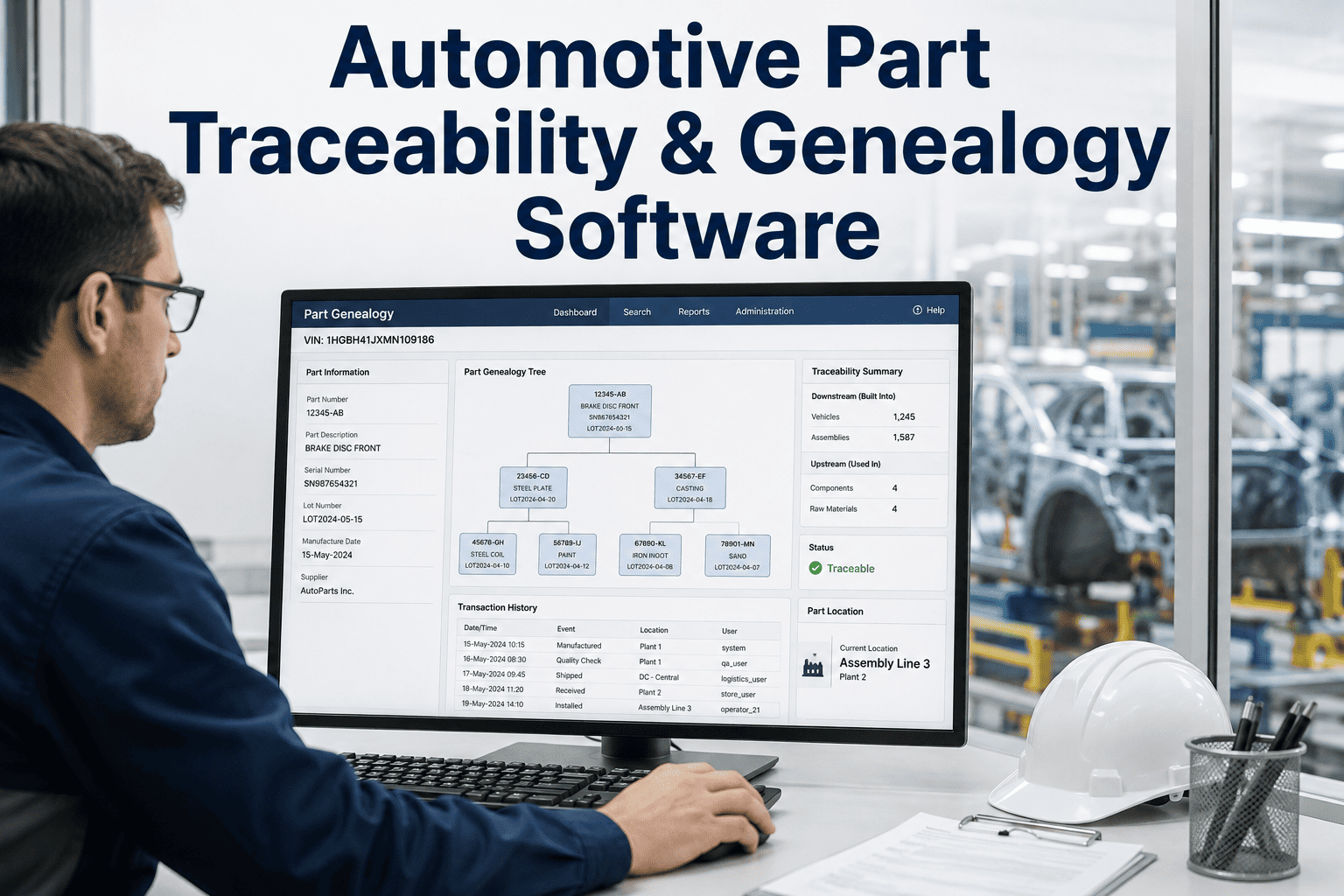
Batch genealogy is the ability to follow a product lot backward to its source materials and forward to its shipments — including every split, merge, rework, and quality event in between. Good genealogy is granular (time-stamped, source-referenced), actionable (queryable in either direction), and auditable (who recorded what and when).
Unified Chain
Each finished lot linked to upstream raw material lot IDs, all intermediate process units (mix tanks, ovens, reactors), and downstream pallet or shipment IDs.
Discipline: end-to-end link
Granular Events
Every lot event — split, merge, hold, rework — is timestamped and source-referenced so you can isolate only the product that matters.
Discipline: timestamped
Bidirectional Query
Trace a shipment back to its ingredient lots instantly, or start from a suspect raw lot and find every affected outbound shipment.
Discipline: two-way
Audit-Grade Log
Every genealogy link carries source system, operator ID, and timestamp — the trail an FDA, BRC, or ISO 22000 auditor actually reads.
Discipline: attribution
Overlay Approach vs Rip-and-Replace
Most manufacturers do not have the luxury of ripping out entrenched MES or QMS systems. An overlay lets plants retain existing investments while adding one intelligence layer that reconciles data across systems, fills gaps from manual records, and presents a coherent genealogy chain. It is an honest transition path: it requires planning and mapping, but avoids prolonged system-replacement projects that leave the plant more exposed in the meantime.
How iFactory AI Fits
iFactory AI is the overlay intelligence layer — it does not replace your MES, QMS, or historian. It sits above them, ingests their data, reconciles the gaps, and presents one queryable genealogy view. Six things it does specifically:
Multi-Source Ingest
Overlay Layer
Connects to MES, QMS, PLC/historian data, Excel exports, and digitized paper logs to map genealogy across the plant — no rip-and-replace.
Configurable Link Rules
Overlay Layer
You define how lots are joined — barcode fields, batch numbers, timestamp windows — so the model reflects your site’s real processes and exceptions.
Split / Blend / Rework
Genealogy Model
Accommodates complex material flows and preserves traceability across merges, divisions, and co-manufacturing without losing lineage.
Gap Detection
Overlay Layer
Highlights weak links — undocumented splits, missing timestamps, orphan lots — so teams can prioritize the fixes that most improve traceability confidence.
Test your own trace-back time this week. Pick one shipment from last month, ask the QA team how long it takes to identify every upstream raw lot and every other shipment that used those materials. If the answer is more than a working day, your genealogy chain has gaps a recall will find. Book a demo and bring one shipment ID — we’ll run a live trace-back on it.
An Illustrative Trace — Shipment S-1234
A recall alert begins with a customer complaint tied to shipment S-1234. Using an overlay-based genealogy, the QA lead queries S-1234 and immediately sees the pallet and lot IDs on the shipment, the packaging run and exact production order, the upstream raw material lots that fed the batch, the mixer and tank IDs with time windows, and any associated QC events with operator notes. Within one session the team isolates three upstream raw lots and two other shipments that used the same suspect materials — enabling a targeted recall rather than a broad one. This example is illustrative and does not imply guaranteed outcomes; real performance depends on the completeness of the underlying data.
Six Steps to Implement Reliable Batch Genealogy
A working genealogy program follows a predictable sequence. Skipping any of the first three steps leaves gaps that surface at exactly the wrong moment.
Step 1
Source Mapping
Inventory where lot and event data reside — MES, QMS, historian tags, Excel, paper. Identify the authoritative source for each event type.
Step 2
Define Link Rules
Specify how lots join across systems (lot IDs, timestamps, machine IDs, barcode fields) and how splits and merges are represented.
Step 3
Digitize Manual Records
Prioritize high-risk process steps for digitization. Use the overlay to ingest historic Excel and paper records where possible.
Step 4
Validate with Pilots
Run real trace-back and trace-forward queries on recent production. Validate model behavior. Log every data gap the pilot reveals.
Step 5
Iterate & Scale
Close prioritized data gaps. Expand to additional lines and sites. Integrate SPC/SQC and OEE overlays to tie quality events to production performance.
Step 6
Maintain Governance
Assign data stewards. Document mapping logic. Audit the genealogy chain regularly to ensure long-term reliability.
Where Genealogy Meets SPC and OEE
Batch genealogy is most powerful when combined with SPC/SQC and OEE data. Each overlay adds a different dimension to the same underlying chain, and together they answer questions no single system can answer alone.
SPC
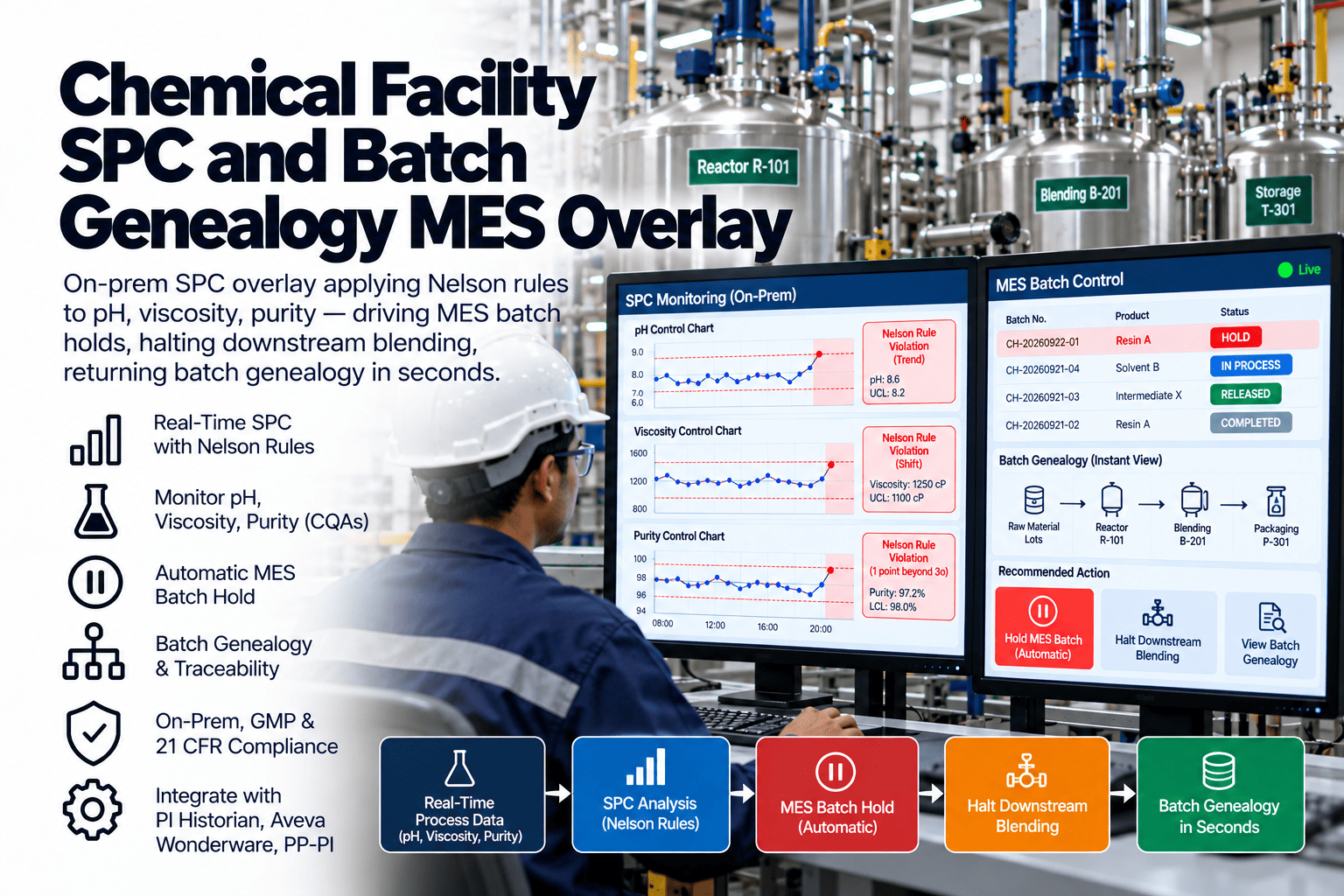
Which lots ran during process drift
SPC detects drift; genealogy links let you see which lots were produced during the drift window and which shipments could be affected — targeted, not blanket.
Predictive Quality
Alerts tied to upstream materials
Predictive models that flag likely out-of-spec conditions become actionable when you can trace the alert back to specific upstream materials and downstream shipments.
OEE
Downtime correlated to genealogy events
OEE overlays surface that a specific downtime or changeover correlated with the lot splits or operator changes that appear in the genealogy chain.
QA / Compliance
Full trace with audit-grade attribution
The joined view is what makes the trace defensible to an FDA, BRC, or ISO 22000 auditor — one narrative, one record, one system to demonstrate.
What This Cannot Do
Honest limits matter. The overlay can reconcile and highlight gaps, but it cannot invent missing lot IDs or reconstruct splits nobody recorded. Some remediation work is unavoidable. It also does not replace regulatory certification — iFactory AI helps you produce auditable records, but auditors still assess your underlying process controls and documented procedures. And configuration takes operational engagement: mapping the link rules and validating pilot traces requires your QA, production, and IT leads together for a defined period. It is an honest, short-term investment for longer-term readiness.
FAQ
Does iFactory AI require us to replace our MES or QMS?
No. iFactory AI is designed as an overlay intelligence layer that maps and reconciles data from your existing MES, QMS, historians, Excel files, and digitized paper records. It preserves your investments while making the genealogy chain queryable across systems that were never designed to talk to each other.
Book a demo to see the overlay running against a live plant’s data.
How does iFactory AI handle paper logbooks or Excel spreadsheets?
iFactory AI ingests Excel exports and digitized paper records, reconciling them with the digital sources of truth. Where manual entries exist, the system highlights the gaps and provides a pathway to prioritize digitization for the high-risk process steps first.
Can the system model lot splits, blends, and rework?
Yes. The genealogy model supports splits, joins, rework, and co-manufacturing flows so that trace-forwards and trace-backs remain accurate even in complex process topologies where a single raw lot may end up across multiple finished batches and multiple shipments.
Is the genealogy data auditable and secure for inspections?
Every genealogy link includes source attribution, timestamp, and user or action metadata to support audit trails. iFactory AI follows standard industrial data security practices; specific controls are scoped during implementation to match your site’s IT and compliance requirements.
How much work is involved to configure the system for our site?
Configuration requires mapping your data sources and defining link rules that reflect your process. This setup ensures accuracy; the work is typically concentrated during initial implementation and then maintained through governance practices. Most sites complete pilot traces within the first four to six weeks.
See it with your own data.
Bring One Lot or Shipment — We’ll Run a Live Trace
The fastest way to evaluate batch genealogy is to see a working trace-back on your process reality. Bring a sample lot ID or shipment code and we’ll demonstrate the overlay running on the kinds of data your plant actually holds.
Bidirectional
trace-back & forward