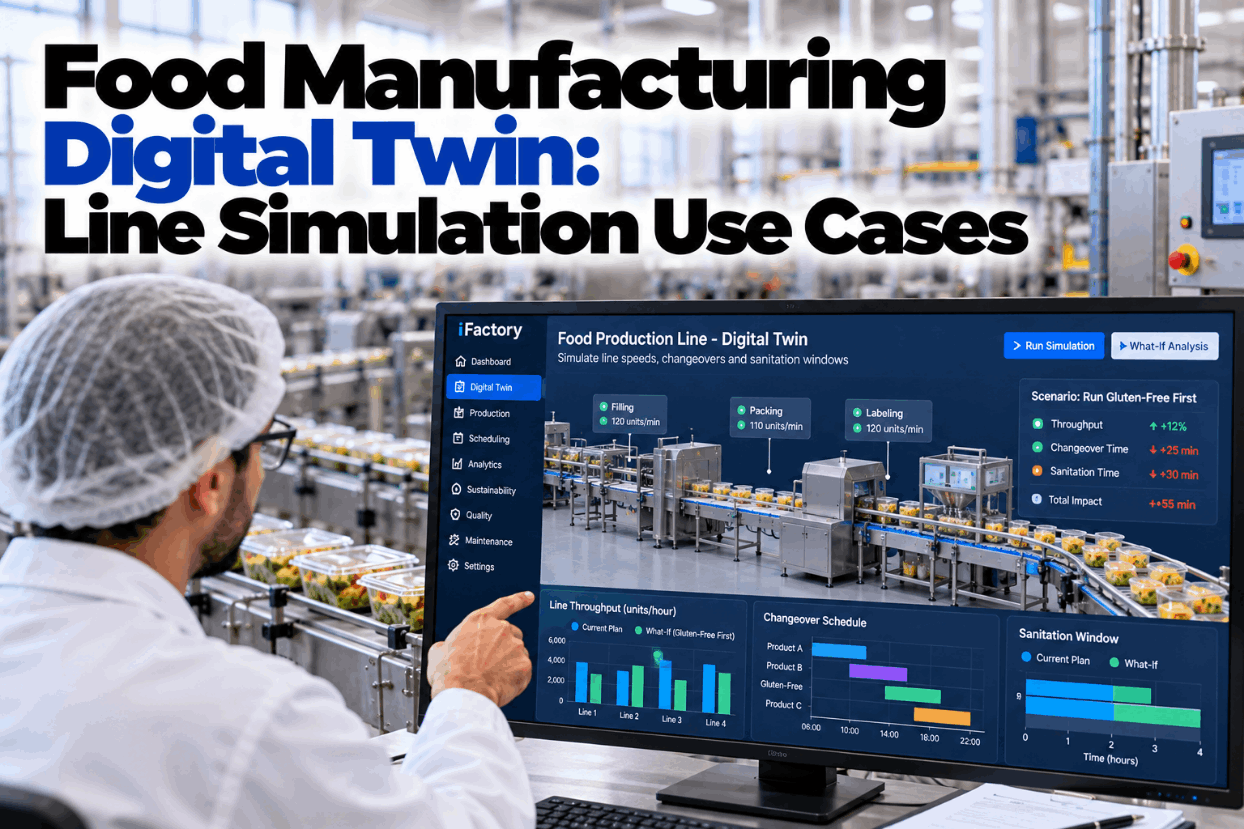
Every food plant planner has made a schedule change that looked fine on paper and cost a shift on the floor. A new product order adds an allergen clean nobody counted, or a faster filler just moves the queue to the packer. A food manufacturing digital twin lets you try those changes on a model of the line first, using your own PLC and MES data, and see the effect on output and clean time before anything moves. See a line model answer real planning questions in a short digital twin demo.
DIGITAL TWIN + COPILOT · LINE PLANNING
Ask "What If We Run Gluten-Free First?" and See the Answer
iFactory builds a model of each line from PLC and MES data. Planners ask what-if questions by voice, and the copilot shows the throughput and clean-time impact before the real schedule changes.
Copilot · Line 2 next weekSimulated
Planner asked"What if we run gluten-free first?"
Current order6.5 h cleans
Gluten-free first1.5 h cleans
DIGITAL TWIN VS LINE SIMULATION
Spreadsheet, Simulation and Twin Are Not the Same Thing
Most planners start with a spreadsheet of average speeds. A discrete-event simulation goes further: it models each machine, buffer and stop as events over time, so variation, blocking and starving show up. A digital twin is a simulation that stays connected to the real line. It is fed by live PLC and MES data and recalibrated as the line changes, so its answers stay close to what the floor actually does. Our support team can help you judge which level you need.
Level 1Spreadsheet
DataAverages and rated speeds
Sees variationNo
UpkeepManual, often out of date
Good forRough capacity checks
Level 2Discrete-event simulation
DataTime studies and history, loaded once
Sees variationYes, from stop and cycle distributions
UpkeepRebuilt for each study
Good forOne-off projects and new lines
Level 3Digital twin
DataLive PLC and MES feeds
Sees variationYes, from current behaviour
UpkeepRecalibrated as the line changes
Good forWeekly planning and ongoing what-ifs
PROCESS TWIN DATA
What Feeds the Line Model and What Comes Out
A virtual food line is only as good as the data behind it. The PLC knows what each machine is doing second by second. The MES knows which order, product and lot is running. Sanitation and allergen rules come from your food safety plan, and planned maintenance comes from the CMMS. Put together, they let the model replay last week and predict next week. Map your data sources in a data review call.
Inputs
PLCMachine states, speeds, stops, counts
MESOrders, SKUs, lots, changeover history
Food safety planAllergen matrix, clean types, times
CMMSPlanned maintenance windows
Line model
Machines and ratesBuffers and conveyorsStop patternsChangeover rulesCrew and shift pattern
Answers
ThroughputUnits per shift and per week
Clean timeHours lost to changeovers and sanitation
BottleneckWhich machine limits the line, and when
Schedule riskOrders likely to miss their date
LINE SIMULATION USE CASES
Five Questions a Food Line Twin Answers Well
A digital twin earns its keep on questions that are expensive to test on the real line. In food plants, most of them involve changeovers, sanitation and the order in which products run, because those are where hours quietly disappear. Each one below is a question a planner can ask in plain words. Bring your own questions to our planning specialists.
01
Changeover sequencing"Which product order needs the fewest allergen cleans?"Total clean time and output for each sequence02
Sanitation windows"Can the allergen clean fall inside the nightly sanitation?"Hours of production gained or lost03
Line speed balancing"If we speed up the filler, does output rise?"Where the queue moves, and the real gain04
Bottleneck hunting"Which machine really limits this line?"Constraint by shift, product and stop type05
Capacity planning"Can we take a new 20,000-case order?"Weeks of capacity, with and without overtime
CHANGEOVER SIMULATION
Worked Example: Two Orders for the Same Four Products
Here is the logic behind running allergen-free first. When the next product contains every allergen the last one did, traces left behind are already declared on the next label, so a standard changeover is usually enough. When the next product lacks an allergen the last one had, you need a full, validated allergen clean. Order products so each one adds allergens, and most full cleans disappear. Your allergen control plan still decides which changeovers need a full clean. All times and rates below are assumed. Test your own product mix in a sequencing session.
Order A · current, by demandClean time 6.5 h
Wheat + milkFull clean 180 minGluten-freeStd 30 minWheat + milk + nutsFull clean 180 minWheat
180 + 30 + 180 = 390 min = 6.5 h
Order B · gluten-free firstClean time 1.5 h
Gluten-freeStd 30 minWheatStd 30 minWheat + milkStd 30 minWheat + milk + nuts
30 + 30 + 30 = 90 min = 1.5 h
Production window, assumed120 h per week
Line rate, assumed6,000 units per hour
Order A run time and output120 − 6.5 = 113.5 h · 681,000 units
Order B run time and output120 − 1.5 = 118.5 h · 711,000 units
Difference5 h · 30,000 units of extra capacity
Why use a twin for something this simple?
The sum above fits on a napkin. What the twin adds is everything around it: whether Order B still meets every ship date, whether the warehouse can hold product made earlier than usual, and whether a start-up verification test before the gluten-free run adds time back.
SANITATION WINDOWS
Let One Clean Do Two Jobs
Many lines already stop every night for sanitation. If an allergen changeover falls in the middle of the day, the line stops twice. The twin can test whether shifting the run order lands the allergen change at the start of the nightly sanitation, so one clean covers both, provided that clean meets your validated allergen clean standard. The illustration uses assumed times for one 24-hour day. Our support team can model your own sanitation plan.
Check before you commit
The combined clean must still pass your allergen verification, such as visual checks and swabs. If it doesn't, the twin shows that the saving isn't real.
Ask the Line a Question, Out Loud
Planners don't need to learn simulation software. They ask the copilot in plain words, and it runs the scenario on the line model, compares it with the current plan and explains the difference.
Line 2 planning · Planner and iFactory
PlannerWhat if we run gluten-free first next week, then wheat, wheat and milk, then the nut bar?
iFactoryTwo full allergen cleans fall away. Clean time falls from 6.5 to 1.5 hours, about 30,000 more units at current rate.
PlannerAny orders at risk?
iFactoryThe wheat and milk order now finishes Wednesday instead of Monday. Its ship date is Thursday, so it still makes it.
THROUGHPUT MODELING
The Slowest Machine on Paper Is Not Always the Bottleneck
Rated speed tells only half the story. A fast packer that stops often can limit a line more than a slower oven that rarely stops. The simple sum below multiplies rated speed by the share of time each machine actually runs. It already changes the answer, and a full twin goes further by adding buffers, blocking and starving. Numbers are assumed for illustration. See your own line's constraint in a bottleneck review.
MachineRated × running share = effective rate
Mixer7,500 × 96% = 7,200 per h
Depositor7,000 × 95% = 6,650 per h
Oven6,000 × 98% = 5,880 per h
Packer7,000 × 80% = 5,600 per h · constraint
FOOD MANUFACTURING DIGITAL TWIN FOR PLANT MANAGERS
What a Line Twin Can and Can't Tell You
A twin is a planning tool, not a guarantee. It is strong on questions about time, flow and sequence, and it is only as good as the data and rules you give it. Knowing the limits up front keeps expectations realistic and stops anyone treating a model result as a food safety sign-off. Our support team can review where a twin fits your decisions.
It can
✓Compare run orders, shift patterns and line speeds side by side
✓Show where queues build and which machine limits output
✓Estimate clean time and output for next week's plan
✓Flag orders likely to miss their ship date
It can't
×Validate an allergen clean. Swabs and checks still decide that
×Replace commissioning trials for new equipment
×Fix poor data. Missing stop reasons give vague answers
×Make the schedule decision. The planner does
FOOD MANUFACTURING DIGITAL TWIN BEST PRACTICES
Keep the Model Honest
A twin that drifts away from reality gives confident wrong answers, and planners stop trusting it after the first bad call. These five habits keep it honest week after week. See how calibration works in a model review.
Replay before you predictRun last week through the model and compare output with what the line really made.
Use real stop dataModel stops from PLC history, not from rated speeds or guesses.
Put allergen rules in the modelClean type for every product pair, taken from your allergen matrix.
Compare at least two optionsA single scenario has nothing to beat. Always run the current plan beside it.
Recalibrate after changesNew equipment, new products or new crew patterns mean a fresh check.
FOOD MANUFACTURING DIGITAL TWIN IMPLEMENTATION GUIDE
Four Steps to a Line Model Planners Trust
Most plants start with one line that has a mix of allergen and non-allergen products, because sequencing gives an answer quickly. Plan the first line with our support team.
Step 1ConnectPLC tags and MES orders for one line
Step 2Build and replayModel machines and rules, replay past weeks
Step 3CalibrateTune until replayed output matches the floor
Step 4Plan with itWeekly what-ifs, then add more lines
FOOD MANUFACTURING DIGITAL TWIN COST AND ROI
Turn One Better Sequence Into a Yearly Figure
The fairest way to size a twin is to price the decisions it changes. This sheet carries the changeover example forward a year. Every input is assumed, and contribution per unit should come from your finance team. Build the case with your own figures in a value session.
Line time freed per week, from the example5 h
Production weeks per year, assumed48
Hours freed per year5 × 48 = 240 h
Units of capacity at 6,000 per hour240 × 6,000 = 1,440,000
Contribution per unit, assumed$0.05
Value if the capacity is sold1,440,000 × $0.05 = $72,000
Freed capacity only has value if you can sell it or use it to cut overtime. If demand is flat, count the overtime hours avoided instead.
TURNKEY AI DEPLOYMENT
Line Models, Copilot and AI Server in One Package
iFactory delivers the Digital Twin and Copilot as a turnkey bundle. A pre-configured NVIDIA AI server ships racked and ready with the simulation engine, copilot and PLC and MES connectors pre-loaded, so scenarios run on site, close to the line data. You rack it, plug in power and Ethernet, and the AI is live. To scope it for your lines, request a turnkey quote.
What's Included
- Pre-configured NVIDIA AI edge server, racked and ready
- PLC and MES connectors for line states and orders
- Line model built and calibrated with your team
- Allergen matrix and clean rules loaded into the model
- Voice copilot for planners and supervisors
- Scenario comparison reports for each what-if
- 24×7 remote monitoring of software and hardware
Live in 6–12 weeks
Wk 1–4
Connect and Map
Server installed, PLC and MES linked, line and allergen rules mapped.
Wk 5–8
Build and Calibrate
Model replays past weeks until output matches the floor.
Wk 9–12
Plan With the Copilot
Planners trained, weekly what-ifs running on live data.
HOW iFACTORY FITS
A Line Twin Built for Food Plant Planners
iFactory keeps the model tied to real line data and puts it behind a voice copilot, so planners use it every week, not once a year. Our support team can walk you through a pilot plan.
1
Fed by PLC and MES. The model reflects how the line runs now, not how it ran at commissioning.
2
Allergen-aware. Changeover rules come from your allergen matrix, so clean time is counted correctly.
3
Voice what-ifs. Planners ask in plain words and get throughput and clean-time impact back.
4
Before the real change. Every scenario is compared with the current plan before the schedule moves.
1000+
Industrial clients running iFactory
99.9%
Platform uptime for planning teams
6-12 wks
From racked server to live what-ifs
FREQUENTLY ASKED QUESTIONS
What Plant Managers Ask About Food Line Digital Twins
What is the difference between a digital twin and a simulation?
A simulation is a model you run to test scenarios, usually built from data gathered once. A digital twin is a simulation kept connected to the real line through live data and recalibrated as things change, so it can be used for routine planning rather than one-off studies.
Why run allergen-free products first?
If each product contains all the allergens of the one before it, carry-over traces are already declared on the next label, so a standard changeover often does. Going the other way needs a full, validated allergen clean. Your allergen control plan and label rules make the final call.
How accurate is the model?
Accuracy is checked by replaying past weeks and comparing modelled output with what the line actually produced. The model is tuned until the two agree closely enough for planning. Recheck after major changes to equipment, products or shifts.
What data do we need to start?
Machine states, counts and stops from the PLC or a data historian, plus orders and products from the MES or ERP. Clean times and your allergen matrix complete the picture. Gaps can be filled with time studies at first.
Does the twin change the real schedule?
No. It shows the impact of each option. The planner decides, and the chosen plan goes through your normal scheduling process and allergen sign-offs.
Where should we start?
Pick a line with frequent changeovers and a mix of allergen and non-allergen products. Sequencing questions there give a clear, quick answer. Our
support team can help you choose the pilot line.
Test the Schedule Before the Line Runs It
Model your line from PLC and MES data, ask what-if questions by voice and see the throughput and clean-time impact first. The full system is delivered turnkey and goes live in 6 to 12 weeks.
Example weekly what-if · Line 2
QuestionGluten-free first?
Clean time6.5 h to 1.5 h
Extra capacityAbout 30,000 units
Orders at riskNone, all ship on time
Every option compared before the plan moves