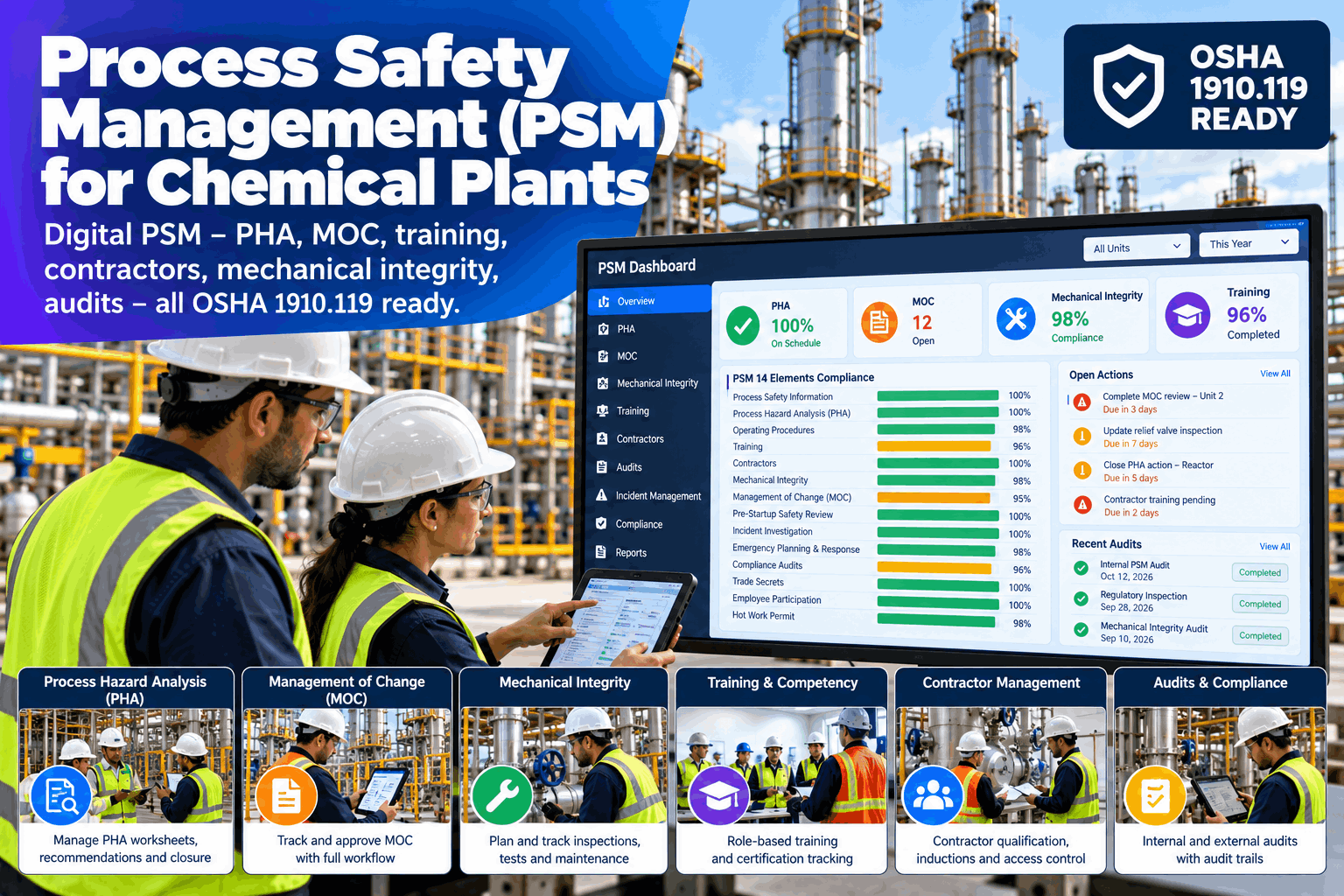
Process safety management under OSHA 1910.119 is not one big task. It is fourteen elements, each with its own records, owners and recurring dates, spread across studies, change requests, training files, contractor records and inspection reports. When those live in separate folders and spreadsheets, the process safety manager spends the weeks before an audit assembling evidence instead of reducing risk. A digital PSM suite keeps PHA, MOC, training, contractors, mechanical integrity and audits in one record trail, with due dates that warn before they pass. This page covers the elements, a worked example and how to roll it out. Process safety managers can see it on their own records in a digital PSM walk-through.
Process Safety Management (PSM) for Chemical Plants
Run PHA, MOC, training, contractors, mechanical integrity and compliance audits in one digital PSM suite built around OSHA 1910.119, on a turnkey on-prem server that keeps your safety records inside your network.
- All 14 elements in one record trail
- Due dates that warn before they pass
- Evidence ready when the auditor asks
Why PSM Programs Strain Under Paper and Spreadsheets
The program is sound. The tracking is not.
Most plants know what the standard asks for. The strain comes from keeping many recurring items current across many owners, and from proving it later. Evidence sits in different folders, dates live in personal spreadsheets, and a change request can slip past the review that should have caught it. Our process safety specialists can map where your records lose their trail.
Scattered evidence
Records in many folders and formats.
Dates in spreadsheets
Recurring items tracked by hand.
Changes outside the system
MOC and contractors on separate paths.
Audit scramble
Weeks spent gathering what should be at hand.
The 14 Elements of OSHA 1910.119
One standard, fourteen sets of records.
The standard lists its elements in paragraphs (c) to (p). A digital suite does not change what each one requires. It gives each element a place for its records, an owner and its recurring dates. Confirm the exact requirements against the current text of the standard and any state plan that applies to you.
Elements (c) to (i)
- Employee participation
- Process safety information
- Process hazard analysis
- Operating procedures
- Training
- Contractors
- Pre-startup safety review
Elements (j) to (p)
- Mechanical integrity
- Hot work permit
- Management of change
- Incident investigation
- Emergency planning and response
- Compliance audits
- Trade secrets
What the Digital Suite Tracks for Each Element
Six elements that create most of the paperwork.
The table is the template for scoping the suite. Each line names an element, what the plant has to keep and what the suite tracks for it. Start with the elements that cause the most chasing, then add the rest. See it built on your records in a working session.
Compliance depends on how your plant runs its PSM program, not on the tool that stores the records. The suite helps keep records, owners and dates in order. Confirm your obligations with your own safety, legal and compliance advisers, including any state plan or EPA rule that also applies.
A Worked Example: Hours Spent Assembling Audit Evidence
Count the time before the audit starts.
Take a plant where gathering evidence for each of the 14 elements takes about 12 hours across folders, spreadsheets and email. If records are already structured and linked, part of that time goes back to the program. All figures are illustrative.
See Your Own PSM Records on One Board
Bring a PHA, a change request and an inspection list, and we show them on one board with owners, due dates and closure evidence.
Three Cycles a PSM Calendar Must Hold
Recurring dates are where programs slip.
Some items repeat every year, some every few years, and each one has an owner who must act before the date. These are common cycles in the standard, and your own procedures may be stricter. Check each against the current text of 1910.119 and your own program.
Procedure certification
Operating procedures certified as current and accurate.
Refreshers and audits
Refresher training and compliance audits come around again.
PHA revalidation
Each process hazard analysis revalidated and updated.
Ask the PSM Board a Question
Ask what is due and get the records behind it.
The process safety manager can ask the board about open items instead of opening folders. The answer comes from the same records as the dashboard. Try it on your own data in a live walk-through.
From Finding to Closed Action
Every finding follows the same path.
A PHA recommendation, an audit finding and an inspection deficiency all need an owner, a date and proof of closure. The suite treats them the same way. Plan the routine with our implementation team.
Record
The finding is logged with its source.
Assign
An owner and a due date are set.
Track
Status is visible to the whole team.
Verify
Closure evidence is attached and checked.
Report
The record trail is ready for the audit.
Digital PSM Best Practices
Tools help most when the program is already clear.
These are common gaps when plants move PSM records into a digital suite. A short readiness review can catch them before the pilot.
What works
- One named owner for each element
- Recommendations tracked to closure with evidence
- MOC linked to training and procedure updates
- A pilot on one process unit first
What fails
- Uploading old files with no owners or dates
- Treating the tool as the compliance program
- Closing items with no evidence attached
- Moving all 14 elements at once
How iFactory Runs the PSM Digital Suite
Records, owners and dates on one server.
iFactory runs the PSM Digital Suite on your on-prem server, so safety records stay inside your network. Elements, owners, review cycles and approval routes are set up with your process safety team, and actions link to your work order system. Fit questions go to our solutions team.
PHA and actions
Recommendations tracked to closure.
Management of change
Reviews and approvals in one flow.
Training and contractors
Status checked before work starts.
Mechanical integrity
Inspections and deficiencies followed up.
Audit trail
Findings, owners and evidence together.
On-prem
Safety records stay in the plant.
The figures and exchanges on this page are illustrative. The suite helps organize PSM records, owners and dates, and does not by itself make a plant compliant. Compliance depends on your program, your people and the requirements that apply to your plant, which you should confirm with your own advisers.
Turnkey AI: Delivered, Connected and Live in 6–12 Weeks
You do not build this. It arrives ready.
iFactory ships as a pre-configured NVIDIA AI server with the software pre-loaded, racked and ready. Rack it, plug in power and Ethernet, and the AI is live on your network. Our team handles cabling, network setup, PLC, SCADA, DCS and CMMS integration, team training and 24×7 remote monitoring. Data stays on your network. For an implementation guide and a quote matched to your plant, request a turnkey quote.
Ship, network and map records
Server installed. Elements, owners and existing records mapped.
Setup and unit pilot
Suite configured for the first elements. Live pilot on one process unit.
Go-live and review
Roll-out across units. Teams trained. Remaining elements added in stages.
Frequently Asked Questions
What is process safety management under OSHA 1910.119?
It is the OSHA standard for managing hazards in processes that involve highly hazardous chemicals above certain thresholds. It sets out 14 elements, from employee participation and process hazard analysis to compliance audits.
What does PSM software for a chemical plant do?
It keeps the records for each element, assigns owners, tracks due dates and recommendations to closure, and links changes, training, contractors and inspections so evidence is in one place.
Does the software make us compliant?
No. Compliance depends on your PSM program and how it is run. The suite helps organize records, owners and dates, and you should confirm your obligations with your own advisers.
How does it support PHA documentation?
It stores each study, tracks every recommendation to an owner, a date and closure evidence, and shows when a revalidation is coming due.
How does it help with MOC tracking?
Each change request moves through its reviews and approvals, and linked actions such as procedure updates, training and the pre-startup review stay visible until they are closed.
What are the best practices for process safety managers?
Name an owner for each element, track recommendations to closure with evidence, link MOC to training and procedures, avoid treating the tool as the program and pilot on one unit first.
What does it cost and what is the return?
Cost depends on the number of units, elements, users and integrations, so we issue a turnkey quote after a short scoping call. The return comes from less time assembling evidence and fewer missed dates, and the pilot measures it on your plant.
How do we start?
Start with a short session using a PHA, a change request and an inspection list. A 6-week pilot then maps one unit, configures the first elements and runs them live. To plan it, contact our team.
Put Your PSM Records on One Trail
In thirty minutes we take a PHA, a change request and an inspection list from your plant and show them on one board with owners and due dates. You keep the results either way.
- 1A recent PHA and its recommendation list
- 2An open or recent change request
- 3Your training matrix for covered processes
- 4Mechanical integrity inspection schedule
- 5Your last compliance audit report