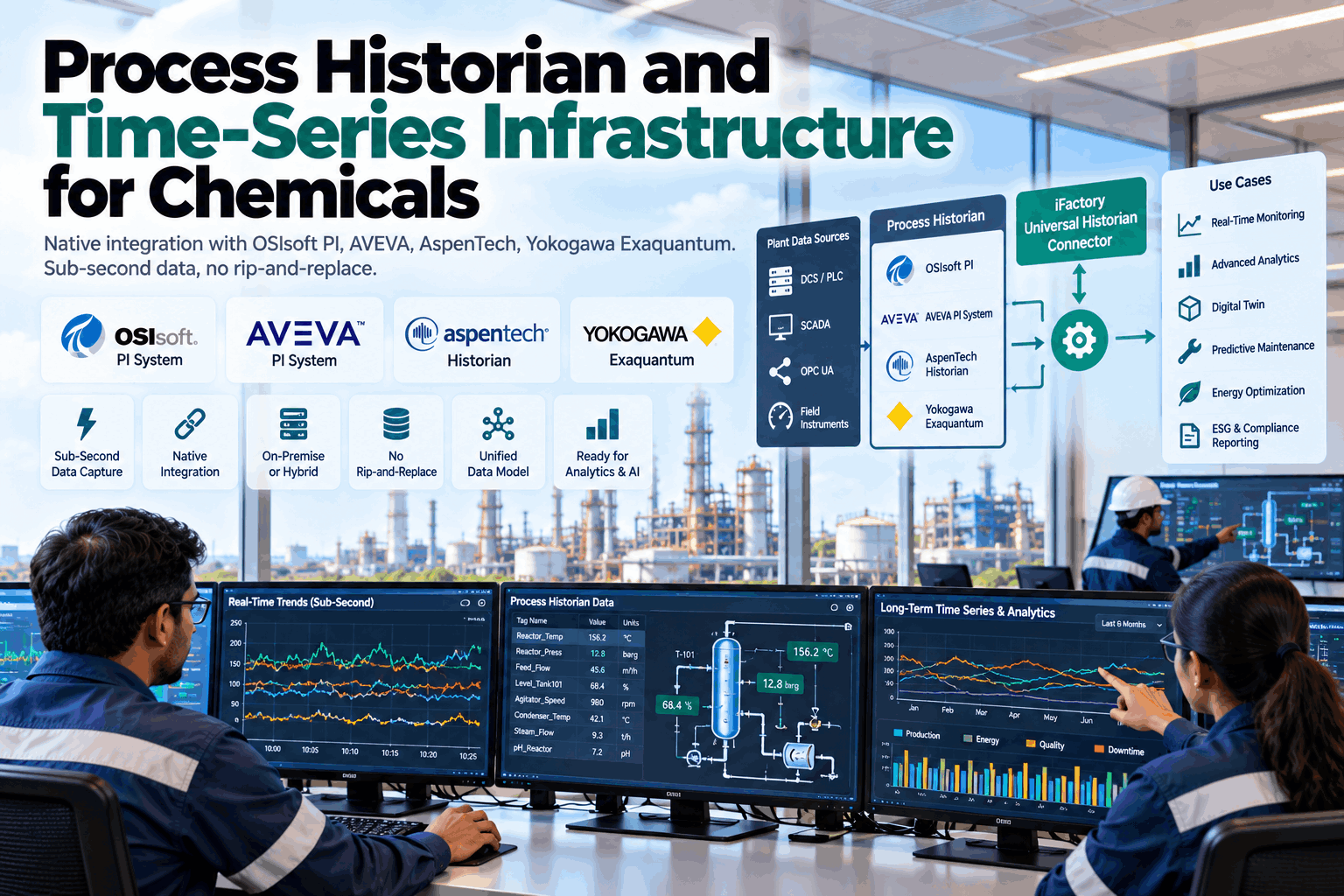
Most chemical plants already own a good historian, and years of data inside it. The problem is getting that data into modern analytics without breaking what already works. iFactory's Universal Historian Connector reads from the historians you have, leaves them exactly as they are, and turns raw tags into a model of your plant. To check it against your systems, book a historian review.
Process Historian and Time-Series Infrastructure for Chemicals
Connect AVEVA PI, AspenTech IP.21, Yokogawa Exaquantum and others to one analytics layer. Read-only, on your own site, with no rip-and-replace.
- How each historian is connected, and through which interface
- What sub-second data really means once a historian compresses it
- How raw tags become a model of reactors, columns and exchangers
How it sits in your plant
Two layers are added on top. Nothing below them is reconfigured.
Why Not Replace the Historian?
Because it already does its job well. It just was not built for AI.
A plant historian is the most trusted record a chemical site has. Shift reports, environmental returns and incident reviews all lean on it. Replacing it means migrating years of data, rebuilding displays and revalidating reports, all for a system that still works. The better move is to read from it. Our support team can talk through what that means for your site.
What your historian does well
- Collects data from the control system, reliably, for years
- Stores it compactly, using exception and compression
- Feeds operator trends, shift reports and compliance returns
- Is known and trusted by the people who use it
What it was not built for
- Training models across thousands of tags at once
- Joining tags from three historians into one view of a unit
- Knowing that TI-104 is the outlet temperature of exchanger E-204
- Spotting drift that only shows across many signals together
The connector uses read-only accounts and the interfaces your historian vendor already supports. Collection settings, compression, archives and existing displays stay as they are. If the connector were switched off tomorrow, your historian would not notice.
Native Connectors, Historian by Historian
Each historian is read through its own supported interface, not a screen-scrape or a flat-file export.
Chemical sites rarely have one historian. A main site may run PI, a newer unit may sit on Exaquantum with its Yokogawa control system, and an acquired plant may bring IP.21 with it. The connector reads all of them side by side. To list what your sites run, book a connector check.
formerly OSIsoft PI
often called IP.21
Ownership from AVEVA, Emerson and Yokogawa announcements. Interfaces are those the vendors document. Your versions decide which one is used.
Three common set-ups on chemical sites
One site, one historian
The simplest case. One connection, one tag list, and the asset hierarchy reused if it exists.
One site, several historians
Typical after unit additions. Each is read through its own interface, then joined into one model of the site.
Many sites, mixed historians
Common after acquisitions. Each site keeps its historian, and units are compared on the same terms across sites.
One Tag, End to End
Follow a single temperature reading from the instrument to an alert, and see where each layer does its part.
Sub-Second Data: What Is Possible, and What Is Not
You can only read what was kept. Three settings decide what was kept.
"Sub-second" is easy to promise and easy to misread. A historian stores what its source sends, after filtering. If a tag is scanned every ten seconds, no connector can find what happened in between. If compression is loose, small swings are gone for good. The connector reads at full stored resolution, and can read fast loops live where your control system allows. Ask our data engineers to check your tag settings.
Scan rate
How often the value is read from the control system. Nothing faster than this ever reaches the historian.
Exception
A deadband. New values are sent on only when they move far enough, or when a set time has passed.
Compression
Points that a straight line can redraw are not stored. PI uses a method called swinging door for this.
Stored history is enough for
- Fouling, catalyst ageing and slow drift
- Energy baselines and daily reports
- Batch-to-batch comparison
- Training most predictive models
A live, fast feed is worth it for
- Fast pressure or flow loops
- Compressor surge and vibration
- Exothermic reactions near their limits
- Any event that lasts less than a scan
For these, the connector can subscribe to the control system over OPC UA, alongside the historian.
Part 11 of the OPC UA specification sets out how a client asks any compliant server for history: raw stored values, values at chosen times, or processed results such as averages over an interval. As more historians and control systems support it, one standard route can serve many vendors. Where a vendor's own interface gives more, such as PI's asset hierarchy, the connector uses that instead.
AVEVA's own guidance suggests keeping the compression deviation at or below the instrument's precision, and setting exception to about half of it. Tags set far looser than that are discarding real process behaviour. The connector lists them, so your team can decide whether to tighten them.
From Tags to Assets: The Chemical Plant Data Model
A tag name means little. A tag on a named reactor means a great deal.
Models learn from equipment, not from tag lists. The connector turns tens of thousands of tags into a model of units, equipment and measurements, reusing any hierarchy your historian already holds. Nothing is copied into yet another data lake unless a model needs it. To see the steps on your own tag list, book a mapping session.
Read the tag lists
Names, units, descriptions and settings from every connected historian.
Reuse what exists
Asset Framework or Exaquantum hierarchies are kept, not rebuilt.
Map to equipment
Each tag is placed on a reactor, column, exchanger, pump or utility.
Flag the doubtful
Duplicates, unclear names and conflicting units go to an engineer.
Add context
Batches, campaigns, grades and operating modes from your records.
Sign off
Your engineers approve the model before any analysis relies on it.
Checks run on every tag
- Values that have not changed for far too long
- Gaps where the source stopped sending
- Readings outside the instrument's range
- Units that do not match the equipment
- Settings that discard more than the instrument can see
Context added from your records
- Batch and campaign start and end times
- Product grade and recipe for each run
- Start-up, shutdown and steady running
- Cleaning, regeneration and planned stops
- Lab results matched to the time of sampling
Without this context, a model cannot tell a grade change from a fault. With it, each comparison is like for like.
Many IIoT projects copy every tag to a central store and then struggle to keep it in step. Here the historian remains the record. The model points to the data where it lives, and only the signals a model actually uses are held locally for fast access.
Security, Network and Who Sees What
Read-only accounts, on your own network, inside your own zones.
Control system data is sensitive in a chemical plant. The connector is built to sit where your OT team wants it. It uses accounts that can only read, runs on a server inside your network, and sends nothing outside unless you choose to. Where your network is split into zones, the server goes in the zone your OT team picks. Our integration team can work through your network design with you.
How it is kept safe
- Read-only access to every historian and control system
- The server sits inside your own network
- Placement agreed with your OT team, zone by zone
- No outside connection needed to keep running
What it asks of the historian
- A service account with read rights
- A network path from the iFactory server
- Agreed limits on how hard it may query
- A contact in your team for tag questions
One set of data, three views
- Automation engineer. Connection health, tag settings and flagged tags.
- Process engineer. Each unit's signals in one place, across historians.
- Plant manager. Models and alerts built on data the site already trusts.
The connector reads. Your historians stay the system of record.
Turnkey AI: Delivered, Connected and Live in 6–12 Weeks
You do not build this. It arrives ready.
iFactory ships as a pre-configured NVIDIA AI server, racked and ready, with the software pre-loaded. Rack it, plug in power and Ethernet, and the AI is live on your network.
Our team handles cabling, network setup, PLC and SCADA integration, operator training and 24×7 remote monitoring. The server sits inside your own network, so historian and process data stay on site. For a scope matched to your historians, request a turnkey quote.
Ship, network and data
Server installed. Read-only accounts set up. First historian connected and its tag list read.
Model training and pilot
Tags mapped to equipment for one unit. First models trained on its history and checked by your engineers.
Go-live and training
Remaining historians and units added. Engineers trained. 24×7 remote monitoring begins.
Frequently Asked Questions
What is a process historian?
A database built to store time-series data from a control system: temperatures, pressures, flows and states, each with a time stamp, kept for years. It compresses data to save space and serves it to trends, reports and other applications. In most chemical plants it is the longest and most complete record of how each unit has actually run.
Do we have to replace our historian?
No. The connector reads from the historian you already run, through interfaces the vendor supports. Your collection settings, archives, displays and reports stay as they are, and the historian remains your system of record.
Which historians does it connect to?
AVEVA PI System, Aspen InfoPlus.21 and Yokogawa Exaquantum through their own interfaces, and other historians or DCS archives through OPC UA Historical Access, OPC HDA or a vendor export. Your versions decide the exact route.
Can it really read sub-second data?
It reads whatever resolution the source holds. If a tag is scanned faster than once a second and kept without heavy compression, that detail is available. If not, it was never stored. For fast loops, the connector can also read live from the control system over OPC UA.
Will it slow our historian down?
It is designed not to. Read limits are agreed with your team, large history reads run at quiet times, and live values are taken by subscription rather than repeated polling. Load is watched during the pilot, and the limits are adjusted with your team if the historian shows any strain.
Does it write anything back?
No. All accounts are read-only. Models, results and alerts live on the iFactory server, not in your historian. Any change to the historian or control system, including tag settings the connector flags, is made by your own team through your normal change process.
How long does it take to go live?
Six to twelve weeks from delivery. We need a place for the server with power and Ethernet, read-only accounts on each historian, and time with your automation team to review tags. To check your set-up first, contact our team.
Bring One Tag List
In thirty minutes we look at one export from your historian, show how its tags would map to equipment, and point out any settings discarding detail. You keep the review whether or not you go further with iFactory.
- 1The historians you run, with their versions
- 2A tag list export for one unit
- 3Exception and compression settings for those tags
- 4Any asset hierarchy already built
- 5A simple sketch of your OT network zones