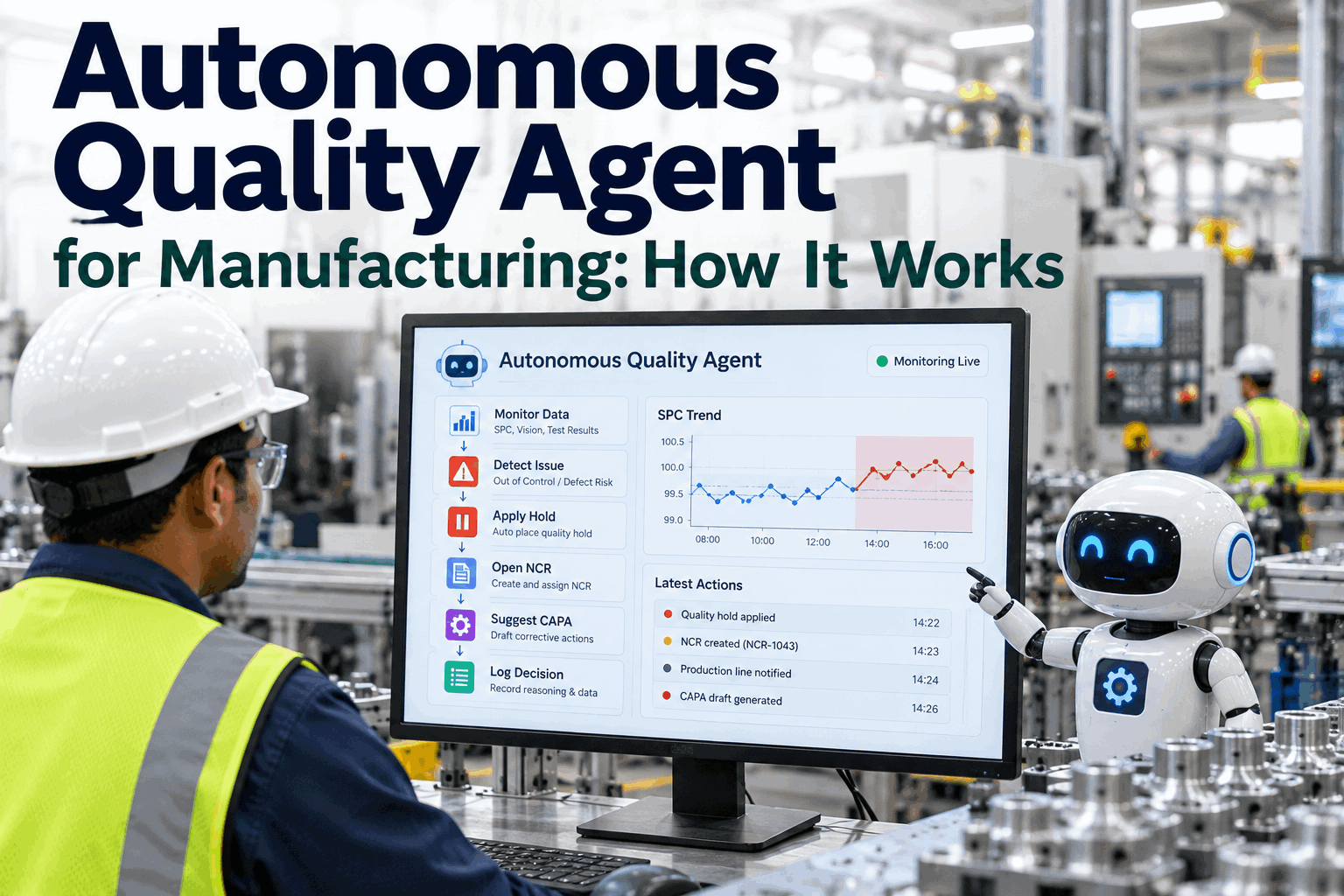
When a control chart signals an out-of-control condition, the clock starts immediately. Every minute between detection and corrective action is a minute during which non-conforming product may continue to be produced, shipped, or released to the customer. For QA Managers in regulated manufacturing environments, the traditional response — an operator notices the chart, calls quality, quality opens a paper log, a supervisor creates an SAP quality notification an hour later with incomplete context — is not a quality system. It is a documentation system masquerading as one. iFactory's live SPC integration with SAP QM resolves this by automatically triggering an SAP QPL01 quality notification the instant a control chart violation occurs — with the full context already attached: recipe version, operator ID, Cpk value, time-series data, and the specific rule that was violated. QA teams that Book a Demo with iFactory consistently describe this capability as the single most impactful quality workflow change they have implemented in their SAP QM environment.
The Cost of the Manual Quality Notification Gap
In most SAP QM implementations, quality notifications are created reactively — after a defect has been confirmed, a batch has been rejected, or a customer complaint has been received. The QPL01 transaction is used to document what happened, not to respond to what is happening. This is a fundamental misalignment between the purpose of the quality notification system and the pace of modern manufacturing. When a control chart goes out-of-control at 2:15 AM on a Saturday night shift, the notification should exist by 2:15 AM — not by Monday morning when the quality engineer arrives and reviews the overnight production log.
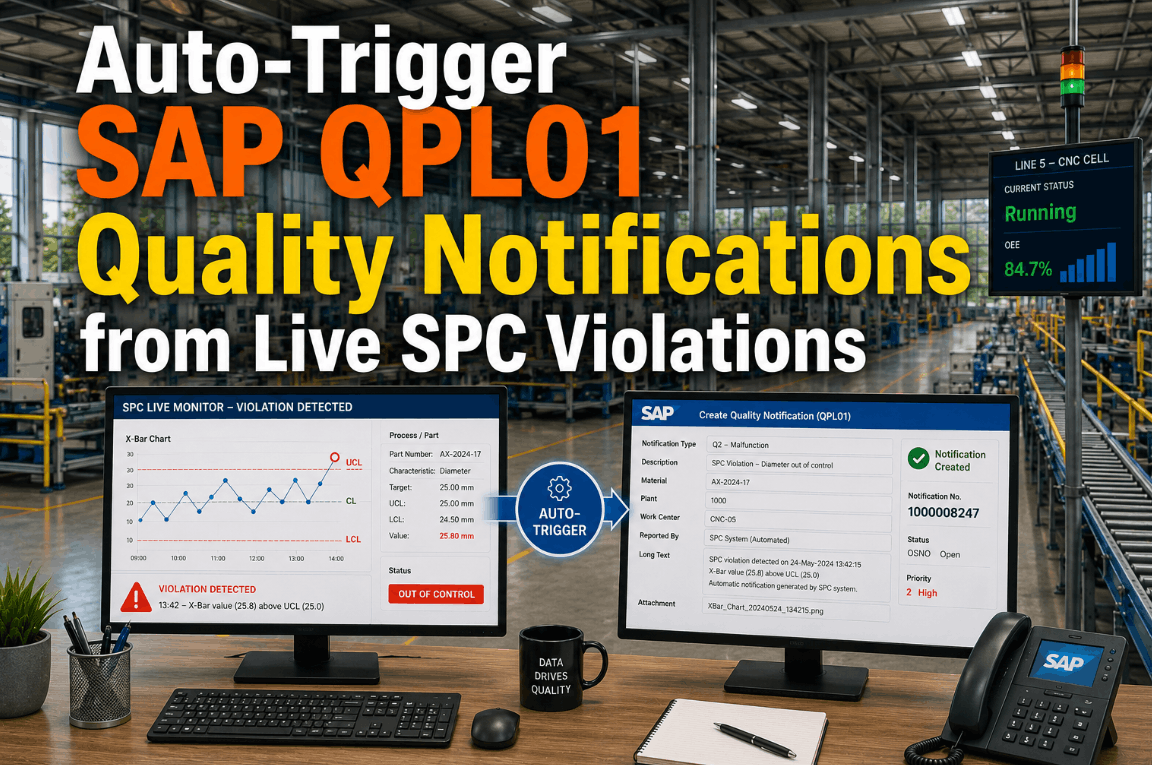
iFactory's real-time SPC engine monitors control charts continuously and evaluates each new sample against all active control rules — Western Electric rules, Nelson rules, or custom rule sets configured by the QA team. The moment a violation is detected, the platform evaluates the violation severity, retrieves the full production context from the active session, and executes the SAP QPL01 notification creation via SAP RFC or REST API — all within seconds of the triggering sample being received from the PLC. QA managers who want to see this trigger sequence demonstrated live can Book a Demo with iFactory's SAP QM integration team.
How iFactory Auto-Fires the SAP QPL01 Notification: Step-by-Step
The following sequence describes the exact technical flow from a live SPC violation to a fully populated, routed, and actionable SAP quality notification. Each step is executed automatically without operator intervention.
Live SPC Sample Received from PLC Pipeline
The iFactory SPC engine receives a new measurement sample from the PLC data pipeline — a gauge thickness reading, hardness value, or any monitored characteristic. The sample includes the PLC SourceTimestamp, asset ID, active production order reference, operator ID from the MES session, and recipe version in force at the time of production.
Control Rule Evaluation Against Active Control Plan
The SPC engine evaluates the new sample against the active control plan — checking for violations of the configured control rules: points beyond 3-sigma control limits, runs of 7+ consecutive points on one side of the centerline, trending runs, stratification patterns, or custom rules defined by the QA team. When a violation is confirmed, the engine records the specific rule violated, the sample value, the subgroup number, and the current Cpk calculated over the most recent rolling window of samples.
Quality Notification Payload Construction
iFactory assembles the QPL01 notification payload by retrieving context from the active production session: the SAP production order number, material code, work center, shift supervisor, operator ID, recipe version and revision date, equipment ID, and customer specification limits. The violation-specific data — control rule name, triggering sample value, calculated Cpk, and a base64-encoded snapshot of the SPC chart at the moment of violation — is appended. This produces a notification that is immediately actionable without requiring anyone to gather supplementary information from other systems.
SAP QPL01 Notification Created via RFC or REST API
The notification payload is submitted to SAP QM using a certified RFC function module call or the SAP REST API, depending on the system version. The QPL01 transaction creates the quality notification with the notification type, defect code, characteristic reference, material, production order, and the full context fields populated. The SAP system assigns the notification number, which iFactory captures and stores in the violation event record — maintaining a bidirectional link between the SPC violation and the SAP quality record for the life of the notification.
Mobile Alert, Routing, and Corrective Action Tracking
Simultaneously with the SAP notification creation, iFactory sends a push notification to the shift QA inspector and shift supervisor via the mobile app — including the notification number, the violated characteristic, and a link to the live SPC chart. The notification is routed in SAP according to the configured quality notification workflow. As corrective actions are completed and the SAP notification is closed, iFactory reads the closure event and updates the violation record — providing a complete history from detection to resolution for every SPC event. Book a Demo to see the full end-to-end notification flow.
What Gets Auto-Populated in the SAP QPL01 Notification
The value of iFactory's auto-trigger is not just speed — it is context completeness. A manually created quality notification is typically sparse: a defect code, a batch number, and a free-text description. An iFactory-triggered QPL01 notification arrives in SAP with all of the following fields already populated.
| QPL01 Field | iFactory Data Source | Typical Manual Entry Status |
|---|---|---|
| Production Order Number | Active SAP production order from MES session | Often missing or entered hours later |
| Material Code & Revision | SAP material master via production order BOM | Entered by QA engineer from memory |
| Work Center / Equipment ID | Asset hierarchy mapping in iFactory | Frequently omitted or incorrect |
| Operator ID | MES session login at time of violation | Rarely captured — shift only is recorded |
| Recipe Version | Active MES recipe download record | Not captured in standard QPL01 workflow |
| Cpk at Time of Violation | Rolling Cpk calculated by iFactory SPC engine | Not available in manual workflow |
| Control Rule Violated | iFactory rule engine detection logic | Not captured — only symptom described |
| SPC Chart Snapshot | Rendered chart image from iFactory at violation moment | Never attached to manual QPL01 |
| Customer Specification Limits | Pulled from SAP sales order attached to production order | Requires separate lookup |
The QPL01 quality notification is the central instrument of SAP QM corrective action management — but its effectiveness depends entirely on the quality of the data it contains. A notification created 90 minutes after an SPC violation, with an incomplete defect description and no operator or recipe reference, is a compliance record, not a quality tool. iFactory's auto-trigger architecture changes the nature of the QPL01 from a documentation artifact to a real-time intervention instrument. When a shift QA inspector receives a push notification at 2:15 AM with the SAP notification number already created, the Cpk already calculated, and the SPC chart already attached, they can make a containment decision in minutes — not reconstruct the event history in the morning. For QA Managers who are responsible for IATF 16949 or ISO 9001 audit readiness, this level of traceability — automatic, complete, and timestamped — represents a significant audit maturity improvement over manual notification workflows. The integration also eliminates the frequent situation where SPC violations are known to the production team but never formally entered into SAP, creating invisible quality event history gaps that surface during customer audits.
Conclusion: Automated Quality Notifications Are a System Design Decision
Relying on operators or quality technicians to manually create SAP quality notifications in response to SPC violations is a system design decision — and it is typically the wrong one. Human-initiated notifications are slow, incomplete, and inconsistently created, especially during high-pressure production situations. iFactory's integration between live SPC monitoring and SAP QPL01 notification creation treats quality event documentation as an automated system output, not a manual data entry task. The result is a quality record system that is complete, instant, and audit-ready at all times — regardless of shift, workload, or operator behavior. QA Managers who are ready to eliminate the gap between their SPC system and their SAP QM notification workflow should Book a Demo with iFactory's SAP QM integration specialists.
Frequently Asked Questions
Does iFactory support all SAP QM notification types, or only QPL01?
iFactory supports configurable notification type mapping — Q1 (complaint), Q2 (defect), and Q3 (activity) notification types can all be triggered automatically based on the violation type and severity configured in the iFactory rule engine.
Can we configure different notification routing for different SPC violation severity levels?
Yes. iFactory supports tiered notification routing — a single out-of-control point may route to the shift QA inspector, while a sustained trend violation routes simultaneously to the QA manager and the production supervisor via configurable escalation rules.
What SAP versions and deployment types are supported for the QPL01 integration?
iFactory integrates with SAP ECC 6.0 and SAP S/4HANA, on-premise and cloud, using RFC function modules for ECC and REST APIs for S/4HANA — covering the major SAP QM deployment architectures in use across manufacturing industries.
Is there a debounce mechanism to prevent multiple notifications from a rapidly oscillating process?
Yes. The iFactory rule engine supports configurable suppression windows — if a notification has been created for a characteristic within a defined time window, subsequent violations are appended to the existing notification rather than creating a new one, preventing notification flooding.
How does iFactory handle SPC violations that occur on non-SAP-connected production lines or legacy equipment?
For lines without SAP production order context, iFactory creates the QPL01 notification using the most recently active order for the asset, flags the notification for manual order verification, and still captures all available SPC context — ensuring no violation goes unrecorded even in partially integrated environments.