A customer request to tighten a specification band is one of the most operationally consequential events in a quality leader's week. The ask sounds simple — move your beverage-can exit temperature from a 336–360°F band to 338–362°F, for example — but the downstream implications touch 30 days of historical Cpk data, active recipe parameters in the PLC, operator training records, and the audit trail your customer will expect to see when they ask how the change was validated. Without a structured workflow, that request bounces between quality, engineering, and operations for days. With iFactory's Recipe Parameter Change Audit, the same workflow completes in under 24 hours — with two-person approval, Cpk validation, and an auto-push to the PLC that eliminates the manual transcription step where most spec errors originate. Book a Demo to see the workflow running on live recipe data.
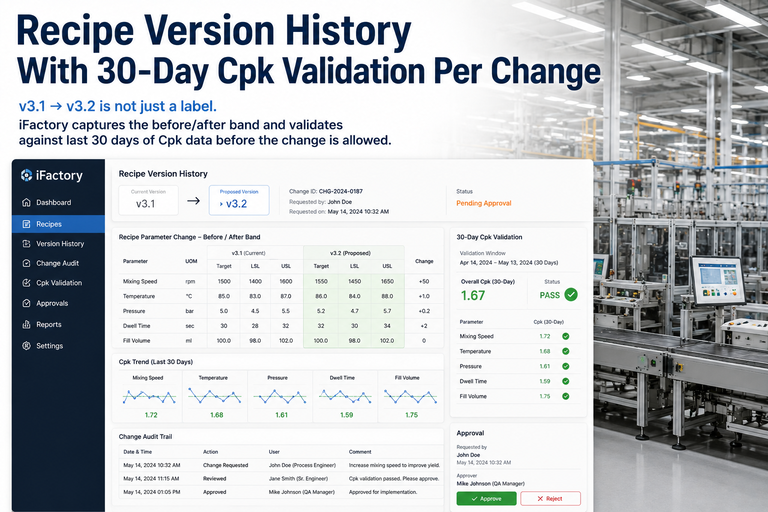
iFactory's Recipe Parameter Change Audit validates the new band against 30 days of Cpk history, routes for two-person approval, and pushes the confirmed recipe to the PLC — without manual intervention or documentation gaps.
Customer-driven specification changes are not rare events in food, beverage, automotive, or industrial manufacturing. They arrive as a supplier quality letter, a phone call from a procurement contact, or a line item in a quarterly business review: the customer wants a tighter process window, and they want documentation that the change has been validated and implemented. The operational challenge is not understanding the request — it is executing it without creating new risk.
The typical quality system response involves extracting the last 30 days of SPC data manually, running a Cpk calculation in a spreadsheet, routing the updated spec sheet through email for approval signatures, and then either verbally communicating the new recipe parameters to production or entering them directly into the HMI — a manual step that is the single highest-risk point in the entire process. That sequence takes 2–4 days in most plants, and the resulting audit trail is fragmented across email threads, spreadsheets, and paper signatures that are difficult to reconstruct in a customer audit or FDA inspection.
iFactory closes every gap in that sequence — from spec change request intake through PLC push — in a single, traceable workflow that a quality leader can initiate, approve, and close within one shift. Book a Demo to walk through the end-to-end workflow in detail.
iFactory's Recipe Parameter Change Audit is a structured, five-stage workflow that handles every step of a customer-driven spec change — from request intake through validated implementation — with a complete, timestamped audit record generated automatically at each stage. The workflow below uses the beverage-can exit temperature example as a reference, but the same logic applies to any continuous process parameter where a customer has requested a tighter control band.
The quality leader creates a Spec Change Request in iFactory — entering the current band (336–360°F), the requested band (338–362°F), the customer reference, and the target implementation date. The system immediately flags the change type (tightening vs. shifting vs. expanding) and identifies all affected recipe parameters and production lines. No spreadsheet, no email chain — the request is the workflow record from minute one.
iFactory automatically pulls 30 days of production data for the affected parameter from the plant historian. The system calculates Cpk under the current band and recalculates Cpk under the proposed new band — generating a before/after Cpk comparison report that shows the quality leader exactly whether the process is capable of holding the tighter specification at current operating conditions. If the before-Cpk is below 1.33 under the new band, the workflow surfaces a risk flag and recommended corrective actions before the change proceeds.
The Cpk validation report, the before/after spec comparison, and the affected recipe parameters are automatically packaged and routed to the two designated approvers — typically the Quality Leader and the Production or Process Engineering Manager. Each approver reviews the validation data, adds comments if needed, and provides a timestamped digital signature. The recipe change cannot proceed until both approvals are recorded. There is no workaround, no verbal override, and no way for the change to advance without a complete approval chain in the system.
Once dual approval is confirmed, iFactory generates the updated recipe with the new parameter band, displays a final side-by-side comparison of the old and new recipe states for review, and presents the implementation window options (immediate, next scheduled CIP, next shift start). The quality leader selects the implementation window, and the system locks the recipe for push — preventing any further edits without a new approval cycle.
At the selected implementation window, iFactory auto-pushes the approved recipe parameters directly to the PLC — eliminating the manual HMI entry step where transcription errors most commonly occur. The push is timestamped, logged against the original spec change request, and immediately begins monitoring the process against the new band. Post-implementation Cpk data begins accumulating automatically, and iFactory flags any early deviation from the tighter spec within the first production run so the quality leader can respond before customer product is affected.
The table below compares the typical manual spec-tightening process used in most U.S. manufacturing plants against iFactory's structured workflow — across the dimensions that matter most to quality leaders responsible for audit readiness, customer response time, and change control integrity.
| Process Step | Manual / Current State | iFactory Workflow | Risk Reduction |
|---|---|---|---|
| Request Documentation | Email or paper form, no structured intake | Structured digital request — immediate workflow record | High — no documentation gap from minute one |
| Cpk Validation | Manual spreadsheet extraction — 4–8 hours | Automated 30-day Cpk pull — <30 minutes | High — eliminates calculation errors and delays |
| Before/After Cpk Comparison | Often skipped or informal verbal review | Auto-generated before/after report in the workflow | High — risk visibility before approval |
| Approval Process | Email signatures, no enforcement of two-person rule | System-enforced two-person digital approval — no bypass | High — change control integrity guaranteed |
| Recipe Implementation | Manual HMI entry — transcription errors possible | Auto-push to PLC — zero manual entry at implementation | High — eliminates highest-risk step in the process |
| Post-Change Monitoring | Operator awareness only — no structured follow-up | Automatic Cpk monitoring begins on first post-change run | Medium-High — early warning on new band performance |
| Audit Trail | Fragmented — emails, paper, and verbal records | Single timestamped record from request to PLC push | High — complete chain of custody for customer audits |
In quality leadership roles across food, beverage, and industrial manufacturing, the spec-tightening request is a scenario that separates plants with mature quality systems from those still operating on tribal knowledge and manual change control. The consistent feedback from quality leaders who have deployed iFactory's Recipe Parameter Change Audit centers on three outcomes that manual processes could not reliably deliver.
The way a manufacturing plant handles a customer-driven spec change reveals the actual maturity of its quality system — not the documented procedures, but the operational reality. A plant with mature change control executes the request in under 24 hours, produces a complete validation package without scrambling, and pushes the new recipe to the line without a single manual entry at the HMI. A plant without it takes three days, produces fragmented documentation, and introduces avoidable risk at the implementation step.
iFactory's Recipe Parameter Change Audit is the structured system that turns the second scenario into the first — for any quality leader managing customer-driven spec changes on continuous process parameters. The 30-day Cpk validation, two-person approval enforcement, and auto-push to PLC are not incremental improvements to a manual process. They are a replacement of the manual process with one that is faster, lower-risk, and fully auditable from request intake to implementation close.
iFactory connects your historian, recipe management, and PLC into a single spec change workflow — so the next customer request becomes a demonstration of your quality system's maturity, not a scramble to assemble records after the fact.