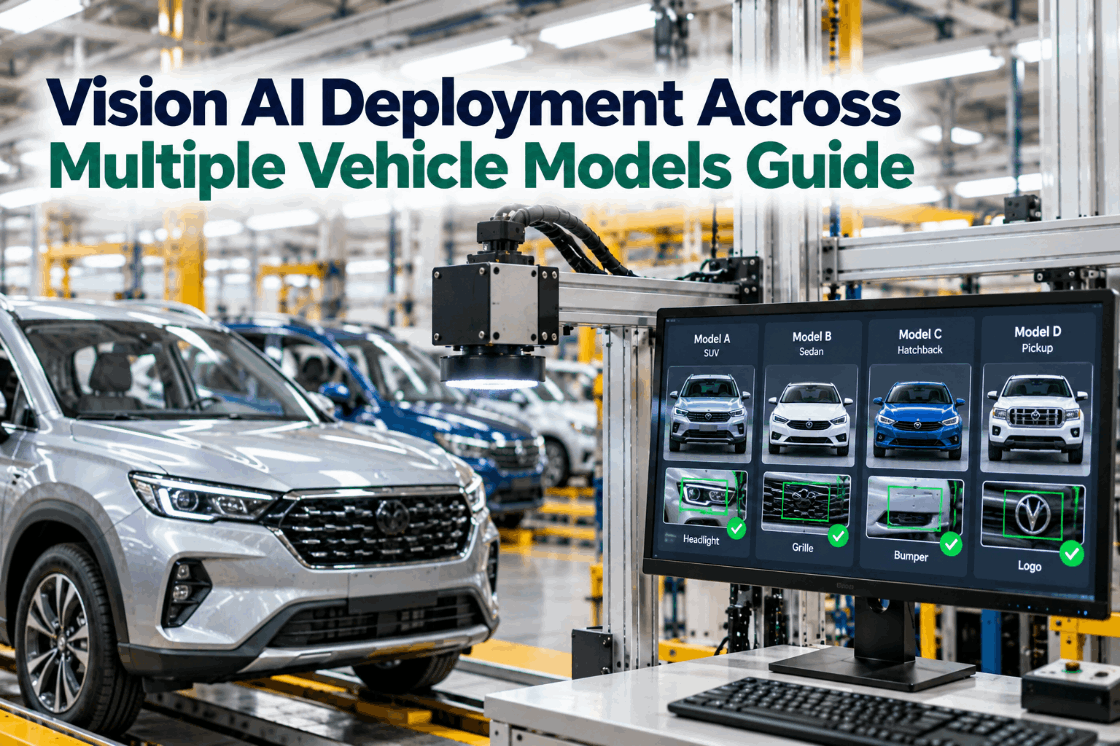
Few automotive plants build one vehicle. A single line may carry several models, each in several trims, colours and option packages, with supplier changes and model-year changes layered on top. A vision system trained on one variant quickly meets parts it has never seen. Build a separate model for each variant and you end up maintaining dozens, each drifting in its own way. This guide explains how to deploy vision AI across multiple vehicle models without that sprawl: shared base models with transfer learning, variant handling driven by build data, versioning under change control, and a shadow-mode rollout for every new launch. To see a multi-model deployment in practice, book a short walkthrough.
Vision AI Across Multiple Vehicle Models: A Deployment Guide for High-Mix Lines
Shared base models, fine-tuned per model and trim, driven by build data and released under version control, so every variant is covered without starting over.
Why One Model per Variant Does Not Scale
The first vision project on a line usually starts with one vehicle and one station. It works. Then the second model arrives, then a new trim, then a new colour. The easiest response is to train another model for each. Within a year, a plant can find itself maintaining dozens of models, each with its own training data, thresholds and quirks, and nobody sure which version runs where.
That sprawl causes three problems. Accuracy becomes uneven, because some variants get more attention than others. Launches become slow, because each new variant starts from zero. And change control becomes almost impossible, because every model is a separate process to validate. IATF 16949 clause 8.5.6.1 expects changes that affect product realization, including software changes, to be controlled and validated before use. That is hard to do across dozens of unrelated models.
A multi-model strategy keeps the number of truly separate models small and handles variation through shared learning and build data. We can map your current model count on a call.
Three Ways to Structure Models Across Variants
There are three common structures for multi-variant vision. Each has a place, and most plants end up with a mix.
Simple to start and easy to explain, but multiplies training, validation and maintenance with every new trim.
Easy to manage, but can lose accuracy on rare variants and makes every change affect every vehicle.
A strong base model learns the common features; light fine-tuning adapts it to each model or station.
The same defect model runs on regions defined for each body style, so geometry changes do not confuse it.
Presence checks read the build sheet, so the model knows which parts each trim should carry.
Measurement stations use rules, cosmetic stations use shared base models, presence uses build data.
The structure also decides how change spreads. With a universal model, retraining for one trim can shift results on every other vehicle, so each release must be validated everywhere. With a shared base and light fine-tuning per station, a change can be limited to the stations that need it, which keeps validation focused and releases faster.
For most high-mix lines, a shared base with region-aware and build-driven logic gives the best balance of accuracy and manageability. Our engineers can recommend a structure per station.
Launching a New Model Without Starting From Zero
A new vehicle launch is the hardest moment for vision AI. Defect examples are scarce, because the line has only just started. Transfer learning solves this by starting from a model that already understands paint, welds, trims and fasteners from other vehicles, then adapting it with a smaller set of images from the new one.
Use the base model trained across existing vehicles and stations.
Capture good and defective parts from pre-series and early builds.
Adapt the model to the new geometry, materials and colours.
Score every vehicle beside current checks without making live calls.
Pass the attribute study, record approval, then go live.
How many images are needed depends on how different the new model is. A new trim on an existing body usually needs far fewer than a new body style with new materials. The shadow period gives real data on that question before any live decisions are made.
Launch planning should start with pre-series builds, when images are easiest to collect. We build image capture into the launch plan.
Using Build Data to Tell the Model What to Expect
Many variant problems are not about recognizing defects at all. They are about knowing what the vehicle is supposed to look like. Build data answers that question, and it already exists in your MES.
Reading build data turns many would-be false alarms into correct passes, and many would-be misses into clear failures. The MES link is a standard part of every integration.
Model Versioning and Change Control
Every model release changes an inspection process. Treat it the way you would treat a change to a gauge or a control plan: versioned, validated, approved and recorded.
| What is versioned | What is recorded | Why it matters |
|---|---|---|
| Model weights | Version number, training date, base model | Know exactly which model made each call |
| Training data | Image sets, labels, sources and dates | Reproduce or audit any release |
| Thresholds and regions | Per class and per station settings | Sensitivity changes are changes too |
| Validation results | Attribute study scores on the master set | Evidence the release performs |
| Approval | Who approved, when, for which stations | Accountability under change control |
| Deployment | Where each version runs and since when | Traceability from call to model |
Each image stored with a vehicle should carry the model version that judged it. When a warranty claim or customer audit asks how a vehicle was inspected, the answer is a lookup, not an investigation.
Where your customer requires notification or approval of process changes, the same records support that step. Our specialists can align releases with your change procedure.
Shadow Mode, Release and Rollback
New models should earn their place on the line before they make live decisions. A staged rollout makes that routine.
The new version scores every vehicle beside the current one. Its calls are logged but not acted on.
Disagreements are reviewed by quality engineers, and the attribute study is run on the master set.
The release is approved for named stations, with the results attached to the record.
The new version makes live calls, with extra monitoring for the first days.
The previous version stays available and can be restored in minutes if needed.
Shadow mode is especially valuable at model launch and after supplier changes, when the risk of unexpected behaviour is highest. It also builds trust with operators, who can see the new version agreeing with them before it takes over.
The same staged release works for every variant, which is what keeps a multi-model system manageable. See it in a demo.
Multi-Model Launch Checklist
Use this checklist for every new model, trim or major supplier change.
The checklist is built into the release workflow, so a version cannot go live with a step missing. Ask our team for a copy.
How iFactory Handles Multiple Vehicle Models
Common learning reused across vehicles and stations.
New models and trims adapted from a small image set.
VIN, trim, colour and options read from MES.
Every version stored with data, results and approval.
New versions scored beside live ones before release.
Previous versions restored in minutes when needed.
It works with your MES and existing vision stations. See how your model and trim mix would be structured in a session.
Bring Your Next Vehicle Launch Into Vision Fast
Choose an upcoming model or trim. We fine-tune from our base models, capture images during pre-series builds and run the new version in shadow before launch.
Model fine-tuned from the sedan base on 1,200 pilot images. Running in shadow beside the current release.
A New Trim Moving Through Shadow Mode
This exchange shows how a vision engineer might manage a new trim launch with iFactory.
iFactory ships as a pre-configured NVIDIA AI server, racked and ready with the multi-model vehicle inspection models loaded. Rack it, plug in power and Ethernet, and the AI is live on your network. Our scope covers cameras and lighting at inspection stations across lines, PLC/SCADA and MES integration, cabling and network setup, operator and quality team training, and 24×7 remote monitoring.
Server installed, cameras and lighting mounted, PLC and MES links live, existing defect images and records loaded.
Models trained on your own parts, paint and variants, then run in shadow on one line with your quality team reviewing every call.
Rollout to the agreed stations under your change control, team training and 24×7 remote monitoring in place.
Hardware, software and integration come as one package. For pricing across your lines, contact our sales team.
Frequently Asked Questions
Use shared base models fine-tuned for each model or station, read build data from MES so each station knows what to expect, define inspection regions per body style, and release every version through validation and change control.
It starts from a model already trained on similar parts and surfaces, then adapts it to a new vehicle with a smaller set of images. It shortens launches when defect examples are scarce.
The vision system reads the VIN and build sheet, so it knows which parts and features each vehicle should have. Expected variation is passed, and missing or wrong parts are flagged.
Record model weights, training data, thresholds, regions, validation results, approval and deployment location for every release, and store the model version with each inspection image.
A new model version scores vehicles beside the current one without making live decisions. Disagreements are reviewed before the new version is approved and released.
A typical rollout takes 6–12 weeks for the first line, with new models and trims added afterward through fine-tuning and shadow release. Plan it with our team.
Cover Every Model and Trim Without Starting Over
iFactory adapts shared base models to each vehicle, reads build data at every station and releases each version under change control, so new launches reach vision fast.
Every release is versioned, validated and approved under change control before it makes live calls.