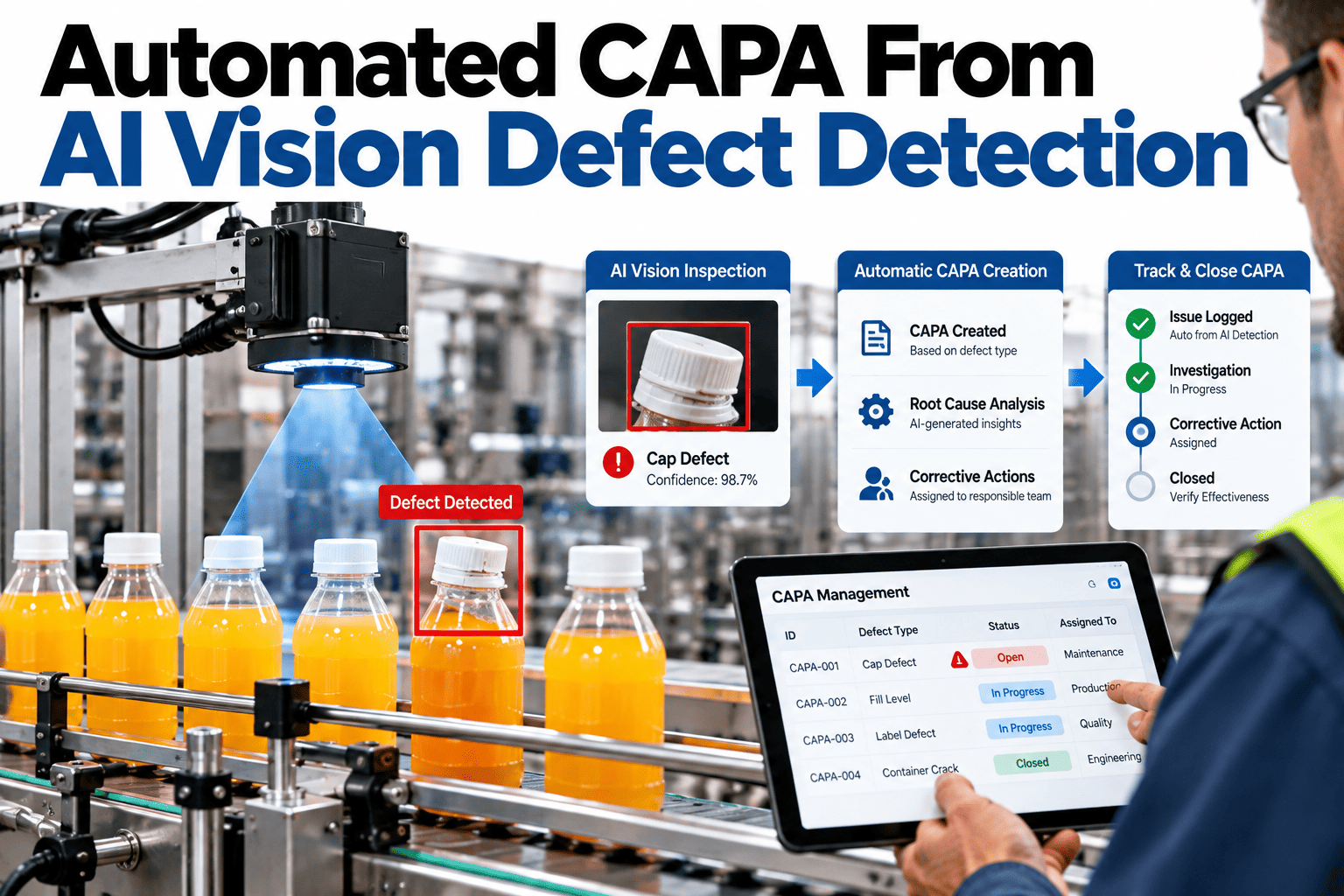
A corrective and preventive action record is supposed to start the moment a defect pattern is confirmed, yet in most plants it starts whenever someone gets around to opening one, often days after the defect was first seen. Vision systems already catch the defect in real time, but the CAPA that should follow it still waits on a quality engineer to notice a trend, pull records and fill out a form. Closing that gap between detection and documented action is where plants recover the most from an automated CAPA process, and teams can see this traced end to end on their own defect data in a short session.
From a Flagged Defect to a Documented Corrective Action, Automatically
iFactory AI turns vision-confirmed defect patterns directly into CAPA records, with root cause context attached from the start.
Why Most CAPAs Start Too Late
A defect has to clear several informal hurdles before it becomes a CAPA: someone has to notice it, decide it is a pattern rather than a one-off, and then find time to open the record. Each hurdle adds days.
| Trigger Source | Typical Lag to CAPA | Risk |
|---|---|---|
| Manual trend review | Days to weeks | Pattern only caught at the next scheduled review |
| Customer complaint | Weeks | Defect has already shipped and repeated |
| Audit finding | Months | Root cause evidence may no longer exist |
| Vision-triggered, automated | Same shift | Lowest, since evidence is attached at detection |
See How Fast a CAPA Opens From Your Own Vision Data
Book a 30-minute session and iFactory AI will show a defect pattern turning into a CAPA record on your own line.
What Gets Lost When CAPAs Start Late
Evidence degrades quickly once a few days pass. The specific machine parameters at the moment of the defect, which operator was running the station, what the tension or temperature reading showed, all of it is far easier to capture at the moment of detection than to reconstruct afterward from memory and partial logs.
A CAPA opened late often ends up documenting the symptom rather than the actual root cause, because the evidence that would have pointed to the cause is simply gone by the time anyone opens the record.
What Automated CAPA Actually Automates
Automation does not replace the quality engineer's judgment. It removes the manual steps that stand between a confirmed pattern and a documented record.
Engineer reviews reports, notices a repeat defect, pulls images and logs separately, opens a CAPA form, and attaches evidence from memory.
Pattern detection flags the trend, a CAPA record opens pre-filled with defect class, images and timestamps, and routes to the right owner for review.
Open to Verified Closed: Five CAPAs Compared
Time to close is only half the story. A CAPA closed without a verification step tends to reopen later as the same defect returns. The timeline below shows illustrative open and verified-closed points for five CAPAs.
Signals Your CAPA Process Needs Automation
These patterns tend to show up well before anyone calls the CAPA process broken outright.
Writing a Corrective Action That Actually Holds
Opening a CAPA faster only helps if the corrective action itself addresses the real cause rather than the easiest fix available. A tightened tolerance or a reminder email rarely holds up the way a genuine process or tooling change does.
Confirm the Root Cause First
Use the attached evidence, images, timestamps and process data, to confirm the actual cause before assigning an action, not just the most visible symptom.
Match the Action to the Cause
A tooling wear issue needs a maintenance action, not an operator retraining session, and vice versa. Mismatched actions are a common reason CAPAs reopen.
Set a Measurable Verification Target
Define what rate drop, over what period, counts as verified before the action is implemented, not after, so closure isn't a judgment call.
Where iFactory AI Fits
Vision detection, pattern analysis and CAPA documentation usually sit in separate systems. iFactory AI connects them so a pattern becomes a record automatically.
Pattern-Triggered CAPA
A recurring defect pattern opens a CAPA pre-filled with evidence, not a blank form.
Root Cause Tagging
Machine state, tension or process data at the moment of detection is attached automatically to support root cause review.
Verification Tracking
A CAPA is not marked closed until the defect rate for that pattern has actually dropped and held.
Audit-Ready Records
Every CAPA carries a full timeline from detection to verified closure, ready for review.
Reviewed by iFactory AI's Quality Systems team for alignment with standard CAPA practice. Automated triggering speeds up documentation and evidence capture, but the corrective action itself still needs engineering judgment, and verification criteria should be set to match your own quality system before automated closure is enabled.
Frequently Asked Questions
Does an automated CAPA skip human review?
No, the system opens and pre-fills the record with evidence, but a quality engineer still reviews, assigns the corrective action and signs off. Automation removes the manual data-gathering delay, not the decision itself. Support can walk through where review stays in your hands.
How is a recurring pattern defined versus a one-off defect?
Thresholds are set per defect class, typically a count or rate within a time window, and tuned to avoid opening a CAPA on normal process variation. These thresholds are configured during rollout against your own historical defect data.
Can this connect to our existing quality management system?
Yes, CAPA records are built to feed into existing QMS platforms rather than live in a separate silo, so your audit trail stays in one place. See a sample integration mapped to your current system in a short walkthrough.
What counts as verified closure?
A CAPA is marked verified once the tagged defect rate has dropped and held below a set threshold for an agreed period after the corrective action, rather than closing the moment the action is implemented.
Does this work with inspection data beyond vision systems?
Vision detections are the primary trigger covered here, though manual inspection logs and sensor-based quality checks can feed the same pattern engine where they already exist. Ask support how other data sources fit in.
Turn Defect Patterns Into Documented Action, Not Backlog
iFactory AI opens CAPAs from confirmed defect patterns automatically, with evidence attached from the start. Book a walkthrough on your own data.