Every hour your operators hand over a clipboard, your facility bleeds money. Paper shift logs — scrawled in three different handwritings, missing timestamps, filed in a binder no one reads — are not a minor inconvenience. They are a structural liability. Unplanned downtime that traces back to a missed shift note costs manufacturers an average of $260,000 per hour. When the night crew fails to document a compressor vibration anomaly and the day crew inherits a failure in progress, that is not a communication problem. That is a process architecture problem — and it is entirely preventable with a digital shift logbook integrated with real-time SCADA data.
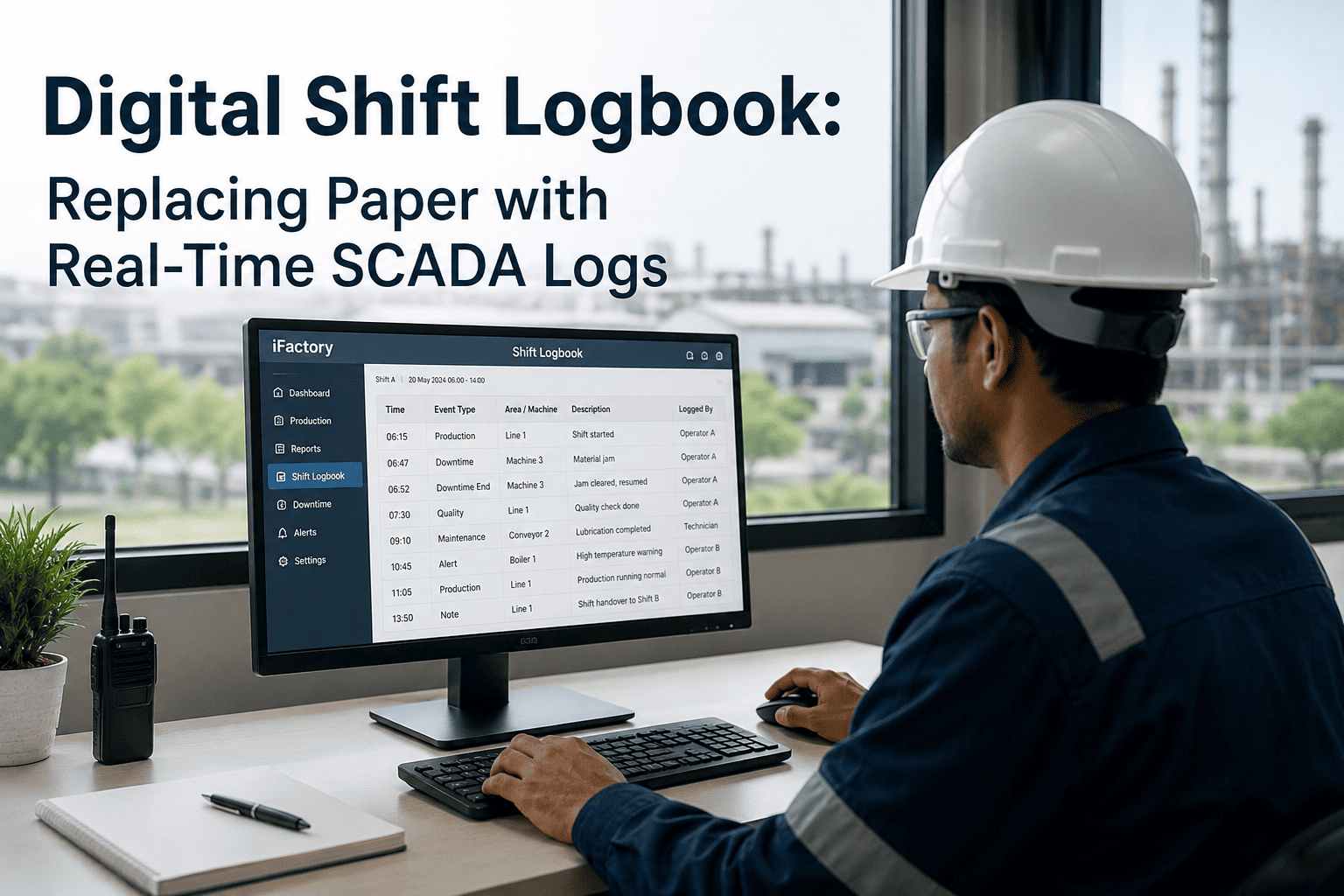
Digital Shift Logbook: Replacing Paper with Real-Time SCADA Logs
The Hidden Cost of Paper Shift Logs in SCADA-Connected Facilities
Most plant managers underestimate what paper shift logs actually cost. The visible problem — illegible handwriting, missing entries — is manageable. The invisible problem is catastrophic: critical machine events captured in SCADA historians never make it into the shift record. An operator notices unusual current draw on a conveyor motor. They intend to write it down. The end-of-shift rush means it does not happen. The next crew starts without context. Four hours later, the motor fails. The root cause analysis cites "no warning" — but the warning existed in the SCADA data, invisible and unshared.
A digital shift logbook integrated with your SCADA layer closes this gap permanently. Every alarm, every threshold breach, every operator-acknowledged event is automatically appended to the shift record. The incoming crew sees exactly what the departing crew saw — plus the machine data to back it up.
Legacy Friction vs. Optimised Excellence: The Shift Handover Gap
| Dimension | Legacy Paper Logbook | iFactory Digital Shift Logbook |
|---|---|---|
| Event Capture | Manual — depends on operator memory and discipline | Automatic pull from SCADA, historians, and MES in real time |
| Handover Duration | 6–12 minutes of verbal briefing with no audit trail | 90-second structured digital handover with full history access |
| Alarm Traceability | Alarms acknowledged in SCADA but not logged in shift record | Every alarm automatically linked to shift log entry with timestamp |
| OEE Visibility | OEE calculated after the fact — no shift-level granularity | Live OEE per shift, per line, per crew with trend comparison |
| Compliance | Paper binders — searchable only by physical page flip | ISO 55000, FDA 21 CFR Part 11, and OSHA audit-ready exports |
| Root Cause Analysis | Reconstructed from memory, often inaccurate or incomplete | Machine timeline auto-assembled from SCADA + logbook entries |
| Knowledge Retention | Leaves with the operator at end of shift | Searchable institutional knowledge base — permanent and indexed |
| Escalation Speed | Phone calls and manual alerts — average 22-minute delay | Automated escalation routing with mobile push in under 60 seconds |
How SCADA Integration Transforms the Shift Record
A digital shift logbook without SCADA integration is simply a faster clipboard. The operational intelligence emerges when machine data flows automatically into the log — without relying on an operator to remember, interpret, or transcribe it. iFactory's MES Workflow module connects to OPC-UA, MQTT, and REST endpoints from leading SCADA platforms including Ignition, WinCC, FactoryTalk, and Wonderware. Once connected, the shift log becomes a living machine narrative: alarms, setpoint deviations, production counts, downtime codes, and energy spikes are all contextualised within the shift timeline.
This means your maintenance engineers stop reconstructing failure timelines from imperfect memory. They open the shift log, filter by asset, and see the exact sequence of events — machine-sourced, timestamped, and operator-annotated — that preceded the incident. Root cause analysis that once took days takes minutes.
- Incoming crew briefed in 90 seconds with full machine context
- Open issues flagged and prioritised automatically
- No verbal Chinese whispers — every event is documented
- Shift patterns identified across weeks and months
- Eliminate manual shift report compilation — saves 45 min/shift
- Auto-generate compliance exports for audits and inspections
- Reduce repeat failures caused by undocumented recurring issues
- Cut supervisor time spent chasing shift data by up to 60%
- OEE improvement of 4–9% in first 6 months post-deployment
- Predictive maintenance alerts surfaced within shift context
- Cross-shift performance benchmarking drives crew accountability
- Institutional knowledge retained as operators rotate or retire
Five Capabilities That Separate Digital Shift Logbooks from SCADA Alone
Your SCADA system already captures machine data. So why do you still need a dedicated digital shift logbook? Because SCADA historians are designed for engineers — not for shift handover, operator annotation, maintenance escalation, or cross-functional reporting. The digital shift logbook bridges operational technology data with the human layer of plant management. Here is what SCADA alone cannot deliver:
Implementation: What Deployment Actually Looks Like
Manufacturers frequently delay digital shift logbook projects because they assume a lengthy, disruptive rollout. The reality is the opposite. iFactory's MES Workflow module deploys alongside existing SCADA and CMMS systems without any rip-and-replace. Operators continue their current workflows while the digital layer adds structure and automation on top.