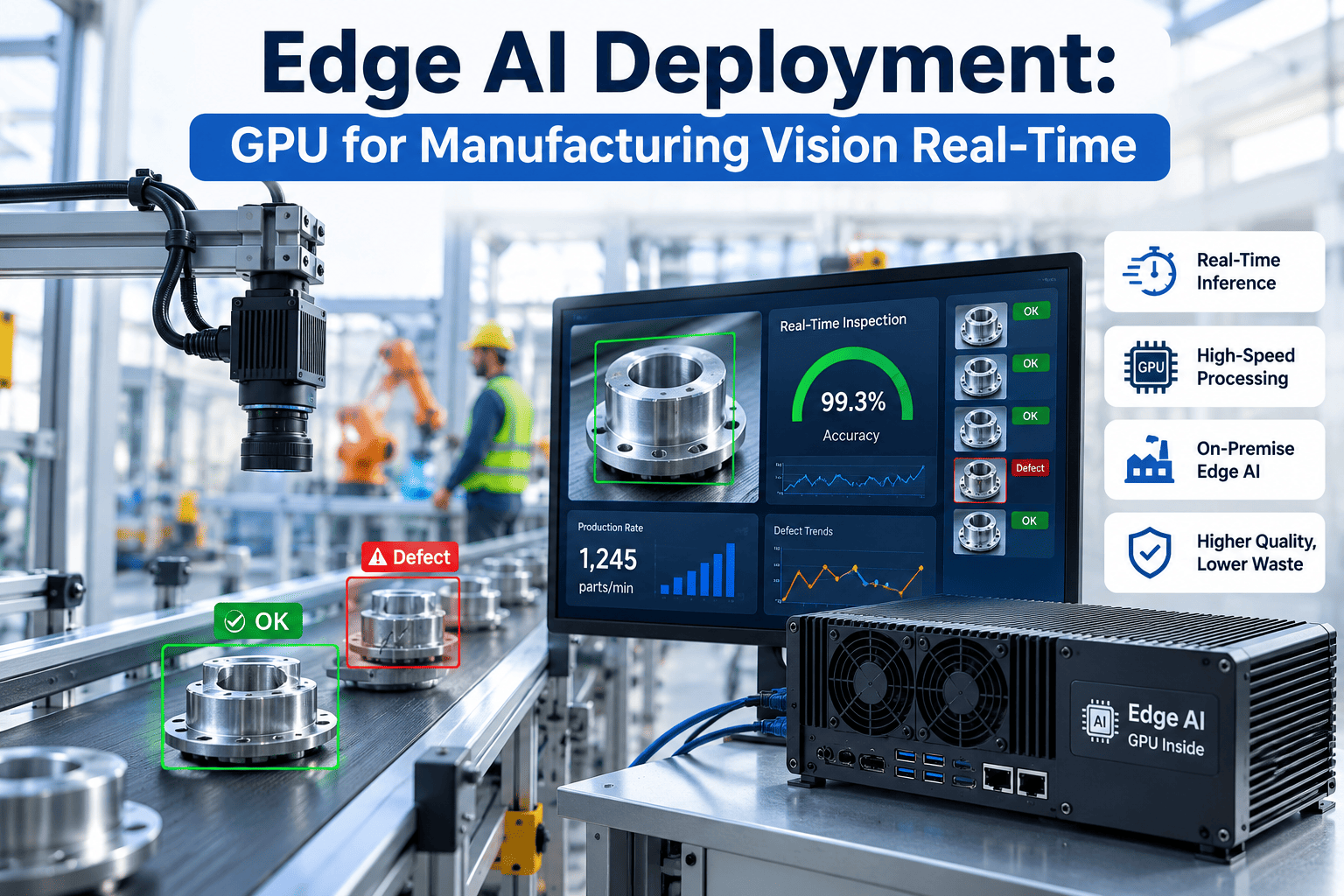
A vision inspection camera generating twenty frames a second doesn't have time to wait for a round trip to the cloud before deciding whether to reject a part — but the AI model that inspects those frames gets better every time it trains on a larger, more diverse dataset than any single plant can produce alone. This is the exact tension an edge computing gateway is built to resolve: keep the millisecond decisions local, on the plant floor, while still feeding the cloud enough data to keep improving the model over time. Getting that split right, rather than defaulting entirely to one side or the other, is what separates a responsive, resilient deployment from one that's either too slow to matter or too disconnected to improve. If you want this balance mapped against your own line, book a demo with iFactory.
Fast Where It Matters. Smart Where It Counts.
An edge computing gateway keeps millisecond decisions on the plant floor while cloud-based training keeps the model improving over time.
What Belongs at the Edge, and What Belongs in the Cloud
The split isn't arbitrary — it follows directly from how time-sensitive a decision is versus how much data and compute it needs to improve. Getting this mapping wrong in either direction is the most common cause of a disappointing edge AI deployment.
- Real-time inference for reject/accept decisions
- PLC-triggered image capture and inspection
- Safety-critical alarms and interlocks
- Buffering data during network interruptions
- Model retraining across multiple lines and plants
- Long-term trend analysis and cross-site benchmarking
- Large-scale historical storage and audit records
- Fleet-wide software and model version management
Why Round-Trip Latency Rules Out Cloud-Only Inference
A cloud round trip for every inspection decision sounds workable until the actual numbers are laid out against a real cycle time budget.
A line running at 300 units per minute has roughly 200 milliseconds of cycle time per unit — a cloud round trip alone can exceed the entire budget before the reject actuator ever receives a signal.
Find the Right Edge-Cloud Split for Your Line
iFactory designs the gateway architecture around your actual cycle time budget and network conditions — not a generic template.
The Feedback Loop That Keeps the Model Improving
A gateway isn't just a one-way local processor — it's also the mechanism that keeps the cloud-trained model current with what's actually happening on the floor.
Local inference runs continuously
The gateway scores every unit against the current model version, entirely within the plant network, with no cloud dependency for the pass/fail decision itself.
Edge cases get flagged and queued
Low-confidence results and operator-overridden decisions are tagged locally and queued for upload rather than discarded.
Cloud retrains on aggregated data
Flagged cases from multiple lines or sites feed a retraining cycle that improves the model on patterns no single line generates enough data to learn alone.
Updated model pushed back to the gateway
A validated new model version is deployed to the edge gateway during a scheduled window, without interrupting live inference on the running line.
What Happens When the Network Goes Down
Plant networks are not always reliable, and an architecture that depends on constant cloud connectivity for basic operation is fragile by design. A properly configured edge gateway keeps running through an outage.
Inference continues uninterrupted
The current model version runs entirely from local memory, so a lost connection to the cloud has zero impact on live inspection decisions.
Data buffers locally
Inspection results, images, and flagged edge cases queue on local storage until connectivity returns, with no data loss during the outage window.
Sync resumes automatically
Once the network reconnects, buffered data uploads automatically in the background without requiring manual intervention from plant staff.
Frequently Asked Questions
What hardware does an edge computing gateway typically require?
The right hardware tier depends on the inference workload — a simple presence-check model runs comfortably on an industrial mini-PC, while a high-resolution defect detection model at line speed often needs a GPU-equipped edge device. The gateway hardware should be sized against the specific model complexity and frame rate required, rather than defaulting to the highest tier available, since oversizing adds unnecessary cost across every station.
How much local storage does the gateway need for buffering during an outage?
This depends on expected outage duration and data volume per unit, but most plants provision enough local storage to buffer several hours to a full shift of flagged images and inspection results without any data loss. Longer expected outage windows, such as in remote facilities with less reliable internet service, warrant proportionally larger local buffers.
How often does the model actually need to be retrained and pushed back to the edge?
Retraining cadence depends on how quickly the process or product mix changes, but many plants settle into a monthly to quarterly retraining cycle once the initial model has stabilized, with faster cycles during the first few months of deployment as edge cases accumulate. A managed retraining pipeline handles this cadence automatically once the feedback loop is configured.
Can one gateway serve multiple cameras or stations on the same line?
Yes, a single sufficiently sized edge gateway can typically serve several cameras or inspection points on the same line, provided the combined inference workload stays within the hardware's processing budget for the required frame rate. This is often more cost-effective than a dedicated gateway per station, though very high-throughput lines may still warrant distributing the workload across more than one gateway.
How do we figure out the right edge-cloud split for our specific process?
Start by mapping your actual cycle time budget against the latency each processing option introduces, then classify each decision your system makes as either time-critical or improvement-focused. Book a demo to walk through that mapping exercise against your specific line speed and network conditions.
Design a Gateway Architecture Built for Your Cycle Time
Book a 30-minute demo and see how iFactory balances local speed with cloud-scale model improvement on your own line.