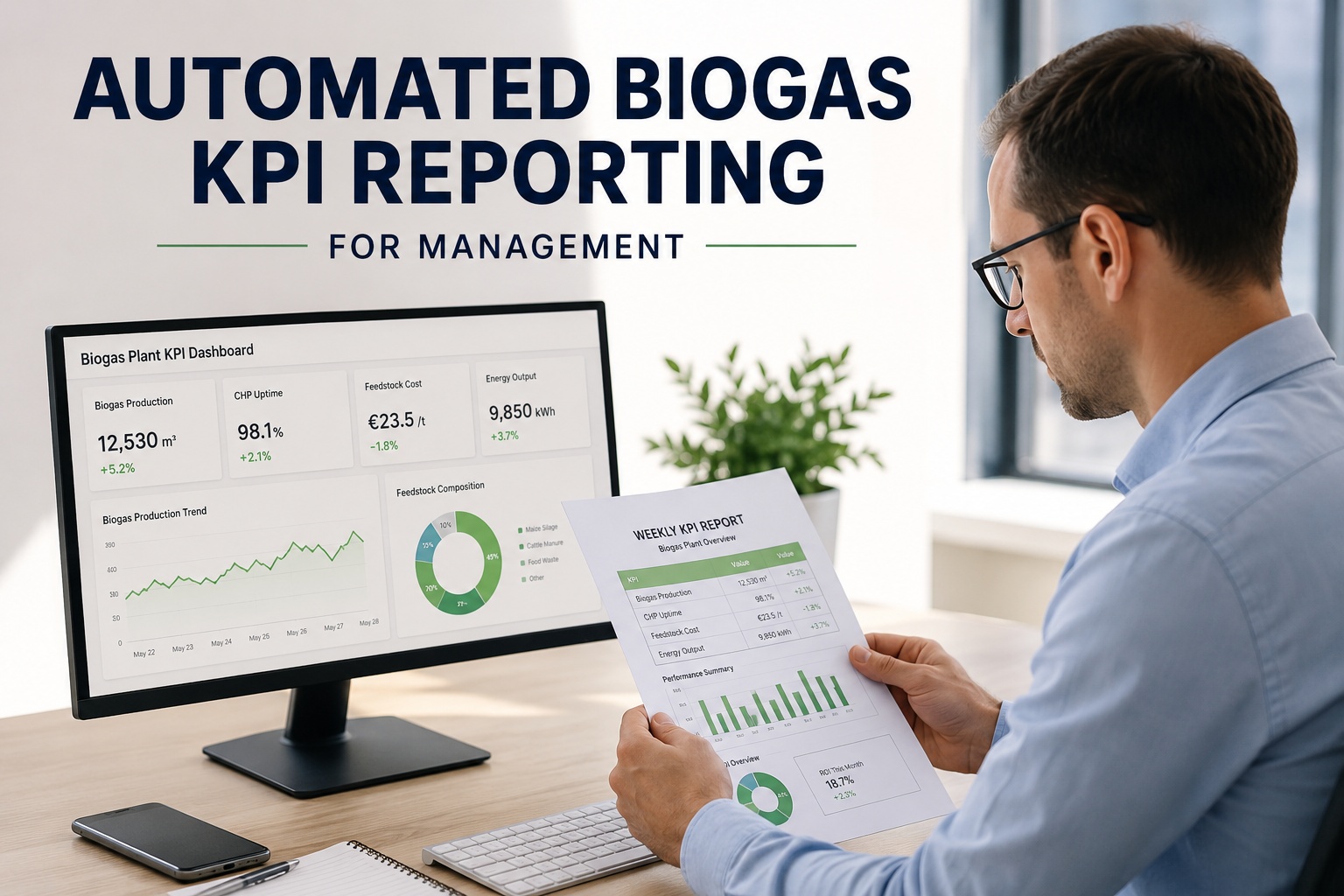
A biogas plant generating 47 operational data streams — gas yield, CHP uptime, feedstock consumption, VFA trends, electricity export, maintenance hours — but delivering management a manually assembled spreadsheet two weeks after month-end isn't reporting, it's archaeological excavation. By the time stakeholders read the numbers, the plant has already run another 14 days without visibility into what's working and what's failing. iFactory's automated reporting platform transforms raw operational data into structured KPI reports — gas yield summaries, CHP availability analysis, feedstock cost breakdowns and ROI calculations — formatted as professional PDFs and delivered to management inboxes on a fixed schedule without a single manual step. The management team that was blind to plant performance now receives weekly intelligence before Monday morning's first meeting. Book a demo to see automated KPI reporting configured for your biogas plant.
How AI Transforms Reporting from Manual to Automated
The transformation below shows the five-stage evolution from traditional manual reporting to automated KPI intelligence — integrating live data aggregation, KPI calculation, narrative generation, PDF formatting, and scheduled stakeholder delivery.
Automated Reporting Architecture — Five-Layer Integration
The pipeline below shows the complete automated reporting stack — from live data ingestion through KPI calculation, narrative generation, PDF formatting, scheduled delivery, and engagement tracking.
Continuous pull from SCADA historian (gas flow, CHP runtime, electricity export, temperature, pressure), ERP or accounting system (feedstock invoice costs, maintenance spend, labour allocation), and utility meter data (grid import, export revenue). Data normalised to reporting periods — daily, weekly, monthly — and validated against expected ranges before KPI calculation begins.
Current week: Gas yield 4,812 MWh | CHP runtime 161.4h / 168h available | Feedstock cost $42,180 | Grid export 3,940 MWh @ $0.089/kWh
Calculates all configured KPIs against targets, prior period actuals, and budget baselines. Handles derived metrics — feedstock cost per MWh produced, CHP electrical efficiency, gas-to-electricity conversion rate, net ROI per tonne substrate — automatically. Flags variances exceeding configured thresholds for narrative commentary generation.
Gas yield vs target:4,812 MWh (+3.2% vs 4,663 MWh target)
CHP availability:94.7% (target: 93%, on track)
Feedstock cost/MWh:$8.77/MWh (budget: $9.12/MWh, −4.1%)
Weekly net ROI:$118,400 (+$6,200 vs prior week)
AI generates plain-language variance commentary for each KPI — explaining what changed, why (where detectable from operational data), and what it means for the reporting period. Commentary is calibrated to audience: technical detail for operations directors, financial summary for CFO, headline performance for CEO. No generic boilerplate — commentary references actual plant data and variance drivers.
CEO summary: "Gas yield exceeded target by 3.2% driven by stable feedstock VS content and zero unplanned downtime. Weekly margin of $118,400 is highest in 6 weeks."
CFO detail: "Feedstock cost $1,240 below budget due to favourable slurry gate fee negotiation (−$0.80/tonne). CHP maintenance spend $2,100 below monthly budget run rate."
Ops director: "CHP Unit 2 availability 91.3% vs 96.1% Unit 1 — scheduled service W/C 18 Nov will address recurring coolant temperature exceedance."
iFactory generates branded PDF reports with configurable sections — executive summary, KPI scorecard with RAG status, trend charts (12-week rolling), variance tables, and forward outlook. Report templates configured per recipient role — CEO receives 2-page executive summary, operations team receives full 8-page technical report with digester parameters and maintenance cost breakdown. All outputs print-ready and board-presentation formatted.
Executive summary PDF: 2 pages, CEO/CFO format, delivered 07:28
Operations report PDF: 8 pages, full KPI detail, delivered 07:28
Board pack appendix: monthly rollup, auto-attached to board folder
Reports delivered automatically to configured recipient lists via email on fixed schedule — weekly operational reports Monday 07:30, monthly financial summaries first business day of month, quarterly board packs 5 days before board meeting date. Delivery confirmation logged, open tracking available. If data source fails before report generation, iFactory alerts operations team and delays delivery rather than sending incomplete report.
This week's delivery: 3 reports generated, 7 recipients, all delivered 07:28 Monday — 6 days, 22.5 hours ahead of previous manual reporting cycle. CEO confirmed receipt and flagged feedstock cost performance for agenda discussion.
See automated KPI reports configured for your plant's data sources and stakeholder structure.
Book a Demo →
Problems with Manual Biogas Reporting
Every card below represents a failure mode in manual KPI reporting that automated intelligence eliminates through live data integration, calculated commentary, and scheduled delivery.
Reporting Lag Means Decisions on Stale Data
Problem: Manual monthly reporting assembled by the 15th of the following month means management reviews October performance on November 15th — 45 days after the data was generated. A feedstock cost overrun visible in week one of October could have been addressed in week two; instead it compounds for the full month before anyone in management sees it.
AI solution: Weekly automated reports delivered every Monday morning contain data current to Sunday midnight — reporting lag reduced from 30–45 days to under 24 hours. Cost overruns, yield underperformance, and CHP availability issues visible to management within one reporting cycle of occurrence.
6–8 Hours Per Week of Operator Time Wasted on Assembly
Problem: Senior operators spend 6–8 hours every week extracting SCADA data, calculating KPIs in spreadsheets, formatting charts, writing commentary, and assembling reports — time taken directly from plant monitoring and optimization tasks. Reporting becomes the primary operational burden instead of running the plant.
AI solution: Full reporting cycle automated end-to-end. Operators configure report templates once; iFactory handles data extraction, KPI calculation, chart generation, commentary, and delivery automatically every week. Operator reporting time: zero. Senior staff redirected to process optimization and maintenance planning.
Manual Calculation Errors Undermine Stakeholder Trust
Problem: Manually assembled reports contain formula errors, unit conversion mistakes, and copy-paste discrepancies — feedstock cost figures that don't reconcile with invoice totals, gas yield numbers that differ between the executive summary and appendix table. When CFO or board members find errors, credibility of all reported numbers is questioned.
AI solution: Automated calculation from single source-of-truth data eliminates transcription and formula errors. All KPIs calculated from raw data using validated formulas — same calculation methodology every reporting period. Variance between summary and detail: zero by design.
One Report Format Serves No Audience Well
Problem: Single monthly report contains 12 pages of operational detail — CEO skips to the summary that isn't there, CFO can't find the cost-per-MWh reconciliation, operations director buries the CHP availability breakdown on page 9. Everyone receives everything; nobody receives what they need.
AI solution: Role-specific report templates configured per recipient. CEO receives 2-page executive summary. CFO receives financial performance pack with cost analysis and budget variance. Operations director receives full technical report with digester parameters and maintenance cost breakdown. Same underlying data, purpose-built presentation per audience.
No Trend Context — Single Period Numbers Without History
Problem: Monthly report shows gas yield 4,200 MWh. Is that good? Bad? Without 12-week rolling trend, seasonal baseline, and target comparison, management cannot judge performance direction — every number exists in isolation, making meaningful decision-making impossible.
AI solution: Every KPI presented with 12-week rolling trend chart, prior period comparison, target variance, and seasonal baseline. Gas yield 4,200 MWh displayed alongside trend (declining 2.1% over 6 weeks), target (4,350 MWh, −3.4% below), and prior year same week (4,180 MWh, +0.5%). Management sees performance direction, not just a point-in-time number.
Reporting Knowledge Lost When Key Staff Leave
Problem: The operator who knows how to extract SCADA historian data, which spreadsheet formulas to use, and how to format the board pack leaves the plant. Replacement takes 3–4 months to achieve equivalent reporting quality — during which management receives incomplete, delayed, or inconsistent information.
AI solution: Reporting logic, data sources, KPI formulas, and template configurations stored in iFactory platform — not in any individual's spreadsheet or memory. Staff turnover has zero impact on reporting continuity. New operators run the reporting system from day one without any institutional knowledge transfer requirement.
Eliminate manual reporting entirely — see how iFactory automates your full KPI cycle.
Book a Demo →
KPIs iFactory Automates for Management Reporting
Weekly and monthly gas production (MWh, m³), electricity export (MWh, revenue), heat utilisation, specific gas yield per tonne substrate, and gas composition — calculated from SCADA historian with target vs actual variance and 12-week trend chart included in every report.
Data source: SCADA gas flow meters, CHP controller, electricity export meter — pulled automatically via API or Modbus
CHP availability percentage, planned vs unplanned downtime hours, MTBF, electrical efficiency (%), heat-to-power ratio, and maintenance cost per operating hour — reported per unit for multi-CHP plants with unit-by-unit comparison and maintenance schedule visibility.
Data source: CHP controller runtime log, maintenance CMMS, electricity meter — reconciled automatically per reporting period
Feedstock cost per tonne by substrate type, total procurement spend vs budget, cost per MWh produced, gate fee income, net feedstock margin, and full plant ROI calculation — reconciled against ERP or accounting system invoice data automatically every reporting cycle.
Data source: ERP / accounting system purchase ledger, feedstock weighbridge records, energy revenue invoices — imported via API or CSV upload
Measured Outcomes Across Deployed Plants
6.5 hrs
Weekly Operator Time Saved
Previously spent on manual data extraction, KPI calculation, and report formatting
97%
Reduction in Reporting Lag
From 30–45 day manual cycle to under 24 hours automated delivery
Zero
Manual Calculation Errors
All KPIs calculated from validated source data — no spreadsheet formula risk
100%
On-Time Report Delivery
Every weekly and monthly report delivered on schedule regardless of staff availability
3 formats
Role-Specific Report Templates
CEO summary, CFO financial pack, operations technical report — same data, right format per audience
4.2 weeks
Average Payback Period
Time saved on manual reporting recovers platform cost within first month
Automated KPI Intelligence
Your Management Team Deserves Current Data — Not Last Month's Spreadsheet
iFactory automatically aggregates plant data, calculates KPIs, generates PDF reports with trend charts and variance commentary, and delivers role-specific reports to every stakeholder inbox on a fixed weekly schedule.
From the Field
"Our plant manager was spending every Friday afternoon and Monday morning assembling the weekly management report — pulling SCADA exports, recalculating gas yield per tonne, reconciling feedstock invoices, formatting charts in Excel, writing commentary. Seven hours every week, every week. After implementing iFactory's automated reporting, that time is completely gone. Every Monday at 7:30 AM the CEO, CFO, and I receive a professional PDF with the full KPI summary, trend charts, and variance commentary — current to the day before. The CEO told me in the first month that the reports were 'finally something I can actually use.' Gas yield overperformance is now visible within the same week it happens, cost variances flagged before they compound, and CHP maintenance scheduling is driven by what the report shows rather than what someone remembers. We haven't manually assembled a report since go-live 14 months ago."
Operations Director
3.8 MW Biogas Plant — Food Waste & Agricultural Feedstock — Yorkshire, UK
Frequently Asked Questions
QWhat data sources does iFactory connect to for automated report generation?
iFactory connects to SCADA historians (OSIsoft PI, Wonderware, Ignition, Siemens WinCC, Allen-Bradley FactoryTalk) via OPC UA, REST API, or direct database query for operational data. Financial data sourced from ERP systems (SAP, Sage, Xero, QuickBooks) or accounting software via API or scheduled CSV import. Utility metering data pulled from smart meter APIs or manual meter read upload. Minimum viable integration: SCADA gas flow and CHP runtime data — additional sources add depth to financial KPIs. Full integration typically achieved within 2–3 weeks of onboarding.
Discuss your specific data sources in a scoping call.
QCan report templates be customised to match our existing board pack format?
Yes. iFactory report templates are configurable for layout, branding (logo, colours, header/footer), KPI selection and ordering, chart types, and commentary depth. If your board pack follows a specific structure — executive summary on page 1, financial summary pages 2–3, operational detail pages 4–8 — iFactory replicates that structure in the automated output. Custom template development is included in standard onboarding for most plan tiers.
QWhat happens if a data source goes offline before report generation time?
iFactory monitors data source connectivity continuously. If a source fails before scheduled report generation, the system attempts reconnection for up to 2 hours. If data cannot be retrieved, iFactory generates the report with available data, clearly flags the missing source and affected KPIs, and alerts the operations team. Report delivery is not delayed — stakeholders receive available information with clear indication of what's missing. Full reporting resumes automatically when the source reconnects.
QCan different stakeholders receive different reports on different schedules?
Yes. iFactory supports fully independent report configurations per recipient group. CEO receives 2-page weekly executive summary every Monday and monthly board summary on the 1st. CFO receives weekly financial KPI pack and monthly cost analysis. Operations director receives full weekly technical report. Schedules, templates, KPI selections, and delivery times are configured independently per group, with no limit on configurations.
See multi-stakeholder reporting configured in a live demo.
Continue Reading
Biogas Yield Prediction Analytics
ML models forecasting gas production — the engine behind accurate yield KPI reporting.
Organic Loading Rate Optimization
AI-driven OLR control that drives the gas yield performance reported to management.
SCADA / PLC Integration
How iFactory connects to plant data systems to pull the live data behind automated reports.
AI Process Upset Prevention
Biological monitoring that prevents operational events from becoming the subject of next week's management report.
Automate Your Reporting — Keep Stakeholders Informed Without the Manual Work.
iFactory pulls live data from your SCADA and ERP systems, calculates gas yield, CHP uptime, feedstock costs, and ROI automatically, and delivers role-specific PDF reports to management inboxes every Monday morning — zero manual assembly, zero reporting lag, zero errors.
Automated Weekly PDF Reports
Gas Yield & CHP KPIs
Feedstock Cost Analysis
Role-Specific Stakeholder Delivery
Zero Manual Assembly