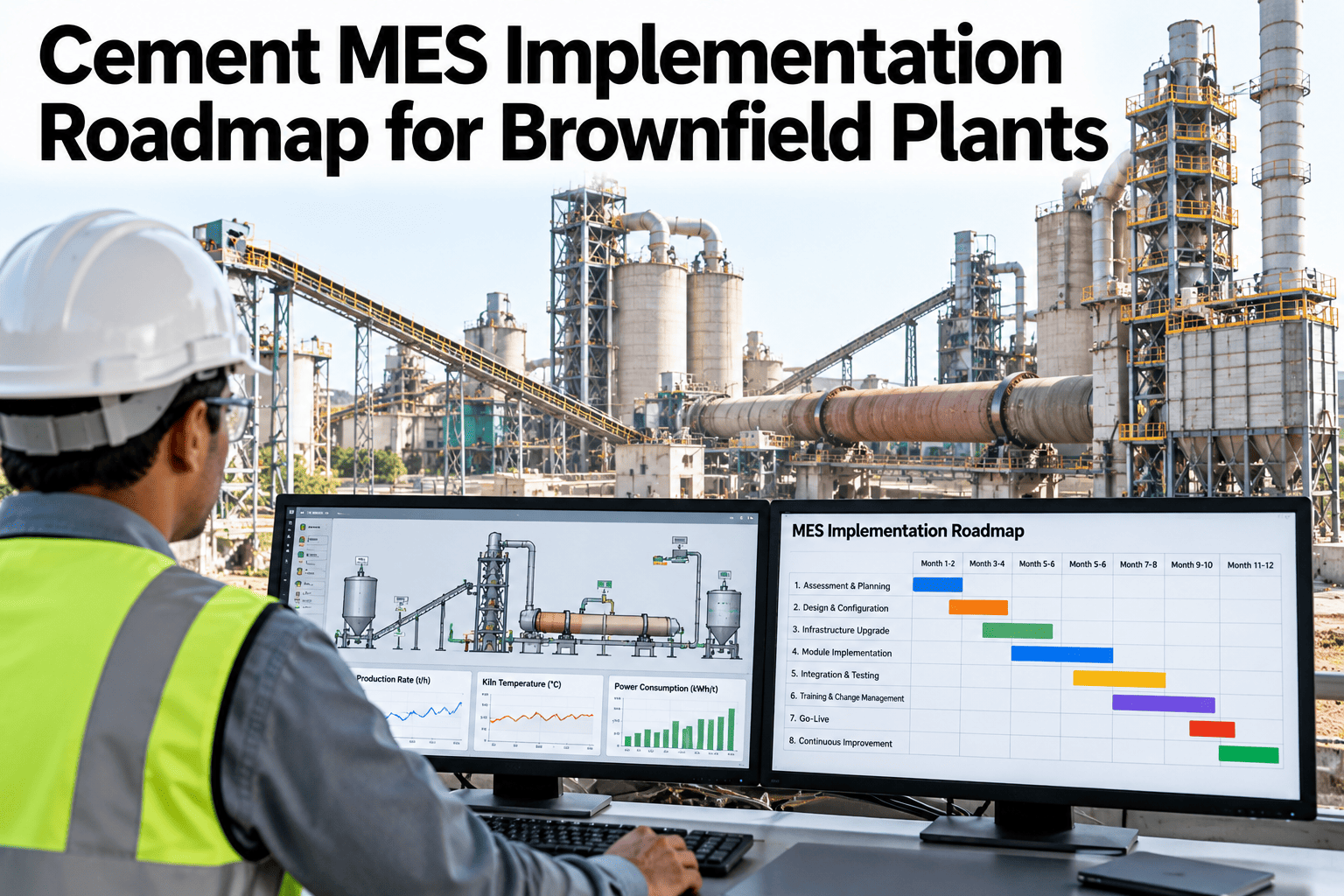
A cement plant cannot stop for a system change. The kiln runs day and night, the old controls work, and the lab and weighbridge each keep their own records. A brownfield MES has to join all of that in steps, without risking output. See how iFactory AI sequences a cement MES rollout around your plant.
Six Steps Out of Paper and Silos Into One Plant Record
iFactory AI helps cement plants map what exists, pick the first use cases, connect systems read-only, prove a pilot and roll out with clear gates.
Why Brownfield Plants Need a Roadmap, Not a Big Bang
A new plant can design its MES with its equipment. An existing plant has to fit the MES around what is already running, and each old system holds a piece of the truth.
Old systems work
The DCS, lab tools and weighbridge each do their own job well enough.
Records are split
Tonnage, quality and stops live in three places that never meet.
A big launch fails
Everything changes at once and problems show up after the money is spent.
Steps succeed
Small gated steps let the team learn, correct and keep producing.
One vendor roadmap for a new-build plant runs 12 to 24 months in total. A brownfield plant usually cannot spend that long in a single push, so the work is cut into gated pieces that each deliver something useful.
Step 1 · Map the Current State
Start by walking the process and writing down, for each area, what is recorded today, by whom and in which system. No software choice makes sense before this map exists.
| Area | Home of today's records | Format | Typical gap |
|---|---|---|---|
| Production output | DCS counters and shift reports | Tags and paper | Totals differ between sources |
| Stoppage reasons | Control-room logbook | Handwritten notes | Not machine-readable in any system |
| Quality results | Lab systems and sheets | Files and databases | Sample time does not match process time |
| Material and silos | Level signals and manual counts | Tags and spreadsheets | No lot link to the cement made |
| Dispatch | Weighbridge and ERP | Database and orders | No link back to the production batch |
| Maintenance | CMMS or work-order files | Orders and notes | Not tied to downtime events |
Step 2 · Choose the Priority Use Cases
Resist the urge to switch everything on. Pick the two or three use cases that fix the loudest pain and rely on data you can reach.
Production against plan
One trusted figure for output by line, product and shift.
Downtime reasons
Stops captured with a short, agreed list of causes.
Quality to batch
Lab results linked to the production run that made the cement.
Material tracking
Silo and stock movements tied to lots and grades.
Dispatch traceability
Each load linked to its silo, batch and quality records.
Shift handover
A shared digital log that replaces the paper handover.
Turn Your Plant Map Into a Plan
Book a 30-minute session and iFactory AI will help rank use cases and draft a gated roadmap around your kiln, mills and dispatch.
Step 3 · Build the Integration Inventory
The integration inventory lists every system the MES must read or write to, how it connects and what could go wrong. It is the most useful single sheet in the project.
| System | Typical examples | Usual interface | Watch for |
|---|---|---|---|
| DCS | ABB 800xA, Siemens Cemat, Schneider | OPC UA or OPC DA | Short local history, load on the control network |
| Historian | AVEVA PI or similar | Web API or asset model | Tag names with no asset structure |
| PLC islands | Stand-alone packing and utility PLCs | Modbus TCP or EtherNet/IP | No historian in front of them |
| Lab | XRF, XRD, free lime, Blaine, residue | Database or file interface | Sample clock, not process clock |
| Weighbridge | Weighbridge database | Database or file interface | Manual overrides and tare entries |
| ERP and CMMS | SAP, Maximo, Oracle | Standard ERP-MES messages | Master data that does not match the plant |
Read first
Start read-only. Write back only to new derived tags, never to control values.
Protect the network
Agree and measure feed rates, and read off a historian when you can.
Flag bad data
Mark frozen signals, signal losses and calibration windows, and do not hide them.
List the unknown
Keep unmapped tags on a visible gap list and do not guess them.
Place of the MES in the Plant Stack
The ISA-95 model describes five levels, and it helps to name the level of each system. The MES sits at level 3, between the controls and the business systems.
Control
PLC, SCADA and DCS. Work in seconds and run the process.
MES
Manages operations, orders and batches through quality and downtime, over minutes to hours.
Business
ERP planning and logistics, working in days to months.
Write the level of each system on the inventory sheet. It makes conversations with vendors and IT much shorter, because everyone can see which layer a request touches and which team has to approve it.
Traceability in Practice
Traceability means being able to follow a load of cement back to the batch, the materials and the quality results behind it. In a brownfield plant, that chain is usually broken in at least two places.
Material in
Clinker, gypsum and additives arrive, with weights and sources recorded.
Production run
The mill runs a grade, with a start, an end and the mix used.
Quality tested
Samples are tested and the results are tied to the run.
Dispatch out
Each load is linked to its silo, its run and its test record.
Master Data to Agree Before Go-Live
Most go-live problems are naming problems. Settle these lists early, give each one an owner and keep one copy.
A Cement Reason-Code List That Works
Keep the list short enough to use in a minute. Six to ten codes cover most stops, and anything else goes under a note that is reviewed weekly.
Feed shortage
Raw material or fuel was late or ran out at the feed point.
Equipment trip
A fan, mill or kiln drive tripped and needed a restart.
Planned maintenance
Work booked in advance, such as liner or refractory jobs.
Silo or bin full
Downstream storage had no room, so production had to wait.
Power or utilities
Grid, air or water loss outside the production area.
Other, with a note
Kept small and reviewed each week so it never becomes a dumping ground.
Risks and How to Answer Them
Review this list at every gate. Risks change as the project moves, and a risk that looked small in the mapping step can become the main one once real signals start to flow.
Step 4 · Run the Pilot and Prove Acceptance
A pilot is a controlled test, not a small launch. Choose an area with real value and manageable complexity, and avoid starting with the hardest process in the plant.
Acceptance criteria, ready to tick
Step 5 · Train for the Job, Not the Software
People accept a system when it makes their shift easier. Teach each role the three or four tasks it will do every day, using real production examples. Keep sessions short and close to the control desk, and repeat them after go-live, when the questions become sharper.
Plan for shift work. Training that only runs on day shift leaves the night crew to learn alone, and they are often the ones who rely on the system most when support is thin. Run each session on every shift, and have the champion on that shift available for the first two weeks.
Step 6 · Set Rollout Governance
Governance keeps the second and third area as good as the pilot. It does not need to be heavy. It needs owners, a rhythm and a way to say no to scope creep.
Steering group
Operations, quality, maintenance and IT meet monthly and own the roadmap.
Change control
Every new tag, report or field passes through one simple request path.
Data owners
Each master list, such as products and reason codes, has one named owner.
Release cadence
Changes go live on a fixed schedule, never in the middle of a critical run.
Who Does What
A roadmap fails when everyone assumes someone else owns a step. Name one lead for each group before the work begins.
Gates are the heart of the roadmap. A gate is a short meeting with a written pass or fail against clear criteria. If a step fails its gate, the team fixes the gap before moving on, and the plan shows the delay openly. This feels slower at the time, yet it prevents the larger delay that follows when a hidden problem is carried into the next area.
KPIs That Prove the Roadmap Works
Choose a small set of measures and record the starting value before the pilot. A gain only counts when it can be compared with a baseline, and most of these can be read straight off the new system.
| KPI | What it shows | Review rhythm |
|---|---|---|
| Output against plan | Whether one trusted figure replaced several | Daily |
| Stop reason coverage | Share of downtime with a recorded cause | Weekly |
| Batch linkage rate | Share of dispatches traced to batch and quality | Weekly |
| Lab turnaround | Time between sample and visible result | Weekly |
| Data completeness | Signals and records present and valid | Daily |
| User adoption | Shifts using the system for handover and logging | Monthly |
| Time to next area | Whether each rollout is faster than the last | Each area |
How iFactory AI Supports a Brownfield Cement MES
iFactory AI connects to the systems your plant already runs and builds the shared record on top of them, one gated step at a time.
Production tracking
Orders, shifts and output by line and product against the plan.
Downtime capture
Stops recorded with a standard reason list and linked to maintenance.
Quality to batch
Lab results linked to the batch and material that made the cement.
Existing system links
Connects to DCS, historian, lab, weighbridge, ERP and CMMS without replacing them.
Traceability record
Production, material and quality records tied together for each dispatch.
Phased rollout
Start with one line or one data type and widen once the pilot is signed off.
A 90-Day Starting Plan
The first 90 days cover steps one to four for a single area. Training and governance start in parallel, so the pilot never waits on them.
Map and rank
Walk the process, build the record inventory and score the use cases.
Connect read-only
Finish the integration inventory and test each read on the pilot area.
Run the pilot
Operate beside the old record, compare totals and fix gaps.
Accept and plan
Sign the acceptance list and schedule the next area with the steering group.
Frequently Asked Questions
Do we have to replace our DCS or historian?
No. A brownfield MES reads the systems you already run and builds the shared record above them. Replacement is a separate decision. Book a demo to review your current systems with the team.
Which area should the pilot cover?
Choose a contained area with real value, such as a finish mill, a packing line or the dispatch gate. Many plants avoid the kiln for the first pilot because of its complexity. Book a demo and share your plant layout, or ask support about pilot scope.
How do we protect the control network?
Start read-only, agree feed rates in writing and read off a historian or a dedicated server when possible. Never write to process control values. Book a demo to see the read-only design in detail.
How do we link lab results to production batches?
Lab results follow the sample clock, not the process clock, so the link must allow for sampling time and transport lag. Agree the rule once and apply it at every area. Book a demo of quality-to-batch linking on sample data.
How long does a brownfield rollout take?
The turnkey build for the first area runs 6–12 weeks. Later areas move faster when the templates carry over, but the total depends on how many areas you add. Book a demo to build your own timeline with a gate for each step.
Move to One Plant Record Without Stopping the Kiln
iFactory AI gives cement plants a gated path out of scattered records into a traceable MES. Book a workshop on your own plant.