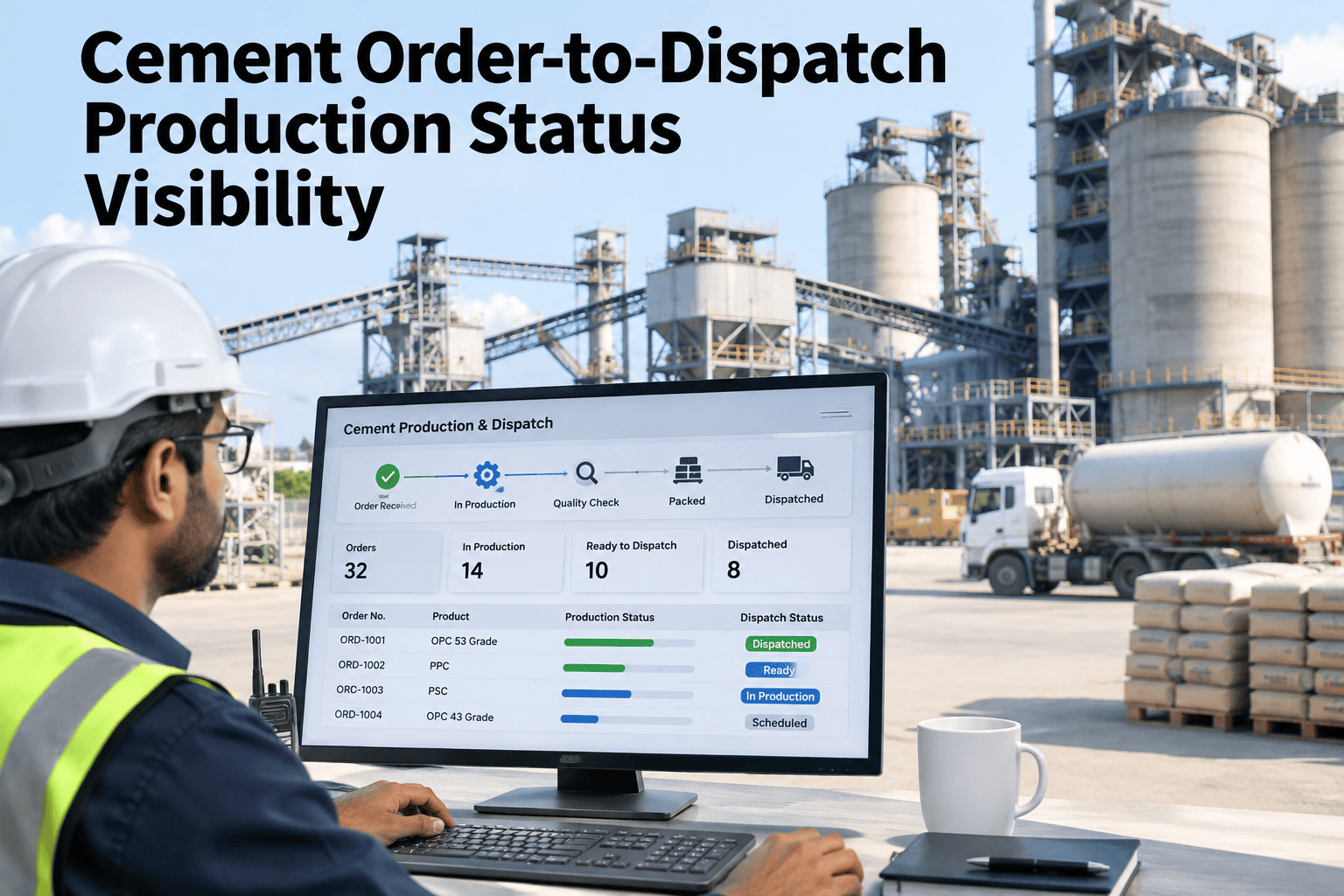
A dispatch coordinator fielding "is my order ready" calls all afternoon is usually working from the same disconnected view every cement plant struggles with — an order sitting in the ERP, production status sitting on a SCADA screen, and loading bay activity tracked on a whiteboard or a radio call. None of the three updates the others automatically, so the honest answer to "is it ready" often depends on who you ask and when. Order-to-dispatch visibility means one status that production, dispatch and the customer-facing team all read the same way. Dispatch teams who want to see their own order flow mapped end to end can walk through a status visibility review with our team.
One Status, From Order Placed to Truck Gone
iFactory, an on-premise AI platform for cement dispatch operations, connects order, production and loading data into one status so "is it ready" has one answer, not three.
Why Do Production, Dispatch and the Customer Team See Three Different Answers?
Each team works from its own system of record — the ERP for the order, the SCADA or MES for production, a whiteboard or radio for the loading bay — and none of the three is wired to update the others automatically. The order status a customer hears is only as current as the last phone call someone made to check it, and that call itself takes a dispatcher away from the loading bay they are supposed to be coordinating. Ask our team which of your three systems is currently the bottleneck.
Matching an Order to the Right Silo and Grade
An order rarely names a silo — it names a product and a grade, and someone or something has to map that to which silo actually holds it right now.
| Order field | Mapped to | Where this can break |
|---|---|---|
| Product and grade code | Current silo holding that grade | Grade changed silos after a packer changeover |
| Requested quantity | Available silo inventory | Inventory reserved by an earlier order, not yet released |
| Bulk vs bagged | Loading bay type and equipment | Bay assigned does not match the load type |
| Customer or carrier | Dispatch document set | Document generated before load is actually confirmed |
See Where Your Order Status Goes Stale First
Walk through a recent order from placement to dispatch and see where the status fell out of sync.
Five Milestones That Should Update the Order Automatically
Gate entry is logged against the order and queue position is known.
Tare weight is captured before loading begins.
Bay assignment and product confirmed against the order.
Loaded weight confirms quantity against what was ordered.
Documents are generated and the order closes automatically.
Each milestone only needs to fire once from its own source system — the gate log, the weighbridge, the loading bay controller — for the order status to stay current without anyone having to manually relay it to the next team down the line.
Manual Phone Checks vs Automatic Exception Alerts
The Order That Was "Ready" for Six Hours Before Anyone Noticed It Wasn't
An order showed as production-allocated in the ERP while the actual grade had been reassigned to a different silo after a packer changeover earlier that shift. The mismatch was only caught when the truck arrived and the loading bay operator could not find the product.
Visibility Across a Full Day's Order Book, Not Just One Truck
A single order's status matters to the customer waiting on it, but a dispatcher's real job is managing dozens of orders across a shift, each at a different milestone. A shared view that shows every order's current stage at once — not just answerable one phone call at a time — is what actually lets a dispatcher spot a queue building at the loading bay before it becomes a line of waiting trucks.
One Order Status, Updated at Every Milestone
Live Grade-to-Silo Mapping
Order grade is checked against the silo actually holding it, updated at every changeover.
Milestone-Based Status
Gate, weighbridge and loading events update the order automatically, without a phone call.
Exception Notifications
A stalled order or a mismatch is flagged before a truck is waiting at the gate.
Turnkey On-Premise Deployment
Order and dispatch data stay on your own server, with no outside cloud dependency.
What Dispatch Teams Ask About Order-to-Dispatch Visibility
Does this replace our ERP, or work alongside it?
Alongside it. The order itself still lives in the ERP — visibility connects that order to real-time production and loading data so its status reflects what is actually happening on the ground. Ask how this fits your current ERP.
How does grade-to-silo mapping stay current after a changeover?
A changeover event updates which silo holds which grade automatically, so an order's status reflects the current mapping instead of the one in place when the order was first placed. Ask support how changeovers are tracked.
What counts as an exception worth alerting on?
A stalled milestone, a grade mismatch, or a wait time beyond a set threshold are the most common triggers, though the specific list is usually tuned to each plant's own dispatch pattern. Discuss exception rules for your dispatch flow.
Can customers see order status directly, or only internal teams?
That depends on what the plant wants to expose externally — many start with internal visibility for dispatch and customer service teams before deciding whether to extend status access to customers directly. Discuss which teams need visibility first.
How long does it take to connect weighbridge and loading bay data?
Timing depends on what data each system already outputs in a usable format, but most weighbridge and loading bay systems can be connected within the first phase of a deployment. Ask support about your specific equipment.
Give Every Team the Same Answer to "Is It Ready?"
See order, production and loading status connected into one view, updated at every milestone.