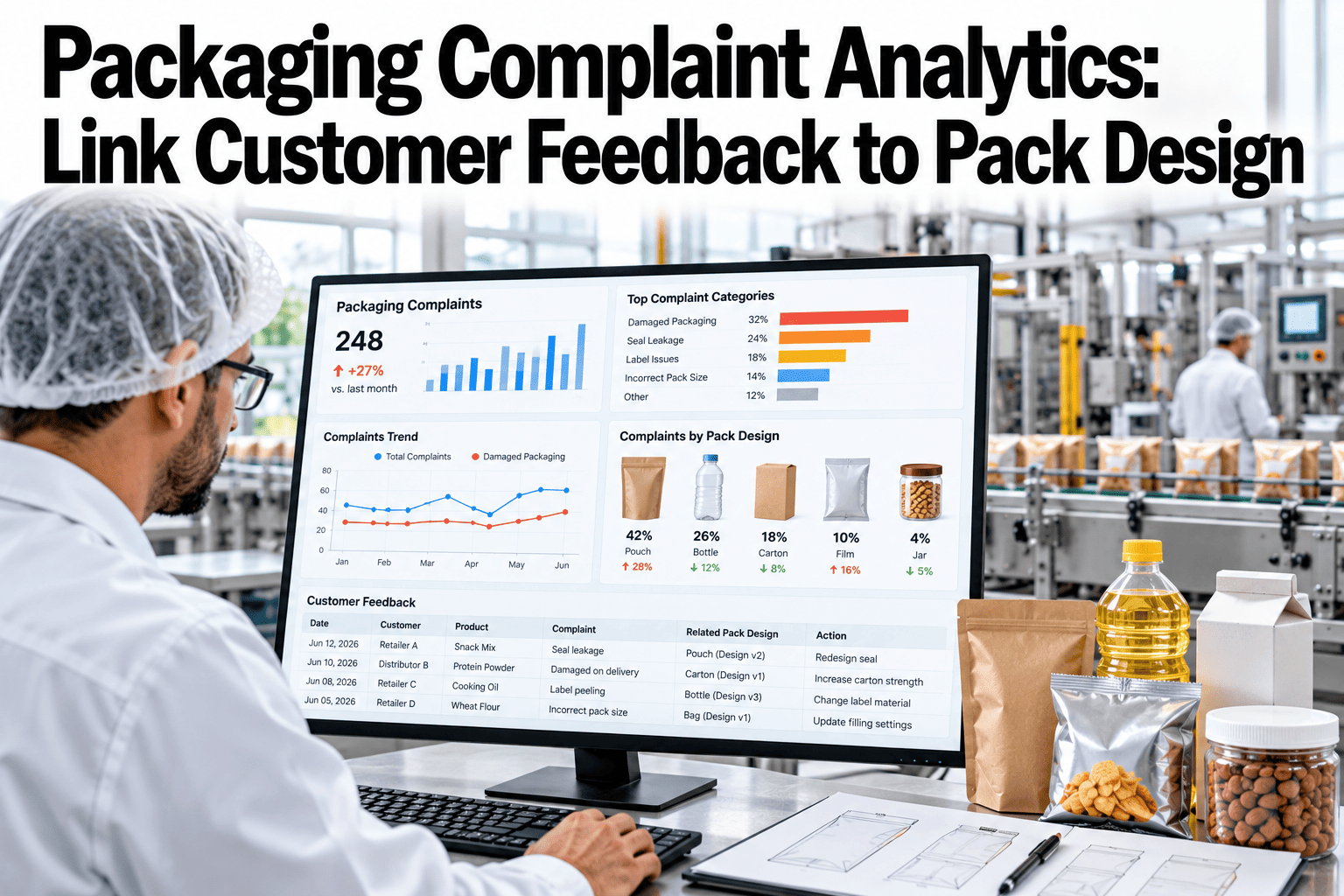
Every damaged parcel, hard-to-open pack and wrong-size box ends up as a complaint, a review or a return. Read together, they show which pack designs fail and why, long before a formal test would. Yet these notes usually sit in separate systems, held by service, returns and warehouse teams, and they rarely reach the packaging engineer in a form that can be counted or ranked. See how iFactory AI links customer feedback to pack design using the records you already hold.
Turn Packaging Complaints Into Design Fixes
iFactory AI codes every complaint, joins it to the order, pack and lane, and ranks the pack problems that cost the most, so engineers revise the right design first.
Why Complaints Are Your Cheapest Pack Test
Lab tests show how a pack behaves in a plan. Complaints show how it behaves in real hands, real carriers and real homes. Most teams collect them, but few join them to pack design.
Customers notice
A DS Smith survey reported by Retail Times found 23% of UK shoppers had received a damaged item in the past year.
Trust moves
Of those shoppers, 51% said they were less likely to order with that retailer again.
Retailers pay
The same research reported an average of £7,646 a month spent on damaged parcels by UK retailers.
Feedback sits idle
Reviews, contact notes and return forms rarely reach the packaging engineer in usable form.
Section 1 · Build a Complaint Taxonomy
A taxonomy is a short, agreed list of codes. It turns free text such as "box was a mess" into a category that can be counted, ranked and tied to a design.
| Group | Example codes | Typical evidence | Usual owner |
|---|---|---|---|
| Product damage | Crushed, punctured, broken, scuffed, shifted contents | Customer photo of box and product | Packaging engineer |
| Leak or spill | Seal failure, cap loosened, liquid on other items | Photo of stains and the seal | Packaging engineer and supplier |
| Usability | Hard to open, cannot reseal, sharp edges | Comment text and short video | Pack designer |
| Fit and size | Overpackaged, too much fill, wrong box size | Photo with a ruler or the box label | Operations lead |
| Information | Label unclear, missing instructions, misleading claims | Comment text and label image | Compliance lead |
| Delivery condition | Wet, opened, dented outer carton | Carrier scan and photo | Carrier manager |
Section 2 · Capture Damage and Usability Feedback
Damage and usability are different kinds of feedback. Damage is physical and visible. Usability is about effort and feeling, so it needs different questions.
Contact center notes
Agents tag the code while the customer is still on the line.
Return forms
Reason lists with a packaging branch and a photo field.
Product reviews
Text read for packaging words and mapped to codes.
Carrier claims
Damage claims with scan history and photos.
Warehouse returns
Inspection at the dock with a packaging condition check.
Social posts
Public photos and comments, tracked but weighed with care.
See Your Complaint Data Ranked by Pack
Book a 30-minute session and iFactory AI will code a sample of your complaints and show which pack designs rise to the top.
Section 3 · Link Return Reasons to Orders and Packs
A return reason is a customer's view, not a cause. Join it to the order record, and the pack, lane and packer behind it begin to explain what really went wrong.
| Join key | What it adds | Question it answers |
|---|---|---|
| Order and item | What was bought and how many | Does a certain product fail more often? |
| Pack variant | Carton, fill and cushioning used | Does one pack-out cause more damage? |
| Carrier and lane | Service, route and handling points | Is the problem a lane, not a pack? |
| Packing site and shift | The place and time the order was packed | Is the pack-out followed at every site? |
| Supplier lot | Carton or tray batch | Did a material batch change? |
| Date and season | Ship date, delivery date, weather period | Do complaints rise in peak or in cold weather? |
A Worked Reading of the Data
The figures below are invented for illustration. They show why a rate and a split by variant reveal what raw counts hide.
| Pack variant | Orders shipped | Damage complaints | Per 1,000 |
|---|---|---|---|
| Carton A, paper fill | 20,000 | 60 | 3.0 |
| Carton B, air pillows | 5,000 | 40 | 8.0 |
| Carton C, molded tray | 10,000 | 10 | 1.0 |
Section 4 · Revise the Product and the Pack
Not every pack complaint is a pack problem. Decide whether the fix belongs in the pack, the product, the process or the carrier, before anyone orders new material.
Pack design
Stronger board, a better tray or a changed fit. Retailers in the DS Smith research favored stronger materials, impact resistance and structural design.
Product design
A weak corner, loose cap or fragile part may need a change in the product itself.
Pack-out process
The design is sound but not followed. Fix training, bench tools or the screen guidance.
Carrier or lane
Damage clusters on one service or route. Raise it with the carrier or change the lane.
Section 5 · Run Corrective Actions That Stick
A complaint program fails when findings stay in slides. Treat each recurring pattern as a corrective action with an owner, a date and a check.
Spot the pattern
A code on a pack variant rises above its normal rate.
Confirm the cause
Inspect returns and photos, and test the pack if needed.
Choose the fix
Pack, product, process or carrier, with an owner and a date.
Roll it out
Change the pack record, the bench guide and the stock plan.
Verify the rate
Compare complaint rates before and after, over the same season.
Close or reopen
Close the action if the rate holds lower, or reopen with new facts.
| Action field | What to record | Why it matters |
|---|---|---|
| Trigger | Code, pack variant and rate that raised the flag | Shows what started the action |
| Cause | Confirmed cause with evidence | Stops guesses turning into fixes |
| Fix and owner | Change made, named person, due date | Keeps the action moving |
| Check date | When the rate will be reviewed | Makes verification a plan |
| Result | Rate before and after, and decision | Builds the team's evidence base |
Reading Free Text and Photos at Scale
Most feedback arrives as words and pictures. A short, careful routine turns them into codes without losing the detail that engineers need.
Suggest a code
The system proposes a primary code and tags using the text and the photo.
Show the evidence
The reviewer sees the photo and the highlighted words behind the suggestion.
Confirm or change
A person accepts the code or corrects it, and the correction is saved.
Learn and audit
Corrections improve the suggestions, and a monthly sample checks agreement between reviewers.
When the Complaint Is Not About Packaging
Some feedback sounds like a pack problem but has another cause. Sorting it out early keeps the packaging team focused on real design issues.
Season, Carrier and Site Patterns
Rates move with weather, volume and handling. Look for patterns before concluding that a design has failed.
Peak weeks
Temporary staff and heavy volume raise errors at the bench and in carrier hubs.
Weather
Cold, heat and wet seasons stress seals, board and adhesives in different ways.
One lane
A single route or hub with a high rate points to handling, not design.
One site
A site with higher rates for the same pack points to process or training.
Who Uses the Findings
| Role | Looks at | Decides | Feeds back |
|---|---|---|---|
| Packaging engineer | Rates by pack variant and code | Design changes and tests | Revision log and test results |
| Operations lead | Rates by site and shift | Bench training and tools | Process fixes done |
| Customer service lead | Contact reasons and photos | Code rules and call guides | Code corrections |
| Carrier manager | Rates by lane and service | Carrier talks and lane changes | Claim outcomes |
| Compliance lead | Information and safety codes | Label and claim changes | Approval records |
Hold one short monthly review with these roles. Look at the top three codes by rate, any pack variant that moved outside its normal band, and every action due for a check. Close what has worked and reopen what has not.
Share the results back with the people who generate the data. When agents see that their tags led to a better tray or a clearer label, coding quality improves, and the loop keeps itself alive.
Start with a narrow slice. Choose one product family, one channel and the three pack variants that ship the most, then code a month of complaints by hand with the agents who take the calls. That sample teaches the team which codes are clear and which need a better definition, before software is asked to scale the work.
Record a baseline before the first fix. Capture complaint rates by code and pack variant for the last three months, along with return rates and contact volumes. When the first revised pack ships, that record is what proves the change worked, and it is what earns support for the next one.
Keep the language of the program plain. Codes such as crushed corner or hard to open are understood by every team, while internal shorthand is not. Plain codes also make customer-facing replies easier, because agents can tell customers exactly what was recorded and what will happen next.
Plan for privacy and consent at the very start. Customer photos and comments can include faces, addresses and order details. Store only what the analysis needs, mask personal details in shared reports, and follow your own data policy and local rules for how long feedback and images are kept.
Finally, decide how customers hear back. A short reply that names the problem, thanks the customer and says what the team is changing builds trust, and it also invites more useful feedback on the next order. Track replies as part of the loop, so the cost of listening is visible next to the benefit.
Treat the first quarter as a learning period. Expect some codes to be merged, some pack variants to be renamed and some data joins to fail. Log each of these changes, so the team can explain any jump in a chart by a change in method and not by a change in customers.
Governance Checklist
How to Judge the Results
| Measure | How to count it | What good looks like |
|---|---|---|
| Complaints per 1,000 orders | By code and by pack variant | Falling after each fix |
| Coded share | Complaints with a valid code, divided by all | Close to every complaint coded |
| Time to action | Days between a flag and a named owner | Short and falling |
| Fix success rate | Actions whose rate stayed lower after the check date | Rising over the quarters |
| Repeat codes | Codes reopening on the same pack variant | Few, each with a recorded cause |
How iFactory AI Supports Complaint Analytics
iFactory AI holds the taxonomy, joins complaints to orders and packs, and tracks each fix through to its result.
Auto-coding
Suggests a code for each complaint using text and photos, with human review.
Order and pack join
Links each complaint to the item, pack variant, carrier and site.
Rate ranking
Ranks codes and packs by rate per thousand, not by raw count.
Action tracker
Owner, due date and check date for every corrective action.
Revision log
Pack changes tied to the complaint rates before and after.
Alert rules
Flags a code that rises above its normal band on any pack.
A 90-Day Starting Plan
Collect and sample
Gather three months of complaints and returns, and read a sample.
Build the taxonomy
Agree codes, definitions and sample photos with each owner.
Join and rank
Link complaints to orders and packs, and rank by rate.
Act and verify
Open the first actions, and set check dates for each one.
Frequently Asked Questions
Do we need photos to analyze packaging complaints?
Photos help a lot, but you can start with text and add a photo field over time. They settle cause faster than comments. Book a demo to see photo-based coding on sample complaints.
Can we use the return reasons we already have?
Yes, as a start. Map your current reasons to a short taxonomy, then add a packaging branch for damage and usability. Book a demo to map your return reasons, or ask support about reason codes.
How do we know if the pack or the carrier is at fault?
Compare complaint rates for the same pack across lanes and carriers. A problem on one lane points to the carrier. Book a demo to compare lanes and packs in one view.
How soon can we judge whether a fix worked?
Wait for enough orders on the revised pack and compare a like period, so season and volume do not mislead. Book a demo to plan your check dates and sample sizes.
How long does a pilot take?
The turnkey build runs 6–12 weeks, with the first ranked pack list after the data join. Book a demo to plan your pilot around your product calendar.
Let Customer Feedback Shape Your Next Pack
iFactory AI turns complaints into ranked pack fixes with owners and check dates. Book a walkthrough on your own returns and contact data.