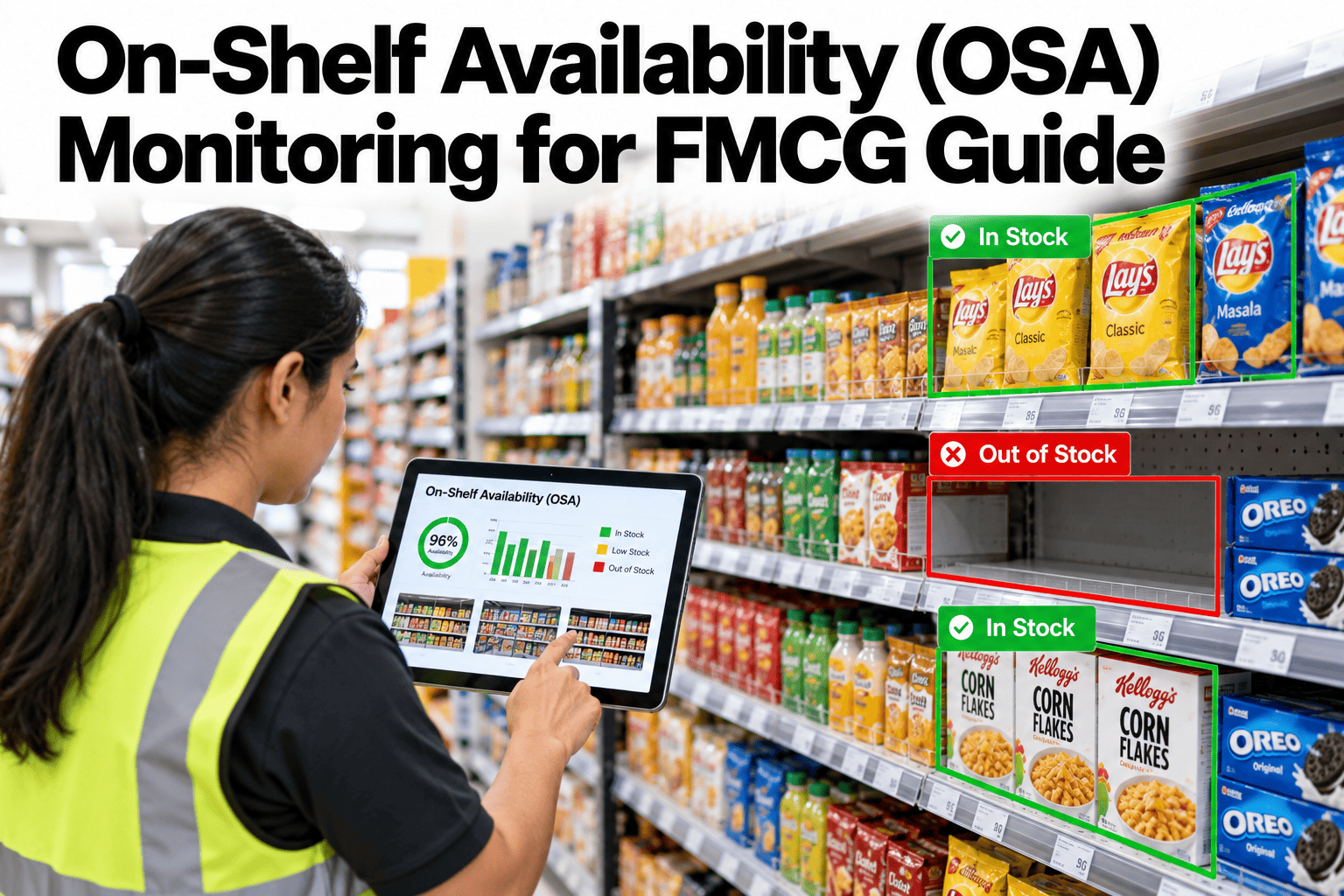
A product that is in the store but not on the shelf sells the same as a product that is not in the store at all, which is nothing. On-shelf availability monitoring tries to catch these gaps early, including hidden ones where records say stock exists while the shelf is empty. Smart shelf sensors, computer vision and store-level data feeds each see part of the picture, and the strongest programmes combine them. To see how this could look for your brand and retail partners, you can review an availability monitoring approach with our team.
FMCG inventory and multi-location sync
Catch Empty Shelves Before Shoppers Do, Including the Ones Your Records Cannot See
iFactory AI combines shelf signals, store data and inventory records to find hidden stockouts and send the right action to the right team.
Three views of the shelf
Shelf sensorsComputer visionStore data feeds
The hidden gapStock in the Store Is Not the Same as Product on the Shelf
Records can say a product is available while the shelf is empty. Shoppers see the shelf, not the record.
Record says in stock
The system shows units on hand
Shelf is empty
Product sits in the back room or is missing
Sales stop
Demand is lost or switches to a rival
Nobody notices
Reports show stock, so no alert fires
Finding these hidden gaps is the main value of availability monitoring. Ordinary stock reports cannot see them.
Why shelves go emptyAn Illustrative Split of Causes
Causes differ by retailer and category. This split is illustrative.
35 percent: Shelf replenishment
Stock is in the store but not moved to the shelf.
25 percent: Ordering and forecasting
Not enough product ordered for the store.
25 percent: Record errors
The system believes stock exists when it does not.
15 percent: Supply or delivery
Late or short deliveries.
The biggest slice is often inside the store, not in the supply chain. That is why shelf-level data matters.
Detection methodsFour Ways to See Availability
| Method | What it sees | Strength | Limit |
|---|
| Smart shelf sensors | Weight, presence or light changes on the shelf | Continuous, precise for chosen items | Cost and installation for each shelf |
| Computer vision | Images from fixed cameras, robots or staff devices | Sees the whole shelf and facings | Needs good images and many stores |
| Sales and scan data | Sudden drops in sales against forecast | Cheap and wide coverage | Cannot tell why sales stopped |
| Store inventory records | What the system believes is on hand | Already available | Wrong when records are inaccurate |
See Which Gaps Your Reports Are Missing
Share sales and inventory data for a few stores and see how iFactory AI would flag likely hidden stockouts.
Measuring availabilityDefine the Measure Before You Chase It
On-shelf availability = product-store-days with product on the shelf / total product-store-days
20
Products tracked per store
Share
Of 700 product-store-days with product on the shelf
For example, if 650 of those 700 product-store-days had product on the shelf, availability is about 93 percent. The numbers are illustrative.
Coverage and costMatch the Method to the Value of the Product and Store
Not every product in every store needs the most advanced monitoring.
Priority
High-value products
Lower-value products
Large, busy stores
Full monitoring
Sensors or vision plus data analysis
Data-led
Use sales and record analytics
Small, quiet stores
Sample
Audit a sample of stores
Light touch
Periodic checks only
Start with the products and stores where a lost sale costs the most, then widen coverage as results justify it.
From signal to actionFour Steps From Detection to a Full Shelf
1
Detect
A sensor, image or sales pattern suggests a gap.
2
Confirm
Records and other signals check whether the gap is real.
3
Alert
The right person gets a clear task with the product and location.
4
Close the loop
Replenishment is confirmed and recorded.
Alerts must be specific. A message that says Aisle 4, Product X, back room stock available is far more useful than a general warning.
Always-on versus auditsWhat Changes With Continuous Monitoring
Manual audits
Occasional visits
Small samples
Results arrive days later
Gaps found after sales are lost
Continuous monitoring
Signals through the day
Wide coverage across stores
Alerts within hours
Gaps closed while shoppers are still in store
Data feedsBring Shelf, Store and Supply Data Together
The strongest view combines what the shelf shows with what the records say.
Shelf sensors and camerasSales and scan dataStore inventory and orders
Availability monitoring layer
Store replenishment tasksBrand and retailer dashboardsForecast and supply planning
Agree data sharing with retailers early. Contracts, privacy and system access often take longer than the technology.
Alert priorityRank Gaps by What They Cost
Low
Slow product, stock still on the shelf nearby.
Medium
Likely lost sales, stock in the back room.
High
Top seller empty at a busy time of day.
Ranking by value keeps teams focused. To design priority rules, ask our team for an alert ranking guide.
PilotFive Steps to Prove the Value in a Few Stores
1
Pick stores and products
Choose a mix of busy and quiet stores and top items.
2
Set the baseline
Measure availability with audits before starting.
3
Switch on monitoring
Use the chosen mix of data, sensors or vision.
4
Act on alerts
Track how fast gaps close.
5
Compare and decide
Measure sales and availability gains against the baseline.
Availability measure defined and agreed
Priority products and stores chosen
Baseline audit completed
Data access agreed with retail partners
Alert rules and owners defined
Store task flow tested
Control stores kept for comparison
Results reviewed with finance
Expert reviewWhat a Retail Execution Lead Would Check First
Availability programmes succeed when alerts become tasks that stores actually complete. A great detection system with no action loop is just a report.
Verdict
Strong when detection combines several sources and alerts reach a named person.
Watch for
Sensor-only designs that ignore record errors and store workload.
Do next
Pilot in a few stores with a control group and measure sales, not only availability.
Frequently asked questionsWhat FMCG Teams Ask About On-Shelf Availability Monitoring
What is a phantom stockout?
It is a gap where the record shows stock but the product is not on the shelf, so normal stock reports raise no alarm. Shelf-level signals and sales patterns are the main way to find them.
See how hidden gaps are detected.
Do we need sensors in every store?
Not necessarily. Many programmes start with data-led detection everywhere and add sensors or vision only for high-value products and busy stores. Choose by the cost of a lost sale.
Ask about coverage planning.
How do we get retailers to share data?
Show the benefit to both sides, agree what data is shared and how it is protected, and start with a small pilot. Clear contracts and privacy terms shorten the process.
Plan a data sharing approach.
How do we measure the sales benefit?
Compare pilot stores with similar control stores over the same period, and track availability and sales together. Adjust for promotions and seasonality.
Ask about measurement design.
What makes alerts effective?
Specific, timely tasks with the product, location and likely cause, sent to a person who can act. Too many general alerts teach staff to ignore them.
Review alert design.
Every empty shelf is a lost sale
Fill the Gaps Shoppers See and Systems Miss
Book a session with iFactory AI to combine shelf, store and inventory data and plan a pilot that proves what better availability is worth.