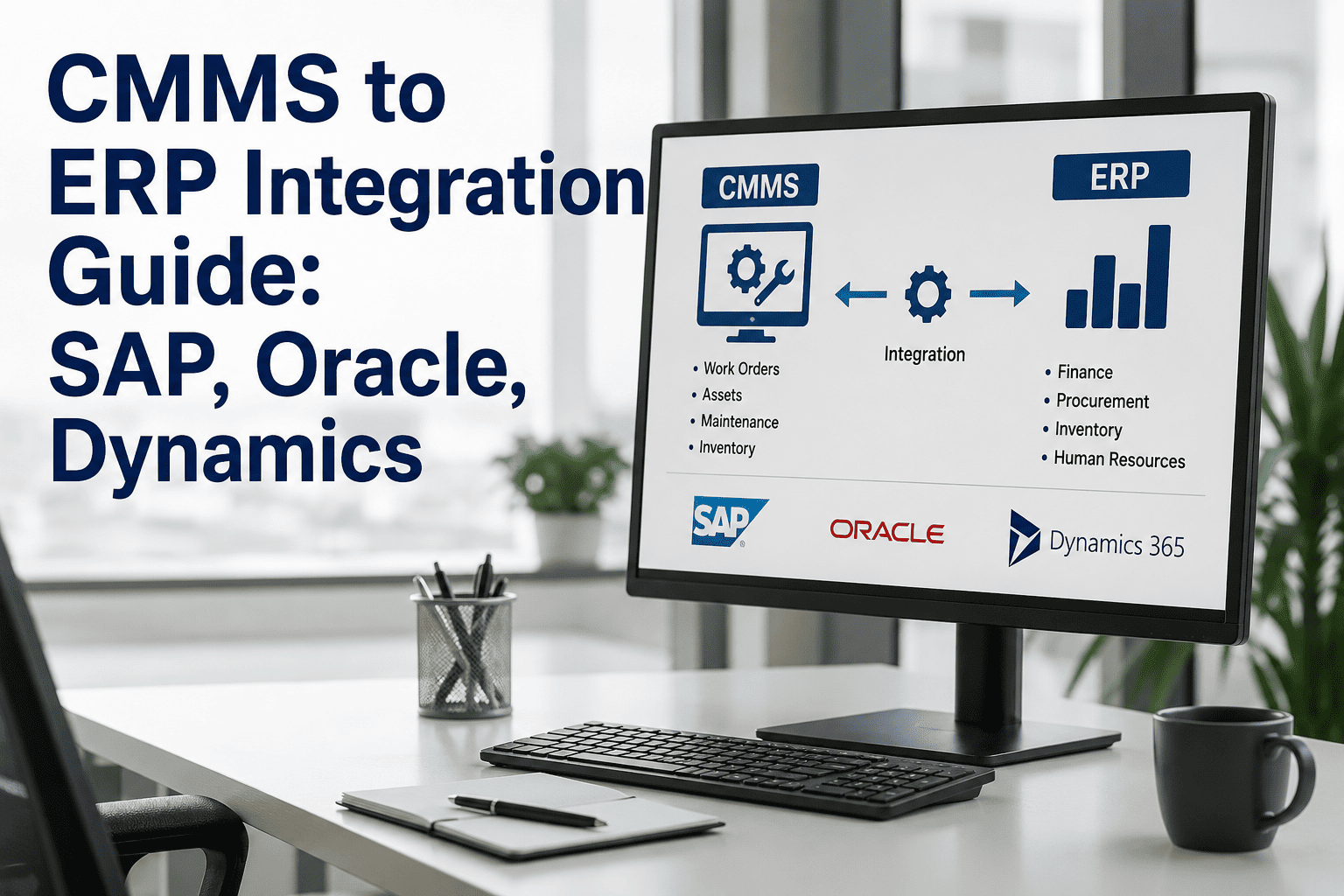
A technician closes a work order on the floor. Three separate people then re-key the same repair into three separate systems — procurement logs the parts consumed, finance posts the labor cost, and planning updates the asset's downtime record — because the CMMS and the ERP have never actually talked to each other. Every one of those manual re-entries is a chance for the numbers to stop matching, and by the time anyone notices a discrepancy, tracing it back to the specific re-entry step where it originated can take hours of reconciliation work across three different departments. iFactory's ERP integration layer connects directly to SAP, Oracle, and Microsoft Dynamics, so a closed work order posts its cost, its parts consumption, and its downtime record automatically — once, correctly, without a second set of hands re-typing the same numbers.
One Repair, One Record — Not Three Systems Disagreeing With Each Other
SAP, Oracle, and Microsoft Dynamics each expose maintenance data through a different integration mechanism. Picking the right one determines whether your integration is a clean data pipeline or a fragile, custom-built bridge.
Work Orders, Parts, Labor
API / Middleware
Cost, Inventory, Finance
Why Disconnected Systems Cost More Than the Integration Does
When a plant's CMMS and ERP don't talk to each other, the same data gets entered twice — once by maintenance, once by procurement or finance — and the two records never quite match. A closed work order sits in the CMMS with one version of parts consumed and labor hours; the ERP's cost center holds a separately re-keyed version of the same event, entered by someone reading off a printed report hours or days later, introducing both a timing lag and a genuine risk of transcription error at every single handoff.
Disconnected Systems
Maintenance cost data lives in the CMMS; the ERP's cost center reflects a manually re-entered, time-delayed approximation of it — two records of the same event that drift apart the moment either one gets updated without the other, and stay drifted until someone eventually notices and manually reconciles the difference.
Integrated Systems
A closed work order posts its cost, parts, and labor directly into the ERP's cost structure the moment it closes — one event, one record, reflected consistently in both systems without anyone re-typing anything.
SAP, Oracle, and Dynamics: Three Different Integration Mechanisms
The three dominant ERP platforms in industrial and food manufacturing environments each expose maintenance and asset data through a fundamentally different mechanism, and choosing the right one for a given environment matters more than picking whichever tool a vendor happens to recommend by default — the wrong mechanism for a given transaction type can turn a straightforward integration into a fragile, hard-to-maintain bridge that breaks with every system upgrade on either side.
| Platform | Primary Integration Mechanism | Best Fit For |
|---|---|---|
| SAP (ECC / S/4HANA) | IDoc for batch/EDI exchange, BAPI/RFC for synchronous transactions, OData for S/4HANA Cloud | Large, established manufacturers already running SAP PM or SAP EAM as the finance system of record |
| Oracle (ERP Cloud / EBS) | Oracle Integration Cloud (OIC) as the middleware layer, mapping CMMS objects to Oracle Maintenance Cloud structures | Organizations running Oracle's cloud-native asset management alongside a dedicated CMMS for field execution |
| Microsoft Dynamics 365 | Data Management Framework, OData endpoints, and Power Platform connectors (Power Automate, Azure Logic Apps) | Mid-market manufacturers wanting low-code integration accessible to non-developer IT teams |
SAP's IDoc framework is well suited to batch and EDI-style exchange but was never designed for real-time processing — in modern cloud-based S/4HANA Public Cloud deployments, IDocs are increasingly supplemented or replaced by API-first approaches for exactly that reason. Understanding which mechanism fits which transaction type, rather than defaulting to whichever one an implementation partner already knows, is what separates a clean integration from one that becomes fragile the moment either system upgrades.
The Data That Actually Needs to Flow Between Systems
Not every field in a CMMS needs to sync to the ERP, and not every ERP field needs to flow back. Focusing integration effort on the handful of data types that genuinely require bidirectional consistency avoids building an unnecessarily complex pipeline that's harder to maintain than the manual process it replaces — a common trap is treating "integration" as an all-or-nothing proposition rather than a prioritized set of specific data flows worth automating.
Asset Master Data
Equipment records, functional locations, and asset hierarchy typically originate in the ERP and sync down to the CMMS, giving maintenance a digital twin of the asset structure already defined for financial and logistics purposes.
Work Order Cost Roll-Up
Labor hours, parts consumed, and contractor costs from a closed CMMS work order post automatically to the ERP's cost center structure — the single change most directly responsible for eliminating manual reconciliation work.
Spare Parts Inventory Sync
Parts consumption in the CMMS updates warehouse inventory levels in the ERP in real time, and reorder thresholds in the ERP trigger purchase requisitions automatically based on actual field consumption rather than periodic manual counts.
Purchase Order Status
A parts order raised through the ERP procurement module reflects its approval and delivery status back in the CMMS, so a technician planning a repair can see whether the needed part has actually arrived without switching systems.
Security and Access Control Across the Integration Boundary
Connecting a CMMS to an ERP's financial system inevitably raises a legitimate security question: what data can flow across that boundary, and who controls it. A poorly scoped integration can inadvertently expose more of the ERP's data surface than the CMMS actually needs, creating a security review problem that stalls the entire project long before it reaches a technical implementation question — and once a security team flags a broad-access integration as a concern, resolving that concern typically takes far longer than it would have taken to scope access narrowly from the outset.
Scoped API Access
Modern integration approaches using OAuth 2.0 and scoped API permissions limit the connection to exactly the objects and fields required — work orders, cost postings, inventory levels — rather than granting broad access to the entire ERP data model, a distinction security reviewers specifically look for during approval, and one that meaningfully shortens the review cycle when addressed upfront.
Rate Limiting and Monitoring
API management layers that enforce rate limiting, authentication, and request logging give IT and security teams the audit trail needed to confirm the integration is behaving as designed, not silently pulling more data than intended, across every request the connection actually makes.
Bringing the security and IT governance team into the integration design conversation early — rather than after a technical architecture has already been chosen — tends to produce a smoother approval process than presenting a completed integration plan for security sign-off after the fact. Many integration delays trace back not to technical difficulty, but to a security review that only started once the rest of the project was already underway, forcing rework that could have been avoided with earlier involvement from the start.
A Composite Scenario: The Ghost Inventory Problem
Picture a mid-size food processing plant running SAP for finance and procurement, with maintenance technicians logging parts consumption on paper tickets that a planner manually re-entered into SAP once a week. For months, the plant's inventory reports showed a consistent, unexplained gap between what SAP recorded as on-hand stock and what technicians reported actually finding on the shelf during physical counts — a gap the team had informally started calling "ghost inventory" without ever tracing its actual cause, and without anyone connecting it directly to the weekly re-entry cycle everyone had simply come to accept as normal practice.
The gap traced back to timing, not theft or miscounting. A technician would consume a part on a Tuesday repair, but the weekly manual re-entry into SAP didn't happen until the following Monday — nearly a full week during which SAP's inventory figure was simply wrong, showing stock that had already been used. During that window, the ERP's automatic reorder logic, working from stale data, sometimes failed to trigger a reorder for a part that was actually already below threshold, and other times triggered an unnecessary reorder for a part that had actually been restocked days earlier through an unrelated delivery. Once the plant connected its CMMS parts-consumption data directly to SAP's inventory module through a real-time sync, the weekly re-entry lag disappeared entirely — inventory figures reflected actual consumption within minutes rather than up to a week later, and the "ghost inventory" gap that had puzzled the team for months simply stopped occurring, because its actual cause had never been missing parts at all, only missing timeliness in the data connecting the two systems. The fix, once identified, cost far less to implement than the months of unnecessary emergency parts orders the timing gap had quietly been causing.
Realistic Timelines by Integration Depth
Setting accurate expectations for how long each level of integration actually takes prevents the common failure pattern of a project being scoped as "quick" when it genuinely requires the deeper, multi-month effort a full bidirectional integration demands.
A basic work-order-to-cost-posting integration using standard REST or BAPI connectors typically takes four to eight weeks from configuration to go-live for SAP S/4HANA, with Oracle and Dynamics generally following a similar timeframe.
Full integration including MRO inventory synchronization, compliance record linking, and production schedule data exchange typically requires three to six months, depending on how heavily customized the target ERP instance already is.
Organizations using CMMS platforms with pre-built ERP connectors and established integration middleware consistently achieve materially faster timelines than those requiring fully custom development from scratch.
Standard integration validated against a clean reference ERP instance can behave differently in a heavily customized production environment — testing should always cover the actual target instance before go-live, not just a sandbox default configuration.
Ghost Inventory Isn't a Counting Problem. It's a Timing Problem.
iFactory syncs parts consumption to your ERP in real time, not on a weekly manual batch — so inventory figures reflect what's actually on the shelf, not what was true a week ago.
Validating an Integration After Go-Live, Not Just Before
An integration that passes every test during implementation can still drift out of sync over time, as either the CMMS or the ERP evolves through normal software updates, configuration changes, or new fields added by users on either side. Treating go-live as the finish line, rather than the start of an ongoing validation discipline, is a common reason integrations that worked well for the first several months quietly begin producing mismatched data a year or two later — often without anyone noticing until the discrepancy has grown large enough to trigger the same kind of confused investigation the ghost inventory scenario required.
Periodic Reconciliation Checks
A scheduled comparison between a sample of CMMS records and their corresponding ERP entries catches drift early — before it accumulates into the kind of unexplained gap that took months to trace in the ghost inventory scenario, and before the discrepancy becomes large enough to distort procurement or cost reporting decisions.
Change Management Coordination
Any planned upgrade or configuration change to either the CMMS or the ERP should trigger a review of whether the integration's data mapping still holds — an unannounced field change on either side is a common, avoidable cause of silent integration failure that often isn't discovered until well after it has already begun corrupting downstream reports.
Building this ongoing validation into a standard IT operations cadence, rather than treating it as a one-time implementation deliverable, is what keeps an integration reliable across the years it will actually be in service — considerably longer than the weeks or months the original implementation project itself took to complete, and a far smaller ongoing investment than the cost of rediscovering a ghost-inventory-style gap from scratch every few years.
Common Mistakes That Turn an Integration Project Into a Liability
The mistakes below appear consistently across integration projects regardless of which ERP platform is involved, and most of them trace back to scoping and testing decisions made early in the project rather than technical limitations of the platforms themselves.
Syncing Everything Instead of What Matters
Building bidirectional sync for every field in both systems, rather than focusing on the handful of genuinely shared data types, creates a fragile pipeline that's expensive to maintain and breaks with every schema change on either side.
Testing Only Against a Clean Sandbox
An integration validated against a fresh, unmodified reference ERP instance can fail in unexpected ways against a production system carrying years of customization — testing has to happen in the actual target environment before go-live.
Ignoring Exception and Failure Scenarios
Testing only the happy-path data flow, without covering what happens when a record fails validation or a connection drops mid-transaction, leaves the integration unprepared for exactly the failure modes that occur most often in production.
Choosing Batch Sync Where Real-Time Was Needed
A weekly or nightly batch sync is adequate for some data types but genuinely inadequate for spare parts inventory, where the delay itself — not any error in the data — becomes the source of reorder mistakes and stockouts.
Who Owns an Integration Project: IT, Maintenance, or Finance?
A CMMS-ERP integration touches three functions that don't always coordinate closely by default — IT owns the technical implementation and security posture, maintenance owns the day-to-day workflow the integration is meant to support, and finance owns the cost data the integration is ultimately feeding. Treating the project as belonging to only one of these functions tends to produce an integration that satisfies that function's priorities while missing requirements the others would have raised, often not becoming apparent until well after go-live when a gap surfaces in production use.
IT / Systems Integration
Owns the technical architecture — selecting the right integration mechanism per platform, managing security and access scope, and maintaining the connection through ERP and CMMS version upgrades over time.
Maintenance & Finance
Maintenance defines which workflow data actually needs to sync and how quickly; finance defines the cost center structure and posting rules the integration needs to respect for the resulting numbers to actually be usable downstream.
The ghost inventory scenario described earlier is a useful illustration of what happens when this coordination is missing — a purely technical fix (faster syncing) solved a problem that maintenance and IT had each partially diagnosed on their own, but only became fully clear once someone connected the timing gap in the technical sync to the specific business consequence finance and procurement were experiencing downstream. That connection, more than the technical fix itself, is usually the harder part of resolving an integration gap that spans multiple functions.
Frequently Asked Questions
The questions below reflect what IT and maintenance leaders most commonly ask as they scope a CMMS-ERP integration project across SAP, Oracle, and Dynamics environments.
Does CMMS-ERP integration require replacing our existing ERP system?
No — the standard approach is connecting a dedicated CMMS to whichever ERP a plant already runs, rather than replacing the ERP or relying on its native maintenance module alone. Most food manufacturers keep SAP, Oracle, or Dynamics as the financial system of record while a purpose-built CMMS handles technician-facing maintenance workflows, connected through the integration layer described above. Visit support to see integration options for your specific ERP platform.
How long does a typical SAP integration take from start to go-live?
A basic work-order-to-cost-posting integration using standard REST or BAPI connectors typically takes four to eight weeks from configuration to go-live. Full integration covering MRO inventory sync, compliance record linking, and production schedule exchange generally takes three to six months, with the exact timeline depending heavily on how customized the existing SAP instance already is. Book a demo to get a realistic timeline estimate for your specific environment.
Should spare parts inventory sync in real time or on a scheduled batch?
Real time is strongly preferred for spare parts specifically, because even a short delay between consumption and the ERP reflecting it can trigger the exact reorder mistakes described in the ghost inventory scenario above — a missed reorder for a genuinely depleted part, or an unnecessary one for a part that's already been restocked. Other data types with lower reorder sensitivity, like historical work order archives, can reasonably run on a batch schedule instead.
Is IDoc or REST/API the better integration mechanism for SAP specifically?
It depends on the transaction type and SAP version rather than one being universally superior. IDoc remains well suited to batch and EDI-style exchange but was never designed for real-time processing; BAPI and RFC offer synchronous, transactional consistency for time-critical postings; OData supports API-first integration particularly well suited to S/4HANA Cloud deployments. A mature integration typically uses more than one mechanism, matched to the specific transaction it's handling. Contact support for guidance on which mechanism fits your SAP version and deployment model.
Can a mid-sized food manufacturer on Dynamics 365 benefit from integration, or is it only worthwhile for large SAP or Oracle deployments?
Mid-sized manufacturers benefit significantly, and the barrier to entry is generally lower on Dynamics 365 specifically — the Power Platform connector ecosystem, including Power Automate and Azure Logic Apps, provides accessible, largely low-code integration pathways that don't require the custom API development larger SAP or Oracle deployments sometimes need. The core value — eliminating manual re-entry and reconciliation — applies at any plant size running any of the three major ERP platforms.
Stop Reconciling Numbers That Should Have Matched From the Start
iFactory connects directly to SAP, Oracle, and Microsoft Dynamics — so a closed work order's cost, parts, and downtime post automatically, once, correctly, without a second set of hands re-typing the same repair.