A micro-stop that happens once is noise. The same micro-stop happening twelve times in a single shift is a pattern that deserves a documented corrective action, yet in most plants it takes a human noticing the pattern, deciding it's worth escalating, and manually opening a CAPA record, often days after the twelfth occurrence. Setting a clear threshold, by reason code and by shift, and having a CAPA open automatically the moment that threshold is crossed removes the lag between a pattern existing and someone actually acting on it. Plants can review their own recurring stop patterns against this threshold model in a short session.
The Twelfth Occurrence Shouldn't Need a Human to Notice It
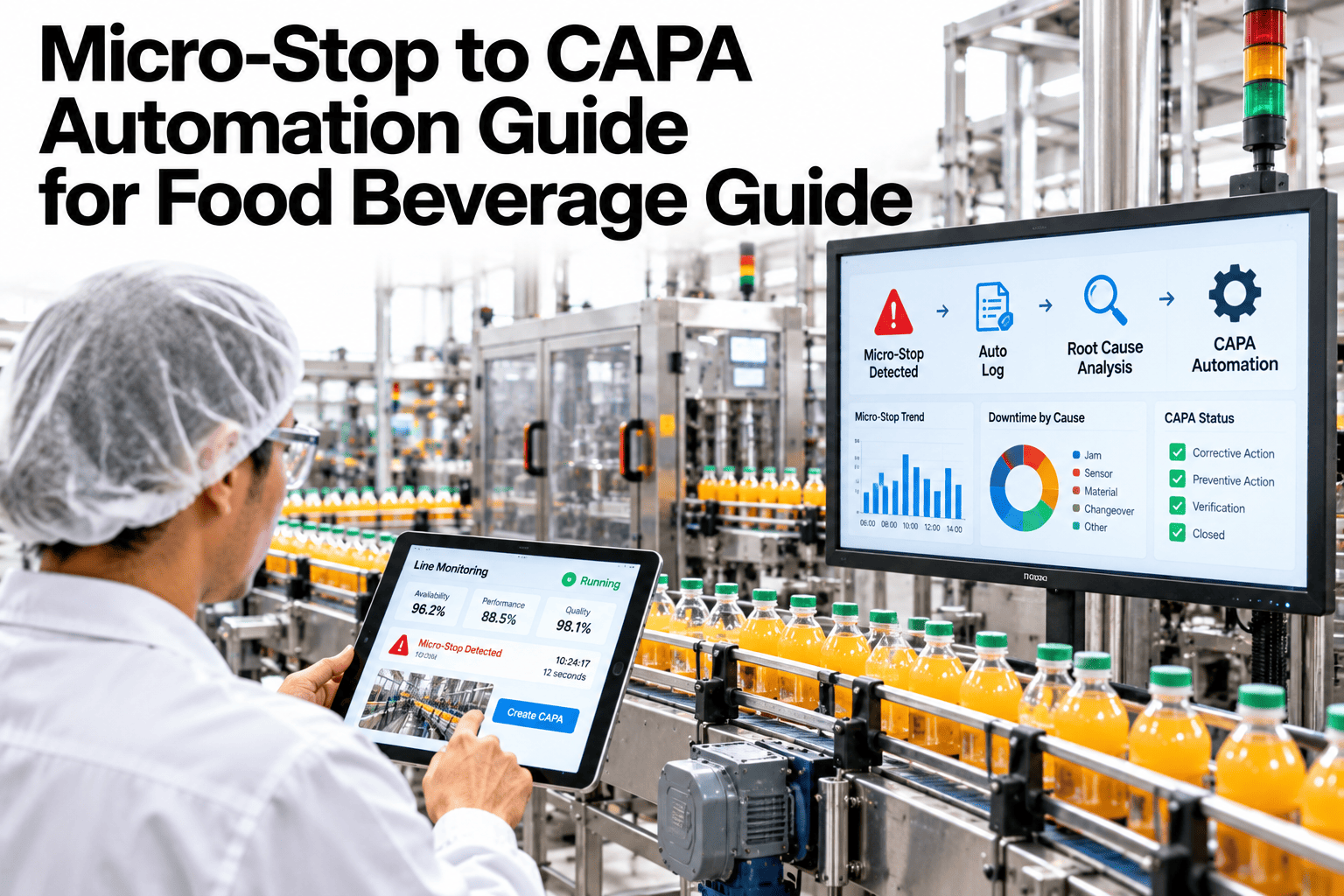
iFactory auto-launches a CAPA record the moment a reason code crosses your defined threshold, with evidence already attached.
Why Manual Escalation Lags Behind the Pattern
A recurring micro-stop pattern is obvious in hindsight, looking at a report at the end of the week. It's far less obvious in the moment, buried among dozens of other stops nobody has time to pattern-match in real time.
| Threshold Type | Trigger Condition | Automated Action |
|---|---|---|
| Same reason code, single shift | Reason code repeats a set number of times within one shift | CAPA opens with all occurrence timestamps attached |
| Same reason code, rolling week | Lower daily count but persistent across multiple shifts | CAPA opens flagging a trend, not just a single-shift spike |
| Combined downtime threshold | Total minutes lost to one reason code exceeds a cost threshold | CAPA opens prioritized by downtime cost, not just count |
See Which of Your Reason Codes Already Cross a Threshold
Book a 30-minute session and iFactory will review your recent stop data against a sample escalation threshold.
How Threshold-Based Escalation Works
Set Thresholds by Reason Code
Different stop types warrant different thresholds, a safety-related stop may trigger far sooner than a minor adjustment pause.
Count Occurrences Automatically
Every classified stop is counted against its threshold in real time, no manual tallying required.
Auto-Launch With Evidence Attached
The CAPA opens pre-filled with every occurrence's timestamp and context, not a blank form waiting for someone to reconstruct the history.
Route to the Right Owner
Each CAPA routes to the team responsible for that equipment or process area, rather than a general queue.
Signals Your Current Escalation Process Is Too Slow
Where iFactory Fits
iFactory connects micro-stop classification directly to CAPA triggering, closing the gap between a pattern existing and someone acting on it.
Configurable Thresholds
Thresholds are set per reason code and severity, matching how urgently each pattern deserves escalation.
Automatic CAPA Launch
A CAPA opens the moment a threshold is crossed, pre-filled with full occurrence history.
Owner-Based Routing
Each CAPA routes automatically to the team or role responsible for the relevant equipment or process.
Verification Before Closure
A CAPA isn't marked closed until the pattern's occurrence rate has actually dropped and held.
Reviewed by iFactory's Quality Systems team for alignment with standard CAPA practice. The 12-occurrence threshold shown is illustrative; actual thresholds should be set per reason code and severity against your own quality system and historical stop data.
Frequently Asked Questions
How is the right threshold number chosen for each reason code?
It's typically set by reviewing historical occurrence data to understand normal variation, then setting the threshold above what's considered routine but low enough to catch a real pattern early. Support can help calibrate thresholds against your own history.
Does automatic CAPA launching skip human review?
No, the CAPA opens pre-filled with evidence, but a quality engineer still reviews it, assigns the corrective action and decides on closure. Automation removes the delay in noticing the pattern, not the decision-making itself.
Can thresholds differ between food and beverage lines in the same plant?
Yes, thresholds are configured per line and reason code, since what counts as a concerning pattern on a high-speed beverage line may differ from a slower food packaging line. See thresholds set for your specific line mix in a short session.
What happens if a threshold is set too sensitively and triggers too often?
Thresholds can be adjusted as actual CAPA volume and outcomes are reviewed, so an overly sensitive threshold generating low-value CAPAs can be recalibrated rather than left as a fixed, one-time setting.
Does this integrate with our existing CAPA or quality management system?
Yes, triggered CAPAs are built to feed into your existing QMS platform rather than creating a separate, disconnected record system. Ask support how this connects to your current QMS.
Let the Pattern Trigger the Action, Not a Human Noticing It Weeks Later
iFactory auto-launches CAPAs the moment a recurring stop crosses your threshold. Book a walkthrough on your own stop data.