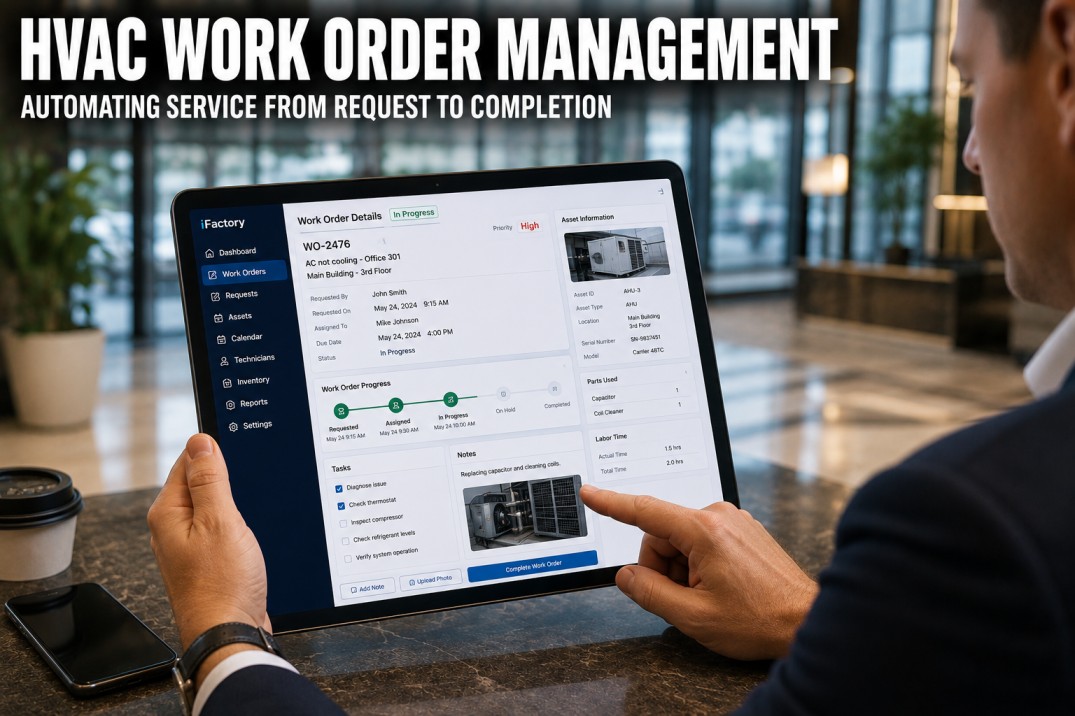
HVAC work order management software transforms maintenance operations from a reactive, paper-based function into an organized, data-driven workflow that tracks every task from detection through completion, analysis, and optimization. When integrated with IoT sensors, BMS data, and predictive analytics, work order management bridges the gap between knowing something is wrong and actually getting it fixed, by automatically generating work orders from FDD alerts, prioritizing based on business impact, assigning to the right technician, tracking parts and labor, and feeding completion data back into analytics models to close the loop.
Automate HVAC Work Orders From Detection to Completion
iFactory's Work Order Management module generates WOs automatically from FDD alerts, predictive models, and PM schedules. Book a demo to see how automated work orders close the gap between detection and resolution.
Core Features: What HVAC Work Order Management Software Should Include
Modern platforms provide functionality beyond simple task tracking.
Automated Work Order Creation
Generate work orders from: FDD alerts, predictive model predictions, scheduled PMs, calendar triggers, API integrations. Auto-populate: equipment ID, fault description, diagnostic info, priority, recommended action, estimated labor and parts.
Intelligent Assignment & Scheduling
Route to right technician based: skill match, proximity, current load, availability. Scheduling: auto-time-slot based on priority, equipment criticality, and technician calendar. Optimize routes for multi-WO tours.
Parts & Inventory Management
Track parts used, labor hours, costs per WO. Auto-reorder critical spares when below threshold. Suggest parts based on fault type and equipment history. Integrate with parts supplier catalogs and pricing.
Performance Analytics & Continuous Improvement
Dashboard: WO volume, completion rate, average resolution time, cost per WO, back-log by priority. Trend: fault recurrence, technician performance, parts consumption, MTTR by equipment.
Work Order Lifecycle: From Detection to Completion
Every work order passes through defined stages with data capture at each step.
| Stage | Activities | Data Captured | Owner | Duration Target |
|---|---|---|---|---|
| 1. Detection | FDD alert, sensor threshold, manual report, scheduled PM | Fault type, equipment ID, timestamp, severity | System / Operator | Instant |
| 2. Creation | System auto-creates WO, validates data, sets priority | WO number, priority, category, estimated hours | System | Seconds |
| 3. Assignment | Auto-assign or manual dispatch to qualified technician | Technician, scheduled time, route | Dispatcher | < 15 minutes |
| 4. Execution | Technician completes work, replaces parts, documents findings | Actions taken, parts used, labor hours, photos | Technician | 2-8 hours per WO |
| 5. Verification | Confirm fault resolved, equipment back online, data normal | Post-repair readings, verification status | Operator / System | < 1 hour |
| 6. Analysis | Review completion, update equipment history, feed analytics | Root cause, cost, recurrence risk | Manager / System | < 1 week |
Close the Loop: From Fault Detection to Verified Repair
iFactory's platform connects FDD, work orders, and post-repair verification. Book a demo to see how closed-loop work order management ensures every alert becomes a completed, verified action.
Work Order Integration: Connecting CMMS, Analytics, and Parts Supply
Value multiplies when work order management is integrated with other systems.
CMMS Integration
Two-way sync: WOs created in analytics platform written to CMMS; completion data read back. Synchronize: equipment hierarchy, parts catalog, technician database, schedule. Avoid: duplicate data entry, mismatched equipment IDs.
Predictive Analytics Integration
FDD alert auto-creates WO: includes diagnostic details, recommended action, estimated parts and labor. Predictive model: suggests optimal timing for intervention. Post-repair: analytics validates the fault is resolved.
Parts & Supplier Integration
Suggest parts based on fault + equipment history. Check local inventory, order from supplier if needed. Track part usage for cost per WO. Integrate with: Grainger, Ferguson, HD Supply, Fastenal.
Work Order Management Best Practices: Maximizing Program Effectiveness
Organizational processes determine software effectiveness in driving maintenance outcomes.
Standardization & SLAs
Standardize work order categories, priorities, and status across all buildings and teams. Define a priority matrix balancing impact (comfort, energy, safety) with urgency (immediacy of failure). Set clear SLA targets: emergency under 2 hours, critical under 4 hours, urgent under 24 hours, routine under 7 days, PM under 30 days.
Documentation & Automation
Require technicians to document root cause, actions taken, parts used, labor hours, and photos. Auto-generate work orders from FDD alerts to eliminate manual entry and ensure no alert is missed. Close the loop by verifying equipment is operating normally after every completion.
Continuous Improvement
Track MTTR and MTBF by equipment. Review open work orders daily to address aging items and reassign as needed. Run monthly analysis on fault recurrence patterns, technician productivity, and cost trends. Continuously improve by adjusting PM frequencies, updating parts kits, and revising procedures.
Work Order Software ROI: Efficiency, Accuracy & Savings
ROI comes from labor efficiency, reduced emergency spend, and better data-driven decisions.
Labor Efficiency
Eliminates 1-2 hrs/day of paperwork and travel per technician. Optimized routing: 10-20% less drive time. Better first-time fix rate: 10-15% reduction in repeat visits.
Emergency Spend Reduction
Predictive WOs replace 30-50% of emergency repairs. Planned repair costs: 40-60% less than emergency. Avoided overtime: 50-75% reduction.
Data Accuracy
Structured WO forms ensure consistent data. Auto-population eliminates data entry errors. Integrated photos provide visual evidence. Historical data enables root cause analysis.
Cost per Work Order
Labor efficiency + better first-time fix + planned vs emergency + parts optimization. Average WO cost: $150-400 emergency to $75-200 planned.
Frequently Asked Questions
What is HVAC work order management software?
It is software that manages the lifecycle of HVAC maintenance tasks from identification through completion. Core functions: automated creation from FDD alerts or PM schedules, intelligent assignment to technicians, tracking parts and labor, documenting completion, and analyzing performance. Modern platforms integrate with IoT sensors, BMS systems, predictive analytics, and parts suppliers.
How does work order management integrate with predictive analytics?
Predictive analytics detects faults and predicts failures. Instead of just alerting, the integrated system: automatically creates a WO with diagnostic details and recommended action, sets priority based on business impact, schedules work based on predicted failure date, sends to technician mobile app, and after completion validates the fault is resolved.
What is the cost of HVAC work order management software?
Standalone CMMS: $5-15/user/mo or $0.01-0.03/sq ft/yr. Integrated analytics + CMMS: $0.05-0.12/sq ft/yr. Implementation: $5K-25K. Total year-1 for 100K sq ft: $10K-40K. Savings year-1: $15K-60K. Payback: 6-14 months.
How do I choose work order management software?
Evaluate: integration capability (FDD, BMS, parts suppliers), mobile app quality (field technician usability), automation (auto-create WOs from alerts, auto-assign), analytics (MTTR, MTBF, cost trends, recurrence patterns), ease of setup and configuration. Run a pilot: 3-month trial with 10-20 WOs per week.
What metrics should I track for work order management?
Leading: WO volume (by category/priority), backlog (aging by priority), assignment-to-acknowledgment time, scheduled vs emergency ratio (target 80:20), first-time fix rate (target >85%). Lagging: MTTR (by equipment type, target <4 hours for critical), MTBF (by equipment, target increasing), cost per WO, cost per sq ft for maintenance, technician utilization (target 75-85%).
Complete HVAC Work Order Management, Fully Integrated
iFactory's Work Order Management delivers end-to-end lifecycle management from auto-creation through assignment, execution, verification, and analysis. Book a demo to see how integrated work orders transform maintenance operations.