A maintenance technician standing in front of a stopped line has three things competing for their hands: the tool they need, the manual or work order they are trying to read, and the radio call to a supervisor who might already be busy on another fault. AR smart glasses collapse all three into a single heads-up display that stays in the technician's line of sight while both hands stay on the machine. Plants running guided assembly and remote-expert workflows on smart glasses are reporting meaningfully higher first-time-fix rates and shorter time to competency for new hires, which is why the category has moved from pilot projects to standard equipment on serious production floors. This page walks through where AR glasses actually pay off on a shop floor, what the deployment path looks like, and where iFactory's applications engineering team can help you scope a rollout.
AR Smart Glasses · Manufacturing Deployment 2026
AR Smart Glasses for Manufacturing: The Use Cases That Actually Pay Back
Guided assembly, remote expert support, hands-free inspection, and structured training are the four use cases where AR wearables move past novelty and into measurable production impact. Here is what each one looks like on a real shop floor, and how the ROI case actually gets built.
Reported Impact From AR-Guided Workflows
25–30%
Fewer procedural and assembly errors
9–18mo
Typical hardware payback window
30–50%
Reduction in mean time to repair
4x
Faster skill acquisition in AR-guided training
The Underlying Problem
Every Manual Task Loses Time to Something Other Than the Task
Watch an experienced technician work through a complex repair and the wasted motion is almost invisible — a glance at a printed procedure, a pause to radio a question, a walk back to a terminal to log what was found. None of that is the actual repair. It is the overhead surrounding the repair, and on a shift full of work orders that overhead adds up to a meaningful fraction of total labor hours spent not fixing anything.
The same overhead shows up on the assembly line in a different form. New operators learning a multi-step build reference a binder or a wall-mounted diagram, look away from the workpiece to check it, look back, and repeat that cycle dozens of times per shift until the sequence becomes muscle memory. Every one of those glances is a moment where the hands stop moving and a moment where a step can get skipped or done out of order.
AR smart glasses do not remove the need for instructions, expert input, or documentation. They remove the need to look away from the work to get any of it, by placing the information directly in the technician's or operator's field of view and updating it as the task progresses.
Where the Value Actually Shows Up
Four Use Cases, Four Different Payback Mechanisms
AR wearables get pitched as a single category, but the four dominant manufacturing use cases pay back through completely different mechanisms. Knowing which one is driving your business case changes how you should scope a pilot.
01
Guided Assembly
Step-by-step build instructions overlay directly onto the workpiece, advancing automatically as each step completes rather than on a fixed timer. If a technician reaches for the wrong part or fastener, the system can flag the mismatch before it gets installed rather than catching it in a downstream quality check. The payback mechanism is error prevention at the point of assembly, not just faster reading.
02
Remote Expert Support
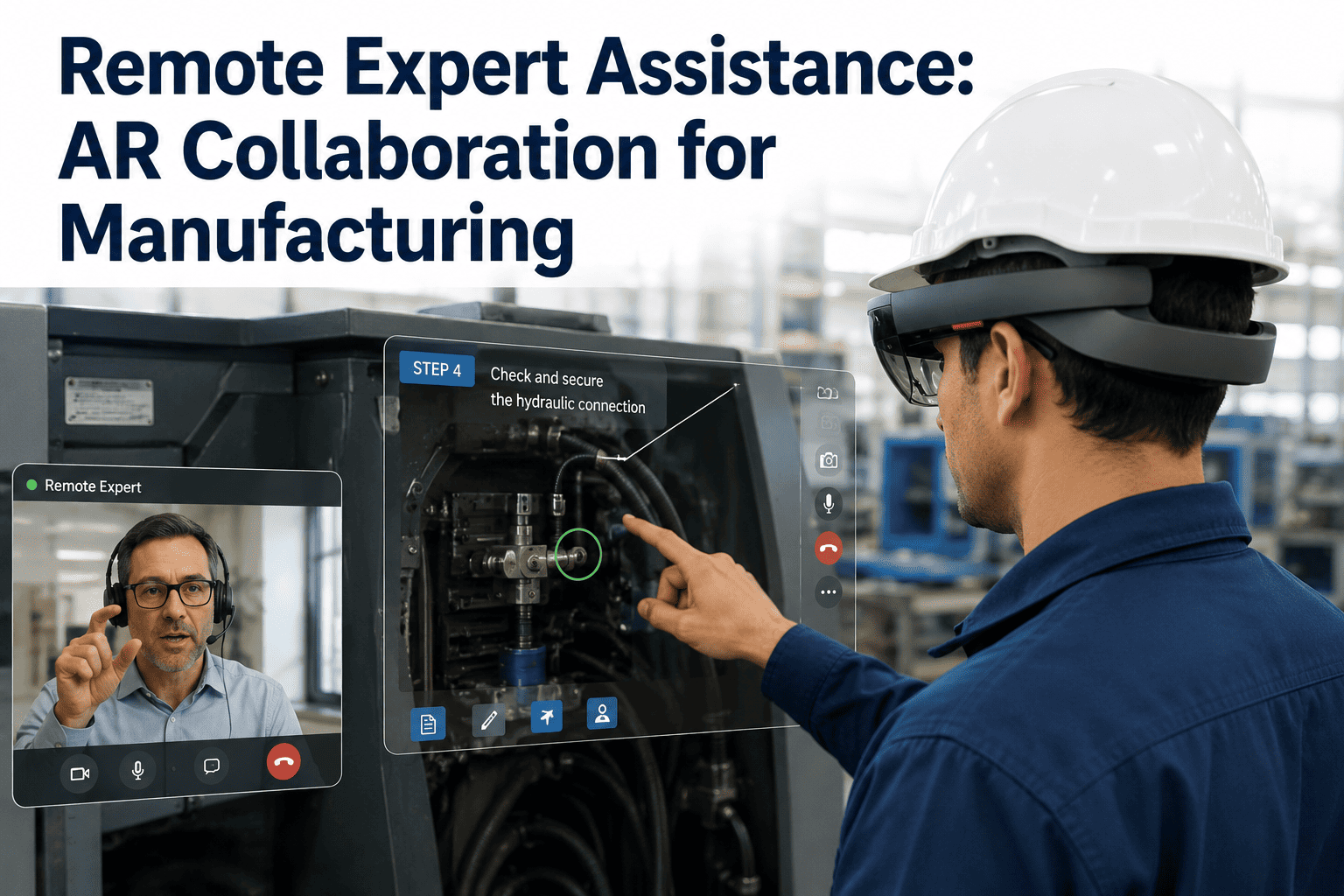
A technician streams a live first-person view to a specialist who may be at another site or another time zone. The expert sees exactly what the technician sees and can annotate directly onto that view or talk them through the fix verbally. The payback mechanism is eliminating a travel-and-wait cycle that can otherwise stretch a two-hour fix into a two-day outage.
03
Hands-Free Inspection
Inspectors work through a checklist that advances by voice command or camera-confirmed step, capturing photo evidence and measurements without setting down a tablet or clipboard. The payback mechanism is inspection throughput and completeness — nothing gets skipped because the checklist will not advance until the current item is addressed.
04
AR-Assisted Training
New hires work through guided procedures with visual overlays marking the exact component to interact with next, rather than learning from a static manual or shadowing a senior operator for weeks. The payback mechanism is compressed time to competency, freeing senior staff from repetitive one-on-one training cycles.
See It Running Against Your Own Procedures
Walk Through an AR-Guided Work Order Live
iFactory's applications engineering team can demo guided assembly and remote-expert workflows using your own equipment documentation, so you can see exactly what the technician's field of view looks like before committing to hardware.
How A Guided Work Order Actually Runs
From Work Order Dispatch to Logged Completion
The sequence below is what a single AR-guided maintenance job looks like end to end, from the moment a work order is assigned to the moment it closes out with documentation attached automatically.
1
Work Order Pushed to the Headset
The technician receives the assigned job, asset history, and required parts list directly in the glasses display the moment they approach the equipment, with no separate device to check.
2
Guided Procedure Begins
Step-by-step instructions, torque specs, and schematics overlay onto the equipment, advancing as each step is completed and confirmed rather than on a fixed timer.
3
Escalation to Remote Expert if Needed
If the technician hits a fault the procedure does not cover, a live call connects to a remote specialist who sees the same first-person view and can annotate directly onto it.
4
Photo and Voice Documentation Captured
Completion photos, voice notes, and readings are captured hands-free during the job itself, rather than reconstructed from memory afterward at a terminal.
5
Work Order Closes With Full Record Attached
The completed job, timestamps, parts used, and any escalation history sync back to the maintenance system automatically, building a clean asset history without extra data entry.
Method Comparison
AR Guidance Against the Tools It Replaces
AR glasses are not the only way to get instructions or expert input to a technician — paper manuals, printed diagrams, and phone-based video calls already do a version of this job. The comparison below is about where each method actually falls short in practice.
| Method |
Hands-Free |
Real-Time Expert View |
Where It Falls Short |
| Paper Manual / Binder |
No |
No |
Static, easily outdated, requires setting down tools to read |
| Handheld Tablet |
No |
Partial — phone camera only |
Occupies one hand, awkward to prop up mid-task |
| Phone Video Call |
No |
Yes, but not first-person |
Camera angle is whatever the phone happens to point at |
| Radio Call to Supervisor |
Yes |
No visual context at all |
Supervisor is troubleshooting blind, based on description alone |
| AR Smart Glasses |
Yes |
Yes, exact first-person view |
Requires hardware investment and workflow onboarding |
The pattern worth noting: every alternative to AR glasses trades away either hands-free operation or real first-person visual context. AR is the only method on this list that keeps both.
Deployment Path
What a Rollout Actually Looks Like
Most successful AR deployments start narrow — one work cell, one procedure type, one shift — before scaling site-wide. The phases below reflect that pattern.
Phase 1
Pilot Cell Selection
Pick a work cell or procedure with high repetition and measurable error or downtime history, so the pilot has a clear before-and-after comparison.
Phase 2
Content and Procedure Digitization
Existing manuals, schematics, and torque specs get converted into the step-triggered guided format the glasses display, tied to specific equipment and part numbers.
Phase 3
Operator Onboarding
Technicians and operators trial the hardware on low-risk tasks first, building comfort with the display and voice controls before it becomes part of critical work orders.
Phase 4
Site-Wide Scale-Out
Once the pilot demonstrates measurable first-time-fix or error-rate improvement, the same content pipeline and hardware standard extend to additional lines and shifts.
What Changes on the Floor
The Operational Shift, Not Just the Hardware
Fewer Escalations That Require a Site Visit
A remote specialist resolving a fault over a live AR call removes the multi-hour or multi-day wait that an in-person visit would otherwise require, especially for facilities without a specialist on staff.
Documentation That Happens During the Job
Photo and voice capture during the work itself replaces the after-the-fact paperwork technicians typically rush through at the end of a shift, producing a more complete and accurate asset history.
New Hires Reach Full Speed Faster
Guided overlays let new operators work independently on complex procedures sooner, reducing the load on senior staff who would otherwise be pulled away from their own work to supervise.
A Searchable Record of Every Guided Job
Every completed procedure, escalation, and expert annotation becomes part of a searchable history, so patterns in recurring faults surface instead of staying anecdotal.
Common Questions
Frequently Asked Questions
Do AR smart glasses work in loud, bright, or dirty factory environments?
Industrial-grade AR devices are built specifically for harsh manufacturing conditions rather than adapted from consumer hardware, with ruggedized housings, noise-canceling microphones for voice commands, and displays designed to remain legible under bright ambient lighting or welding glare. Dust and moisture ratings vary by device, so the right hardware choice depends on your specific floor conditions, which is something worth reviewing before committing to a fleet purchase.
iFactory's applications engineering team can help match hardware to your environment based on a site walkthrough rather than a spec sheet alone.
How long does it take to digitize our existing procedures into a guided AR format?
Converting an existing manual or schematic into a step-triggered guided procedure typically takes longer for the first few procedures while the content structure and equipment tagging get established, then moves faster once a template exists for similar equipment types. Most pilot deployments start with a handful of high-repetition procedures rather than attempting to digitize an entire manual library upfront, which keeps the initial time investment manageable while still producing a measurable pilot result.
What happens if a technician loses network connectivity mid-procedure?
Guided procedures that have already been downloaded to the device can typically continue in an offline mode, since the step sequence and reference content live locally on the headset rather than streaming continuously. Live remote-expert calls do require a network connection, so facilities in areas with unreliable coverage often pair the deployment with a dedicated wireless access point in the affected work cells to keep the escalation path available when it matters most.
Is the payback period realistic for a smaller plant with fewer technicians?
The payback mechanism scales with how much technician time is currently lost to searching for documentation or waiting on expert availability, which is often proportionally higher at smaller sites that cannot justify a full-time specialist on every shift. A focused pilot on the highest-value work cell is usually the right starting point regardless of plant size, since it produces a real before-and-after comparison without requiring a fleet-wide hardware commitment upfront.
Booking a demo is the fastest way to walk through what a realistic payback window looks like for your specific headcount and equipment mix.
Can remote experts support multiple sites from one location using this setup?
Yes — a single specialist can field escalation calls from multiple facilities in sequence, since each call is a scheduled or on-demand video session rather than a continuous monitoring commitment, which is exactly the model that makes AR remote support cost-effective for organizations spread across several plants. This also means a specialist's expertise on a particular equipment type becomes available to every site running that equipment, rather than being limited to wherever that person happens to be physically located that week.
Stop Losing Hours to Searching, Waiting, and Re-Explaining
See a Guided AR Work Order Running on Your Own Equipment
iFactory's applications engineering team can walk you through a live guided-assembly and remote-expert demo built around your actual documentation, so the business case is grounded in your own procedures rather than a generic showcase. Book a session to see the field-of-view experience firsthand, or get in touch to scope a pilot cell.