Most cutting rooms already generate enough fabric remnants every week to sew a second production run of small-quantity styles, yet almost none of that fabric ever gets reused. It gets bagged, shelved in a corner of the warehouse, and forgotten until a physical inventory count rediscovers it a season later, usually too degraded or too disorganized to match against any current order. The plants recovering real value from remnants are not generating less waste at the cutting table — they are simply the ones who catalog, match, and reissue what they already have, and you can see how that system is structured through a short platform walkthrough.
Turn end-of-lay remnants from dead inventory into a recoverable revenue stream.
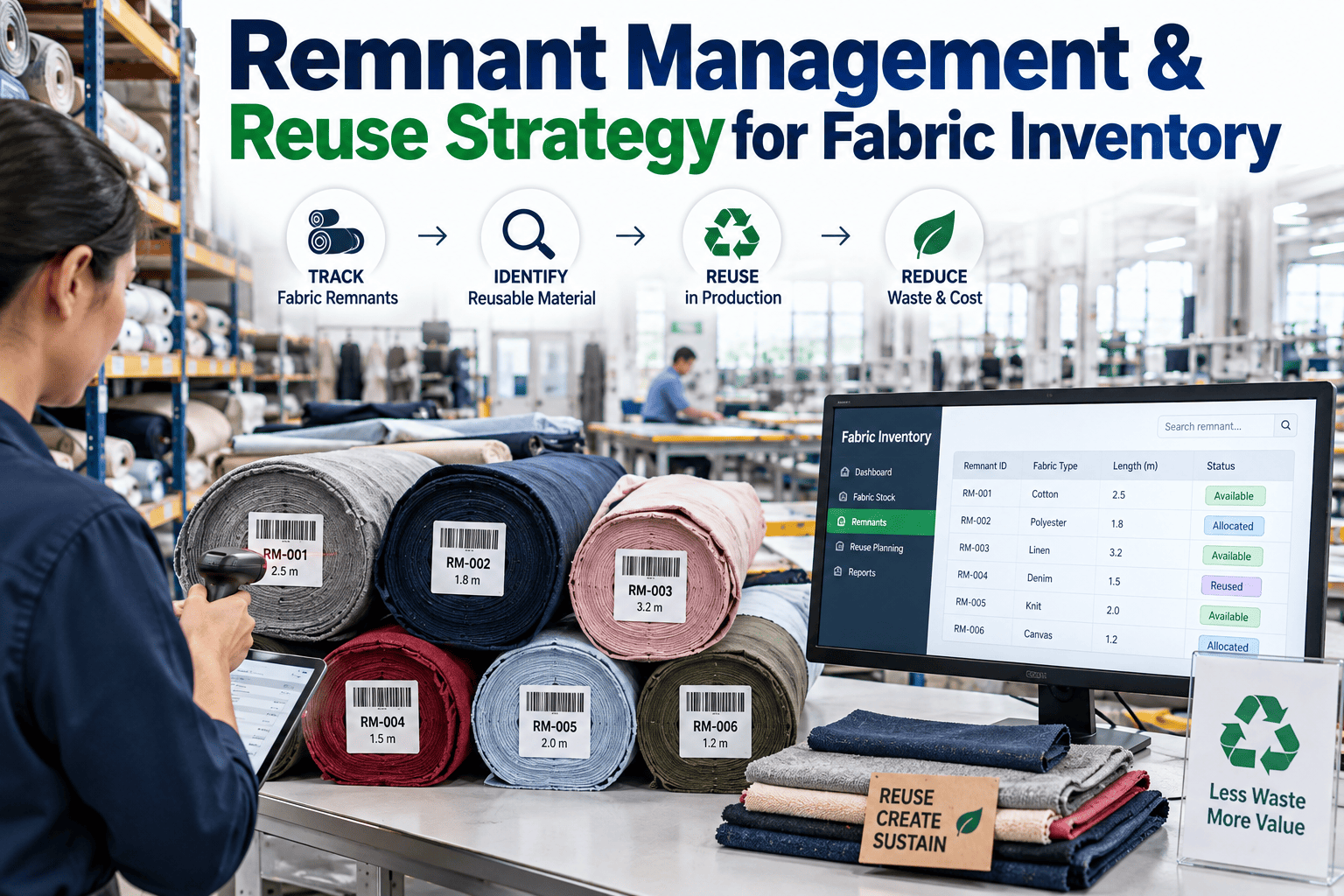
iFactory AI catalogs every remnant by fabric, color, and dimension the moment it leaves the cutting table, then matches it automatically against upcoming small-quantity orders before it ever reaches the shelf.
What untracked remnants actually cost a fabric inventory
Remnant fabric is not scrap. It still has cutting value, and every yard of it that goes unmatched is a yard the plant will buy again for the next small order.
Across mid-sized cutting operations, unmanaged remnants routinely represent five to eight percent of total fabric spend sitting idle in storage rather than circulating back into production.
From end-of-lay leftover to reissued fabric, in five stages
A remnant only creates value if it moves through this loop before it degrades in storage or gets forgotten in a bin.
Lay completes
The final cut piece is removed and the leftover fabric at the end of the lay is set aside for capture instead of being pushed into a general scrap bin.
Remnant captured
Weight, length, and width are logged at the table, tagged with the source fabric roll and style, before the piece is bagged for storage.
Cataloged and shelved
Fabric type, color or shade batch, dimensions, and storage location are entered into a searchable catalog rather than a handwritten tag on a shelf.
Matched to a new order
A matching algorithm checks upcoming small-quantity cutting orders against the catalog and surfaces remnants that fit fabric, shade, and size requirements.
Reissued and value recovered
The matched remnant is pulled from storage and issued against the new order, and the fabric cost that would have been bought new is recovered instead.
What actually needs to be tracked for a remnant to be searchable
A remnant catalog fails the moment someone has to walk the aisles to remember what is on the shelf. Four data points make a remnant searchable instead of memorized.
Fabric identity
Fabric type, construction, and the specific roll or lot it came from, so a remnant can only be matched against orders using the same or a compatible fabric.
Color and shade batch
Dye lot and shade group are recorded separately from fabric type, since two pieces of the same fabric from different dye lots cannot be mixed in one garment.
Dimensions and shape
Usable length, width, and shape of the remaining piece, since an irregular offcut has different reuse potential than a clean rectangular remnant.
Storage location and age
Shelf or bin location and the date the remnant was logged, so aging stock can be flagged for reissue or write-off before it becomes dead inventory.
A catalog only pays for itself if the matching happens automatically. Talk to our team about how remnant matching is set up against your specific fabric and order data.
How a remnant gets matched to the right order, automatically
Matching is not a simple size lookup. It weighs several constraints at once, the same way a planner would if they had perfect memory of every remnant on the shelf.
iFactory AI's matching logic ranks candidate remnants for each upcoming small-quantity order using fabric compatibility, shade tolerance, and usable dimension against the marker requirement, then surfaces the top matches to the planner instead of asking them to search manually.
When no remnant clears the match threshold within a set aging window, the system flags that stock for consolidation into scrap-based secondary products rather than letting it sit indefinitely.
Where remnants go when they cannot be matched to a full order
Not every remnant fits a new cutting order, and that fabric still has value if it is routed to the right secondary use instead of the trash.
Trim and small components
Pockets, facings, and reinforcement pieces need far less fabric than a full garment panel and are the first destination for mid-size remnants.
Sample and swatch stock
Design and merchandising teams routinely need small cuts for sampling, and a catalogued remnant library removes the need to cut fresh fabric for every sample request.
Patchwork and mixed-material lines
Some product lines are specifically designed around varied fabric pieces, turning what would be waste in a standard garment into a planned design feature.
Recycling and fiber recovery
Remnants too small or degraded for any cutting use are the last stop, routed to fiber recovery partners instead of landfill, closing the loop on what cannot be reissued.
Shelf-based storage versus a searchable remnant catalog
The difference is not just organization. It is whether a remnant can be found and reused before it ages out of relevance.
| Element | Shelf and tag storage | iFactory AI remnant catalog |
|---|---|---|
| Finding a specific remnant | Manual search through bins by memory | Searchable by fabric, shade, dimension, and location |
| Matching to new orders | Depends on a planner remembering what is in stock | Automatic ranked matching against open orders |
| Aging stock visibility | Discovered during periodic physical counts | Flagged automatically once past a set aging threshold |
| Typical reuse rate | Under 15 percent of logged remnants | Substantially higher once matching runs continuously |
What a fabric inventory specialist says about remnant recovery
Remnant piles grow because logging one takes thirty seconds and finding one later takes an hour. Nobody wants to spend that hour, so the pile just gets bigger and the fabric ages past usefulness. The moment a plant makes the remnant searchable at the point it is created, the whole equation flips. Planners start pulling from the catalog because it is faster than requesting new fabric, and that is the only condition under which reuse actually sticks as a habit rather than a policy nobody follows.
FAQ: remnant management and reuse strategy
Ready to see what is sitting unmatched in your own remnant storage?
Bring a sample of your current remnant log or storage photos, and we will show you what a searchable catalog and automatic matching would surface for your fabric inventory.