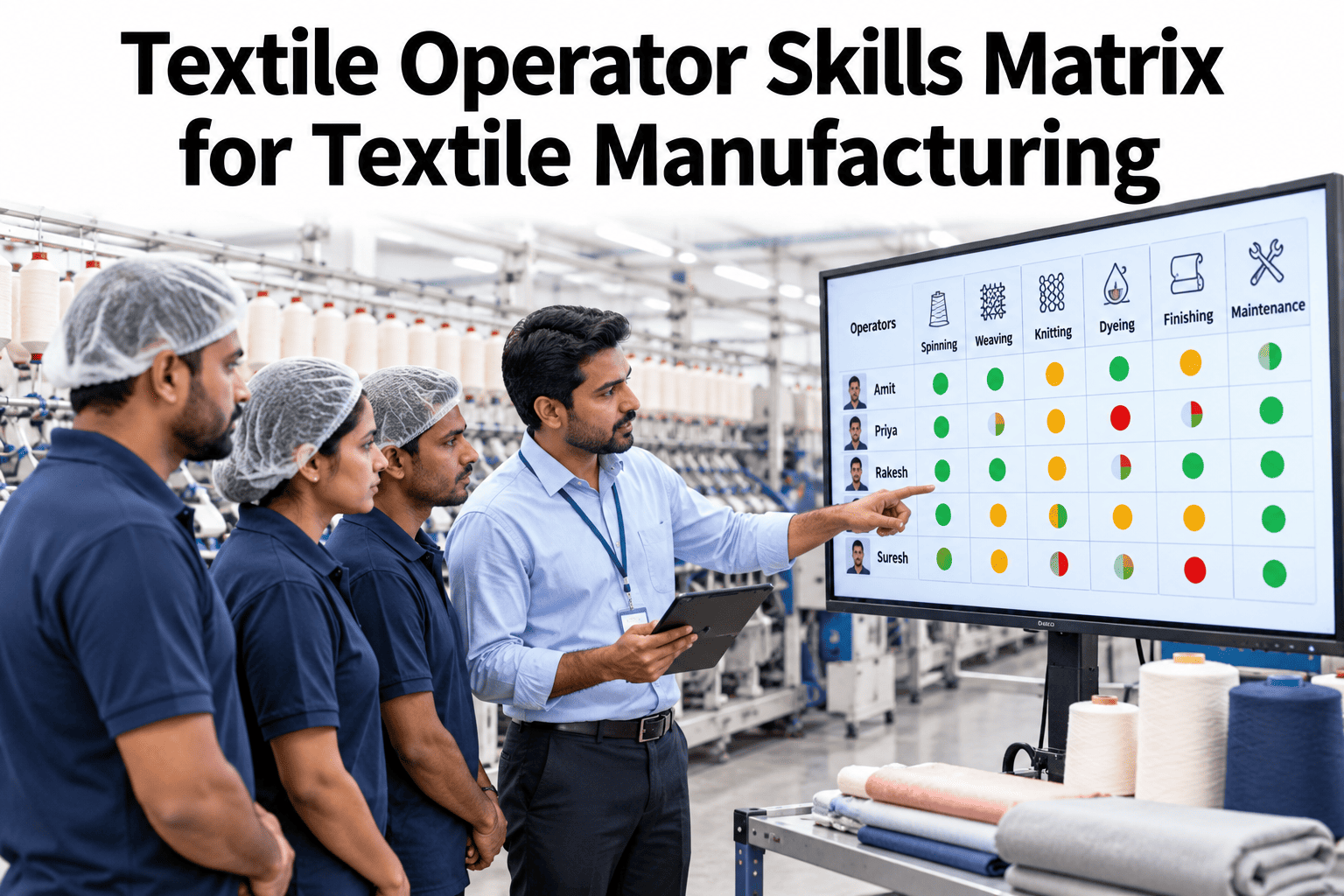
A textile mill runs on people who know which machine, which fabric and which hazard to trust. Without a skills matrix, that knowledge sits in a few heads and a binder nobody reads. Mills can see a live operator skills matrix tied to shifts and safety with iFactory AI.
Know Who Can Run What, Safely, on Every Shift
iFactory AI keeps operator skills, certificates and expiry dates in one live grid, so no machine runs without a qualified person.
Why Textile Mills Need a Matrix
A mill is a chain of different machines, each with its own set of settings, faults and hazards. A new hire on a dye machine faces very different risks than one on a loom. The matrix makes that difference visible before a shift starts.
Moving machinery
Rollers, looms, cutters and winders can trap hands and clothing during a clear or a jam.
Heat and steam
Dye houses and finishing lines combine hot liquids, pressure and slippery floors.
Chemicals
Dyes, acids, alkalis and finishing agents need correct handling and protective gear.
Dust, lint and noise
Fiber dust, fire risk and noise need controls and trained habits at the machine.
Pick a Rating Scale People Can Read
Keep the scale short and clear. Operators should be able to read their own row at a glance and tell what the next level asks of them. Industry guidance usually uses four levels, with an optional fifth, since more levels add noise.
Build the Matrix in Six Steps
Start with what really happens at each station, not with job titles in the HR file. Lean practitioners stress that the columns should be taken out of observed standard work.
Choose a level of detail at which skill really differs, such as machine, process or product family.
Walk the floor with operators and list the real tasks, setups and checks at each station.
Write what an operator must show to hold each level, in plain words and observable steps.
Supervisor and operator rate separately, then compare. Gaps point to unclear standards or training needs.
Look for stations with too few qualified people, no trainer or skills held by near-retirees.
Plan training for the biggest gaps, then revise the matrix after every validated event.
What the Columns Should Cover
A textile matrix works best when it mixes production skills with safety and quality skills, since the same person needs all of them at the same moment.
| Skill family | Examples in a mill | Typical evidence |
|---|---|---|
| Process operation | Loom setup, dye machine loading, stenter running, winder changeover | Observed run to standard |
| Quality checks | Shade matching, GSM and width checks, fault marking, sample handling | Check results compared with a lead |
| Hazardous energy control | Lockout and tagout of looms, calenders, pumps and conveyors | Written test and walk-through |
| Chemical handling | Dye kitchen work, spill response, labeling, PPE choice | Training record and spot audit |
| Autonomous maintenance | Cleaning, lubrication, inspection routes and first-line fault finding | Checklist completion over weeks |
| Housekeeping and fire safety | Lint control, waste handling, extinguisher use, evacuation roles | Drill participation |
| Digital SOP use | Opening the right procedure, logging near misses, confirming steps | Usage logs and spot checks |
Safety-Critical Skills Need Proof, Not Just a Number
For lockout and similar tasks, a level on a grid is not enough. You need dated evidence that the person was trained and stayed current. In the United States, OSHA's lockout and tagout rule, 29 CFR 1910.147, sets the pattern many mills follow. Mills in other countries should apply their own national rules.
Retrain on change
OSHA requires retraining when job assignments change, when machines or processes add new hazards, or when energy control procedures change.
Retrain on gaps
Retraining is also required when inspections find deviations, or when the employer believes knowledge or use of the procedure has gaps.
Certify the training
The employer must certify that training occurred, with each employee's name and the training dates.
Keep it live
Annual training is not mandated by that rule, but many mills set a fixed review cycle as good practice.
Evidence Checklist for Lockout Skills
See Skills, Safety and Shifts on One Screen
Book a 30-minute session and iFactory AI will walk through a live skills matrix with certificates, expiry alerts and shift coverage for your own stations.
Check Coverage on Every Shift
A matrix is only useful if it answers a daily question: is each critical station covered by enough qualified people? Practitioner guidance suggests at least two qualified operators per task per shift, and three or four for critical skills. Treat these as starting points, not laws.
Spot Fragile Skills Early
The grid shows more than gaps. Patterns in it show the spots at which the mill sits one resignation or one sick day short of trouble.
Train With a Method, Not a Hope
Training Within Industry's classic Job Instruction method uses four steps that still work well on a mill floor. Use them to move a person up one level at a time.
Prepare
Break the task into key steps, pick the right trainer and have tools and materials ready.
Present
Show the task slowly, say each step aloud and explain the reasons behind key points.
Try out
Let the learner do it, correct errors on the spot and have them explain each step back.
Follow up
Leave the learner to work alone with a named contact, then check back at set times.
When to Recertify
| Trigger | Why it matters | Typical response |
|---|---|---|
| Fixed review cycle | Skills fade, and habits drift without a regular check | Annual review for steady tasks, as a common practice |
| Process or machine change | New settings and hazards make old training incomplete | Retrain and re-rate before restart |
| Long absence off the task | Operators return rusty after leave or a long move to other work | Refresher after about 90 days away, in a common guideline |
| Incident or near miss | Events show gaps in knowledge or in the procedure | Review the people involved and the standard |
| Audit finding | Inspections can show deviation against the written method | Retrain and record the result |
Station Profiles: What Level Three Looks Like
Levels only work when each station defines them in plain terms. These short profiles show the style. Adapt every line to your own machines and standards.
Ring frame operator
Piecing broken ends fast, changing doffs safely, spotting yarn faults and reporting abnormal vibration or noise.
Loom operator
Tying warp ends, clearing weft stops, reading fault codes and marking defects before the cloth leaves the loom.
Dye machine operator
Loading to weight, running the recipe, checking temperature curves and handling hot liquors without shortcuts.
Stenter operator
Setting width and speed, tracking temperature zones, spotting shade or hand-feel drift and stopping the line safely.
Bring New Operators Up in Thirty Days
Early weeks decide whether a newcomer becomes a safe, steady operator or a risk. A structured first month beats a vague promise to learn on the job.
Safety induction, site walk, PPE fitting and a mentor named on the matrix. No solo work on hazardous machines.
Observation and guided practice at one station, with the four-step method and short written checks.
Supervised work at standard speed, quality checks under review and the first lockout walk-through.
Joint rating by mentor and supervisor, a review of gaps and a plan for the second station.
Rotation and Cover Without Risk
Cross-training is the best protection against absence, but only when it is planned. Random swaps put untrained people on dangerous machines and spoil quality.
Agree which stations pair well, so a loom operator learns winding before dyeing, not the reverse.
Set a maximum number of new stations at once, so each skill is learned well and then used.
Rotate regularly after training, because unused skills fade and ratings quietly lose their meaning.
Make the Grid Easy for Every Operator
A matrix that only managers can read is half a matrix. Visual, local and simple wins on the shop floor.
Connect the Matrix to Daily Work
A matrix that sits in a folder goes stale within weeks. It earns its place when other systems use it every day.
Shift Rostering
Offer only qualified people for a station, and flag a gap before the shift begins.
Digital SOPs
Show the right procedure for the operator's level and log that it was opened and followed.
Quality Data
Compare defect rates by station and level to find the stations that benefit most by training.
Incident Records
Link near misses to the task, the machine and the training status of those involved.
Maintenance Work
Match autonomous maintenance tasks to operators who hold the right skills.
Expiry Alerts
Warn supervisors and operators ahead of a certificate end date.
Common Mistakes That Make Matrices Fail
What to Measure
| Measure | What it tells you | Owner | Review rhythm |
|---|---|---|---|
| Stations with enough qualified people | Share of stations meeting the coverage target on each shift | Production manager | Weekly |
| Expired or expiring certificates | Safety-critical skills at risk in the next weeks | EHS lead | Weekly |
| Cross-training depth | Average number of stations each operator can run | HR and production | Quarterly |
| Time to reach standard | Days for a new operator to reach level two on a station | Training lead | Monthly |
| Near misses per hundred shifts | Reporting culture, plus links to skill level or task | EHS lead | Monthly |
| Quality fault rate by skill level | Whether higher levels really produce fewer faults | Quality manager | Monthly |
A Simple Business Case
Finance teams can request a worksheet through support to test their own figures. The example below uses round numbers for one small shift.
How iFactory AI Fits
iFactory AI brings workforce records next to production, quality and safety data. Skill levels, certificates and expiry dates sit beside the stations and shifts they affect, and the same view shows defects and incidents by task. It works with existing HR, ERP and production systems. Scope and timing are confirmed in a line review.
Live Skills Grid
One shared matrix for every station, shift and line.
Certificate Tracking
Dated records with expiry alerts for safety-critical tasks.
Coverage Alerts
Warn when a shift lacks enough qualified operators.
Skills-to-Quality Link
Compare defects and rework with training status.
Near-Miss Context
Tie incidents to task, machine and skill level.
Multi-Site View
Compare mills with one method and role-based access.
A 90-Day Starting Plan
Choose the pilot
Pick one department, name a production owner and an EHS partner, and agree the scale.
Map and rate
Walk the floor, list real tasks and rate each operator with their supervisor.
Close the first gaps
Train for the thinnest stations, renew expiring certificates and use the roster rule.
Review and widen
Show results to the team, fix the standards that confused people and add the next department.
Frequently Asked Questions
What is a textile operator skills matrix?
It is a grid that lists operators against the tasks and machines of a mill, with a level in each cell. It shows who can run what, who needs training and how thin coverage is. Book a session to see a live textile matrix built on a real shift.
When is a spreadsheet no longer enough?
Practitioner guidance suggests that plants beyond about 50 operators or 30 distinct tasks usually need system support. Sooner, if records go stale, expiry dates are missed or planners cannot see the grid. A small line with a single owner can start in a spreadsheet and move later.
How often should ratings be revised?
After every validated training event, rotation, joiner or leaver, and after any change to a work standard. Review the whole matrix at least every quarter. Safety-critical certificates need alerts before they expire. Support can help set review rhythms that fit your shifts.
Does the matrix replace formal safety training?
No. It records and tracks that training. Rules such as the OSHA lockout standard still require trained people, retraining on defined triggers and certified records. The matrix makes those records easy to find, keeps expiry dates visible and shows which roster choices put untrained people on a task.
How do we get operators to trust it?
Build it with them, not about them. Let operators rate themselves, explain gaps as training chances and show the grid at the machine in their own language. When people see that a higher level leads to new tasks, better pay paths or safer work, they keep their row honest and current.
Put the Right Person on Every Machine
iFactory AI turns scattered training records into a live skills and safety view for your mill. Book a walkthrough on your own stations.