AI Vision Model Training: How Many Defect Images You Need

By James C on October 26, 2026

ai-vision-model-training-many-defect-images-you-need

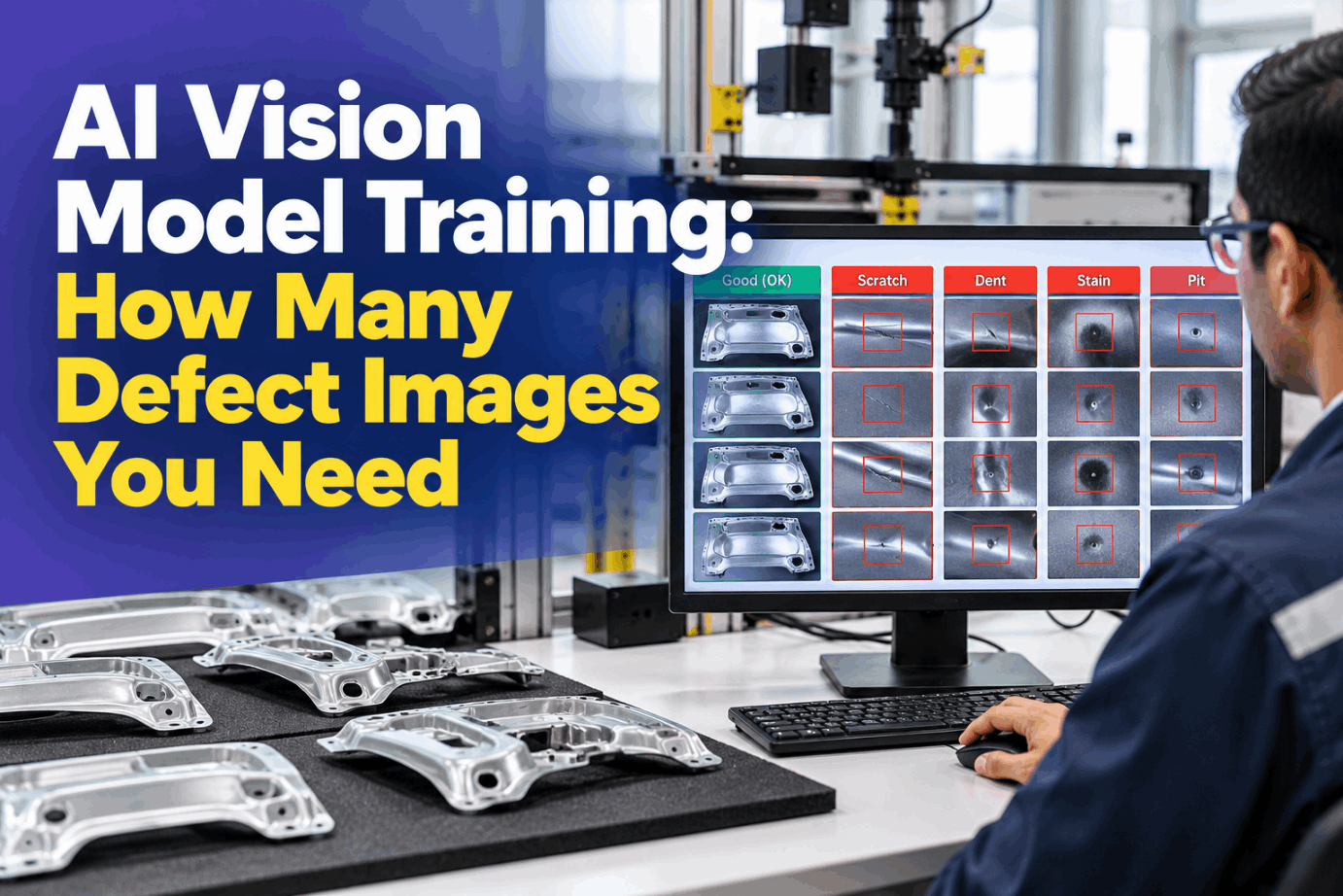
The first question in almost every AI inspection project is how many defect images the model needs, and the honest answer is that it depends on the method. A supervised model needs labelled examples of every defect class. An anomaly model can start from good parts alone. On a line that makes one bad part in two thousand, that difference decides whether you start next week or next quarter. This guide covers image counts, labeling, rare defects and keeping models accurate once they are live. Size your own dataset in a short model training demo.

AI VISION · MODEL TRAINING

Start With Good Parts, Add Defects as They Arrive

iFactory Model Lifecycle gives your team labeling tools, anomaly models for rare defects and drift monitoring, with retraining run on the on-site NVIDIA server. Inspection starts on good images while the defect library grows.

Bracket line 2 · DatasetAnomaly model live
Stamped steel bracket · top camera
Good images18,400
Dent images37 of 60
Label agreementκ 0.81
Good-part scoresIn band
Supervised dent class trains on site at 60 labelled images
ANOMALY DETECTION TRAINING

Two Ways to Train, and What Each Asks of You

Supervised models learn from labelled examples of each defect, so they can name the defect and often show where it is. Anomaly detection learns what normal looks like and flags anything that differs. PatchCore, presented at CVPR 2022, is a well-known example: it fits a memory bank of patch features using defect-free images only. Many lines run both, an anomaly model from day one and supervised classes as real defects build up. Talk through the right mix with our vision data team.

SUPERVISED MODEL
  • Needs labelled images of every defect class
  • Names the defect, so it can grade and route it
  • Struggles with defects it has never seen
  • Best for frequent, well-defined defects
ANOMALY MODEL
  • Fits on good images, which every line has plenty of
  • Flags the unusual, including new defect types
  • Says something is wrong, not what it is
  • Still needs real defect images to test it
DEFECT IMAGE DATASET

What Vendors Say About Image Counts

Published numbers vary widely, and most are minimums to start training rather than what a production model needs. Treat the rows below as vendor and research guidance, not rules. The counts that matter are the ones your own validation results support. Check your defect list against them in a dataset sizing call.

Source
Model type
Stated guidance
Note
Amazon Lookout for Vision
Anomaly classification
20 normal and 10 anomalous images in a single dataset
Support ended 31 Oct 2025
LandingLens
Classification
At least 10 labelled images to train, about 50 per class for complex projects
Similar counts per class
LandingLens
Object detection
About 50 bounding boxes per class for complex projects
The box is the unit
LandingLens
Segmentation
About 20 to 30 labelled areas per class for complex projects
Often fewer images than boxes
PatchCore research
Anomaly detection
Fitted on defect-free images only
Defects needed for testing
iFactory planning guide
Supervised
50 to 150 images for simple, high-contrast defects, up to 500 to 2,000 for a full station
Varies with part and finish
RARE DEFECT DETECTION

Worked Example: What a 1-in-2,000 Defect Rate Allows

A good line is a slow source of defect images. The example uses illustrative figures for a stamping line to show how quickly one defect class builds up. The same week produces tens of thousands of good images, which is why an anomaly model can start long before a supervised one. Run the sums for your own line with our support engineers.

Parts per week1,200 per hour × 16 h × 5 days, assumed96,000
Defective parts per week96,000 ÷ 2,00048
Of which dents48 × 25% share, assumed12
Usable dent images12 × 75% sharp and agreed, assumed9 per week
Weeks to 60 dent images50 to train plus 10 held back for test: 60 ÷ 9 = 6.7About 7 weeks
Good images the same week96,000 − 4895,952
IMAGE LABELING

Classification, Box or Mask: Use the Cheapest Label That Works

The label type sets both the labeling effort and what the model can tell you. A whole-image label says a defect is present. A bounding box says where. A segmentation mask outlines the defect pixel by pixel, so its size can be measured against a spec limit. Choose by the decision the line has to make, not by what looks most advanced. See all three label tools in a labeling demo.

Classification
One label per imageFastest to label. Tells you pass or fail and the defect type, not its position or size.Best for: one defect type per view
Bounding box
A box around each defectShows where defects sit and how many there are. Each box counts as one example.Best for: counting and locating
Segmentation
A mask on the defect pixelsSlowest per image, but gives area and length, which size-based limits need.Best for: limits by size

Know When Each Defect Class Is Ready to Train

Model Lifecycle counts labelled images per class, checks label agreement and tells you when a class has enough real examples. Until then, the anomaly model keeps watching every part.

Bracket line 2 · Quality lead and iFactory
Quality leadHow close are we to a dent model on line 2?
iFactory37 dent images are labelled and 60 are needed, 50 to train and 10 to test. At this month's rate, that is about three more weeks.
Quality leadAnd until then?
iFactoryThe anomaly model keeps flagging unusual parts. Every flagged dent you confirm counts toward the 60.
AI VISION MODEL TRAINING TEMPLATE

A Label Guide That Keeps Two Labelers in Agreement

Inconsistent labels teach the model to be inconsistent. Write one guide per defect class before labeling starts, then have two people label the same sample and measure agreement. Under AIAG guidance, a kappa of 0.75 or more counts as good agreement, and 0.90 is better still. Low agreement usually means the definition is unclear, not that the labelers are careless. Ask our support team for a blank guide.

Defect classDent, top face
DefinitionLocal depression visible under the dome light
IncludeDents of any shape, with or without a scratch
ExcludeDie marks within the drawing limit
Boundary samplesSigned pass and fail parts, by ID
Label typeSegmentation mask
Agreement check10% double-labelled, kappa each batch
OwnerQA lead signs off each guide revision
SYNTHETIC DEFECT IMAGES

Augmentation and Synthetic Defects Help, Within Limits

When real defects are scarce, there are two ways to stretch them. Augmentation varies existing images. Synthetic data renders or pastes new defects onto images of good parts. NVIDIA's own worked example, training a scratch model on rendered images, showed the usual catch: long scratches were missed and reflective edges were flagged until real, hand-labelled images were added. Plan the right blend in a data strategy session.

Augmentation
Vary what the line really variesSmall shifts, rotations and brightness changes that happen on the line. Skip ones that never happen, such as flipping a part with a one-sided feature.
Synthetic defects
Add rare examples on purposeRendered or pasted defects with labels made automatically. Useful to fill gaps, but expect a gap between rendered and real images.
Real images
The ground truthAlways part of training, and the only images that belong in the test set. Results on synthetic data alone prove little.
AI VISION MODEL TRAINING BEST PRACTICES

Split Train, Validation and Test by Lot and Day

The training set fits the model, the validation set tunes thresholds and settings, and the test set is looked at once to give an honest score. A random split by image leaks: neighbouring frames and the same part shot twice end up on both sides, and the score mostly measures memory. Split on the unit that will be new in production, such as lot, shift or day. Get a split check from our vision data team.

Train 70%Val 15%Test 15%
Illustrative split. Whole lots go to one side only.
Group firstAssign whole lots or days, then shuffle the groups
Every class, every splitCheck each defect class appears in all three
Freeze the test setKeep it fixed so retrained models are compared fairly
MODEL RETRAINING

Six Signals That Should Trigger Retraining

A model that never changes still meets a line that does. New material lots, a replaced light, die wear and new defect types all shift the images it sees, which is called data drift. Model Lifecycle watches the score distribution on known-good parts and the share of parts sent to review, then retrains on the on-site NVIDIA server and compares the result on the frozen test set before release. See drift checks in a live walkthrough.

New material or supplier lotCollect good images from the lot, refit the anomaly model if scores shift
Light, lens or camera changeRe-image the boundary samples and compare scores with the baseline
Good-part scores creeping upThe normal finish has moved, so add recent good images
Review share risingLabel the queue backlog and check for a new pattern
New defect type confirmedOpen a class, write its label guide and start counting
Escape found downstreamAdd the missed part to the test set and retrain before release
AI VISION MODEL TRAINING COST AND ROI

Price the Labeling Before You Start

Labeling time is the cost most projects underestimate, and it depends mostly on label type. The worksheet uses assumed times per image to show the arithmetic only, so time a batch of your own images before planning. Our support team can help you scope it.

Images to label3,000, assumed
Classification at 20 s per image, assumed3,000 × 20 s = 60,000 s ≈ 16.7 h
Bounding boxes at 45 s per image, assumed3,000 × 45 s = 135,000 s = 37.5 h
Segmentation at 90 s per image, assumed3,000 × 90 s = 270,000 s = 75 h
10% double-labelled for agreement, masks300 × 90 s = 27,000 s = 7.5 h
Total for masks with agreement check75 h + 7.5 h = 82.5 h

Multiply by your own labour rate. If whole-image labels answer the line's question, the same dataset costs a fraction of the mask effort.

TURNKEY AI DEPLOYMENT

Labeling, Anomaly Models and Retraining on One NVIDIA Server

iFactory delivers Model Lifecycle with the hardware it runs on. A pre-configured NVIDIA AI server ships racked and ready with labeling tools, anomaly models and drift monitoring pre-loaded, so images, labels and retraining stay inside the plant. You rack it, plug in power and Ethernet, and the AI is live. Scope it for your lines in a deployment scoping call.

What's Included
  • Pre-configured NVIDIA AI server, racked and ready
  • Labeling tools with double-label agreement checks
  • Anomaly models for rare defects from day one
  • Supervised classes as real defects build up
  • Test sets split by lot and frozen
  • Drift monitoring and on-site retraining
  • 24×7 remote monitoring of models and hardware
Live in 6–12 weeks
Wk 1–4
Collect and Define

Cameras and server in, good images flowing, a label guide written for each class.

Wk 5–8
Fit and Compare

Anomaly model in shadow, first labels checked for agreement, test sets frozen.

Wk 9–12
Release and Hand Over

Models released, retraining triggers set, QA trained on labeling and review.

HOW iFACTORY FITS

Model Lifecycle Tools Built for the Plant, Not the Lab

Model Lifecycle puts dataset work in the hands of the quality team that knows the defects. Our support team can walk you through a pilot plan.

1
Labels on site. Classification, box and mask tools with agreement checks built in.
2
Anomaly first. Rare defects are covered by a good-image model while real examples build up.
3
Watches drift. Good-part scores and review share are tracked for every station.
4
Retrains locally. New models train on the on-site NVIDIA server and are scored on the frozen test set.
1000+
Industrial clients running iFactory
99.9%
Platform uptime for inspection lines
6-12 wks
From racked server to released models
FREQUENTLY ASKED QUESTIONS

What Plant Managers Ask About Training Vision Models

How many defect images do we need to train an AI vision model?
It depends on the method. Vendor guidance for supervised models ranges from about 10 labelled images to start to around 50 per class for complex parts, and production models often need more. Anomaly models start from good images and need real defects mainly for testing. We can work out your numbers in a demo.
What if a defect almost never happens?
Start with an anomaly model trained on good parts, which flags anything unusual. Confirm each flagged part and label it, so a supervised class builds up over time. Synthetic defects can fill gaps, but real images still decide whether the model is ready.
Should we label with boxes or segmentation masks?
Use the cheapest label that answers the line's question. Whole-image labels are enough for pass or fail. Boxes add position and counts. Masks are slower but let you measure defect size against a limit, and often need fewer images per class than boxes.
How do we know our labels are consistent?
Have two people label the same sample, about one image in ten, and measure kappa. AIAG suggests at least 0.75 for good agreement, with 0.90 preferred. If it is low, tighten the label guide before labeling more. Our support team can set up the check.
When should a vision model be retrained?
When the images change or the model shows signs of strain: a new material lot, a light or camera change, good-part scores creeping up, a rising review share, a new defect type or an escape. Retrained models should beat the old one on the same frozen test set. You can see the drift checks on a live line.
How do we start?
Pick one station, collect good images for a few weeks, write label guides for the defects you know and fit an anomaly model in shadow. Count real defects as they arrive and train supervised classes when each one has enough. Book a 30-minute demo to plan it.

Train on the Images You Have, Grow Into the Ones You Need

Start inspecting with good-part models, label defects as they arrive and retrain on site when the line changes. Delivered turnkey and live in 6 to 12 weeks.


Example dataset status · Bracket line 2
Good images18,400 from four lots
Dent class37 of 60 labelled
Label agreementκ 0.81 on the double-labelled sample
Test setFrozen, separate lots
Dent model trains on site at 60 labelled images

Share This Story, Choose Your Platform!