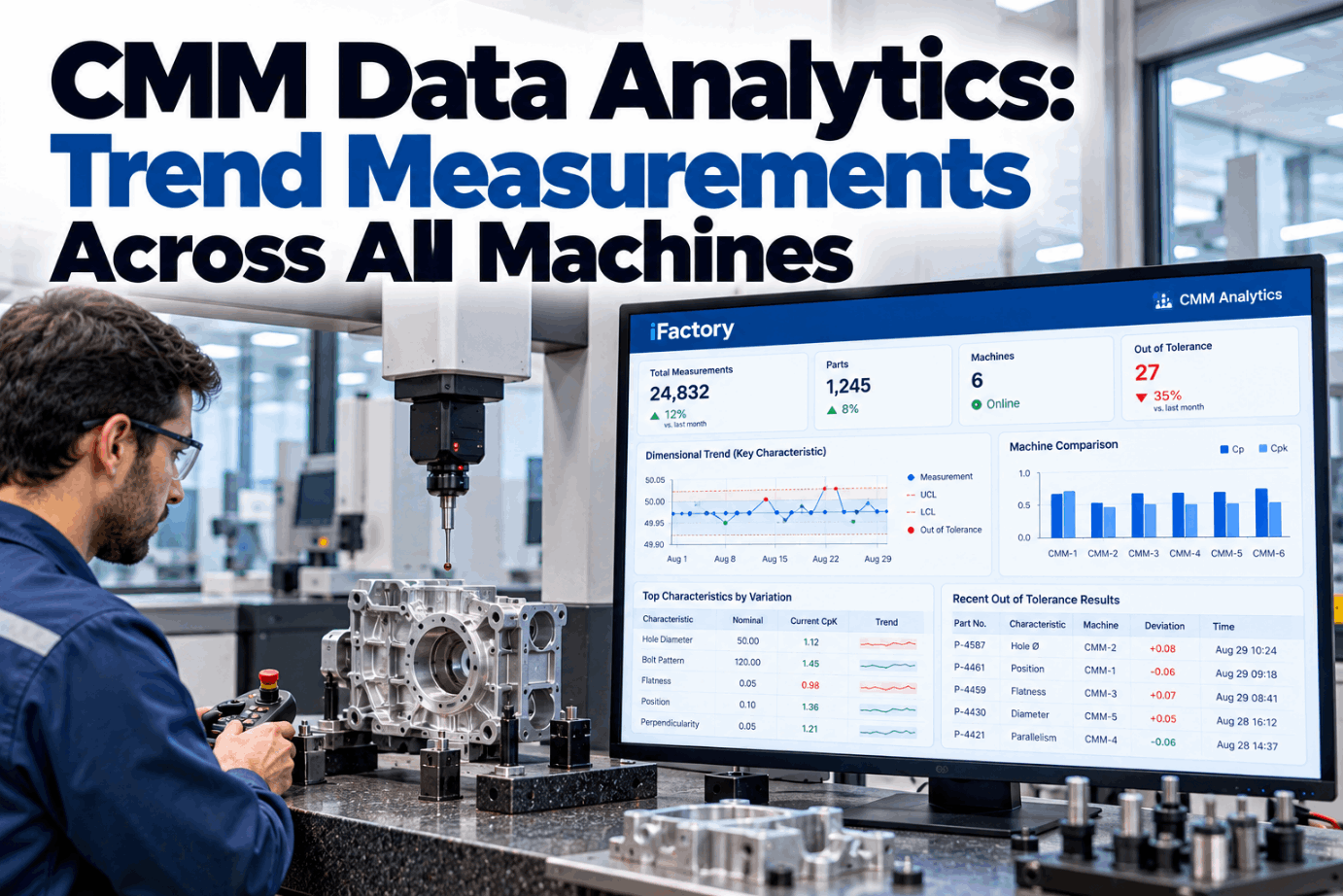
CMM Data Analytics: Trend Measurements Across All Machines

By David Cook on October 21, 2026

cmm-data-analytics-trend-measurements-across-all-machines

Most plants with more than one CMM have the same blind spot. Each machine prints its own report, each report says pass or fail, and nobody sees that the same bore has been creeping toward its limit on all three machines since Tuesday. CMM data analytics pulls every result into one place, trends each characteristic across parts, machines and fixtures, and tells the machinist which offset to check before the first bad part. See it on real inspection data in a short CMM analytics demo.

METROLOGY · CMM DATA ANALYTICS

One Trend for Every Characteristic, Across Every CMM You Own

iFactory CMM Integration imports results automatically and trends each characteristic with SPC. When a drift appears, it shows which machines agree and suggests a tool offset for the machinist to approve.

Bore Ø25.000 ±0.015 · OP20Drift flag
Last 10 parts per machine · deviation from nominal
CMM 1 · Cell A+0.009
CMM 2 · Cell B+0.010
CMM 3 · Final+0.008
Suggested offset · T12 boring barØ −0.009 mm (radius −0.0045)All 3 CMMs agree · rising for 8 parts
Waiting for machinist approval · nothing changes on its own
WHY SINGLE REPORTS MISS DRIFT

Three CMMs, Three Reports, One Blind Spot

A CMM report answers one question: is this part in tolerance? It does not tell you where the characteristic is heading, whether another machine sees the same thing, or which tool or fixture is behind it. When parts from one machining cell are checked on several CMMs, the history is split across machines, programs and file formats. Coordinate measuring machine data only becomes a process signal once it is joined by characteristic. Talk through your own CMM layout with our metrology team.

CMM 1
In-process checksPass / fail report
CMM 2
Second cell, same partPass / fail report
CMM 3
Final inspectionPass / fail report
Joined by characteristic
Bore Ø25.000 · all machines, all fixtures, all shifts One trend, one set of control rules, one place to act
QIF DATA AND OTHER FORMATS

Getting Results Out of Every Machine Automatically

The hardest part of inspection data analytics is often the import, not the statistics. Plants usually run CMMs from different makers and software generations. The Quality Information Framework, published as ISO 23952:2020, gives results a standard XML structure that links each measured value to its characteristic and feature. DMIS is the long-standing language for CMM part programs and output, and many plants also export Q-DAS ASCII files or plain text. Check which outputs your machines support in a data connection review.

Format
What it carries
Strength
Watch out for
QIF Results
Measured values tied to characteristics and features, with unique IDs
Best traceability
Older CMM software may not export it
DMIS output
Results from DMIS part programs, feature by feature
Widely supported
Characteristic names vary by programmer
Q-DAS ASCII (DFQ)
Values plus part and characteristic fields for SPC software
Common in automotive
Field mapping must be agreed per plant
CSV or text export
Nominal, actual, deviation and tolerance per line
Easy to start with
No standard layout between machines
PDF report
Formatted printout for people
Last resort
Must be parsed, so values can be misread
MEASUREMENT TRENDING WITH SPC

Catching a Drift While Every Part Still Passes

Tolerance limits tell you when a part is bad. Control limits tell you when the process has changed. Once results from every CMM sit in one series, standard run rules pick out trends long before the tolerance limit is reached. Nelson's rules include one point beyond three sigma, nine points in a row on one side of the centre line, and six points in a row steadily rising or falling. The chart below is illustrative. Review your current control rules with our quality engineers.

Bore Ø25.000 · individual values, all CMMsIllustration
Control limits Upper tolerance Rising run, flagged at point 6
1 pointBeyond three sigma. A sudden jump, often a setup or loading error.
9 in a rowOn one side of the centre line. A shift in the process mean.
6 risingSteadily up or down. The classic sign of tool wear or slow thermal growth.
FIXTURE DRIFT OR TOOL WEAR?

Reading the Shape of the Trend

The trend shape says a lot about the cause, especially when results are grouped by tool, fixture and CMM. A steady ramp on features cut by one tool points to wear. A step on many features that share a datum points to the fixture. A shift seen on one CMM only points to the measurement, not the part. These are starting points for a person to confirm, not verdicts. Walk through your own trends in a dimensional analysis session.

Steady rampOne tool's features only. Likely tool wear. Offset or tool change.
SawtoothRamp, then reset at each tool change. Wear is normal, check the change interval.
Step on shared datumsSeveral features move together after a pallet or fixture change. Check locators, clamps and chips.
Daily cycleFollows the clock or shop temperature. Check part soak time and CMM room control.
Offset on one CMMSame parts read differently on one machine. Check probe qualification and correlation.

A Drift Alert That Already Knows the Tool

iFactory imports results from every CMM automatically, trends each characteristic with SPC and links it to the machine, tool and fixture that made it. When a drift appears, the machinist gets a suggested offset and decides whether to apply it.

Cell A · Machinist and iFactory
MachinistWhy is the OP20 bore flagged? It's still in tolerance.
iFactoryIt has risen for 8 parts in a row on all three CMMs. Mean is +0.009 mm. Only features cut by T12 are moving.
MachinistSo it's the boring bar, not the fixture.
iFactoryThat fits. Suggested wear offset is −0.009 mm on diameter. Approve it and I'll watch the next five parts.
CMM CORRELATION AND MSA

Trust the Machines Before You Trust the Trend

Trending across CMMs only works if the machines agree. Two checks matter. A gauge R&R study shows how much of the tolerance is used up by measurement variation, and the AIAG MSA manual treats under 10% as acceptable, 10% to 30% as marginal and over 30% as unacceptable, with at least five distinct categories. A correlation study measures the same reference parts on every CMM and compares the averages. Plan a correlation study with our MSA specialists.

Under 10%%GRR acceptable
10% to 30%Marginal, depends on use
Over 30%Not acceptable
ndc ≥ 5Distinct categories
Correlation check · reference part calibrated at Ø25.0020Illustration · tolerance band 30 µm
CMM 125.0022+0.2 µm · 0.7% of tolerance
CMM 225.0031+1.1 µm · 3.7% of tolerance
CMM 325.0008−1.2 µm · 4.0% of tolerance
Bias = CMM average − reference value. Bias ÷ 30 µm gives the share of tolerance. Re-run after probe changes, crashes or moves.
TEMPERATURE CHECK

When the Trend Is Really the Thermometer

ISO 1 sets 20 °C as the reference temperature for dimensional measurement. A part measured warm reads large unless the CMM compensates for it, and shop-floor CMMs near machining cells see bigger swings than a lab. That is why iFactory logs part and room temperature with each result where sensors exist, so a daily cycle can be told apart from tool wear. The numbers below use typical expansion values. Check your own CMM environment with our metrology engineers.

Part length300 mm
Part temperature26 °C, 6 °C above reference
Aluminium, about 23 µm per m per °C0.300 × 23 × 6 = 41.4 µm
Steel, about 11.5 µm per m per °C0.300 × 11.5 × 6 = 20.7 µm
Against a ±15 µm toleranceMore than the whole band if not compensated
TOOL OFFSET FEEDBACK

From Drift Alert to Approved Offset in Six Steps

Closing the loop does not mean the software edits your CNC. iFactory works out a suggested offset from the trend and sends it to the machinist with the evidence. The machinist approves, adjusts or rejects it, and the next parts confirm whether it worked. Check whether your control uses radius or diameter values, because a diameter error of 0.009 mm is 0.0045 mm on radius. Agree the approval flow with our support team.

1DetectRun rule fires on the joined trend
2ConfirmAll CMMs agree and MSA is current
3ClassifyRamp on one tool's features
4SuggestOffset = nominal − recent mean
5ApproveMachinist applies, changes or rejects
6VerifyNext parts checked back near nominal
Worked example

Nominal Ø25.000 mm. Recent mean across three CMMs is 25.009 mm, so the suggestion is 25.000 − 25.009 = −0.009 mm on diameter. If the trend is still rising, the machinist may also plan a tool change.

CMM DATA ANALYTICS TEMPLATE

A Characteristic Record That Makes Trending Possible

Trends are only as useful as the links behind them. Set up one record per key characteristic so every result knows which machine, tool, fixture and CMM program it came from. Ask our dimensional data team for a blank version.

Characteristic recordOP20 · Bore A
Characteristic IDSame ID in drawing, CMM program and SPC
Nominal and toleranceØ25.000 ±0.015 mm
DatumsA, B, C from drawing
Machine and toolHMC 3, T12 boring bar
Fixture or palletPallet 1 and 2, tracked separately
CMMs and programsCMM 1, 2 and 3, program rev logged
Sampling1 in 5 in process, 100% at final
Control rulesRule 1, 2 and 3 active
Offset ownerCell machinist, lead approves tool change
CMM DATA ANALYTICS BEST PRACTICES

What Separates Useful Trends From Noise

Most failed CMM analytics projects stumble on data hygiene, not maths. The list below compares common habits with the ones that make cross-machine trending work. Review your current setup with our quality team.

COMMON HABITS
  • Characteristic names differ on each CMM
  • Only out-of-tolerance results get reviewed
  • Fixture and pallet not recorded with the result
  • Re-measured parts counted twice
  • Offsets changed without a record
WHAT WORKS
  • One characteristic ID across all programs
  • Control rules on every key characteristic
  • Machine, tool, fixture and CMM on every result
  • Re-measures flagged and kept separate
  • Every offset logged with who approved it
CMM DATA ANALYTICS COST AND ROI

A Worksheet for Plant Managers

Value comes from two places: hours no longer spent reading reports, and parts saved by catching drift earlier. Size both with your own figures. Every input below is assumed and only the arithmetic is shown. Build your own case with our ROI specialists.

CMM reports reviewed per shift3 CMMs × 60 reports, assumed
Minutes to review each report3, assumed
Review time per shift3 × 60 × 3 = 540 min = 9 h
Drift events per month6, assumed
Parts made before drift is noticed40 per event, assumed
Share of those out of tolerance25%, assumed
Parts at risk per month6 × 40 × 0.25 = 60 parts
TURNKEY AI DEPLOYMENT

CMM Connectors, SPC Models and NVIDIA Server in One Package

iFactory delivers CMM Integration as a turnkey bundle. A pre-configured NVIDIA AI server ships racked and ready with the import connectors, characteristic mapping and drift models pre-loaded, so results are trended on site the moment they leave the CMM. You rack it, plug in power and Ethernet, and the AI is live. To scope it for your quality lab, request a turnkey quote.

What's Included
  • Pre-configured NVIDIA AI edge server, racked and ready
  • Importers for QIF, DMIS, Q-DAS and text exports
  • Characteristic mapping across all CMM programs
  • SPC trending with run rules per characteristic
  • Cross-CMM correlation and MSA tracking
  • Offset suggestions with machinist approval log
  • 24×7 remote monitoring of models and hardware
Live in 6–12 weeks
Wk 1–4
Connect and Map

Server installed, CMM exports connected, characteristic IDs aligned across programs.

Wk 5–8
Correlate and Baseline

Correlation run on every CMM, control limits set from recent history.

Wk 9–12
Alerts and Offsets

Drift alerts and offset suggestions switched on, machinists trained.

HOW iFACTORY FITS

CMM Analytics That Ends at the Machine Tool

iFactory treats every CMM as one measurement system and every characteristic as one trend. Our support team can walk you through a pilot plan.

1
Imports results automatically. Every CMM's output is read and mapped to one characteristic ID.
2
Trends with SPC. Run rules watch each characteristic across machines, fixtures and shifts.
3
Raises drift alerts. Alerts show which CMMs agree and whether tool, fixture or temperature fits best.
4
Suggests tool offsets. Machinists get a calculated offset and stay in charge of applying it.
1000+
Industrial clients running iFactory
99.9%
Platform uptime for production quality data
6-12 wks
From racked server to live drift alerts
FREQUENTLY ASKED QUESTIONS

What Plant Managers Ask About CMM Data Analytics

What is CMM data analytics?
It is the practice of collecting results from every coordinate measuring machine into one place and analysing them by characteristic over time. Instead of reading each report on its own, you see trends, compare machines and fixtures, and link dimensional changes back to the tools and setups that caused them.
Do we need QIF to get started?
No. QIF (ISO 23952) gives the cleanest link between values and characteristics, but most plants start with what their CMMs already export, such as DMIS output, Q-DAS files or text reports. The key step is mapping every program to the same characteristic IDs.
How do you tell fixture drift from tool wear?
By grouping results. Tool wear shows as a ramp on features cut by one tool. Fixture or datum problems show as several features shifting together, often as a step after a pallet or fixture change. A shift that only appears on one CMM points to the measurement instead.
Does iFactory change CNC offsets on its own?
No. It calculates a suggested offset from the trend and sends it with the evidence. The machinist applies, changes or rejects it, and every decision is logged with who approved it. The following parts confirm whether the change worked.
What if our CMMs don't agree with each other?
Then fix that first. Run a gauge R&R and a correlation study on shared reference parts. If one machine shows a consistent bias, investigate probe qualification, temperature and program differences before trusting combined trends.
What does a CMM data analytics implementation guide start with?
Connecting exports and aligning characteristic IDs, then a correlation check on every CMM. Once exports are connected, history can be imported, so trends appear on day one. Control limits are usually set from recent stable data during the first weeks. Our support team can help you choose the first characteristics to watch.

See Every CMM as One Measurement System

Import results automatically, trend every characteristic across machines and fixtures, and give machinists offset suggestions they approve. The full system is delivered turnkey and goes live in 6 to 12 weeks.


Example weekly summary · Machining cell A
CMMs connected3, results imported automatically
Characteristics trendedAll key features, SPC rules on
Drift alertsLinked to tool, fixture or CMM
OffsetsSuggested, approved by machinists
Every offset traceable to its evidence

Share This Story, Choose Your Platform!