Visual Management for Quality: Boards That Drive Action

By James C on October 26, 2026

visual-management-quality-boards-that-drive-action

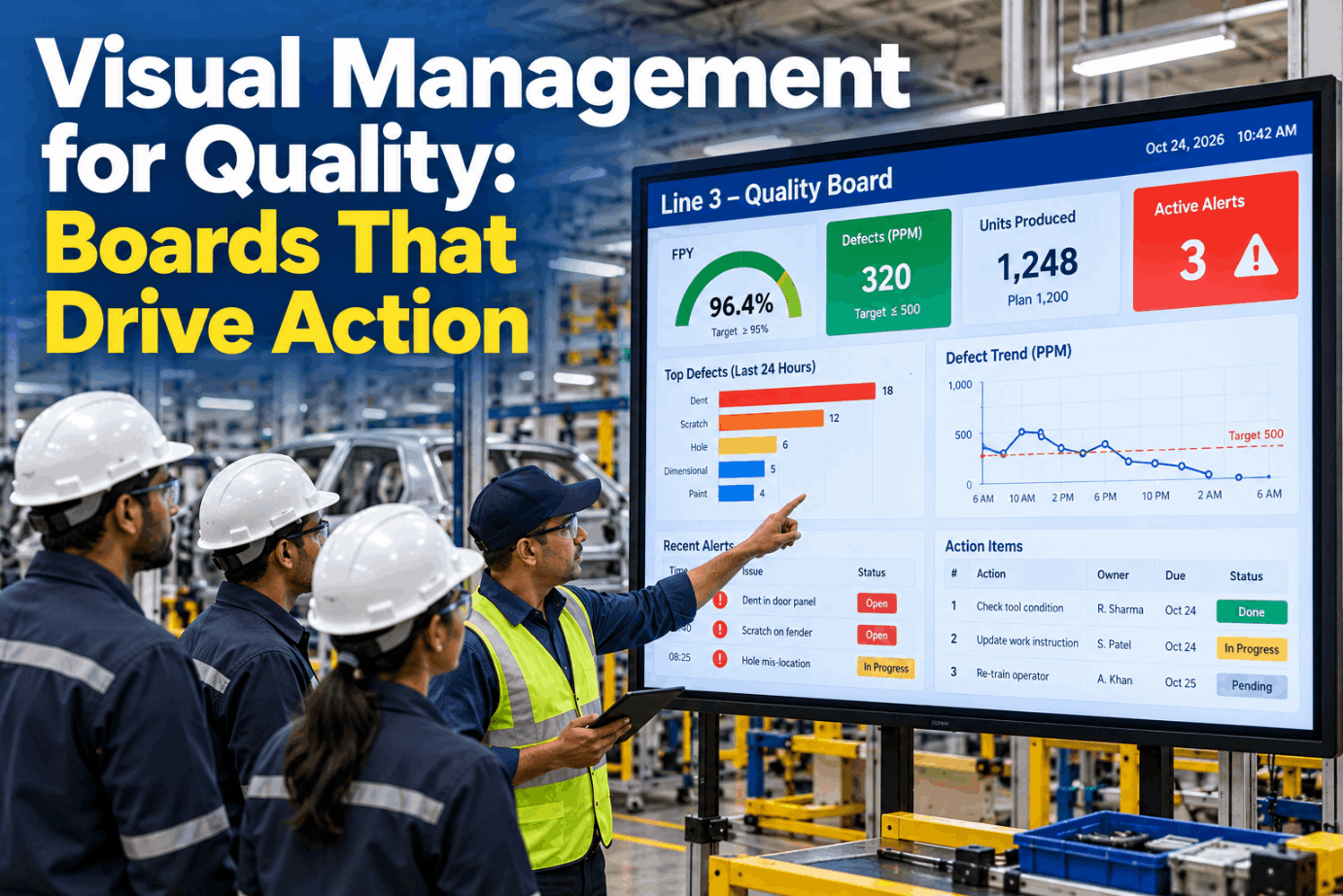
Walk past most production lines and you will find a quality board. Many show last week's numbers, a chart nobody can read from the aisle and a list of actions that stopped moving a month ago. A board like that is wallpaper. Visual management for quality works when anyone walking past can tell in a few seconds whether the line is making good parts, what the biggest problem is right now and who is fixing it. See a line board that refreshes itself in a short quality boards demo.

DIGITAL QUALITY BOARDS · LINE SIDE

Line Boards That Show What Is Wrong Now and Who Is Fixing It

iFactory Digital Quality Boards put live FPY and top defects on line displays. Alerts and actions are pulled from the system, and team leads add voice notes from the floor, so the board stays current without anyone rewriting it.

Line 3 · Quality boardShift B · 10:15
FPY this shift95.7%Below 96% target
Open actions31 past due
Cover scratch14
Missing screw9
Label skew5
Team lead voice note"Screw feeder jam cleared at nine fifty, watching the next hour."
Saved to Line 3 actions · owner R. Patel
VISUAL FACTORY QUALITY

Five Tests Every Quality Board Should Pass

The visual factory idea is simple: information belongs where the work happens, shown so clearly that normal and abnormal can be told apart at a glance. A quality board that needs explaining, or sits in an office, does not meet that bar. Use these five tests on the boards you have today, and ask our support team for a scoring sheet.

01
Read in secondsStatus is clear from the aisle without stopping to study it
02
At the point of useMounted at the line, where the team stands every day
03
Target beside actualEvery number shows the standard it is measured against
04
Named ownersEach open problem shows a person and a due date
05
Leads to actionSomething on it should change what someone does today
TOP DEFECTS BOARD

Three Panels on Every Line-Side Display

A line-side quality display only needs three things: how the line is doing, what is causing most of the trouble and what is being done about it. First pass yield by hour answers the first. A top-3 defects Pareto answers the second. An open actions list answers the third. The figures below are illustrative. See the same three panels on a real line in a live board session.

FPY by hour · target 96% · bars start at 90%
06:0097.1%
07:0096.4%
08:0093.8% !
09:0094.5% !
10:0096.8%
Top-3 defects · 34 found this shift
Cover scratch14 · 41% of all
Missing screw9 · running total 68%
Label skew5 · running total 82%
Top three = 28 of 34 defects
Open actions
Check screw feeder trackR. Patel · today
Add cover pad to fixture 2J. Moreno · Thu
Label printer alignmentA. Singh · past due
STATUS AT A GLANCE

Red and Green Help, but Words Do the Work

Many plants mark on-target cells green and off-target cells red. It is fast to read up close, but colour alone fades from a distance, under some lighting and for colour-blind viewers. Pair every colour with a word and a symbol so the status still reads in greyscale. On this page the three states are shown in tints of one colour to make the point. Agree a status key for your site with our quality team.

✓
On targetUsually green. Meets the standard, no action needed
~
WatchOften amber. Close to the limit or trending the wrong way
!
Off targetUsually red. Below standard, needs an owner and an action
DAILY PROBLEM SOLVING

Tier 1 to Tier 3: How a Problem Climbs in One Morning

Tiered huddles link the boards together. The line team meets first, then supervisors and support functions, then plant leadership. Anything a tier cannot solve within its own authority moves up the same day, with the facts already on the board. Timings vary by plant; the ones below are typical. Walk through a tiered morning in a guided demo.

Start of shift · 10–15 min
Tier 1 · Line team Team lead and operators at the line board. Yesterday's FPY, top defects, today's risks and actions.
After tier 1 · 15–30 min
Tier 2 · Area Supervisors with quality, maintenance and planning. Items the lines could not close, plus support needed.
Daily or a few times a week
Tier 3 · Plant Plant manager and department heads. Escalations, resources and decisions no one lower down can make.
One rule keeps tiers honest

An item moves up only with a clear ask, and the answer comes back down to the board it started on, so the line sees what happened to its problem.

Walk Into Tier 3 Already Knowing What Came Up

Because every line board draws from the same system, plant leaders can ask what was raised in tier 1 and tier 2 and get a short answer before the meeting starts.

Plant manager and iFactory
Plant managerWhat came up from tier 2 this morning?
iFactoryTwo items. Line 3 ran below FPY target for two hours, mostly missing screws. Line 5 has a fixture action four days past due.
Plant managerWhat does Line 5 need from us?
iFactoryThe team lead's voice note says the spare locator pin is on back order. Purchasing approval is the open ask.
ANDON FOR QUALITY

A Signal, a Response and a Record

Andon comes from the Toyota Production System, where it is part of jidoka: any team member who sees a quality problem can pull a cord or press a button to call for help. The board's job is to show that call clearly and to keep the record afterwards. Talk through response rules with our support team.

1
SignalOperator pulls the cord or presses the button at the station
2
RespondTeam lead arrives within the agreed time and sees the issue first-hand
3
Fix or stopSolved within the cycle, or the line stops until it is safe to run
4
RecordThe call, cause and fix go to the board and the top defects panel
VISUAL MANAGEMENT QUALITY SOFTWARE

Whiteboard or Screen? Usually Both

Whiteboards have real strengths: they are cheap, the team owns them and writing by hand makes people think. Their weakness is the numbers, which are copied by hand, late and sometimes wrong. A digital board fixes the numbers but can feel like someone else's screen. Many plants pull the numbers from the system and keep the actions in the team's own words. See how both fit on one display in a short walkthrough.

WHITEBOARD
  • Low cost and quick to change
  • Strong team ownership
  • Numbers copied by hand, often hours old
  • No history once it is wiped
DIGITAL LINE BOARD
  • FPY and defects pulled from the system
  • Same formula on every line
  • Actions kept with history and owners
  • Voice notes from team leads keep it human
VISUAL MANAGEMENT QUALITY BEST PRACTICES

Good KPIs Point to an Action, Vanity KPIs Just Look Good

A vanity KPI is a number that rises or stays green without telling anyone what to do. A good quality KPI is close to the work, shown against a target and specific enough to start a conversation. Review the measures on your boards with our quality team.

Vanity measure
Why it misleads
Measure that drives action
Inspections completed
Counts activity, not whether parts are good
FPY by hour against target
Plant-wide monthly yield
Too late and too broad for any line to act on
Line FPY this shift
Total defects this year
Only ever goes up and names no cause
Top-3 defects this shift
Actions closed
Rewards closing, not fixing
Repeat defects after an action
Days since last complaint
Feels good, says nothing about today's risk
Escapes per million shipped
BOARD REFRESH CADENCE

How Often Each Board Should Refresh

A board's refresh rate should match how fast the people reading it can act. A line team can act within the hour, so its board should be that fresh. A plant board read once a day only needs daily figures. Set cadences for your boards in a board planning session.

Instant
Andon panelShows a call the moment it is raised
Every 15–60 min
Line boardFPY and top defects for the current shift
Each shift
Area boardShift results and open items for tier 2
Daily
Plant boardYesterday by line, escalations for tier 3
Weekly
Trend wallFour to eight weeks of FPY and defect trends
VISUAL MANAGEMENT QUALITY TEMPLATE

A Layout Sheet for Each Line Board

Fill in one sheet per line before the board goes up. It keeps every board in the plant built the same way, so anyone can read any line. Ask our support team for a blank copy.

Line and productLine 3, control housing
Headline measureFPY by hour, target 96%
Defect panelTop 3 this shift, with running total
Action panelOwner, due date, status word
Status keyOn target, watch, off target
Refresh rateEvery 15 minutes
HuddleTier 1 at 06:05, team lead
Escalation ruleTwo hours below target goes to tier 2
VISUAL MANAGEMENT QUALITY EXAMPLES

Three Lines, Three Boards That Earned Their Place

These illustrations show how a good board changes a conversation. They are not case studies. Work through your own lines in a short scenario review.

Electronics assembly
The hour FPY fellHourly FPY shows the dip started right after a feeder change, so the team checks that feeder first instead of the whole line.
Medical device packing
A seal defect at the topSeal width defects lead the Pareto two shifts running, so the issue moves to tier 2 with the facts already on the board.
Automotive trim line
An action stuck past dueThe past-due flag on a fixture action prompts the plant manager to clear a purchasing hold in tier 3.
VISUAL MANAGEMENT QUALITY FOR PLANT MANAGERS

A Board Health Check for Your Next Floor Walk

Stop at each board and tick what is true. Two or more unticked lines means the board needs attention before the numbers do. Get help fixing weak boards from our quality specialists.

TURNKEY AI DEPLOYMENT

Line Displays, Quality Data and AI Server, Ready to Run

iFactory delivers Digital Quality Boards as a turnkey package. A pre-configured NVIDIA AI server ships racked and ready, with links to your inspection and test data and the board layouts set up before it arrives. You rack it, plug in power and Ethernet, and the AI is live. Scope your rollout in a turnkey planning call.

What's Included
  • Pre-configured NVIDIA AI server, racked and ready
  • Line-side displays for FPY, top defects and actions
  • Connectors to inspection, test and MES data
  • Alerts and actions pulled from the system
  • Voice notes from team leads, saved to the board
  • Area and plant boards for tier 2 and tier 3
  • 24×7 remote monitoring of models and hardware
Live in 6–12 weeks
Wk 1–4
Connect and Lay Out

Server installed, quality data linked, board layout and status key agreed per line.

Wk 5–8
Pilot Line

One line runs its tier 1 huddle from the digital board, with team leads using voice notes.

Wk 9–12
Tiers Connected

Remaining lines added, area and plant boards running tier 2 and tier 3.

HOW iFACTORY FITS

Quality Boards That Keep Pace With the Line

iFactory keeps the numbers right and leaves the conversation to your teams. Our support team can map it to your current boards and huddles.

1
Live FPY on line displays. First pass yield by hour, against target, refreshed from line data.
2
Top defects at a glance. The top-3 Pareto for the current shift, with a running total.
3
Alerts and actions from the system. Off-target hours and past-due actions show without retyping.
4
Voice notes from team leads. Spoken on the floor, read back and saved to the right board.
1000+
Industrial clients running iFactory
99.9%
Platform uptime for always-on line displays
6-12 wks
From racked server to boards on every line
FREQUENTLY ASKED QUESTIONS

What Plant Managers Ask About Visual Management for Quality

What should a line-side quality board show?
Three things: first pass yield against target, ideally by hour; the top three defects for the current shift; and the open actions with owners and dates. Anything more usually makes the board harder to read from the aisle.
How often should the numbers refresh?
As often as the readers can act. Line boards every 15 to 60 minutes, area boards each shift and plant boards daily is a common pattern. You can see each refresh rate on a demo board and judge what suits your lines.
Should we replace our whiteboards?
Not necessarily. Many plants keep the team's own space for actions and ideas and pull only the numbers from the system. That keeps ownership while fixing late or miscopied figures. Our support team can suggest a mix for your floor.
How do tiered huddles use the boards?
Tier 1 meets at the line board at the start of shift. Tier 2 meets at an area board with supervisors and support teams. Tier 3 meets with plant leadership. Each tier reads its own board and passes up only what it cannot solve.
How do we stop a board turning into wallpaper?
Keep it current, keep it short and make sure every huddle uses it. If nobody points at the board during the meeting, it is not doing its job. To see a board built around the huddle, walk through it with our team.
Where should we start?
Pick one line with a committed team lead. Put FPY by hour, the top-3 defects and open actions on one display, run tier 1 from it for a month, then add the next line. To plan that first line, book a 30-minute demo.

Put the Right Three Things in Front of Every Line

Live FPY, top defects and open actions on line displays, voice notes from team leads and boards linked from tier 1 to tier 3. Delivered turnkey and live in 6 to 12 weeks.
Example shift view · Line 3
FPY this shift95.7%, target 96%
Top defectCover scratch, 14 of 34
Open actions3, one past due
Board refreshEvery 15 minutes
Every problem on the board has an owner

Share This Story, Choose Your Platform!