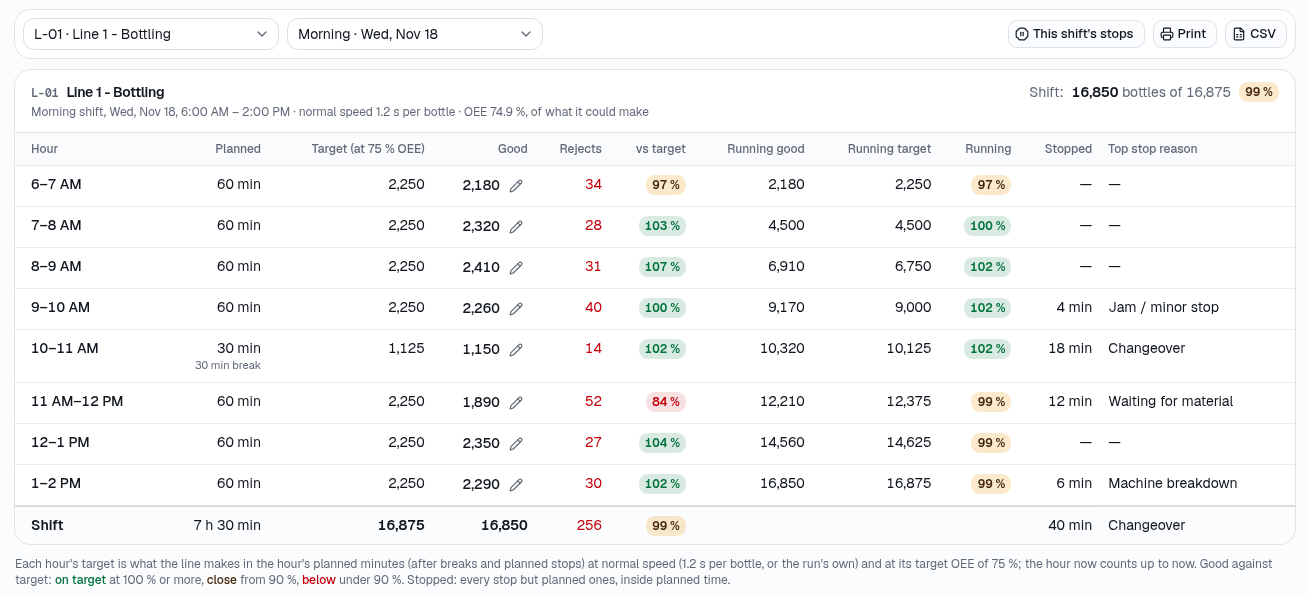
Hour by hour puts one line's shift on one table. Pick the line and the shift, and each row is an hour: planned minutes, the hour's target, good units, rejects, good against target, running totals, minutes stopped and the top stop reason. Hours with a break get fewer planned minutes and a lower target, the current hour counts up to now, and a shift row totals it all. It is the hourly board, kept for you. You can sign up to access Line OEE and see your own shift hour by hour, with 14 days of Pro features and no card.
iFactory Tools · Production · Live views
Each hour of the shift against its own target
One row per hour, coloured on target, close or below, with the stop that cost the most minutes.
Good against target, hour by hour
One morning shift on a test bottling line. Seven hours were on target or close; one fell to 84 % with 12 minutes waiting for material.
Values read from the test-account screenshot below; bars are capped at 100 % for display. Sample data, not customer results.
What every column means
| Column | What it shows |
|---|---|
| Planned | Planned minutes in the hour, after breaks and planned stops |
| Target | Units the line should make in those minutes at normal speed and its target OEE |
| Good and rejects | Units made in the hour; each good count has a pencil to correct it |
| vs target | Good against target, coloured on target, close or below |
| Running good, running target, running | The shift so far, so a slow morning is visible before the end |
| Stopped and top stop reason | Minutes stopped inside planned time and the reason that cost the most |
Replace the hourly board with one that fills itself
Counted by camera or entered by hand, the same table builds as the shift runs.
Using it during the shift
Pick the line and the shift
The table opens on one line's shift, with normal speed and OEE so far in the header.
Read the hour that is going now
The current hour counts up to now, so the target and the count are compared fairly.
Correct a count if it is wrong
Use the pencil on the good count. Running totals follow the change.
Open This shift's stops
Go from a red hour to the stops behind it and give any missing reasons.
Print or download CSV
Print the board for the meeting or download the table as CSV.
Breaks are already in the target
Example from the test account
A 30-minute break at 10 AM halved that hour's planned time to 30 minutes and its target from 2,250 to 1,125 bottles. The hour still showed 102 %, and its top stop reason was a changeover.
Expert review
A close review of the hourly components and the portal shows the target worked out the way a supervisor would do it by hand: planned minutes after breaks, at normal speed, at the line's own target OEE. Breaks never make an hour look bad.
The value is in the running columns and the top stop reason: a slow hour is tied to the stop that caused it while the shift can still recover. The figures here are from a test account, not customer results.
Frequently asked questions
How is each hour's target worked out?
It is what the line makes in the hour's planned minutes, after breaks and planned stops, at normal speed and at the line's target OEE. An hour with a 30-minute break gets half the target.
What do the colours mean?
Good against target is on target at 100 % or more, close from 90 %, and below under 90 %. The current hour counts up to now, so it fills in as the shift runs. You can sign up to access Line OEE and see it on your own line.
Can a wrong count be corrected?
Yes. Each good count has a pencil to correct it, so a miscount can be fixed in place and the running totals follow.
Can we print the board or export it?
Yes. The page has Print and CSV buttons, and This shift's stops opens the list of the shift's stops for the same line.
Does it need a camera?
No. Hour by hour reads the same records whether units are counted by a camera or entered by hand. You can get started with Line OEE on one line and fill the board as you go.
See your next shift hour by hour
Set up one line with its shifts and breaks, and the board builds itself from the counts.
- Targets that respect breaks
- Running totals for the shift
- Print and CSV
Free for 14 days · no card needed