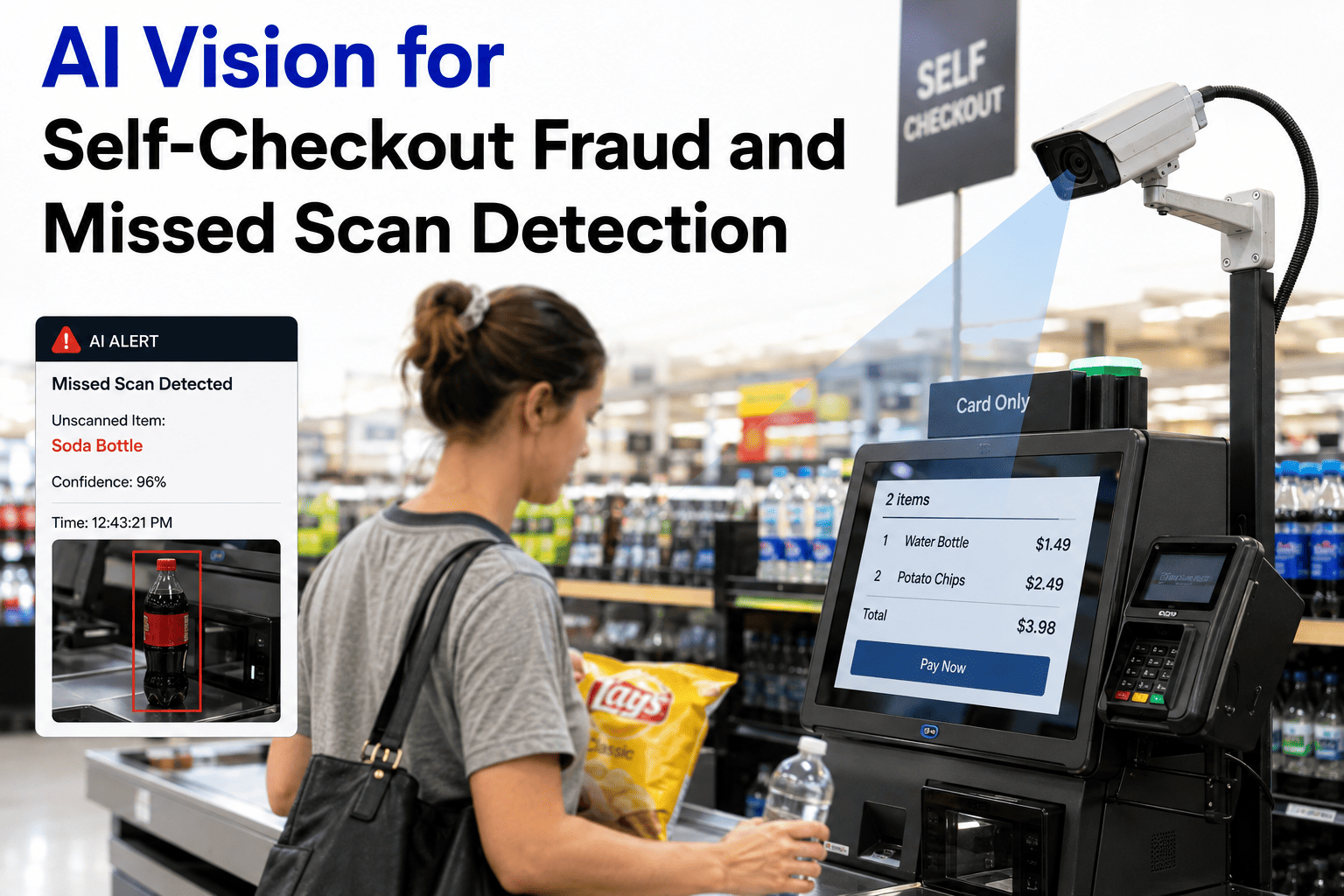
Self-checkout lanes were built to save labor, but they opened a loss channel that traditional cashier lanes never had — a shrinkage rate several times higher than staffed checkout, driven by a mix of honest mistakes and deliberate scan avoidance. AI cameras positioned over the scanning surface and bagging area now watch every item movement and compare it against the point-of-sale scan log in real time, catching a missed scan, a swapped barcode, or a pass-around the moment it happens rather than during a loss prevention review days later. This is the same real-time correlation approach behind iFactory's AI Vision Camera platform, which retailers can see in action by visiting this scheduling link.
Why Self-Checkout Became a Shrinkage Problem
Removing a cashier removes the one consistent set of eyes that used to see every item cross the counter, and shoppers — honest and dishonest alike — know it. Some losses are pure accident: an item hidden under a bulky product on the belt, a barcode the scanner failed to read on the first pass. Others are deliberate: switching a barcode for a cheaper item, weighing an expensive product as loose produce, or handing an unscanned item to a companion waiting past the terminal. Both categories show up as the same line item on a shrinkage report, and both are exactly what continuous visual monitoring is positioned to catch that a distracted attendant covering four or six lanes at once cannot.
The Four Patterns AI Cameras Are Trained to Catch
Loss at self-checkout tends to cluster into a small number of recognizable behaviors rather than an unlimited variety of tricks, which is exactly why a trained vision model can catch most of it once it knows what each pattern looks like on camera.
Concealment
Hiding an item behind, under, or inside another product on the belt so it passes the scanning zone without triggering a read.
Barcode Switching
Scanning a cheaper item's barcode while bagging a higher-value product, or mis-keying weighted produce as an inexpensive category.
Pass-Around
Handing an unscanned item to a companion who has already completed their own transaction, moving it past the terminal entirely.
Technical Error
A genuine scanner miss or double-item read that inflates shrinkage numbers without any intent behind it at all.
How Detection Actually Works at the Terminal
The core of the system is a constant comparison between two data streams that used to live in separate systems entirely — what the camera sees moving through the scanning zone, and what the point-of-sale terminal actually registers as scanned.
The camera tracks every item from the moment it enters the scanning zone until it reaches the bagging area, building a visual count independent of the POS scan log.
The system compares the visual item count and estimated size or category against the POS transaction log in real time, looking for items present on camera with no matching scan event.
A mismatch triggers a graduated response — a gentle on-screen prompt asking the shopper to rescan for likely honest mistakes, or a flagged attendant alert for patterns matching known fraud behavior.
Confirmed and resolved events are logged with a timestamped clip, giving loss prevention teams evidence they can review in seconds instead of scrubbing through hours of raw footage.
Not Every Alert Should Feel Like an Accusation
A system that treats every mismatch as suspected theft creates friction for the majority of shoppers who made an honest mistake, which is why response should scale with confidence rather than firing the same alert every time.
| Confidence Level | Likely Cause | System Response |
|---|---|---|
| Low | Scanner misread or item obstruction | On-screen prompt to rescan, no staff involved |
| Medium | Repeated missed scans in one transaction | Silent attendant notification for a discreet check-in |
| High | Concealment or pass-around pattern match | Immediate attendant alert with flagged video clip |
The Cost of Leaving Self-Checkout Unmonitored
Self-checkout shrinkage rarely shows up as a single dramatic incident — it accumulates one missed scan and one mis-keyed weight at a time until it becomes visible in the quarterly loss numbers, by which point the pattern has already cost far more than any single theft event. Retailers who have layered AI camera correlation on top of existing self-checkout hardware report shrinkage reductions of up to half, alongside a much faster path from detection to resolution when a genuine incident does occur.
Estimated annual US retailer losses tied to self-checkout shrinkage across the industry
Reduction in self-checkout shrinkage reported by retailers deploying AI-based scan correlation
Higher loss rate at stores where self-checkout accounts for half or more of total transactions
Beyond Single Transactions: Spotting Organized Patterns
Not every loss at self-checkout is an isolated shopper making a one-time decision. Organized retail crime rings deliberately exploit self-checkout lanes across multiple stores and visits, and a single-store view of transaction data will rarely surface that kind of coordinated pattern on its own.
Cross-location pattern matching links similar concealment or barcode-switching behavior across stores in the same chain, surfacing repeat offenders who spread their activity to avoid detection at any single location.
Frequency analysis flags shoppers whose visit patterns and transaction sizes deviate sharply from typical behavior at that store and time of day.
Evidence packages compiled automatically from flagged incidents give loss prevention and, where appropriate, law enforcement a consolidated case file instead of a folder of disconnected clips.
Frequently Asked Questions
Will this slow down checkout for honest customers?
The system is designed to add friction only where the confidence level actually warrants it, so a shopper who scans normally never sees a prompt at all. Low-confidence mismatches typically resolve with a quick on-screen rescan request rather than a full stop, which keeps the checkout experience close to normal speed for the overwhelming majority of transactions.
How does the system tell an honest mistake apart from deliberate fraud?
Behavioral signals are layered together — how an item moved, whether it matches a known concealment or pass-around pattern, and whether the shopper's transaction shows a single missed scan versus a repeated pattern across several items. A single missed scan resolves quietly, while a pattern consistent with known fraud behavior escalates to an attendant with visual evidence attached.
Can this integrate with the self-checkout hardware we already have installed?
Yes — the vision layer sits alongside existing POS and scale hardware rather than replacing it, correlating camera data with the transaction log your terminals already generate. Reach out through ifactory Support for a compatibility review of your current checkout fleet before rollout.
What happens to the video evidence once an alert is flagged?
Flagged events are stored as short, timestamped clips linked directly to the transaction record, giving loss prevention teams a searchable evidence trail instead of hours of undifferentiated footage. This turns an investigation that used to take hours of manual review into a lookup that takes minutes, which is a core part of what gets demonstrated in a live platform walkthrough.
How does the system handle unpackaged or barcode-free items like produce?
Weighted and unpackaged items are one of the most common fraud vectors, since a shopper can key in an inexpensive produce code for a costlier item, so the vision layer is trained specifically to recognize common produce and bulk items visually and flag a mismatch when the keyed category does not match what the camera sees on the scale. This closes a gap that scanner-only systems cannot address on their own.