A sensor flags a failing spindle at 2 a.m. The alarm sits in a queue, a planner writes the work order at shift start, someone hunts for the part, and a technician hears about it an hour later. The anomaly was caught in seconds, but the response took hours. Agentic AI closes that gap. It reads the anomaly, creates the work order, reserves the parts, alerts the right technician and logs every step. To see the flow on your own line, book an agentic workflow walkthrough.
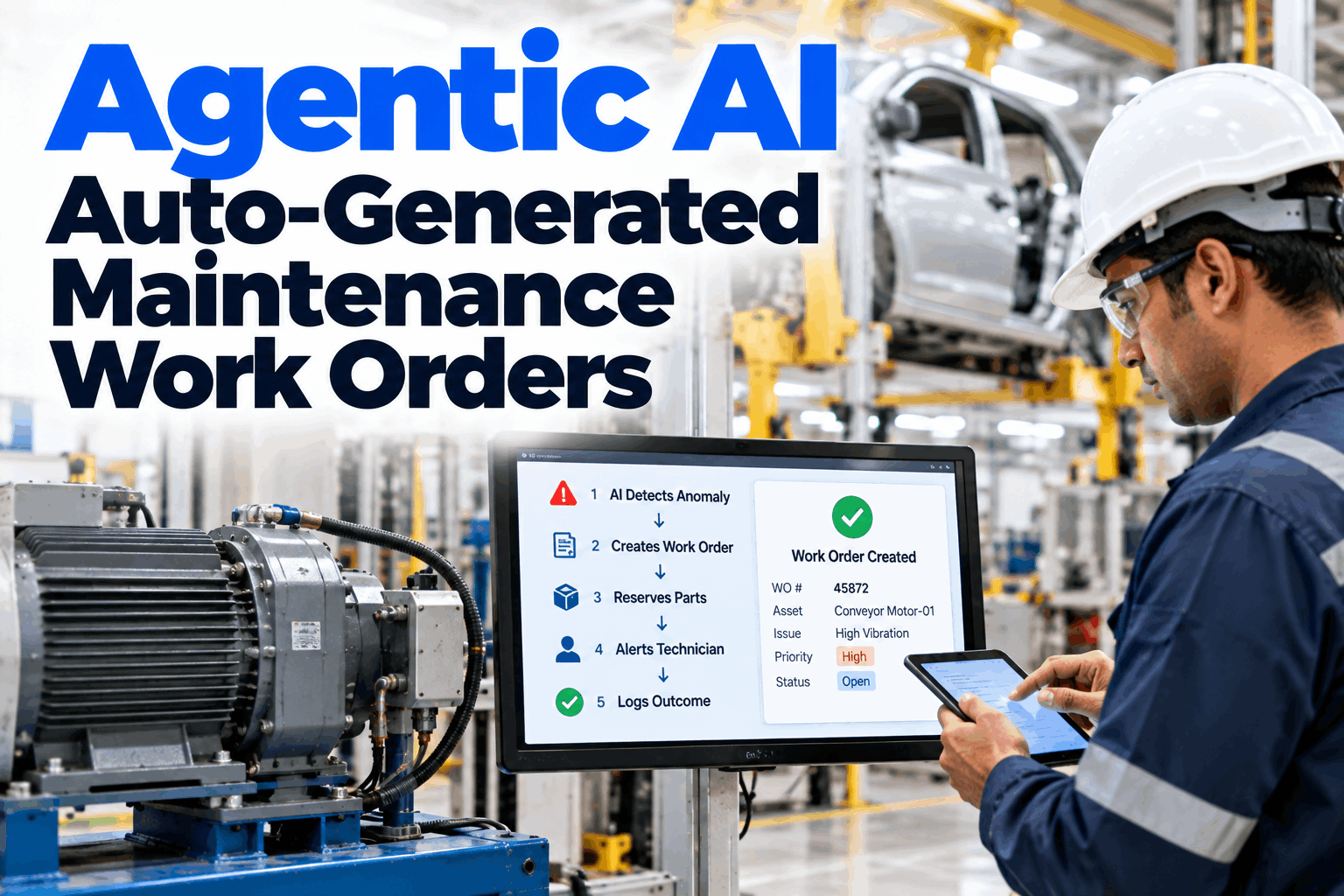
Agentic AI Auto-Generated Maintenance Work Orders
The agent turns an anomaly into a finished work order with no manual routing. It adds the asset, the likely fault, the parts and the right technician, then records every step in your on-prem CMMS for audit.
- How an anomaly becomes a work order in seconds
- How parts and technicians are matched automatically
- How every action stays traceable for IATF and ISO audits
From Alert to Work Order Without the Hand-offs
Most delay sits between the alert and the action, not in the detection.
In most plants an anomaly alert is only the start of a manual chain. Someone must judge it, open the CMMS, write the order, check stock, find a technician and chase the result. Each hand-off adds waiting time and each one can drop the ball. An agent does the whole chain itself, and does it the same way every time. Our maintenance AI team can map your current chain and show where the time goes.
Read the anomaly
Sensor and PLC signals checked against each asset's baseline.
Write the order
Asset, fault lead, priority and task steps filled in.
Hold the parts
Stock checked and the needed parts reserved at once.
Reach the tech
The right skill, on shift and close by, gets the job.
The agent is only as good as the context behind it. Connect the asset register, spare parts list, shift roster and past work orders, so its first draft looks like one a good planner would write.
The Agentic Workflow, Step by Step
One chain, six steps, no one in the middle.
The agent runs the same path for every qualifying anomaly. Steps one to four happen in seconds. Steps five and six close the loop after the repair, so the next prediction learns from what really happened.
Detect
Anomaly found against the asset baseline.
Create
Work order written in the CMMS.
Reserve
Parts held in stores.
Alert
Technician notified with the full brief.
Confirm
Repair and findings entered.
Log
Outcome and audit trail saved.
What the Agent Writes Into Every Work Order
A complete order on the first draft, not a blank form.
Poor work orders cause repeat visits: no fault lead, the wrong part, the wrong skill. The agent fills the fields from live data and history, so the technician arrives with the brief already in hand. To review the fields for your CMMS, book a field mapping call.
Pick a group of assets with a clear failure history, such as press servo drives or robot joints. Prove the draft quality there first, then widen to more lines once planners trust what the agent writes.
Where the Manual Routing Time Goes
The fix itself is rarely the slow part. Most of the 90 minutes is spent on triage, paperwork and finding parts and people.
Guardrails: Where People Stay in Control
Automatic does not mean unchecked.
Agents should act freely where the risk is low and ask where it is not. Your team sets the boundary, and it can be tightened or loosened as trust grows. Every action, automatic or approved, is recorded the same way.
The agent does on its own
- Creates work orders within your rules
- Reserves standard parts from stock
- Alerts technicians on shift
- Logs every step and result
A person approves first
- Stopping a line or taking an asset offline
- Purchases and emergency orders
- Safety-critical assets and lock-out work
- Anything the agent is unsure about
Have a planner check a small sample of auto-generated orders each week. Note edits and rejections. It keeps quality honest, and the edits teach the agent how your plant likes its work orders written.
An Audit Trail You Do Not Have to Build
If the agent did it, the log says so.
Auditors ask who decided, on what evidence, and what was done. The agent records each decision as it happens, so the answers are ready before anyone asks. This supports your documented information controls under ISO 9001 clause 7.5.3 and the maintenance evidence IATF 16949 audits look for. Your quality team stays the owner of the system and its rules. For an audit-readiness review, request an audit trail demo.
How iFactory Agentic Workflow Works
Anomaly in, finished work order out.
iFactory's agentic workflow connects your anomaly detection, CMMS, stores and roster. It applies your rules to every qualifying anomaly, writes the work order, reserves parts, alerts the technician and logs each step. It runs on an on-prem server beside your CMMS. Questions on fit go to our support desk.
Your systems
CMMS, stores, roster, PLCs and sensors.
Your rules
Priority, approval and parts rules set by your team.
Full chain
Order, parts and alert done in seconds.
Closed loop
Outcomes feed back into the next prediction.
Results depend on your data quality, rules and how well the CMMS is kept. We measure routing time, first-time fix and planner workload on your own line during the pilot, rather than promising a general figure.
Turnkey AI: Delivered, Connected and Live in 6–12 Weeks
You do not build this. It arrives ready.
iFactory ships as a pre-configured NVIDIA AI server with the software pre-loaded. Rack it, plug in power and Ethernet, and the AI is live on your network. Our team handles cabling, network setup, CMMS, PLC and SCADA integration, planner and technician training and 24×7 remote monitoring. Data stays on your own network. For a scope matched to your plant, request a turnkey quote.
Ship, network and connect
Server installed. CMMS, stores, roster and signals connected for the pilot line.
Draft and review
Agent drafts orders for review. Planners check quality and set the rules.
Go-live and training
Automatic creation switched on. Teams trained. 24×7 remote monitoring begins.
Frequently Asked Questions
What is agentic AI for maintenance work orders?
It is an AI agent that carries out the whole response to an anomaly: it creates the work order, reserves parts, alerts a technician and logs the result, within rules your team sets.
Does it replace maintenance planners?
No. It takes over routine routing and paperwork, so planners spend their time on scheduling, approvals and improving the rules.
Which CMMS does it work with?
Most CMMS and EAM systems that offer an API or a database interface. We confirm the interface during the first call.
What if the agent is wrong?
Low-risk orders can be edited or closed by a planner, and high-risk actions need approval first. Every edit is logged and used to improve the rules.
Is it audit-ready?
Each trigger, decision, action, approval and outcome is stored with a time stamp. This supports your ISO 9001 and IATF 16949 evidence, and your quality team keeps ownership of the rules.
How do we start?
With one line or asset class that has a clear failure history and a slow response today. A 6-week pilot connects the data, drafts orders for review and measures the time saved. To plan it, contact our team.
Let the Agent Do the Routing
In thirty minutes we look at your CMMS, your current alert-to-technician chain and the rules an agent would follow. You keep the notes whether or not you go further with iFactory.
- 1A name or screenshot of your CMMS
- 2A few months of past work orders
- 3Your spare parts list and stock rules
- 4Your priority and approval rules today
- 5The response delays that hurt most