A changeover finishes, the new product starts, and the old roll of film is still on the wrapper. For twenty minutes, packs of a milk-free product go out wearing a label that misses the milk in the recipe, or a date code that prints a year off. Nobody sees it, because one person cannot read thousands of labels an hour. AI vision can. This guide shows how label verification checks the allergen statement, lot and date code on every pack and stops mislabels before they leave the plant. Start with a label check review.
AI Vision Label Verification for Allergen and Date Codes
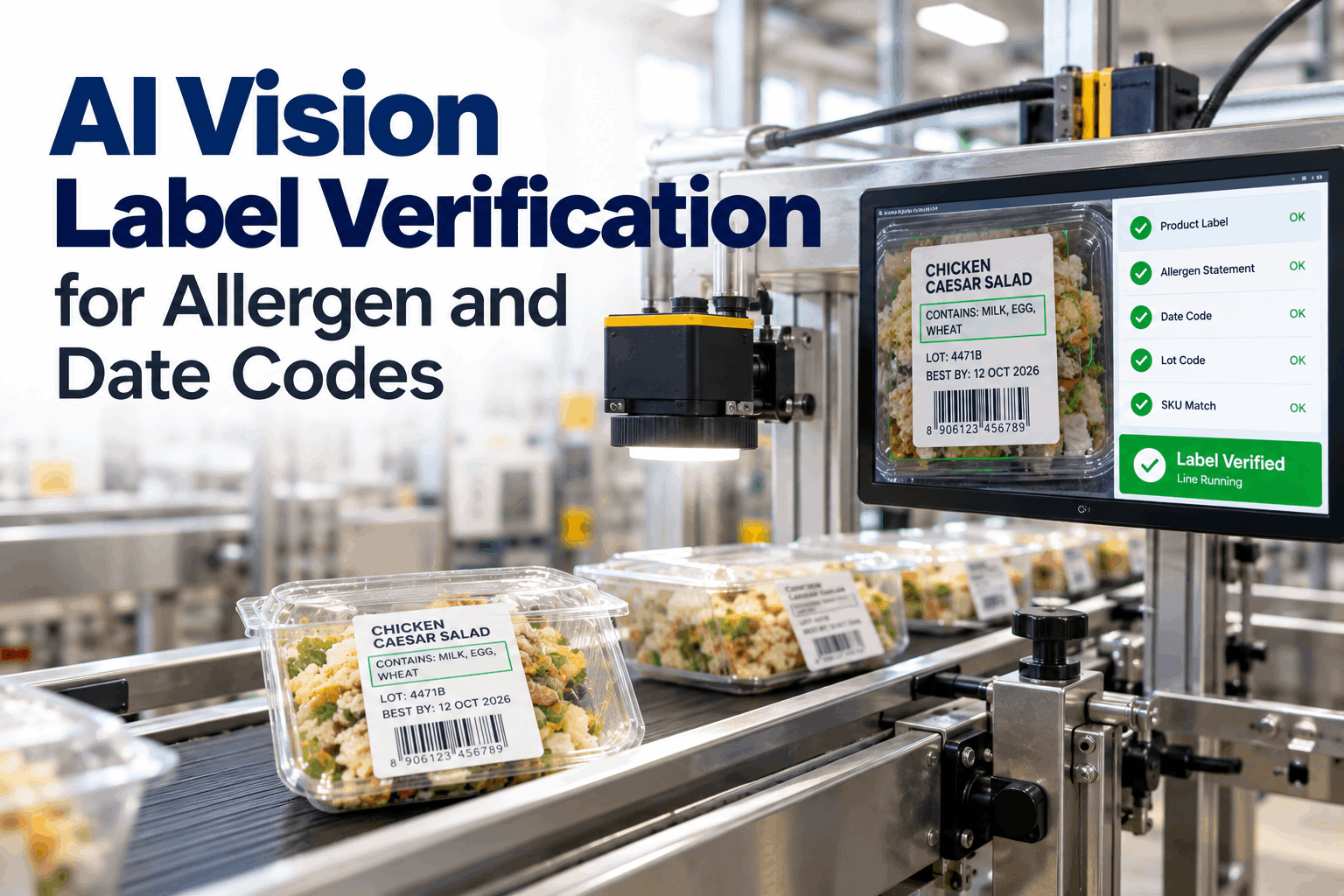
Cameras read every pack at line speed and compare it with the active SKU. Wrong allergen statement, missing lot or bad date code? The pack is rejected, repeat errors stop the line and QA hears about it by voice.
- Why mislabels slip past people and barcodes
- What AI vision checks on every pack
- How rejects and line stops are set up
How Mislabels Reach the Market
Most label errors start at a changeover and run until someone notices.
Labeling mistakes are rarely made at the design stage, where artwork is checked and approved. They happen on the floor: the wrong roll of film loaded, last run's labels left in the applicator, a printer that keeps an old date or a code smudged beyond reading. A person checking a few packs an hour cannot catch an error that starts between checks and runs for twenty minutes. A barcode scanner can confirm the product, but not what the allergen statement says. Our QA specialists can show where your lines are exposed.
Wrong film or label roll
The previous product's packaging left loaded on the line after a changeover.
Old artwork version
A recipe changed, but stock printed with the old allergen statement was used.
Date code errors
Wrong shelf-life offset, wrong year or a printer not reset after the last run.
Unreadable codes
Smudged, faint or missing lot and date codes that break traceability during a recall or customer complaint.
Many plants share a barcode across artwork versions, or print the right barcode on the wrong film. Scanning the barcode proves which product it should be. Reading the label proves what the customer will actually see. For allergen safety, only the second answer matters.
What AI Vision Checks on Every Pack
Read the whole label, not only the code.
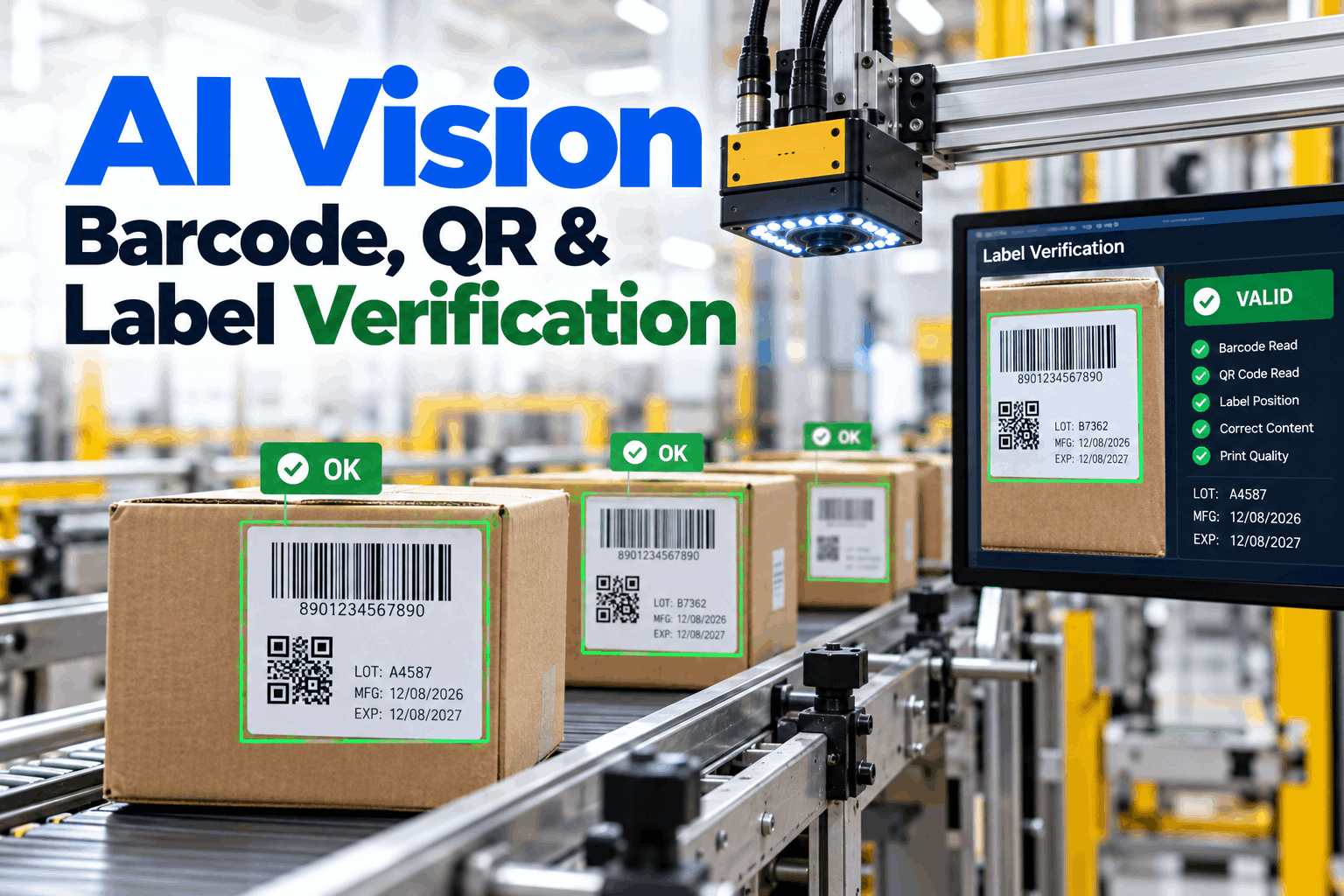
AI vision combines optical character recognition with pattern matching. It reads printed text and codes, compares artwork against an approved master and checks that each field matches the SKU the line is running right now. Every result is kept with its image. Plan your check list in a label audit.
A date code changes every day, so it cannot be matched to a fixed image. The system calculates what the date should be from the production date and the product's shelf life, then checks that the printed date matches. Runs that cross midnight are handled the same way.
The Allergen Statement Must Match Exactly
One missing word on a label can put a consumer in hospital.
In the US, labels must declare the nine major food allergens, either in the ingredient list or in a "Contains" statement. Sesame became the ninth major allergen in 2023, and a wave of sesame-related recalls followed as plants caught up. For a vision system, the allergen statement is the single most important field to read, and it has to match the SKU word for word. Map your allergen statements in an allergen label review.
What the system compares
The full "Contains" statement and any allergen names in the ingredient list, against the approved text for the SKU running on the line.
What counts as a fail
Any missing allergen, an extra allergen that does not belong, or text too faint or damaged to read with confidence.
If the camera cannot read the allergen statement clearly, the pack has not been verified. Reject it rather than pass it. A high rate of unreadable packs points to print, lighting or pack position problems that need fixing at the source.
From Read to Reject to Line Stop
One bad pack is a reject. A pattern is a stop.
A single mislabeled pack is removed by the reject device without stopping production. But if several in a row fail, something upstream is wrong, and rejecting packs one by one only fills the reject bin while the cause keeps running. The system escalates in steps, so the response matches the problem. Questions on reject setup go to our controls team.
Single fail
Pack rejected and its image saved with the exact reason.
Repeat fails
Operator alerted on screen and by voice to check film and printer.
Pattern confirmed
Line stopped, QA alerted and packs since the last good read held.
Capture
Camera images each pack as it passes.
Read
OCR and pattern match pull every field.
Compare
Fields checked against the active SKU.
Decide
Pass, reject or escalate within milliseconds.
Record
Result and image kept for traceability.
Most mislabels start in the first minutes after a changeover. When the line switches SKU, the system loads the new master, holds the first packs until they pass and asks the operator to confirm the film and printer settings by voice. That closes the window where the old label is most likely to run.
What One Caught Mislabel Is Worth
An allergen mislabel that reaches shelves can mean a recall, retailer penalties and real harm to consumers. Catching it at the line costs one rejected pack and a few minutes of checking.
Setting Up Label Verification That Works
Good images and a clean master library matter more than the model.
Vision checks only work when the camera can see the label clearly and the system knows exactly what each SKU should look like. Most failed projects trace back to poor lighting, moving packs or an out-of-date artwork library, not to the AI itself. Plan your setup in a line survey.
Camera placement
After the last point where a label can change, usually just after the applicator or wrapper exit.
Lighting
Diffuse lighting to stop glare on shiny film, foil and clear wraps.
Pack handling
Guides that keep packs at a steady angle and spacing past the camera.
Master library
One approved artwork and allergen statement per SKU, version-controlled.
For shiny wraps and foil, a short trial with sample packs under the planned lighting is the quickest way to confirm read rates before installation.
When a recipe changes, its allergen statement often changes too. Tie the label master to the recipe system so a new allergen cannot go live on the line without the approved artwork being loaded at the same time. Old packaging stock should be blocked in the same step.
Label Verification Mistakes to Avoid
Most gaps come from what is not checked.
A vision system is only as complete as its check list and the rules behind it. Plants that check codes but not allergen text, or reject packs but never stop the line, leave the biggest risks open on every shift. A short rollout plan session helps close them.
What works
- Allergen statement checked word for word
- Date codes checked by rule from production date
- Escalation from reject to line stop
- Artwork library tied to recipe changes
What fails
- Checking barcode only
- Rejecting packs with no limit on repeats
- Out-of-date master artwork
- Cameras placed before the last label change point
How iFactory Runs AI Vision Label Checks
AI Vision QC on an edge server, right at the line.
iFactory runs OCR and label matching on an edge AI server next to the line, so decisions happen in milliseconds and images stay on your network. It reads the active SKU from your line controls or MES, checks every pack, drives the reject device, stops the line on repeat errors and alerts QA by voice. Fit questions go to our solutions team.
Every-pack OCR
Allergen text, lot and date codes read at full line speed.
SKU matching
Each pack compared with the SKU the line is running right now.
Reject and stop
Single fails rejected, repeat fails stop the line.
Voice alerts
QA hears what failed, where and what probably changed.
Artwork library
Approved masters per SKU, with version control.
Traceable images
Every result and image kept by lot for audits and recalls.
Results depend on your lines, packaging materials, lighting and artwork control. We measure read rates, false rejects and caught errors on your own lines during the pilot, rather than promising a general figure.
Turnkey AI: Delivered, Connected and Live in 6–12 Weeks
You do not build this. It arrives ready.
iFactory ships as a pre-configured NVIDIA AI edge server with the software pre-loaded, racked and ready. Rack it, plug in power and Ethernet, and the AI is live on your network. Our team handles cameras, lighting, cabling, network setup, PLC and MES integration, reject device wiring, operator training and 24×7 remote monitoring. Images stay on your network. For a scope matched to your lines, request a turnkey quote.
Ship, network and data
Edge server and cameras installed. SKU list and artwork masters loaded.
Model training and pilot
OCR tuned to your fonts and materials. Pilot on one packing line.
Go-live and training
Rejects and line stops live. Operators and QA trained. 24×7 monitoring begins.
Frequently Asked Questions
What is AI vision label verification?
It uses cameras, OCR and image matching to read every package label at line speed and check the allergen statement, product artwork, lot code and date code against the SKU the line is running. Packs that fail are rejected automatically.
Why is a barcode scanner not enough?
A barcode confirms which product a pack should be, but not what its label says. The barcode can be correct on film with old artwork or a missing allergen, so the printed text has to be read too.
How are date codes checked?
The system calculates the expected date from the production date and the product's shelf life, then reads the printed date and checks that they match. Wrong years, offsets and unreadable prints are caught.
What happens when a pack fails?
It is rejected and its image saved. Repeat failures alert the operator, and a confirmed pattern stops the line, holds packs since the last good read and alerts QA by voice. The thresholds for each step are set with your QA team.
Does it slow the line down?
No. Processing runs on an edge server at the line, with decisions in milliseconds, so the line keeps its normal speed. Camera and lighting choices are matched to your fastest line during the survey.
Which allergens must US labels declare?
Nine major allergens: milk, eggs, fish, shellfish, tree nuts, peanuts, wheat, soybeans and sesame. Sesame was added from 2023, and many 2023 allergen recalls involved it.
How often do false rejects happen?
That depends mostly on image quality. Good lighting, steady pack position and a clean artwork library keep false rejects low. Each rejected image is saved, so QA can review them and the model can be tuned during the pilot.
Can it check printed and applied labels on the same line?
Yes. Pre-printed film, applied labels and inkjet or laser codes can all be read, often by one camera placed after the last point where anything on the label can change.
How do we start?
Start with the packing line that has the most changeovers or the most allergen SKUs, where the risk of a mislabel is highest. A 6-week pilot installs cameras, loads your artwork masters and runs checks beside your current process. To plan it, contact our team.
Read Every Label Before It Ships
In thirty minutes we look at your lines, your changeovers and how labels are checked today. You keep the notes whether or not you go further with iFactory.
- 1SKU list with allergen statements
- 2Approved label artwork for top SKUs
- 3Date code and shelf-life rules
- 4Line speeds and packaging materials
- 5Any recent label near miss or complaint