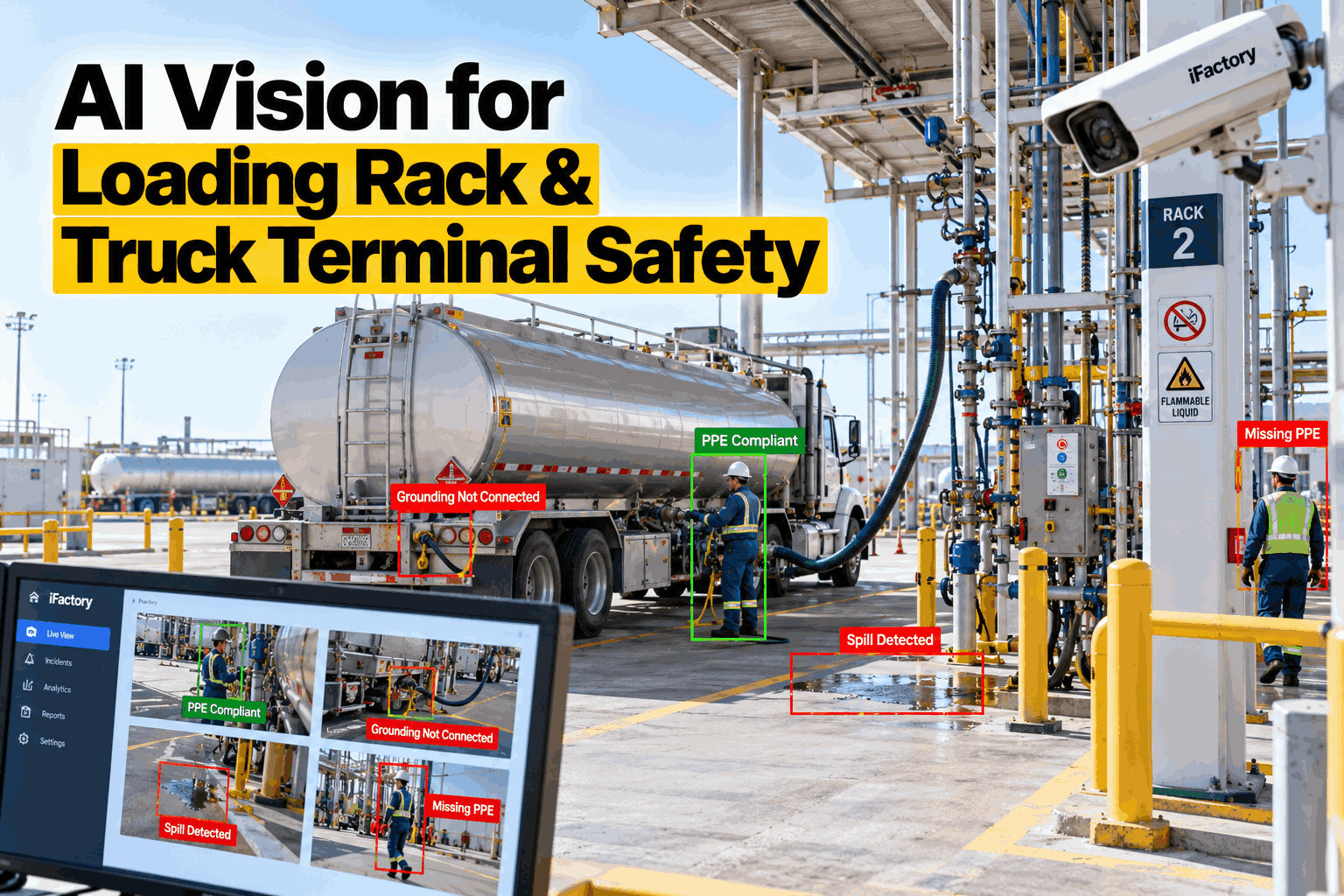
A truck loading rack runs on a short procedure that every driver knows: chock, ground, connect, stay with the truck, disconnect in reverse. It is carried out hundreds of times a day, mostly by visiting drivers, often at night, and usually with nobody watching. The steps that get skipped are the ones that almost never matter — until the one load where they do. iFactory's AI Vision Camera Platform watches each bay through every load, checks the sequence against the terminal's own procedure, and raises an alert while there is still time to act. To see it on footage from your own rack, book a rack walkthrough.
AI Vision at the Loading Rack: Every Load Watched, Every Shortcut Seen
iFactory detects missed or early-removed ground clamps, drivers leaving the truck during flow, liquid on the pad, missing PPE and vehicles moving while still connected. It works beside your ground monitors, overfill protection and terminal automation system, and keeps a record of every load.
- Loading sequence checked on every load
- Alerts at the bay and in the control room
- A time-stamped record for audits and carriers
Why Loading Racks Go Wrong: Routine
Loading rack incidents are rarely exotic. In PHMSA's review of 2003 to 2007, a third of incidents with a reported cause came from incorrect operation during loading or unloading — neglecting to supervise, a valve left in the wrong position, equipment connected improperly. The physical safeguards at a modern rack are good. What they cannot see is behaviour: the clamp taken off early to save a walk, the driver in the cab with the door shut, the drip that has been there all week. If your exception reports depend on someone happening to be looking, our terminal specialists can review how your bays are covered today.
Sequence shortcuts
The steps are right, the order is not. A ground removed before the arm, a hatch opened before the bond, chocks never placed.
Attendance that drifts
A load takes long enough to make a phone call, fetch paperwork or sit in the cab. The rule says within 25 feet with a clear view.
Drips that become normal
A weeping coupling leaves a stain, then a patch, then a pool. Each shift assumes the last one reported it.
Cameras nobody watches
Most racks already have CCTV. It is reviewed after an incident, by which time it is evidence and no longer prevention.
What the Cameras Watch For
Each detection is tied to a step in your own loading procedure and to a bay, a time and a load. The list is agreed with your operations and safety teams, and each item is tested on your racks before it is switched on. To go through the list against your procedure, book a detection review.
Grounding and bonding
Clamp attached before hatches open or arms connect, cable intact, and clamp still in place until the last connection is broken.
Driver attendance
A person within the attendance zone with a view of the truck and hose while product is flowing; time out of zone is measured.
Spills and leaks
Liquid on the pad, drips from couplings and arms, spray, and overflow at the dome on top-loading racks.
PPE
Hard hat, eye protection, coveralls and gloves as your site rules require, checked on entry to the bay.
Movement while connected
A truck that begins to move with an arm, hose or ground cable still attached — the drive-away.
Chocks and position
Wheel chocks in place and the vehicle stopped inside the bay markings before any connection is made.
Working at height
People on tank tops or gantries without the gangway lowered, the handrail in place or a harness where required.
People where they should not be
Pedestrians in traffic lanes, people in a bay with no active load, phone use and smoking in the rack area.
Prove It on Two Bays in Six Weeks
Choose two bays. We fit or connect cameras, train the detections on your trucks, arms and procedure, run in alert-only mode beside your existing safeguards, and report every detection and every false alarm each week.
What a Camera Can Verify — and What It Cannot
Vision is a second layer, not a replacement for engineered safeguards. A camera can see that a clamp is on the lug; it cannot measure whether the connection is 10 ohms or less. That is the ground monitor's job. The useful design reads both: the monitor proves continuity, and the camera proves the clamp went on first and came off last. The same division applies to every check on the rack. Our vision engineers can map it to the safeguards you already have.
From Detection to Response
An alert that arrives in a report next week prevents nothing. Each detection has an agreed response, graded by how quickly it needs someone to act. By default iFactory advises and records; it does not stop a load by itself. Where your safety review calls for it, a signal can be passed to the rack control system, with the action designed, tested and approved under your own management of change. To set the response for each event at your terminal, book a response workshop.
Rules the Record Supports
The loading rules are short and specific, and each leaves a trace a camera can keep. The summaries here paraphrase the regulations and standards; check the wording against the current texts and your own procedures. Our compliance team can align the record with your audit format.
Security at Marine Terminals: Where TWIC Fits
Terminals with a waterfront are regulated under the Maritime Transportation Security Act, and anyone needing unescorted access to a secure area must hold a TWIC. That is an identity check, and it is done with the credential — visually or with an electronic reader. For certain high-risk facilities the Coast Guard has postponed the electronic reader requirement to May 2029. Vision does not read or verify a TWIC and iFactory does not use face recognition. What it adds for the facility security officer is evidence about movement.
Presence without a transaction
A person or vehicle in a secure area or loading bay when no load is authorised there is flagged for the security desk.
Tailgating at gates
Two vehicles or two people passing on one credential read are detected at the gate and logged with the reader event.
A record for inspection
Time-stamped clips of access events, searchable by gate, bay and time, to support what the access log already shows.
What the AI Adds Beyond Recording
Conventional video analytics can tell that something moved. Recognising a ground clamp on a lug, a puddle on wet concrete at night, or a driver who has stepped behind the truck takes models trained on rack footage. iFactory's models run on a GPU server at the terminal, so video stays on site and alerts do not depend on an outside connection.
- Learns your rack. Detections are trained on your arms, clamps, trucks and lighting, bay by bay.
- Understands sequence. Events are judged in order and against flow, so a clamp removed after disconnect is normal and before is not.
- Finds patterns. Exceptions are counted by carrier, bay and shift, which shows where a conversation or a repair is needed.
- Answers in plain language. Supervisors ask about last night or last month and get the events and the clips.
Delivered as a Turnkey AI System — Hardware and Software Together
iFactory ships as a complete bundle: a pre-configured NVIDIA AI server, racked and ready, with the AI Vision Camera Platform and models pre-loaded, plus cameras where your existing ones do not cover the bays. Rack it, plug in power and Ethernet, and the AI is live on your network — video stays at the terminal. Cameras for classified areas are specified to your area classification. Our team handles camera installation, cabling, network setup, PLC and SCADA integration with rack controls and the terminal automation system, operator training and 24×7 remote monitoring. For a scoped proposal, book a deployment call.
Ship, network and data
Server delivered and racked. Cameras connected or fitted on the first bays. Ground monitor, flow and card-in signals read. Footage collected.
Model training and pilot
Detections trained on your rack and tested one by one. Alert-only running on the pilot bays, with weekly review of detections and false alarms.
Go-live and training
Remaining bays brought on. Bay alerts and control room displays live. Supervisors and security staff trained; carrier reporting begins.
Frequently Asked Questions
Can a camera tell whether a truck is properly grounded?
It can tell whether the clamp is attached, where, and in what order relative to the other steps. It cannot measure electrical continuity. That is why iFactory reads the ground verification monitor as well: the monitor proves the circuit, and the camera proves the sequence.
Does it replace ground monitors, overfill protection or the emergency shutdown?
No. Those are engineered safeguards and they stay exactly as they are. Vision adds a layer that sees behaviour and conditions they cannot, and records each load.
Can it stop a load?
By default it alerts and records. If your safety review decides that a detection should hold or stop a load, the signal is passed to your rack control system and the action is designed, tested and approved under your management of change.
Does it work at night and in bad weather?
Performance depends on lighting, camera position and conditions, and it is lower in heavy rain, fog and glare. That is why each detection is tested on your racks across day, night and weather during the pilot, and why detection rates are reported and not assumed.
Does it identify drivers?
No. The models detect people, objects and actions, not identities, and face recognition is not used. A load is tied to a driver and carrier through the card-in at the rack, as it is today.
Does it check TWIC cards?
No. TWIC verification is done with the credential, by eye or with a reader. At terminals regulated under the Maritime Transportation Security Act, vision supports security by flagging presence in secure areas without a transaction and tailgating at gates.
How long does deployment take, and what do we need to provide?
A typical terminal is live in 6–12 weeks. You provide rack space, power, an Ethernet connection, access to existing camera feeds, your loading procedure, area classification drawings and an operations contact for the pilot. iFactory supplies the pre-configured NVIDIA AI server, cameras where needed, software, integration and training. To scope your terminal, contact our project team.
Someone Watching Every Bay, on Every Load
One turnkey system — NVIDIA AI server, cameras, AI Vision Camera Platform, integration and training — delivered and live inside 12 weeks. Start with the bays that load the most trucks at night.
- 1Was every truck grounded before anything else was connected?
- 2Did every driver stay with the truck during flow?
- 3Was any liquid on a pad, and for how long?
- 4Did any truck move while still connected?
- 5Which carriers account for most exceptions?