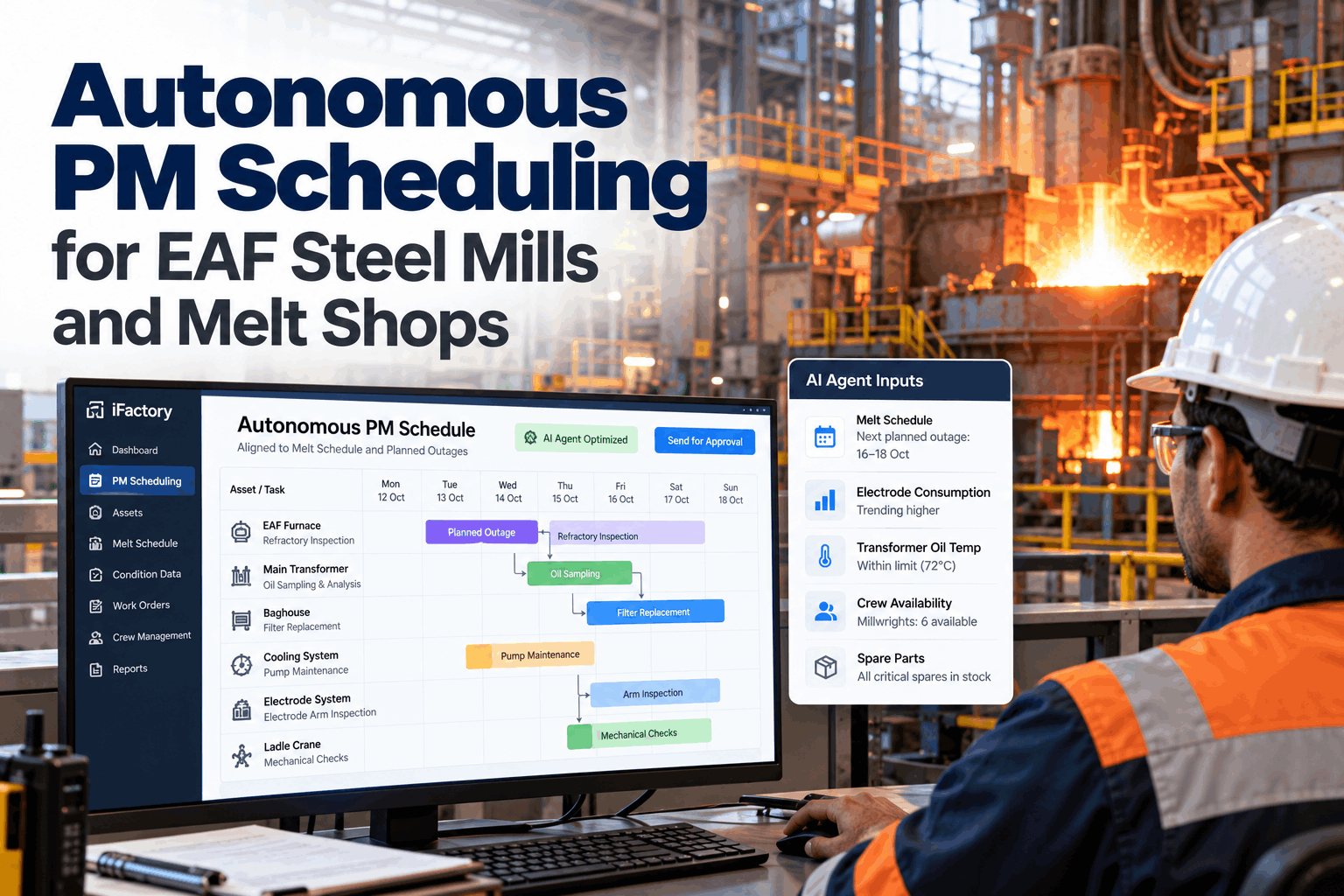
On Monday the melt shop planner builds a tidy PM plan for Thursday's outage. By Wednesday the melt schedule has changed, a transformer oil temperature is creeping up, the baghouse crew is short two people and half the plan no longer fits. So the planner starts again in a spreadsheet and some tasks slide another week. This guide shows how an autonomous PM agent keeps EAF maintenance plans current, re-slotting furnace, transformer and baghouse work into planned outages as conditions change, while the planner keeps the final say. Start with a PM plan review.
Autonomous PM Scheduling for EAF Steel Mills and Melt Shops
An AI agent reads the melt schedule, condition data and crew rosters, then fits each PM into the right planned outage. When anything changes, it re-plans and posts the revised plan for the planner to approve. No more spreadsheet juggling or late surprises.
- Why fixed PM calendars break in melt shops
- What the agent reads and how it decides
- How planners stay in control of every change
Why Fixed PM Calendars Break in Melt Shops
A melt shop changes faster than a monthly PM plan can.
EAF shops run hard and change often. The melt schedule shifts with orders and scrap supply. Equipment condition changes heat by heat. Planned outages move, shrink or get cancelled, and crews are pulled to breakdowns. A PM plan built once a week on fixed intervals is out of date within days. Planners spend their time rebuilding spreadsheets instead of improving the plan, and tasks that do not fit simply slip. Our planning specialists can show where your plan breaks first.
Melt schedule moves
Order changes shift outage dates and lengths.
Condition changes
A rising temperature makes a task urgent overnight.
Crews get pulled
Breakdowns take the people the plan relied on.
Parts not ready
Tasks land in an outage before their spares arrive.
Look at the last quarter's PM compliance by asset. The tasks that slipped most often usually belong to the hardest-working equipment, which is exactly where a missed PM costs the most.
What the Agent Reads Before It Plans
Good scheduling starts with seeing everything a planner would check.
An autonomous PM agent does the cross-checking a planner does by hand, but across every input at once and every time something changes. It reads production plans, condition data, crew availability and parts, and scores each PM task by urgency and fit. Map your inputs in a data mapping session.
Melt schedule
Heats planned, outage windows and their length.
Live equipment data
Transformer oil temperatures, panel water temperatures, baghouse pressure loss and hydraulic data.
Consumption and counts
Electrode consumption, heats since last task and power-on hours.
Crews and spares
Rosters, skills, contractors and parts on hand.
Wear in a melt shop follows heats and power-on hours more closely than calendar days. Basing PM intervals on heats means a busy week brings work forward and a quiet week pushes it back, which matches how the equipment actually wears.
PM Task Families in an EAF Melt Shop
Each asset family has its own triggers and outage needs.
The agent treats each task according to what drives it and how long it needs. Some tasks need a full outage. Others can run during a short delay between heats. The grid below shows common melt shop PM families and how the agent schedules them. Questions on your task list go to our support desk.
Condition Signals That Move a PM
The agent brings work forward only when a signal gives it a reason.
Calendar and heat counts set the baseline plan. Condition data decides when a task should move earlier. The agent watches trends rather than single readings, compares them with similar operating conditions, and only proposes a change when the trend is clear enough to explain to a planner in one short sentence. Each threshold is set with your reliability engineers, not copied from a generic list. Review your signals with our reliability team.
Top-oil temperature
A rise at the same load and ambient temperature points to cooling or internal problems and pulls oil sampling and cooler checks forward.
Panel water temperature
A water-cooled panel running warmer than its neighbours brings the panel inspection into the next outage before a leak develops.
Pressure loss
Differential pressure that keeps climbing after cleaning cycles suggests blinded or damaged bags and moves the bag inspection earlier.
Arm hydraulics
Slower arm response or rising hydraulic temperature brings the clamp and cylinder service forward before regulation suffers.
Most melt shops already log transformer temperatures and baghouse pressure in the DCS or historian. Connecting those first gives the agent useful triggers in the opening weeks, before any new sensors are fitted.
Planning Around Outage Length
Fitting work is a packing problem with people and parts attached.
A planned outage has a fixed length, a fixed number of crews and a set of jobs that compete for the same access. The agent packs tasks so the most urgent work goes in first, jobs that need the same isolation are grouped, and crews are not double-booked. When everything cannot fit, it says what was left out and why, so the planner can decide whether to extend the outage, add contractors or accept the deferral. Talk it through in a planning call.
Packed first
- Locked safety and statutory tasks
- Tasks with a clear condition trigger
- Overdue high-criticality PMs
- Jobs sharing the same isolation
Moved to a later window
- Low-criticality routine checks
- Tasks waiting on spares
- Jobs that fit a short delay between heats
- Work needing a crew that is unavailable
What a Live PM Plan Is Worth
Every planned outage hour used well is an hour that does not become a breakdown later. Every task that stops slipping lowers the risk on the equipment that matters most.
How Autonomous PM Scheduling Works
Score, fit, check, propose, then wait for a human yes.
The agent runs the same steps every time an input changes. It scores every open PM, tries to fit the most urgent ones into the next fitting outage, checks crews and parts, and posts a proposed plan with the reason for each change. Nothing reaches the crews until a planner approves. See a live example in a scheduling demo.
Read
Melt plan, condition data, crews and parts.
Score
Each PM ranked by risk, criticality and due date.
Fit
Tasks placed into outages by length and crew.
Check
Spares, permits and skills confirmed.
Propose
Plan posted with reasons for planner approval.
The Planner Stays in Control
Autonomous does not mean unsupervised.
The agent removes the spreadsheet work, not the planner. Planners set the rules, lock tasks that must not move and approve every proposed change. The agent explains each move in plain words, so the planner can agree, adjust or reject it quickly. Plan your approval rules in a governance session.
What the agent does
- Watches every input for changes
- Re-scores and re-fits tasks automatically
- Checks crews, skills and spares
- Explains every proposed move
What the planner does
- Sets priorities and scheduling rules
- Locks tasks that must not move
- Approves, adjusts or rejects changes
- Talks with production on outage timing
Safety-critical and statutory inspections, such as crane and pressure system checks, should be locked to their dates. The agent works around them rather than moving them, and flags any outage change that would put them at risk.
Autonomous PM Mistakes to Avoid
The agent is only as good as the task list and data behind it.
Plants that get the most from an autonomous PM agent clean up their task list first and connect the condition data that matters. Plants that skip this end up with fast plans built on bad information. A short rollout plan session helps set the order.
What works
- A cleaned PM task list with real durations
- Condition data on the critical melt shop assets
- Locked dates for safety and statutory tasks
- Planner approval on every change
What fails
- Task durations copied from old templates
- Rosters not kept current in the system
- Letting the agent publish without approval
- Ignoring short delays between heats as work windows
How iFactory Runs Autonomous PM Scheduling
Autonomous PM Agent, on your own network.
iFactory connects your melt schedule, DCS and PLC data, historian, CMMS and rosters to an on-prem AI server inside your plant. The Autonomous PM Agent reads them continuously, re-slots PM tasks into the next fitting planned outage and posts each plan for planner approval. Fit questions go to our solutions team.
Outage-aware planning
PMs fitted to real outage windows from the melt schedule.
Condition triggers
Rising temperatures and pressure loss bring tasks forward.
Crew and skill checks
Rosters and contractors matched to each task.
Spares readiness
Tasks only scheduled when parts are available.
Plain-word reasons
Every proposed move explained for the planner.
Approval and locks
Nothing published without approval. Locked tasks never move.
Results depend on your task list, data coverage and outage pattern. We measure PM compliance, re-planning time and condition-driven moves on your own data during the pilot, rather than promising a general figure.
Turnkey AI: Delivered, Connected and Live in 6–12 Weeks
You do not build this. It arrives ready.
iFactory ships as a pre-configured NVIDIA AI server with the software pre-loaded, racked and ready. Rack it, plug in power and Ethernet, and the AI is live on your network. Our team handles cabling, network setup, PLC, SCADA, DCS and CMMS integration, melt schedule and roster links, operator training and 24×7 remote monitoring. Data stays on your network. For a scope matched to your plant, request a turnkey quote.
Ship, network and data
Server installed. Melt schedule, condition data, CMMS tasks and rosters connected.
Model training and pilot
Task durations and triggers tuned. Agent proposes plans beside your planner for one furnace.
Go-live and training
Agent live for the melt shop. Planners trained. 24×7 monitoring begins.
Frequently Asked Questions
What is autonomous PM scheduling?
It is an AI agent that keeps the preventive maintenance plan up to date by itself. It reads production plans, condition data, crews and parts, then re-slots tasks into planned outages and posts the plan for a planner to approve.
Does the agent change the plan without approval?
No. It proposes changes with reasons. A planner approves, adjusts or rejects them before anything reaches the crews.
Which EAF assets benefit most?
Those with condition data and high criticality, such as the furnace transformer, water-cooled panels, electrode arm hydraulics and the baghouse. Their tasks can move forward when condition changes.
What data does it need?
The melt schedule, PM task list with durations, rosters, spares stock and any condition data you have, such as transformer oil temperatures and baghouse pressure loss.
Can it use short delays between heats?
Yes. Short tasks that do not need a full outage can be placed in short delays, which frees full outages for the work that truly needs them.
How does it handle safety-critical inspections?
Those tasks can be locked to their dates. The agent works around them and warns if any outage change would put them at risk.
What happens when a planned outage is cancelled?
The agent re-fits the affected tasks into the next windows, flags any high-criticality work that would go overdue and posts the revised plan for approval within minutes rather than days.
Does it replace our CMMS?
No. Tasks and work orders stay in your CMMS. The agent reads them, schedules them and writes the approved plan back.
How do we start?
Start with one furnace and its most critical assets. A 6-week pilot connects your data, tunes the task list and runs the agent beside your planner. To plan it, contact our team.
Stop Rebuilding the PM Plan Every Week
In thirty minutes we look at your melt schedule, your PM task list and how outages are planned today. You keep the notes whether or not you go further with iFactory.
- 1Next month's melt schedule and outages
- 2Your melt shop PM task list
- 3Last quarter's PM compliance by asset
- 4Condition data you already collect
- 5One outage where the plan fell apart