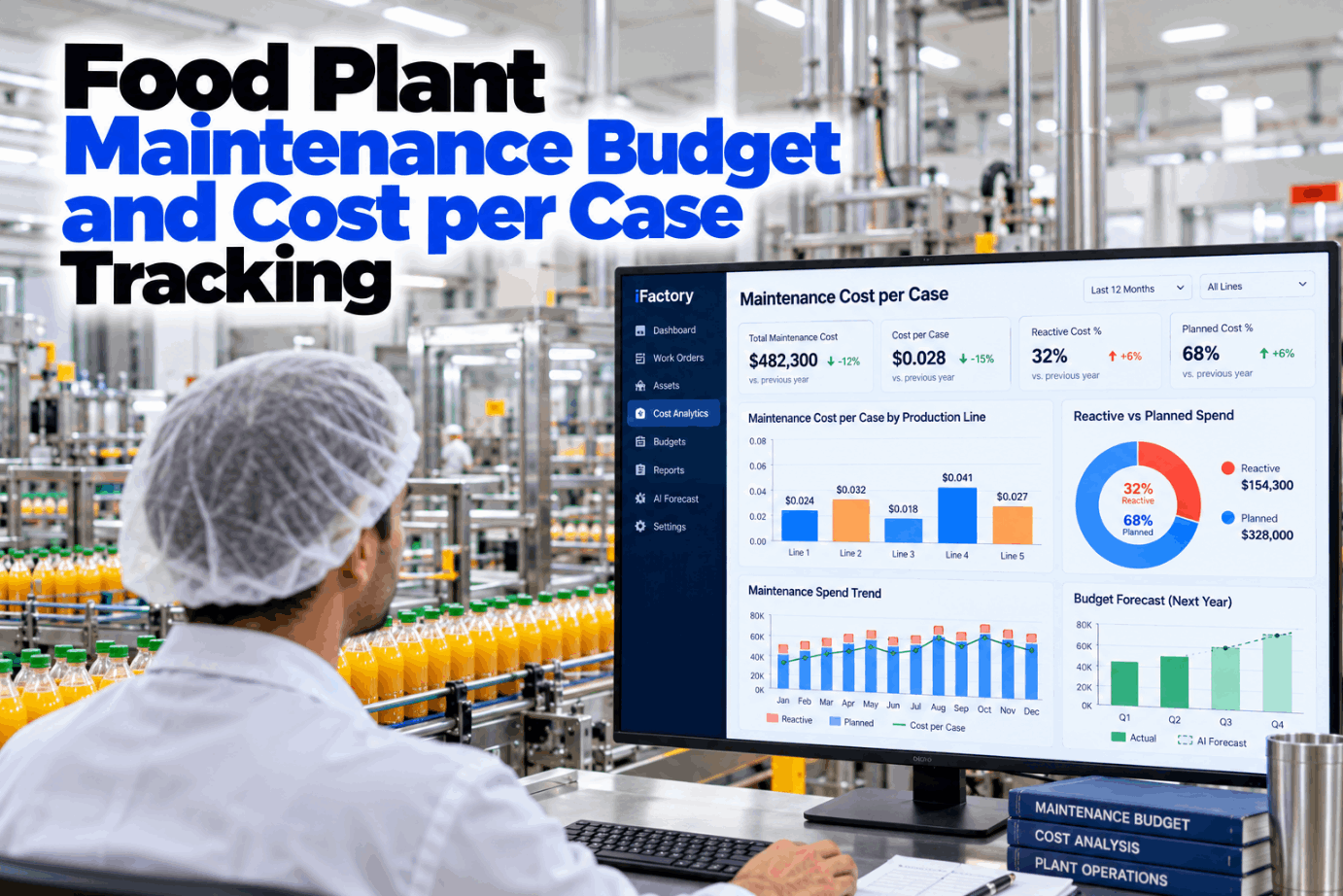
Most food plants know their annual maintenance spend. Far fewer know what maintenance costs on each case that leaves the dock, which line drives the number, or how much of it was spent on breakdowns instead of planned work. Maintenance cost per case closes that gap. It turns a budget line into a production measure that plant managers, finance and line leads can all read the same way. See it calculated from live work orders in a short cost analytics demo.
Know What Maintenance Costs on Every Case, Line by Line
iFactory Cost Analytics charges labor, parts and contractor spend to each line and asset, splits reactive from planned work and reports spend per case. The Forecast Agent then prices next year's budget from asset condition, not last year's total.
Four Cost Buckets Make Up the Number
The formula is simple: maintenance cost for a line in a period, divided by the cases that line produced in the same period. The hard part is agreeing what goes in the top half. Most plants use four buckets. Three are charged directly through work orders, and one is a fair share of plant-wide costs that no single line owns. Agree your own bucket rules with our cost team.
Capital projects for new capacity or upgrades, sanitation crew labor and production downtime cost. Downtime matters, but it belongs in its own measure. Mixing it in makes cost per case swing with every breakdown and hides what maintenance actually spent.
One Line, One Month, Worked Through
The figures below are illustrative inputs for a single snack bagging line over one month. Labor is 310 hours at an assumed loaded rate of $48 an hour. Shared plant cost of $16,600 is spread by run hours, and Line 2 ran 400 of the plant's 2,000 line-hours, or 20%. Run the same sum on your own lines in a cost walkthrough.
Charge Cost Where the Work Happened
Cost per case is only as good as the allocation behind it. The rule is direct charging first, through a work order against an asset that belongs to a line. Only what truly cannot be traced, such as the ammonia plant or the air compressors, should be spread by a driver. Pick one driver per cost pool, write it down and keep it for the whole year. Ask our support team for an allocation sheet.
Four Lines Side by Side, and Why Volume Matters
Comparing lines shows where to look first. The figures below are an illustration, not plant data. Read them with care: a line with high fixed cost will look worse in a slow month even if nothing changed. If Line 2 spends the same $32,000 but ships 600,000 cases, cost per case rises to $0.053. Lines that pack different case sizes need a standard or equivalent case before they can be compared. Review your own line mix in a spend review.
Ask Where the Money Went, Get the Line and the Asset
iFactory builds cost per case from work orders, stores issues and invoices as they happen, so nobody stitches spreadsheets together at month end. Ask which line or asset moved the number and the answer comes back with the jobs behind it.
Split Every Dollar by How the Work Arrived
Cost per case says how much. The reactive and planned split says why. SMRP's metric guidance defines reactive work as maintenance work that interrupts the weekly schedule, which is a clearer test than "was it a breakdown". Tag every work order at the moment it is raised, then report cost, not just hours, on each side. Set up the tags with our planning team.
- Breaks into the weekly schedule after it is frozen
- Parts often bought at short notice or flown in
- Overtime and call-out labor at premium rates
- Repairs done without a job plan or kitted parts
- Often followed by extra cleaning and a food safety release
- Planned and on the weekly schedule before it starts
- PM, condition-based work and repairs found by inspections
- Parts kitted, labor at standard rates
- Timed to fit sanitation windows and changeovers
- Easier to forecast, so easier to budget
Four SMRP Measures Worth Knowing, and How to Read Them
SMRP publishes standard definitions for maintenance metrics, and benchmarks are often quoted against them. Treat any published range as a reference point, not a target. Asset age, product mix and how a plant counts RAV all move the result. Metric numbers have also changed between SMRP editions, so check yours before quoting one. Compare your figures with ours in a benchmark session.
Three Ways to Build Next Year's Budget
Many plants still take last year's total, add inflation and spread it over twelve equal months. Writing in Plant Services, Jeff Hill argues that this carries last year's problems forward and ignores months when the real work happens. A zero-based budget starts from need instead, and splits spend into nondiscretionary items such as scheduled PM, legal inspections and service contracts, and discretionary items such as rebuilds and modifications. Plan your next cycle with our budget team.
What One Forecast Line Should Carry
A forecast the plant can defend shows where each number came from. The Forecast Agent drafts lines like the one below from condition data and work order history, and a planner prices and approves each one. Nothing enters the budget without a person signing it off. See a draft forecast built in a forecast demo.
Five Steps to a Number Finance Will Accept
Start with one line and one month, and reconcile the result with the finance ledger before you show it to anyone. Once the two agree within a small margin, add the other lines. Plan a first line with our support team.
A Worksheet for Moving Spend From Reactive to Planned
The value of cost per case is in what it makes visible. The worksheet below uses assumed inputs for Line 2 to show the arithmetic only. The cost gap between a reactive job and the same job planned must come from your own work order history, not from a rule of thumb. Our cost specialists can help you size it.
Small per case, but it is one line and one lever. Add fewer unplanned stops, less overtime and fewer extra food safety releases, measured with your own data rather than estimated.
Cost Analytics, Forecast Agent and AI Server in One Package
iFactory delivers Cost Analytics and the Forecast Agent as a turnkey bundle. A pre-configured NVIDIA AI server ships racked and ready with the cost models, CMMS and ERP connectors pre-loaded, so cost and condition data stay on site. You rack it, plug in power and Ethernet, and the AI is live. To scope it for your plant, request a turnkey quote.
- Pre-configured NVIDIA AI edge server, racked and ready
- CMMS, stores and ERP cost ledger connectors
- Asset-to-line mapping and allocation driver setup
- Cost per case reports by line, asset and month
- Reactive and planned split on every work order
- Forecast Agent drafts with planner approval steps
- 24×7 remote monitoring of models and hardware
Server installed, CMMS and ledger connected, assets mapped to lines and pools.
Cost per case run on pilot lines and matched with the finance ledger.
All lines reporting, forecast drafts switched on, planners and finance trained.
Maintenance Cost You Can Read Per Case
iFactory links every maintenance dollar to a line, an asset and a reason, then uses condition to plan the next dollar. Our support team can walk you through a pilot plan.
What Plant Managers Ask About Maintenance Cost per Case
Put a Price on Every Case, and a Reason on Every Dollar
Track maintenance cost per case by line, see where reactive work drives spend and build next year's budget from asset condition. The full system is delivered turnkey and goes live in 6 to 12 weeks.