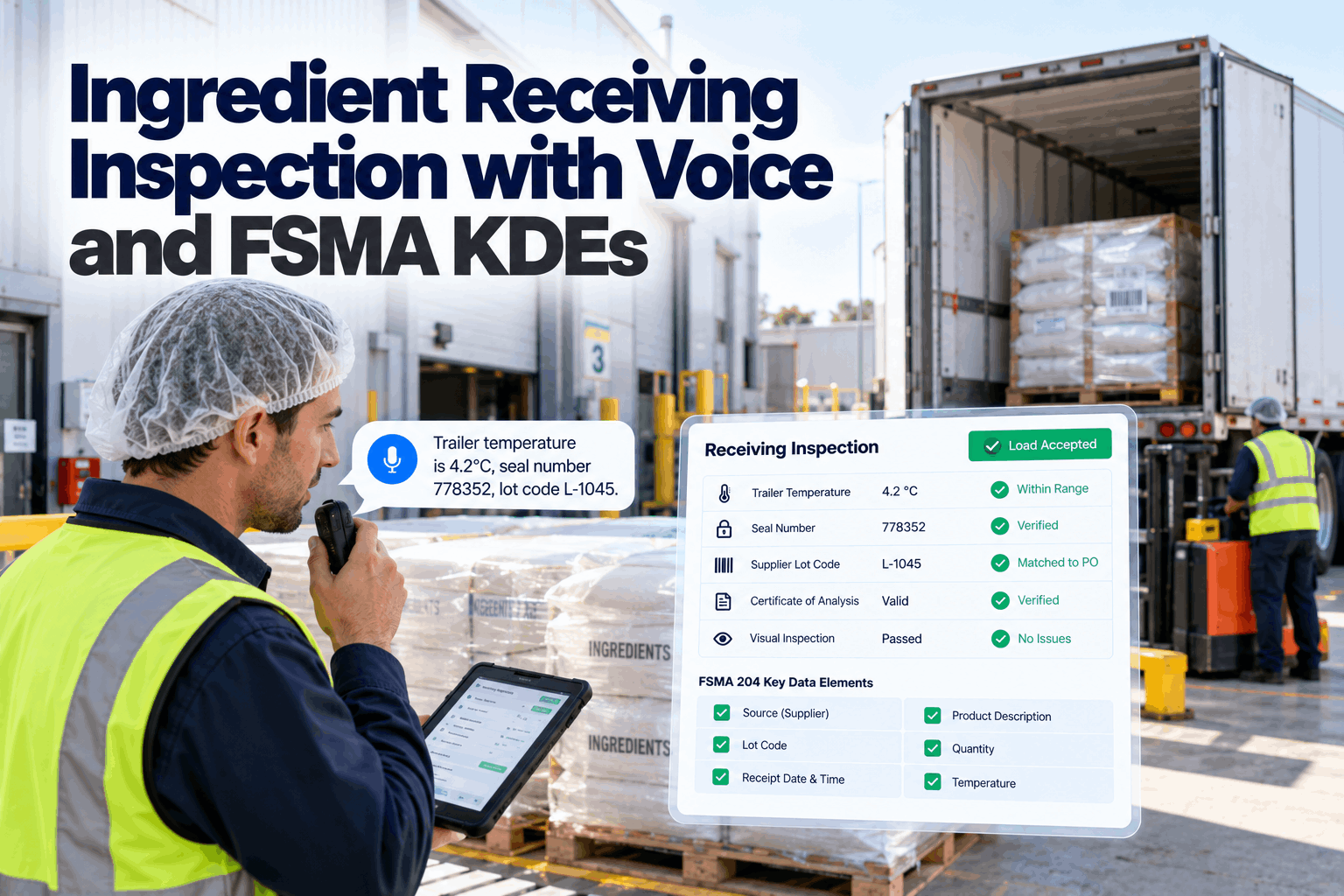
Traceability problems rarely start in production. They start at the receiving dock, where a driver is waiting and the dock hand juggles a clipboard, a probe and a forklift. A seal number gets misread, a supplier lot code goes unrecorded, and weeks later a recall trace stalls at the first step. Voice receiving inspection lets dock staff speak each check as they do it. The AI validates it against the purchase order and specification, rejects out-of-spec loads and stores the FSMA 204 key data elements on arrival. Start with a receiving review.
Ingredient Receiving Inspection with Voice and FSMA KDEs
Trailer temperatures, seal numbers, condition checks and supplier lot codes spoken at the dock, checked against the PO and spec, and stored as traceability records in one step.
- The receiving checks that protect food safety
- FSMA 204 receiving KDEs and how to capture them
- Accept, hold and reject decisions with a clear record
Why Receiving Is Where Traceability Starts
If the lot code is not captured at the dock, it is very hard to recover later.
The FDA's food traceability rule under FSMA section 204 requires businesses that receive foods on the Food Traceability List to keep key data elements for the receiving critical tracking event, and the compliance date is now July 20, 2028. Separately, the FDA's sanitary transportation rule in 21 CFR Part 1, Subpart O sets expectations for keeping food safe in transit, including temperature control where needed. Both meet at the receiving dock. The same few minutes of inspection decide whether unsafe product is refused and whether the lot information needed for a future trace is ever written down. A rushed paper check can miss a temperature problem and lose the lot information that a recall trace depends on. Our traceability specialists can review your current dock process.
Hurried checks
Drivers waiting, docks full, checks skipped.
Lost lot codes
Supplier lots not written down or misread.
Paper gaps
Temperatures noted but not compared with spec.
Slow traces
Records hard to search when a recall comes.
The Receiving Checks That Matter
Every load gets the same checks, in the same order.
A good receiving inspection covers the vehicle, the product and the paperwork. The grid below shows the checks most food plants use for ingredients, and what the voice agent does with each one. Set your checks with our food safety team.
A trailer's air temperature can look fine while product near the doors or the top of the load has warmed. Take product temperatures from several positions, and record each one. The agent can ask for the next reading until the minimum number of probes is reached.
FSMA 204 Receiving KDEs, Captured at the Dock
Record the right data elements once, at the right moment.
For foods on the Food Traceability List, the receiving key data elements include the traceability lot code, quantity and unit of measure, product description, the location of the immediate previous source, the receiving location, the date received, the traceability lot code source or its reference, and the reference document type and number. Voice receiving captures what dock staff can see and fills the rest from the PO, the advance ship notice and site records. Map your KDEs in a traceability workshop.
The traceability rule applies to foods on the FDA's Food Traceability List and to foods containing them as ingredients in certain cases. Flag those items in your item master, so the agent knows when the full KDE set is required and when a standard receiving record is enough.
Start Traceability at the Dock
Every check spoken, validated against the PO and spec, and stored as a receiving record with the key data elements in place.
How Voice Receiving Works
Speak each check, get an instant answer, move on.
Dock staff wear a headset or carry a rugged handheld. The agent prompts each check in order, listens to the answer, validates it and reads back the result. Out-of-spec results trigger the reject or hold path straight away. If the dock is busy, staff can pause one delivery and pick up another, and the agent remembers where each inspection stopped, so nothing is missed when they come back to it. See it at a dock like yours in a live demo.
Open
PO and expected items loaded for the dock.
Inspect
Seal, temperatures, condition and labels spoken.
Validate
Checked against PO, spec and transport limits.
Decide
Accept, hold for QA or reject.
Store
Record and KDEs saved, stock adjusted.
Accept, Hold or Reject
Clear rules for the safe decision. People for the judgement calls.
When a check is clearly out of specification, such as product temperature above the limit, the agent rejects the load by rule and notifies QA and purchasing. When a result is borderline or the rules call for judgement, the load is held and QA decides. Accepting a load outside specification is always a named QA decision, never an automatic one. Agree your decision rules with our QA team.
All checks pass
Stock received, KDEs stored, label printed for putaway.
Needs judgement
Borderline results or missing COA. QA reviews before use.
Clear failure
Over-temperature, broken seal or damaged product. Load refused.
Allergen and Label Checks at Receiving
The wrong ingredient through the door can undo every control inside.
Allergen control starts at receiving. An ingredient that arrives with a changed formulation, a missing allergen statement or the wrong item code can enter production unnoticed if labels are not checked. The agent compares the spoken label details with the approved item specification, and holds the delivery if anything differs. Set up allergen checks with our food safety team.
Right item
Item name and code match the PO and specification.
Statement checked
Allergen declaration matches the approved spec.
Approved source
Supplier and site on your approved list.
Segregation
Allergen items routed to their storage area.
Faster at the Dock, Not Slower
Better records should not mean longer waits for drivers.
A common worry is that more checks mean longer dock times. In practice, voice often speeds receiving up, because staff do not stop to write, find a pen or re-key data into the ERP afterwards. Checks happen while hands are busy with the probe and pallet jack. Discuss dock throughput with our operations team.
Time saved
- No handwriting during inspection
- No re-keying into the ERP later
- Instant accept, hold or reject decision
- Putaway labels printed straight away
Time well spent
- Several product temperatures, not one
- Seal and paperwork checked every time
- Photos for rejected or held loads
- Lot codes confirmed before putaway
Certificates of Analysis and Supplier Performance
Check the paperwork as carefully as the product.
Many ingredients arrive with a certificate of analysis. The agent links each COA to the lot, checks its results against your specification and holds the lot if a COA is missing or out of limits. Over time, receiving records show which suppliers deliver on spec and on temperature, and which do not. That turns supplier reviews from opinion into evidence, and helps buyers and QA agree where tighter checks are really needed. Review supplier data with our quality team.
What receiving data shows
- Rejects and holds by supplier and item
- Temperature problems by carrier
- Missing or late COAs
- Seal and paperwork mismatches
What you can do with it
- Raise issues with suppliers using facts
- Adjust inspection levels by supplier
- Feed supplier approval reviews
- Plan dock time for problem deliveries
Receiving Inspection Mistakes to Avoid
Speed at the dock should never cost the record.
These are the most common gaps in ingredient receiving. A short dock review can find them.
What works
- Same checks in the same order every time
- Several product temperatures, not one
- Lot codes captured before putaway
- Out-of-spec acceptance only by QA
What fails
- Checking only the reefer display
- Writing lot codes after putaway
- Accepting loads to keep the line running
- Paper logs nobody can search
How iFactory Runs Voice Receiving
Voice Receiving Agent, on your own network.
iFactory's Voice Receiving Agent lets dock staff speak temperatures, seal numbers and lot codes, validates them against the PO and specification, rejects clearly out-of-spec loads and stores the key data elements for traceability. It runs on an on-prem AI server inside your plant and connects to your ERP and quality systems. Fit questions go to our solutions team.
Voice dock checks
Hands-free while probing and inspecting.
Temperature rules
Readings checked against item limits.
Seal verification
Seal numbers matched to shipping documents.
KDE capture
Receiving data elements stored per lot.
COA checks
Certificates linked and checked against spec.
Supplier insight
Rejects and holds by supplier and carrier.
iFactory supports your receiving and traceability procedures. Your QA and regulatory teams decide how records meet FDA requirements for your products.
Turnkey AI: Delivered, Connected and Live in 6–12 Weeks
You do not build this. It arrives ready.
iFactory ships as a pre-configured NVIDIA AI server with the software pre-loaded, racked and ready. Rack it, plug in power and Ethernet, and the AI is live on your network. Our team handles cabling, network setup, PLC, SCADA, DCS and CMMS integration, ERP and dock links, operator training and 24×7 remote monitoring. Data stays on your network. For a scope matched to your plant, request a turnkey quote.
Ship, network and data
Server installed. POs, item specs, supplier data and docks connected. Headsets tested.
Model training and pilot
Receiving checks and decision rules tuned. Voice receiving runs at one dock.
Go-live and training
Voice receiving live at all docks. Dock staff and QA trained. 24×7 monitoring begins.
Frequently Asked Questions
What is voice receiving inspection?
A way for dock staff to speak each receiving check, such as seal number, temperatures and lot codes, while the AI validates it and builds the receiving record.
What are FSMA 204 KDEs?
Key data elements that must be kept for critical tracking events, such as receiving, for foods on the FDA's Food Traceability List. They include the traceability lot code, quantity, product description, source and receiving locations, date and reference document.
When does the traceability rule apply?
The FDA has set the compliance date for the food traceability rule at July 20, 2028.
Can the AI reject a load?
Yes, when a check is clearly out of specification under your rules. Borderline results are held for QA, and accepting an out-of-spec load is always a QA decision.
Does voice receiving slow the dock down?
Usually not. Staff speak checks while they work instead of stopping to write, and the record goes straight into the system, so there is no re-keying afterwards.
Can lot codes be scanned instead of spoken?
Yes. Barcodes can be scanned where available, and voice is used for everything else.
How are COAs handled?
COAs are linked to the lot and checked against your specification. A missing or out-of-limit COA puts the lot on hold.
Does it work at a cold, noisy dock?
Yes, with noise-cancelling headsets or push-to-talk handhelds rated for cold and wet conditions, tested at your docks during the pilot.
How do we start?
Start with one dock and your highest-risk ingredients. A 6-week pilot sets up checks, rules and KDE capture. To plan it, contact our team.
Know Exactly What Came Through Your Doors
In thirty minutes we walk through your receiving form and traceability needs, and sketch a voice receiving flow for one dock. You keep the sketch either way.
- 1Your receiving inspection form
- 2Ingredients on the Food Traceability List
- 3Temperature limits by item
- 4Sample bill of lading and COA
- 5One delivery that caused a problem later