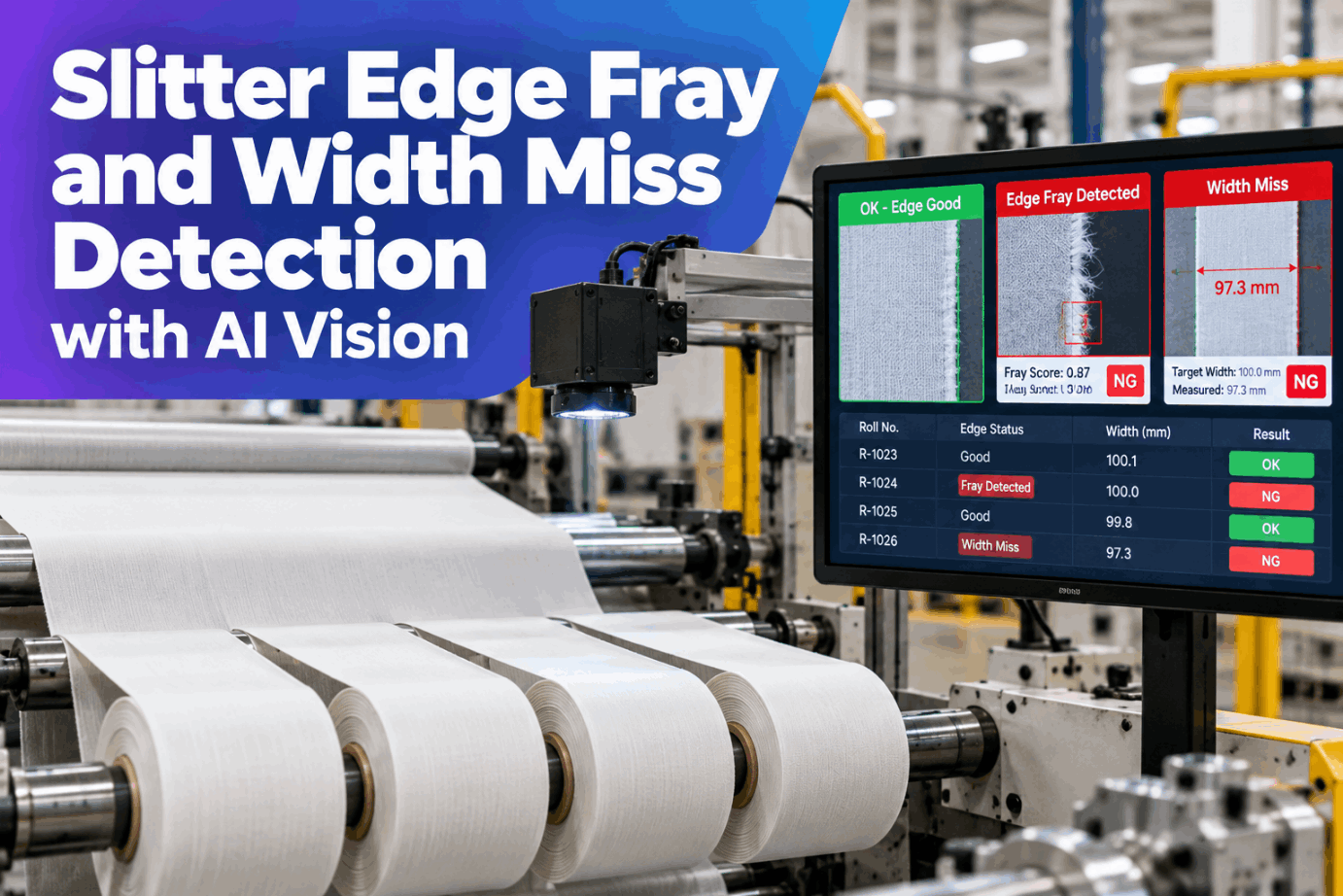
On a converting line, the slitter can be cutting one lane slightly narrow or fraying one edge for hundreds of metres before anyone looks. Manual width checks happen at doff or on a timer, and a frayed edge often shows up first as a complaint from the customer's sewing or laminating line. By then the roll has been wound, labelled and packed. Line-scan vision measures every slit edge as the web runs, grades each roll and holds bad ones at the exit. See it on your own fabric in a slitter vision demo.
Grade Every Slit Roll for Edge Fray and Width Before It Leaves the Rewinder
iFactory measures each lane's width and edge condition with line-scan cameras at the exit, then grades every roll against its spec. A roll that misses width or carries fray beyond your limit is held at the rewinder, with the metre positions on record.
Slitting Methods and the Edge Each One Leaves
Fray starts with the cutting method. Razor slitting is simple and quick to set up, but its blades need frequent changes to keep a good edge. Rotary shear knives stay sharp longer but take more time to position. Crush cutting presses a knife against an anvil and suits nonwovens and foams, though its edge is the roughest of the three. Hot knife and ultrasonic slitting seal the edge as they cut, but only where the fibre is thermoplastic, so cotton and other natural fibres will not seal. Check your method against your fabric with our converting support team.
Six Line Conditions That Turn a Clean Edge Ragged
A frayed edge is usually a symptom, not a mystery. The same few conditions show up again and again, and most of them build slowly, which is why edge quality drifts during a run instead of failing at once. Logging fray against blade hours and settings is what turns a complaint into a cause. Review your fray history with us in a converting quality session.
Width Tolerance, Lane by Lane
Each lane has its own width spec, and the lanes plus edge trim must add up to the parent web. That arithmetic is a useful check. In the set below, the six lanes measure 299.9 mm and the trims 20.1 mm, which makes 320.0 mm. When one lane runs narrow and its neighbour runs wide, the knife between them has usually moved. When every lane drifts together, look at web wander or tension. Map your own lane specs with our process support team.
What Line-Scan Vision Measures, and What It Can't Judge
A line-scan camera builds an image one line at a time as the web passes, which suits continuous material. Dedicated edge cameras of this kind report edge position in hundredths of a millimetre. So width and visible fray are well within reach. Seal strength, fibre content and anything inside a wound roll are not. See where the line is drawn in a live measurement demo.
- Every slit edge position, so each lane width, along the whole run
- Loose fibres and fringe visible beyond the cut line
- Wavy edges and lane wander from scan to scan
- The metre position of each event, from the line encoder
- Whether a sealed edge will hold under load or washing
- Fibre content, so whether a blend can seal at all
- Relaxed width of knits and stretch fabrics after tension is released
- Damage inside the roll once the layer is wound over
Width is graded against the spec at line tension, and stretch fabrics carry a correction set from relaxed lab samples. Seal strength and fibre content stay with the lab and the material spec. The camera grade only releases what it can actually see.
Ask Which Roll, Which Lane, Which Metre
The line head does not need another trend screen. iFactory answers in plain words, names the roll and the metre range, and points to the knife or setting most likely behind it.
Roll-Level Grading From Metre-Level Data
The camera sees thousands of edge readings per roll, but the decision is per roll. iFactory rolls the readings up into one grade for each lane roll, using the width spec and fray limits you set for that product and customer. The grades below show the logic. The limits are yours, not ours. Our quality support team can help you write the grading rules.
How a Held Roll Is Stopped at the Rewinder
Holding a roll only works if it cannot slip through packing. iFactory maps each event to its lane, roll and metre, grades at doff and sets a hold that the line or MES respects. Whether that hold is a PLC signal, a label that will not print or an MES status depends on how your line is wired. Plan the hold path in a line integration call.
A Shift Report the Line Head Can Act On
Roll grades answer whether to ship. The shift view answers what to fix. Linking fray and width to blade hours, knife positions and line speed shows which setting is drifting before it costs a roll. The cards below are an illustration of one shift, not measured results. Get a sample report from our analytics team.
Put Your Own Numbers on Fray and Width Misses
We don't publish defect rates or savings figures, because every line and fabric is different. Every input below is assumed, and the worksheet only multiplies them. Put your own complaint log and check intervals in their place, or work through it with us in a cost review call.
This is the cost exposure on the assumed inputs, not a promised saving. How much of it continuous measurement removes depends on how fast your team acts on a hold.
Line-Scan Cameras, Edge Server and Roll Holds in One Delivery
iFactory delivers slitter vision as a single package. Line-scan cameras and lighting are mounted at the slitter exit, and a pre-configured NVIDIA AI server ships racked and ready with the edge and width models loaded, so measurement runs on site at line speed. You rack it, plug in power and Ethernet, and the AI is live. Our deployment team can survey your slitters.
- Pre-configured NVIDIA AI edge server, racked and ready
- Line-scan cameras and lighting sized to your web width
- Edge, width and fray models tuned to your fabrics
- Encoder link for lane, roll and metre mapping
- Roll grading rules per product and customer
- Hold signal to the rewinder, labeller or MES
- 24×7 remote monitoring of models and hardware
Cameras fitted at the exit, width calibrated against gauge measurements, encoder linked.
Rolls graded silently and compared with manual checks while fray limits are agreed.
Exit holds switched on, operators trained, shift report started for the line head.
Made for Slitting and Rewinding Lines
iFactory works alongside your slitter controls, not in place of them. It adds a measurement and a decision at the point where rolls leave the line. Start with a pilot scoping call for one slitter.
What Converting Line Heads Ask About Slitter Vision
Let No Off-Spec Roll Reach Packing
Measure every lane, grade every roll and hold the ones that miss width or fray limits, with metre-level evidence. It ships as one turnkey package and runs on your slitter within 6 to 12 weeks.