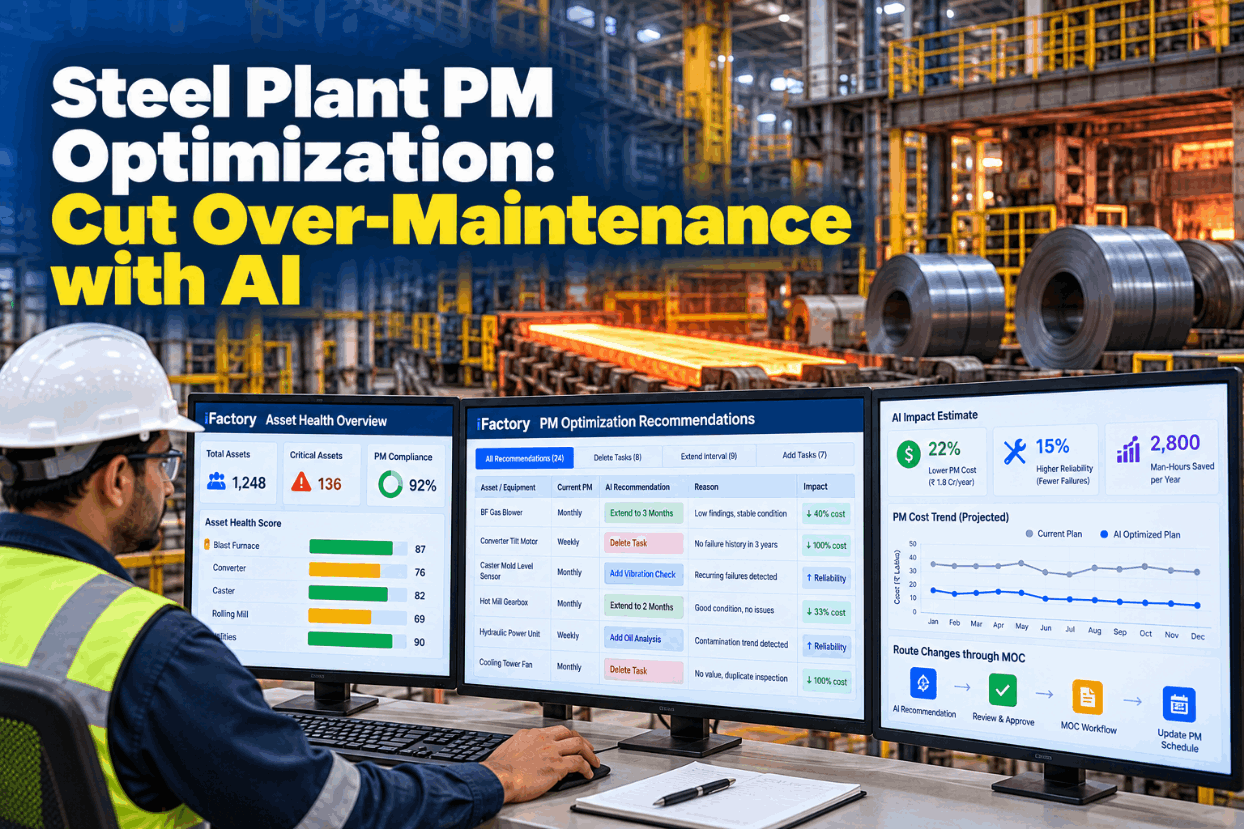
Steel Plant PM Optimization: Cut Over-Maintenance with AI

By Jackson T on October 27, 2026

steel-plant-pm-optimization-cut-over-maintenance-ai

Most steel plant PM lists only grow. A breakdown leads to a new check, a new OEM manual adds another, and two crafts end up inspecting the same gearbox on different routes. Tasks rarely come off the list, because nobody has the evidence to take them off safely. PM optimization reviews the existing list task by task against failure history and PM findings, then removes, stretches or adds work with a written reason for each change. See how the review runs on your own CMMS records in a short PM review demo.

PM OPTIMIZATION AGENT · STEEL

Trim the PM List to the Tasks That Actually Find Failures

iFactory's PM Optimization Agent compares every PM's findings against failure history. It recommends removals, interval changes and new tasks, and routes each change through MOC approval, so nothing on the schedule moves without sign-off.

PM list today
34 tasks
Finishing mill · lube and hydraulics
Gearbox oil level2 routes
Coupling visualWeekly
Descaler vibration2 wk
Chock bearing tempNone
After review
26 tasks
34 − 10 + 2 = 26 · 4 extended
Gearbox oil level1 route
Coupling visualRemoved
Descaler vibration4 wk
Chock bearing tempAdded
Routed to MOC16 changes waiting for area sign-off
OVER MAINTENANCE

Five Ways a Steel Plant PM List Gets Heavier

Over-maintenance rarely comes from one bad decision. It builds up through years of sensible-looking additions, and the cost shows up as craft hours spent on checks that never find anything, plus intrusive work that can disturb healthy equipment. Reliability coach Paul Dufresne describes a review of several plants in which completed PMs identified corrective work less than 0.5% of the time. Talk through the patterns in your own list with our reliability team.

01
OEM default intervalsCopied from the manual at commissioning and never tested against your duty cycle
02
Post-failure additionsA check added after each breakdown, whether or not it can detect that failure
03
Duplicate routesMechanical, lube and operator rounds checking the same point on different days
04
Intrusive tasksOpening or re-torquing healthy equipment, which can introduce new faults
05
Unrecorded resultsChecks signed off with no reading, so nobody can tell whether they find anything
PM OPTIMIZATION PROGRAM

How a PM Task Review Runs, Area by Area

PM optimization starts from the tasks you already do, not from a blank sheet. Each task is traced to the failure mode it should prevent or detect, checked against what it has actually found and what failed anyway, then given a decision with a written reason. Working one mill area at a time keeps each review small enough to finish. Map your first area with us in a scoping call.

1CompilePull every PM, route and operator round for the area from the CMMS
2MapLink each task to the failure mode it is meant to catch
3TestCompare findings and failure history for every task
4DecideKeep, remove, extend, merge or add, with a reason
5ApproveRoute each change through MOC before the schedule moves
RCM LITE

Full RCM or PM Optimization: Which One When

SAE JA1011, published in 1999, sets the minimum criteria a process must meet to be called RCM: seven questions, starting from the asset's functions in its present operating context. SAE JA1012 (2002) is the companion guide. PM optimization, often called RCM lite, works the other way round, starting from existing tasks. John Moubray warned that such retroactive methods are weak on protective devices, so the agent gives those tasks extra scrutiny. Compare both approaches on one of your assets with our support engineers.

FULL RCM · SAE JA1011
  • Starts from functions and performance standards
  • Answers all seven questions for every function
  • Suits new assets, major redesigns and high-consequence systems
  • Slower, and needs a facilitated cross-craft team
PM OPTIMIZATION · RCM LITE
  • Starts from the current PM list and failure history
  • Tests each task against the failure mode it targets
  • Suits mature mills with years of CMMS records
  • Faster per asset, with protective and hidden-failure tasks reviewed on their own
PM FINDINGS RATE

How Often Does Each PM Find Something?

The findings rate is the share of completed PMs that found a condition needing action, such as a reading out of limits or a defect that raised a corrective work order. It is the plainest test of whether a task earns its hours. A practitioner rule of thumb, quoted by Dufresne, says that if six completions pass without a corrective work order, the PM is probably done too often. The rates below are illustrative. Get a findings report on your own records in a data walkthrough.

Finishing mill · last 52 weeksPMs with a finding / PMs completed
Work roll chock grease check11/52
Looper cylinder leak check6/52
Descaler pump vibration route1/26
Pinch roll gearbox oil, 2 routes1/104
Stand coupling visual0/52
Keep and trendChock grease, looper leaks
Extension candidateDescaler vibration, stable trend
Merge or removeGearbox oil level, coupling visual
PM INTERVAL EXTENSION

Stretching an Interval Without Losing the Warning

An inspection only protects you if it lands inside the P-F interval, the time between the first detectable sign of failure and the failure itself. A common guide, set out by Jeff Shiver in Plant Services, is to inspect at about half the P-F interval. In a mill, also take off the time needed to plan and fit the repair, because a warning you can't act on in time is no warning. All values below are assumed. Check your own P-F estimates with our reliability team.

Asset and taskDescaler pump 2, drive-end bearing vibration route
P-F interval, assumed12 weeks
Time to plan, get parts and fit the repair in a stop, assumed4 weeks
Usable warning window12 − 4 = 8 weeks
Inspect at half the usable window8 ÷ 2 = 4 weeks
DecisionExtend from every 2 weeks to every 4 weeks
When the agent keeps the old interval

If recent findings show a worsening trend, if the asset's duty has changed, or if readings were not recorded, the extension is not proposed. Half the raw P-F interval alone (6 weeks here) would leave too little time to act.

Ask Which PMs Have Never Found Anything

The agent answers from your CMMS history: completions, findings, failures and the tasks that were meant to stop them. Every recommendation arrives with its evidence and goes nowhere without approval.

Roughing mill · Reliability engineer and PM Agent
EngineerWhich roughing mill PMs found nothing in the last 52 weeks?
PM AgentNine tasks. Five repeat checks on other routes, four never recorded a reading. None is linked to a failure mode with a recent breakdown.
EngineerDraft the changes, but leave the safety checks alone.
PM AgentDrafted: five merges, four reading trials. No safety or protective tasks touched. Sent to the area manager as one MOC.
FAILURE MODE COVERAGE

Matching Failure Modes to the Tasks Meant to Catch Them

Removing tasks is only half the job. The same review shows failure modes with no task at all, and tasks that run on time but can't detect the failure they are named after. The agent reads corrective work orders and failure codes to find both. The rows are illustrative. Run a coverage check on your critical assets in a coverage session.

Asset
Failure mode
Current task
What the record shows
Coverage
Ladle crane main hoist
Wire rope wear and broken wires
Monthly rope inspection with measurements
Findings logged regularly, ropes changed before failure
Covered
Caster segment rolls
Roll bearing seizure
Visual check at segment change
Seized rolls found after strand marks, not by the check
Task can't detect
Reheat furnace burners
Flame failure from a blocked nozzle
None
Repeat corrective jobs, no PM linked to the failure code
Not covered
Work roll chocks
Bearing overheating
None
Bearing failures logged with no temperature check in place
Not covered
Pinch roll gearbox
Low oil level
Weekly check on two craft routes
One finding in 104 completions
Duplicated
STEEL PLANT PM OPTIMIZATION EXAMPLES

One Finishing Mill Review, Worked Through

This illustration follows one area review from start to approval. It is not a case study, and the counts are chosen to show the method. The finishing mill's lube and hydraulic PMs started at 34 tasks. Twenty were kept as they were, ten were removed, four were extended and two were added, so 34 − 10 + 2 = 26 tasks remain and 16 changes went to MOC. Walk through a review like this with our support team.

Removed · 10 tasks
Six duplicates merged, four with no valueSix checks repeated on another craft's route were folded into one route. Four never recorded a reading and covered no failure mode.
Extended · 4 tasks
From every two weeks to every fourVibration and oil-condition routes with few findings, stable trends and an eight-week usable warning window, as in the calculation above.
Added · 2 tasks
Checks for failures that kept slipping throughA work roll chock bearing temperature check and a side guide liner wear measurement, both linked to repeat corrective jobs.
MAINTENANCE STRATEGY REVIEW

Why Every Change Goes Through MOC

Taking a PM away changes how an asset is protected, so it deserves the same discipline as a hardware change. For processes covered by OSHA's process safety standard, 29 CFR 1910.119(l) requires written MOC procedures for changes to process chemicals, technology, equipment and procedures, and lists five points to address first. Many steel plants apply the same five points to strategy changes on critical assets, even where the standard doesn't apply. Set up your approval path in an MOC walkthrough.

T
Technical basisFindings rate, failure history and P-F reasoning attached to each change
S
Safety and health impactProtective devices and hidden-failure tasks flagged for EHS review
P
Procedure changesRevised task steps and route sheets issued with the change
W
TimingWhen the new interval or task starts, and when it will be reviewed
A
AuthorizationWho signs: reliability engineer and area manager, plus EHS for any safety task
STEEL PLANT PM OPTIMIZATION TEMPLATE

A One-Page Review Sheet for Each Task

Use one sheet per task so every decision carries its own evidence. The agent fills most fields from the CMMS and condition data, and the engineer completes the rest before it goes to MOC. Request a blank copy from our support team.

Task and assetDescaler pump 2 vibration route
Failure mode coveredDrive-end bearing wear
Current intervalEvery 2 weeks
Findings rate1 of 26 completions in 52 weeks
Failures since last reviewNone on this pump
DecisionExtend to every 4 weeks
Reason8-week usable window, stable trend
MOC and next reviewMOC raised, review after six months
STEEL PLANT PM OPTIMIZATION FOR PLANT MANAGERS

Size the Craft Hours With Your Own Numbers

The honest value of PM optimization is craft time moved from checks that find nothing to work that prevents failures. Fewer breakdowns may follow, but they belong in the case only when your own data supports them. The worksheet uses the finishing mill example with assumed hours and rates. Build the case with your figures in a planning session.

Removed: 10 weekly tasks at 0.5 h each, assumed10 × 52 × 0.5 = 260 h a year
Extended: 4 tasks at 1 h each, 26 runs a year down to 13, assumed(26 − 13) × 4 × 1 = 52 h a year
Added: 2 monthly tasks at 1.5 h each, assumed2 × 12 × 1.5 = 36 h a year added
Loaded craft rate, assumed$70 per hour
Net craft time freed260 + 52 − 36 = 276 h, or 276 × $70 = $19,320 a year

Treat the freed hours as capacity, not as a headcount cut. Most plants move them into the backlog, condition monitoring or root cause work on bad actors.

TURNKEY AI DEPLOYMENT

PM Agent, CMMS Link and AI Server, Delivered Ready

iFactory delivers the PM Optimization Agent as a turnkey package. A pre-configured NVIDIA AI server ships racked and ready, with connectors for your CMMS PM and work order history, condition monitoring data and MOC workflow. You rack it, plug in power and Ethernet, and the AI is live. Plan the install with our deployment team.

What's Included
  • Pre-configured NVIDIA AI server, racked and ready
  • CMMS connector for PMs, work orders and failure codes
  • Links to vibration, oil and temperature data
  • Findings-rate and coverage reports by mill area
  • Task review sheets filled from your records
  • MOC routing with approval tiers you set
  • Remote monitoring and model support
Live in 6–12 weeks
Wk 1–4
Connect and Compile

Server racked, CMMS history loaded, the first area's tasks mapped to failure modes.

Wk 5–8
Review and Draft

Findings rates and coverage gaps checked with your engineers, changes drafted.

Wk 9–12
Approve and Run

First MOC batch approved, revised schedule live, review cycle agreed.

HOW iFACTORY FITS

Steel Plant PM Optimization Software With Sign-Off Built In

iFactory gives reliability engineers the evidence and keeps the decision with them. See the agent work through a sample steel PM list in a live demo.

1
Reads findings and failures. PM completions, readings and corrective work orders are compared task by task.
2
Recommends with reasons. Each removal, interval change or new task comes with its evidence attached.
3
Guards protective tasks. Safety, regulatory and hidden-failure tasks are flagged, never removed automatically.
4
Routes through MOC. Changes reach the schedule only after the approvers you name have signed.
1000+
Industrial clients running iFactory
99.9%
Platform uptime for round-the-clock mills
6-12 wks
From racked server to first approved changes
FREQUENTLY ASKED QUESTIONS

What Plant Managers Ask About Steel Plant PM Optimization

What is PM optimization in a steel plant?
It is a structured review of the preventive maintenance you already do. Each task is linked to the failure mode it should prevent or detect and checked against its findings and the failure history. The result is a shorter, better-aimed list: tasks with no value are removed, intervals are stretched where the data allows, and checks are added where failures keep slipping through.
How is PMO different from RCM?
RCM as defined by SAE JA1011 starts from each asset's functions and answers seven set questions. PMO starts from the existing task list and works back to failure modes. It is faster on mature assets, but it can miss protective devices, so those need a separate check. You can see both approaches on one asset with our team.
Will removing PMs raise our failure rate?
It shouldn't if every removal has a reason: the task covers no failure mode, repeats another task, or cannot detect the failure it is named after. Failure modes keep at least one effective task, and each change has a review date so results can be checked. Our support engineers can help you set review rules.
What is a good PM findings rate?
There is no standard target. Jeff Shiver has noted he isn't aware of a standardized PM deficiency rating. Use the rate to compare tasks: a check that never finds anything over a year needs a look, and one that finds something on most runs may be too infrequent or point to a design problem.
Which tasks does the agent never remove on its own?
Regulatory inspections, safety system tests, protective device checks and failure-finding tasks for hidden failures. The agent can flag them, for example where two routes repeat the same test, but any change goes to EHS and the asset owner through MOC. Walk through the guardrails in a short call.
How do we start?
Choose one area with a long PM list and good CMMS history, such as the finishing mill's lube and hydraulic routes. Load the records, review findings and coverage with your engineers, and send the first batch of changes through MOC. You can book a 30-minute demo to scope that first area.

Spend PM Hours Where Failures Actually Start

Find the checks that never find anything, stretch intervals your data supports, close the coverage gaps, and keep every change behind MOC sign-off. The full package is turnkey and live in 6 to 12 weeks.


Example review summary · Finishing mill
Tasks reviewed34
Removed or merged10
Interval extended4
New checks added2
26 tasks · 16 changes routed to MOC

Share This Story, Choose Your Platform!