A gage R&R study sounds simple on paper: a few operators measure the same parts a few times, and the numbers show whether the gage is trustworthy. In practice it eats a day or more of operator time, a spreadsheet full of manual formulas, and a report someone has to reformat to match AIAG conventions before an auditor will accept it. Bias and linearity studies add their own rounds of setup and calculation on top of that. None of this complexity makes the study more accurate; it just makes it slower and more prone to a transcription error that invalidates the whole result. Automating the calculation and reporting layer keeps the study itself unchanged while cutting the effort around it substantially. Quality managers running MSA programs can see a gage R&R study calculated and reported automatically before the next study is due.
Best MSA Automation Software for Automotive Quality Managers
Gage R&R, bias and linearity study automation with AIAG-aligned reporting that shrink study effort by 50 to 70 percent.
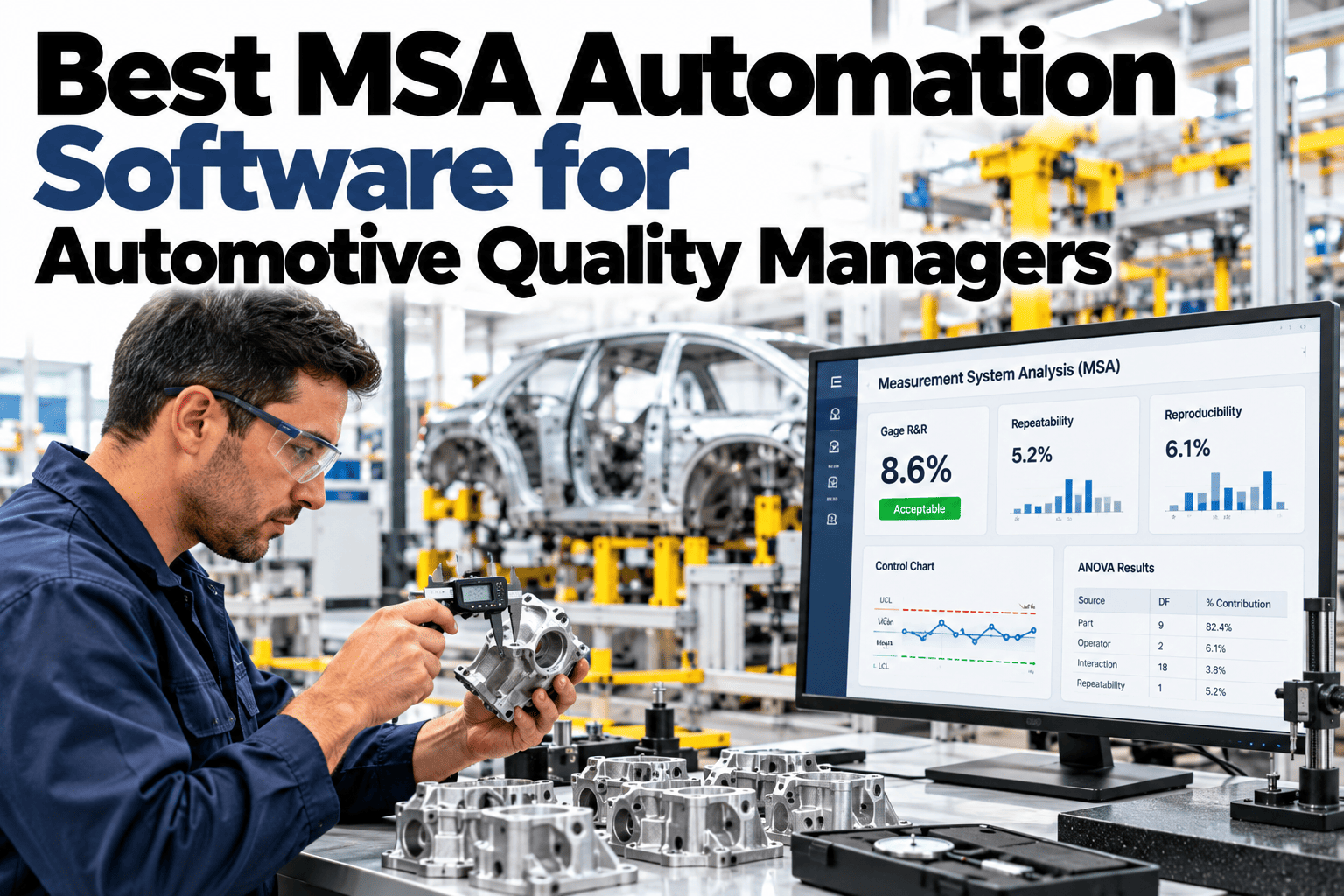
Illustrative gage R&R breakdown: variance split automatically across the three components
Why MSA Studies Take Longer Than They Should
The study design itself is rarely the bottleneck. Three recurring issues add most of the extra time.
Spreadsheet-based variance calculations are easy to get subtly wrong and hard to double-check quickly.
Results often need manual reformatting to match AIAG reporting conventions before submission.
Coordinating operators and gages for a study adds delay before any data is even collected.
None of these are part of the actual statistical method. They are overhead that automation removes without touching the study design itself.
The Four MSA Study Types
A complete measurement system analysis program covers all four, not just gage R&R alone.
Gage R&R
Separates repeatability and reproducibility to show how much variation comes from the gage versus the operator.
Bias
Checks whether the gage consistently reads higher or lower than a known reference value.
Linearity
Confirms the gage stays accurate across the full range of values it is expected to measure.
Stability
Tracks whether a gage's accuracy holds steady over weeks and months of repeated use.
Run Your Next Gage R&R in a Fraction of the Time
Book a 30-minute session and bring a current gage. iFactory AI will show the study designed, calculated and reported automatically.
AIAG-Aligned Reporting, Built In
Reports are formatted to match what an OEM auditor expects, without a manual reformatting step.
| Report Element | Manual Process | Automated Process |
|---|---|---|
| Variance breakdown | Calculated and formatted by hand | Generated automatically from study data |
| Pass or fail criteria | Applied manually per AIAG guidance | Applied automatically against the standard |
| Audit-ready export | Reformatted separately for submission | Exported in AIAG-aligned format directly |
What iFactory AI Supports
The study design stays standard; the calculation and reporting layer is what gets automated.
Guided Study Setup
Operators, parts and trials are configured against standard gage R&R, bias and linearity designs.
Automatic Variance Calculation
Repeatability, reproducibility and part variation are calculated the moment data entry is complete.
AIAG-Aligned Output
Reports export in a format ready for OEM audit review without manual reformatting.
Gage History Tracking
Every gage's study history is stored, making re-certification scheduling straightforward.
iFactory AI connects to existing gage and quality systems. Scope covers study template setup, AIAG format configuration, team training and ongoing support.
Expert Review
The fifty to seventy percent effort reduction we see is almost entirely in setup and reporting time, not the measurement collection itself. Operators still measure the same parts the same number of times; what disappears is the spreadsheet work and the reformatting before submission.
Teams that automate reporting but skip gage history tracking tend to lose the benefit over time, since re-certification scheduling quietly reverts to manual tracking. Keeping history in the same system as the study results is what makes the gain stick.
Frequently Asked Questions
Does automation change how the gage R&R study is actually run?
No, the study design, number of operators, parts and trials follows the same AIAG-recognized method as a manual study. Automation changes how the data is entered, calculated and reported, not the underlying statistical approach. This keeps results comparable to historical manual studies. See a study design in a live session.
Can we automate bias and linearity studies too, or just gage R&R?
All four MSA study types, including bias, linearity and stability, can run through the same automated calculation and reporting layer. Most quality managers start with gage R&R since it is run most frequently, then extend to the other study types. Ask support about adding additional study types to your program.
How does the system apply AIAG pass or fail criteria?
The calculated variance percentages are checked automatically against the acceptance thresholds defined in AIAG guidance, flagging a gage as acceptable, conditionally acceptable, or unacceptable. This removes the step of manually looking up and applying the criteria after each study. Request a sample pass or fail report.
Can historical MSA studies be imported into the system?
Yes, past study results can be imported to build a gage history from day one, which supports re-certification scheduling and trend review without starting from a blank record. Contact support about importing your existing MSA records.
How often should a gage be re-studied?
Re-study frequency depends on the gage type, usage rate and the part criticality it measures, typically ranging from quarterly to annually. The system tracks each gage's last study date and can flag upcoming re-certification needs automatically. Book a session on setting a re-study schedule for your gage inventory.
Spend Study Time on the Measurement, Not the Spreadsheet
iFactory AI calculates and reports MSA studies automatically, in AIAG-aligned format. Book a walkthrough on your own gages.